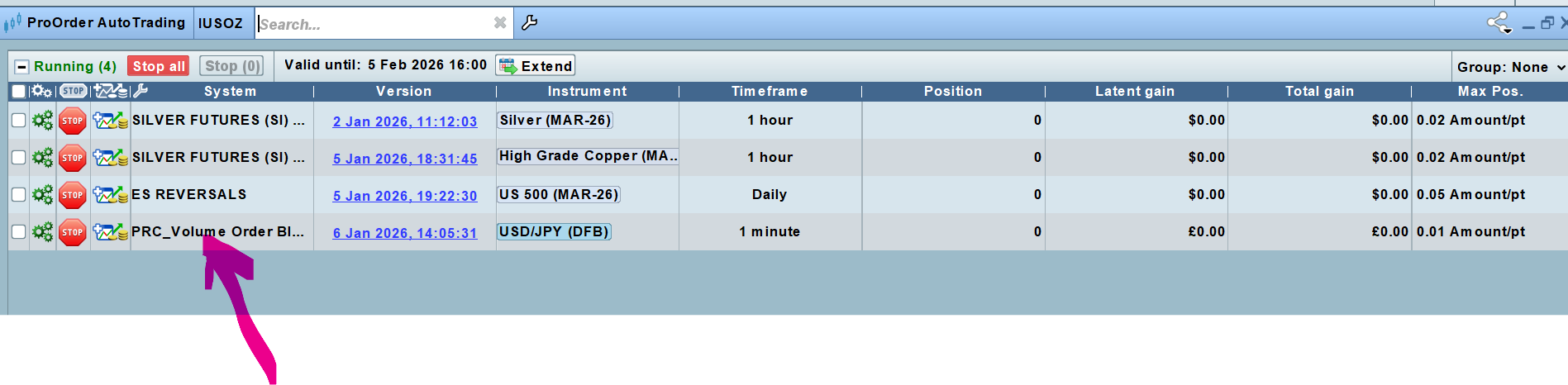
Hi there
I’m unable to get ProRealTime (PRT) order execution to place trades into my IG Spread Betting account. The strategies are running correctly in ProRealTime, and I’ve confirmed that auto-trading is enabled. To isolate the issue, I also created a very simple test strategy designed to execute a trade at a specific time, but that failed as well. No orders are being transmitted to IG. I just get a pop up alert stating a specific strategy has triggered, and thats it.
what configuration or permissions might be missing, or what checks I should perform to enable live order execution between PRT and my IG Spread Betting account?
Thanks for any help
 JS
JSParticipant
Senior
Hi,
What you can check first is whether you meet the minimum position size.
Also make sure that enough (preload) bars are loaded; otherwise, the strategy may simply be waiting until sufficient bars are available.
If you are using time conditions in your strategy, verify that they are correct for the time zone being used.
Additionally, it is possible that something is not correctly set up on the IG side, in which case you may need to contact IG…
These are the first things that come to mind…
Thanks so much for your ideas. i have checked for all of those and seems correct. IG Help desk have responded saying
“I have come to the conclusion that the issue you are experiencing is due to incorrect conditions in your ProOrder code. It is likely due to your condition set to alert only. Could you kindly review your ProOrder code and confirm if this is the case? You will have to change this to actual trading instructions. Eg:
IF buyCondition THEN
BUY 1 CONTRACT AT MARKET
ENDIF
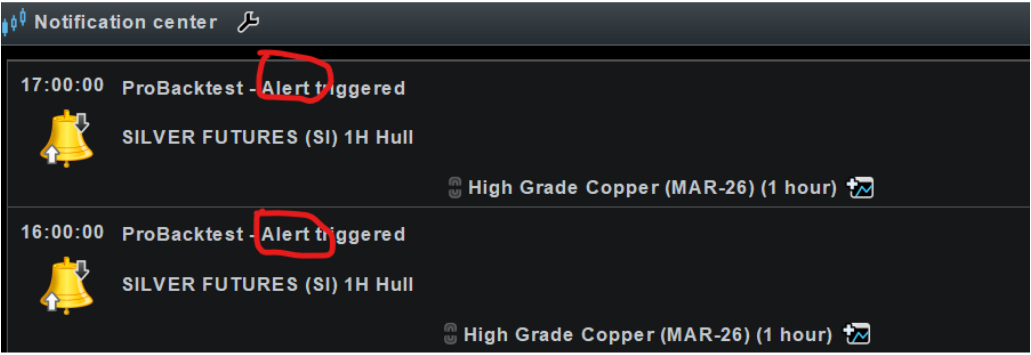
I have also noticed that in your notification center it says Probacktest – Alert triggered. This is not correct. Please follow the below steps to correct this:
If notifications say “ProBacktest – Alert triggered”, then:
- You launched the strategy in Backtest/Alert context
- You must STOP it
- Then re-launch via ProOrder AutoTrading”
Its the
relaunch via ProOrder AutoTrading that i cannot seem to do in v2 of PRT. I even created a simple auto strategy to BUY 1 lot at mkt at a specific time (7pm UK) and this didnt execute either. Hoping you can see where im going wrong
code as follows.
//————————————————————————-
// IG EXECUTION TEST STRATEGY
// BUY AT EXACTLY 19:00 UK TIME
//————————————————————————-
DEFPARAM CumulateOrders = False
DEFPARAM PreloadBars = 100
//————————————————————
// Parameters (ticks)
//————————————————————
minStopTicks = 40 // IG-safe minimum
stopTicksInput = 50
targetTicks = 100
//————————————————————
// Enforce minimum stop distance
//————————————————————
effectiveStopTicks = MAX(stopTicksInput, minStopTicks)
stopDistance = effectiveStopTicks * pipsize
targetDistance = targetTicks * pipsize
//————————————————————
// Time condition (UK time)
//————————————————————
isSevenPM = TIME = 190000
//————————————————————
// One trade per day guard
//————————————————————
IF Date <> Date[1] THEN
tradedToday = 0
ENDIF
//————————————————————
// ENTRY: BUY exactly at 19:00
//————————————————————
IF isSevenPM AND NOT LongOnMarket AND tradedToday = 0 THEN
BUY 1 CONTRACT AT MARKET
tradedToday = 1
ENDIF
//————————————————————
// IG-SAFE POST-FILL STOPS
//————————————————————
IF NOT ONMARKET THEN
longStop = 0
longTarget = 0
ENDIF
IF LongOnMarket THEN
IF longStop = 0 THEN
longStop = tradeprice(1) – stopDistance
longTarget = tradeprice(1) + targetDistance
ENDIF
SELL AT longStop STOP
SELL AT longTarget LIMIT
ENDIF
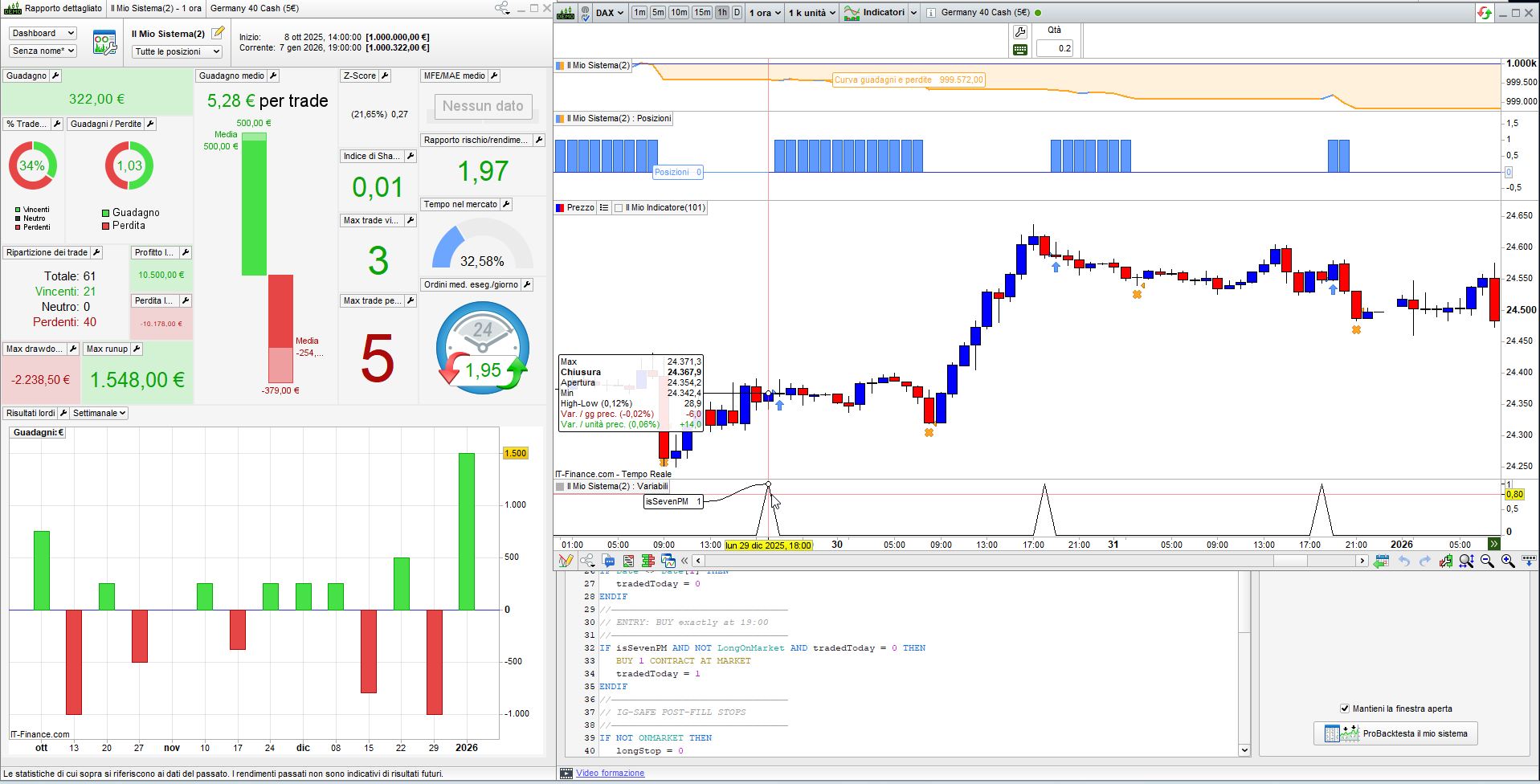
On DAX, 1-hour TF, your code works like a charm, as you can see from the attached pic.
The only issue is when 7pm is the last bar the market is open, in which case the trade will be opened when the market next opens, usually on Sunday or Monday.
I run the code with IG’s CFDs (no spreadbetting).
so where am i going wrong do you think? Perhaps IG doesnt allow auto execution into Spread Betting accounts? Do you or anybody know if this is the case?
Also, when a strategy triggers, i just get a pop up ALERT. And they never auto execute. See attached
I really appreciate your help.
doesnt allow auto execution into Spread Betting accounts
Yes it is allowed … loads of UK members use SB Accounts.
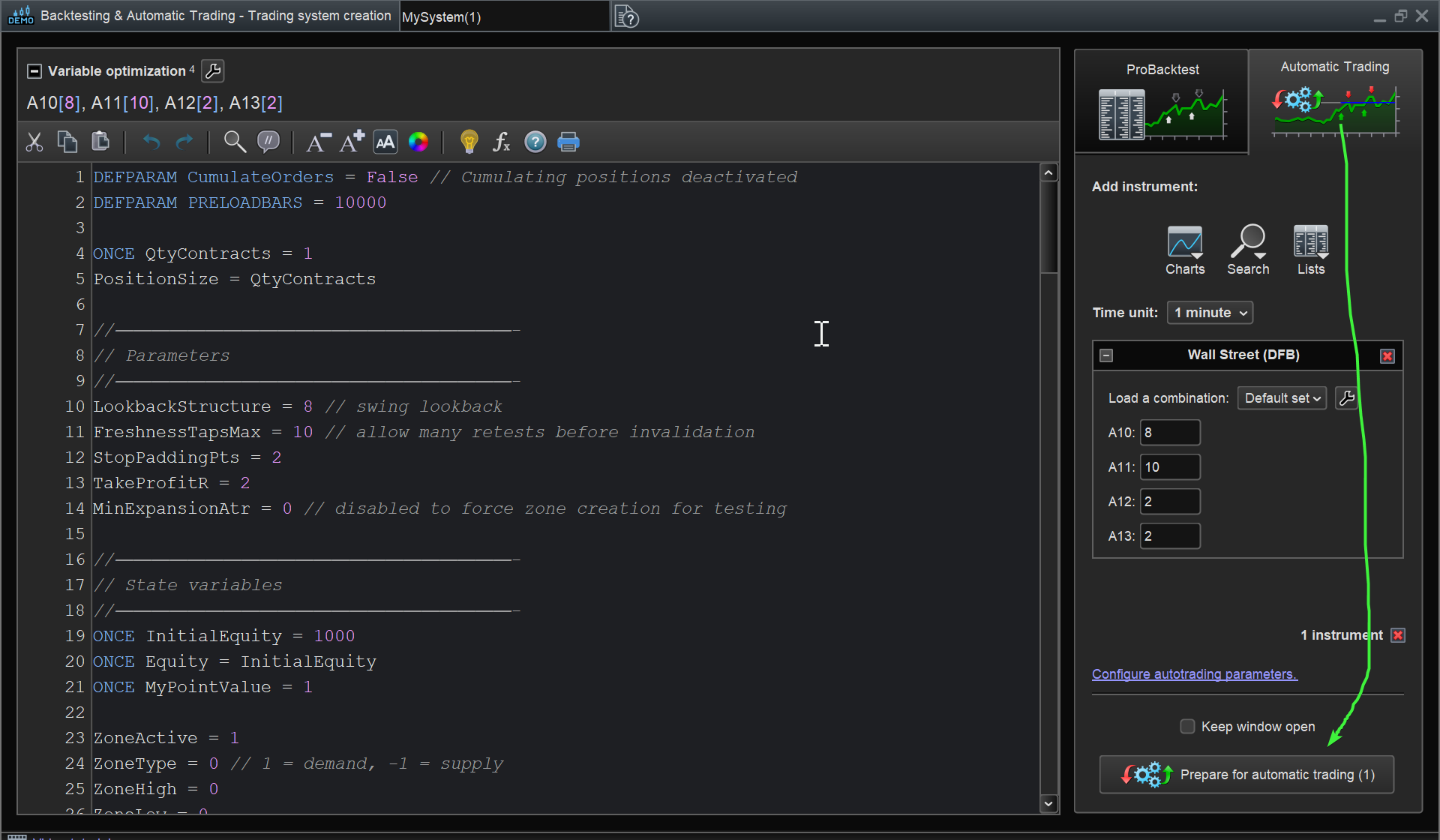
Are you not starting your Algos using the button on attached at the green arrowhead?
yes , thats what i always do to place the strategy into live auto trading . Today as an example, the attached shows a strategy that should have triggered 2 hours ago as per the chart, and this time i didn’t get an alert , and no auto execution. Its trading in the smallest size.
Please see attached and again, really appreciate your help as this is so frustrating
Strategy code as follows:
//=====================================================================
// PRC_Volume Order Blocks -> PROORDER AUTO STRATEGY (IG Spread Betting ES)
// – No drawings (strategy only)
// – Trades the most recent ACTIVE bull/bear block
// – IG-safe post-fill stop/target using POINTS, with minimum stop guard
//=====================================================================
DEFPARAM CumulateOrders = False
DEFPARAM PreloadBars = 1500
//——————————
// SETTINGS
//——————————
length1 = 5
length2 = length1 + 13 // 18
atrPeriod = 200
//——————————
// IG SPREAD BETTING RISK (POINTS)
// IMPORTANT: set minStopPts to >= IG deal ticket minimum stop distance.
// IG minimum stop distance can vary by market/time/volatility. :contentReference[oaicite:1]{index=1}
//——————————
stopPtsInput = 6 // desired stop distance in POINTS
targetPtsInput = 12 // desired target distance in POINTS
minStopPts = 8 // IG minimum in POINTS (set from deal ticket)
// Enforce minimum distance
effectiveStopPts = MAX(stopPtsInput, minStopPts)
stopDistance = effectiveStopPts
targetDistance = targetPtsInput
//——————————
// EMA CALCULATION
//——————————
ema1 = ExponentialAverage[length1](close)
ema2 = ExponentialAverage[length2](close)
crossUp = ema1 CROSSES OVER ema2
crossDn = ema1 CROSSES UNDER ema2
//——————————
// ATR CALCULATION (used for block thickness)
//——————————
myAtr = AverageTrueRange[atrPeriod](close)
atr1 = myAtr * 2
//——————————
// STORAGE (blocks)
//——————————
ONCE b = 0
ONCE z = 0
//——————————
// BULLISH BLOCK DETECTION (on crossUp)
//——————————
IF crossUp THEN
myLowest = Lowest[length2](low)
myLowestIndex = -1
src = 0
FOR i = 1 TO length2 DO
IF low[i] = myLowest THEN
myLowestIndex = BarIndex[i]
src = MIN(open[i], close[i]) // bull block upper boundary
BREAK
ENDIF
NEXT
IF myLowestIndex >= 0 THEN
// Ensure a minimum thickness using ATR
IF (src – myLowest) < (atr1 * 0.5) THEN
src = myLowest + atr1 * 0.5
ENDIF
$bullIndex[b] = myLowestIndex
$bullUpper[b] = src
$bullLower[b] = myLowest
$bullMid[b] = (src + myLowest) / 2
$bullIsActive[b] = 1
b = b + 1
ENDIF
ENDIF
//——————————
// BEARISH BLOCK DETECTION (on crossDn)
//——————————
IF crossDn THEN
myHighest = Highest[length2](high)
myHighestIndex = -1
src = 0
FOR i = length2 DOWNTO 1 DO
IF high[i] = myHighest THEN
myHighestIndex = BarIndex[i]
src = MAX(open[i], close[i]) // bear block lower boundary
BREAK
ENDIF
NEXT
IF myHighestIndex >= 0 THEN
// Ensure a minimum thickness using ATR
IF (myHighest – src) < (atr1 * 0.5) THEN
src = myHighest – atr1 * 0.5
ENDIF
$bearIndex[z] = myHighestIndex
$bearUpper[z] = myHighest
$bearLower[z] = src
$bearMid[z] = (src + myHighest) / 2
$bearIsActive[z] = 1
z = z + 1
ENDIF
ENDIF
//——————————
// SIMPLE INVALIDATION (live-safe, latest blocks only)
//——————————
IF b > 0 THEN
lastBull = b – 1
IF $bullIsActive[lastBull] = 1 AND close < $bullLower[lastBull] THEN
$bullIsActive[lastBull] = 0
ENDIF
ENDIF
IF z > 0 THEN
lastBear = z – 1
IF $bearIsActive[lastBear] = 1 AND close > $bearUpper[lastBear] THEN
$bearIsActive[lastBear] = 0
ENDIF
ENDIF
//——————————
// ENTRY LOGIC (trade the most recent active block)
// Bull: touch block then close back above upper boundary (bounce)
// Bear: touch block then close back below lower boundary (rejection)
//——————————
bullBounce = 0
bearReject = 0
IF b > 0 THEN
lastBull = b – 1
IF $bullIsActive[lastBull] = 1 THEN
bullTouch = (low <= $bullUpper[lastBull]) AND (low >= $bullLower[lastBull])
bullBounce = bullTouch AND (close > $bullUpper[lastBull])
ENDIF
ENDIF
IF z > 0 THEN
lastBear = z – 1
IF $bearIsActive[lastBear] = 1 THEN
bearTouch = (high >= $bearLower[lastBear]) AND (high <= $bearUpper[lastBear])
bearReject = bearTouch AND (close < $bearLower[lastBear])
ENDIF
ENDIF
IF NOT ONMARKET AND bullBounce THEN
BUY 1 CONTRACT AT MARKET
ENDIF
IF NOT ONMARKET AND bearReject THEN
SELLSHORT 1 CONTRACT AT MARKET
ENDIF
//——————————
// IG-SAFE POST-FILL STOPS & TARGETS (POINTS)
//——————————
IF NOT ONMARKET THEN
longStop = 0
longTarget = 0
shortStop = 0
shortTarget = 0
ENDIF
IF LongOnMarket THEN
IF longStop = 0 THEN
longStop = tradeprice(1) – stopDistance
longTarget = tradeprice(1) + targetDistance
ENDIF
SELL AT longStop STOP
SELL AT longTarget LIMIT
ENDIF
IF ShortOnMarket THEN
IF shortStop = 0 THEN
shortStop = tradeprice(1) + stopDistance
shortTarget = tradeprice(1) – targetDistance
ENDIF
EXITSHORT AT shortStop STOP
EXITSHORT AT shortTarget LIMIT
ENDIF
You appear to have selected max pos size as 0.01 per point, but your code calls for pos size 1 per point.
Change max pos size to 2 per point and report back or say if above is not clear?
OK – thanks.
When i set the strategy to autotrade, im asked to input the max position..in this case i entered 0.01 as per screenshot
But you are saying that whats hardcoded must match this value for a trade to execute?
I want to start this one off ‘small’ so rather than change to 2 per point, can i just change this piece of the code to
IF NOT ONMARKET AND bullBounce THEN
BUY 0.01 CONTRACT AT MARKET
ENDIF
IF NOT ONMARKET AND bearReject THEN
SELLSHORT 0.01 CONTRACT AT MARKET
Is that the right syntax?
Try it on Demo Account with virtual money first to be safe.
Have you enabled your Demo / Paper Trading Account under Settings on the IG Dashboard?
Goodnight … I’ll check back in the morning over my porridge! 🙂
BUY 0.01 CONTRACT AT MARKET
You need to Test / start on Demo Account always (so then you are not worried about losses etc).
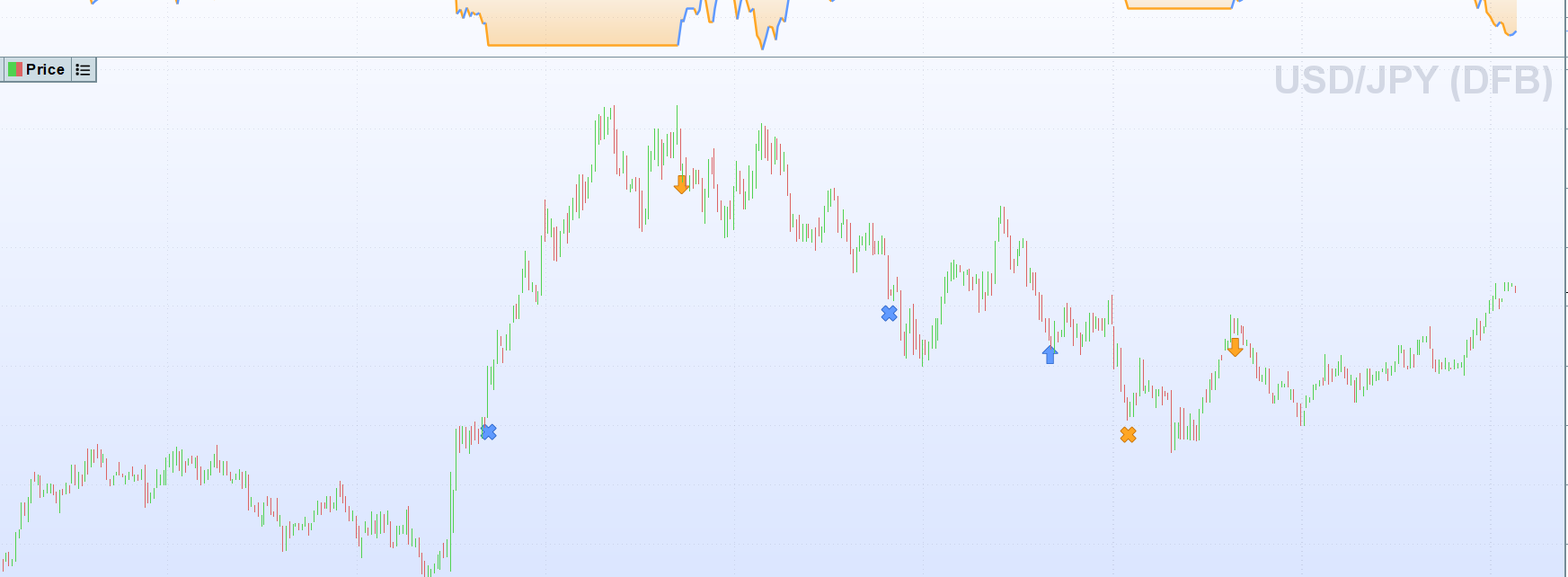
What is the min pos size on USDJPY?
I just checked and min pos size looks like 0.1 Contracts on USDJPY?
whats hardcoded must match this value for a trade to execute
Yes so if code states 0.1 Contracts then max pos size must be set at >= 0.1.
I usually double the coded value (to allow for exit & entry) but probably not necessary.
Have an extra dollop of honey in your porridge….and its on me!
I think you’ve solved it. Just going to try and few more simple ones and will confirm tomorrow
Have a great evening
You launched the strategy in Backtest/Alert context
I’m intrigued … what is / how do you / we launch in Backtest/Alert context??
How did you achieve / get the
Alert which IG refer to above … after launching your Strategy (in ProOrder??)?