Hi all, needing bit understanding of inclusion/exclusion of weekend data from trading strategies. There is an option on PRT charts to exclude weekend data from being shown on charts, but not aware if this applies to coding strategies as well. For example, Average[50](close) function when used within strategy for GBPUSD, it contains roughly 12-14 Saturday/Sunday data items which I want to be excluded.
Reason being, this dataset is so small and biased, it sometimes alters the output of function massively. Eg, Average[20](close) on hourly timeframe on Monday morning will only give data from Saturday/Sunday which is vastly different from when markets are on normal working days or in active trading hours.
More importantly, do you think this data is problem or just me thinking out of league?
Since PRT do not allow to exclude a time/day range, over one year ago I coded these MA’s based on a Time Range https://www.prorealcode.com/prorealtime-indicators/time-range-moving-averages-simple-exponential-weighted-trsma-trema-trwma/. They can be easily changed to apply to a day range in order to exclude weekend data.
Since trading days are numbered 1 to 5 (Monday through Friday), this is the first one (TRSMA, renamed DRSMA) changed to meet your requirements:
// DRSMA
//
// Day Range Simple Moving Average
//
DEFPARAM CalculateOnLastBars = 1000
//Periods = 100
Periods = max(1,min(999,Periods))
//
i = 0
DRSMA = 0
FOR j = 0 TO 1000
IF OpenDayOfWeek[j] >= 1 AND OpenDayOfWeek[j] <= 5 THEN
DRSMA = DRSMA + close[j]
i = i + 1
IF i = Periods THEN
BREAK
ENDIF
ENDIF
NEXT
DRSMA = (DRSMA / Periods)
IF DRSMA = 0 THEN
DRSMA = close
ENDIF
Return DRSMA AS "DRSMA"
if you do not import the attached file, but prefer Copying & Pasting the code, uncomment line 6.
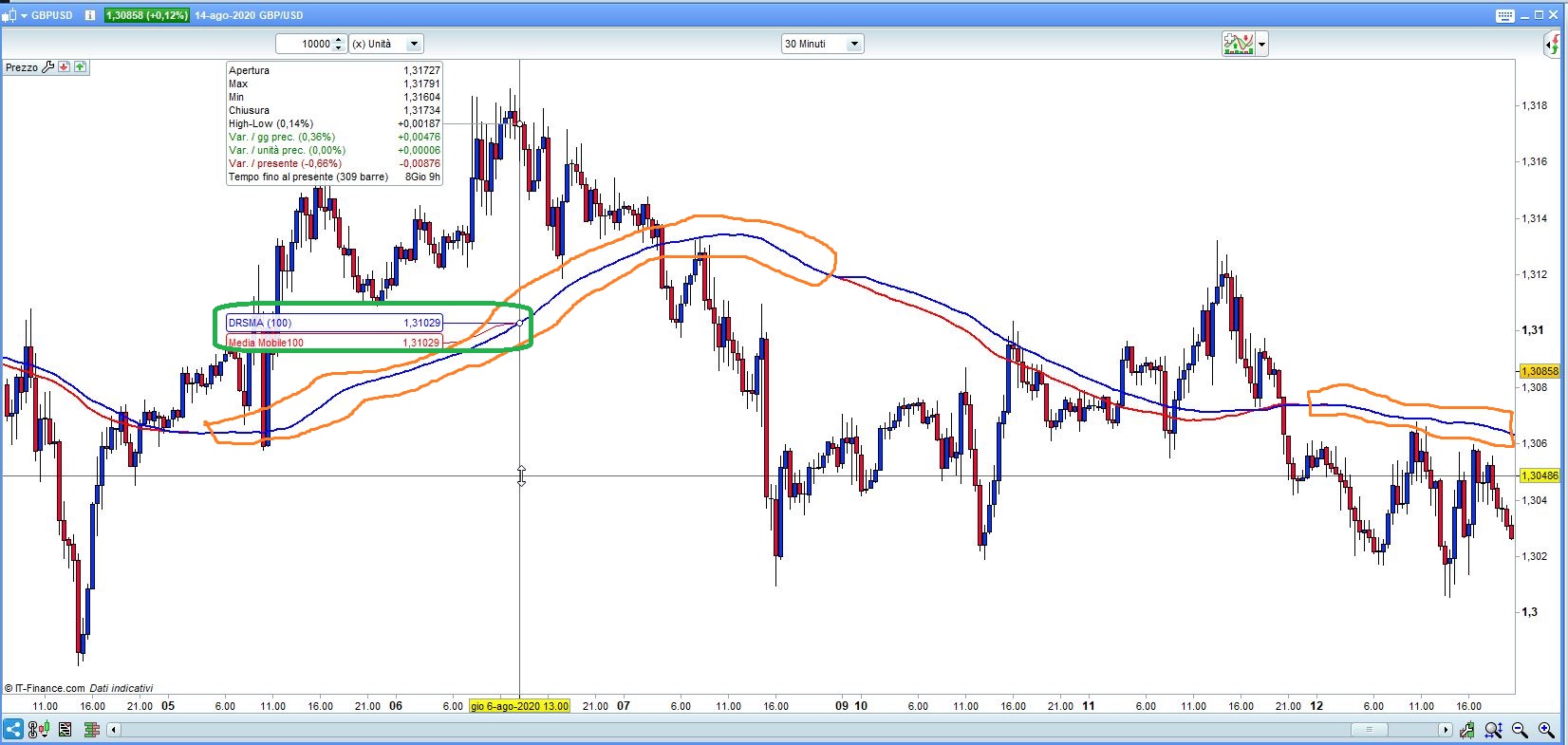
The attached pic shows the built-in 100-period SMA (Red) and the above 100-period DRSMA (Blue), applied to GbpUsd, 30-minute TF. When periods are not affected by weekend data, the two MA’s overlap (you only see the Blue one), otherwise they differ.
If you look at the differences between the codes of TRSMA and DRSMA, you will be able to apply them to the other two and maybe to other indicators.
This is an indicator, but you can apply that code to any strategy, as well.