Everything appearing small in new computer

Viewing 2 posts - 1 through 2 (of 2 total)
  • Author
    Posts
  • #173877 quote
    toptrader8
    Participant
    New

    Hi, I purchased a new computer (Dell XPS 13) as a travelling companion, but when I load Prorealtime, everything appears tiny.

    I cannot figure out how to resize.  PRT on my 18inch laptop continues to be fine, and all other programs including Tradingview

    appear fine on the screen on the new machine?


    Thanks for helping

    #173878 quote
    JC_Bywan
    Moderator
    Master

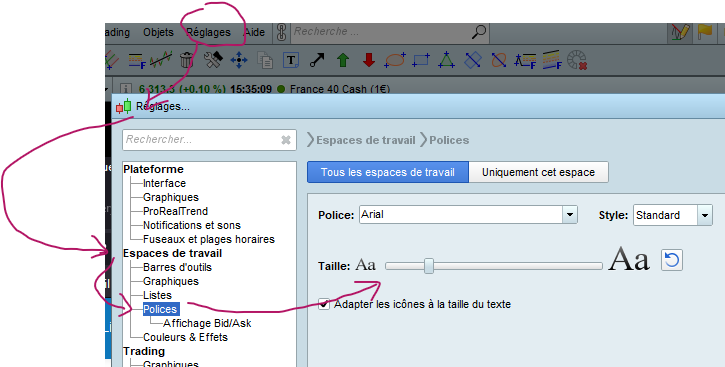
    In the platform main menu, go to “settings” then “workspace” then “fonts”, and you should have a sliding rule to adjust font size. As I am not sure of having translated properly the menu names, let me add a screen capture in a moment, menu will be in french, but at least at the right location.

    Edit: image attached.

    FontSizeSettings.png FontSizeSettings.png
Viewing 2 posts - 1 through 2 (of 2 total)
  • You must be logged in to reply to this topic.

Everything appearing small in new computer


Platform Support: Charts, Data & Broker Setup

New Reply
Author
author-avatar
toptrader8 @toptrader8 Participant
Summary

This topic contains 1 reply,
has 2 voices, and was last updated by JC_Bywan

4 years, 7 months ago.

Topic Details
Forum: Platform Support: Charts, Data & Broker Setup
Language: English
Started: 07/20/2021
Status: Active
Attachments: 1 files
Logo Logo
Loading...