


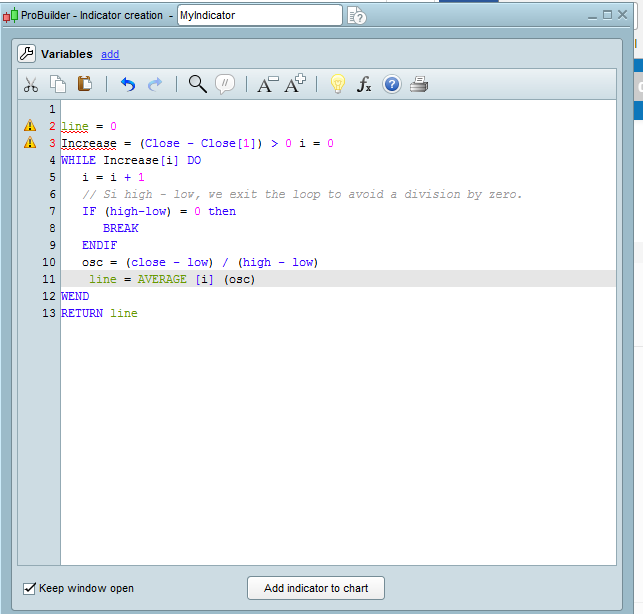
error message with line keyword

Viewing 2 posts - 1 through 2 (of 2 total)

  • Author
    Posts
  • #29093 quote
    balancebalance
    Participant
    Junior

    Hi,
    The following example copied from the pro builder guide. (Page 23)

    but When I copy it into the software I get an error message.
    Can you check me why , please ?

    line = 0
    Increase = (Close – Close[1]) > 0
    i = 0
    WHILE Increase[i] DO
    i = i + 1

    // Si high – low, we exit the loop to avoid a division by zero.

    IF (high-low) = 0 then
    BREAK
    ENDIF
    osc = (close – low) / (high – low)
    line = AVERAGE [i] (osc)
    WEND
    RETURN line

    Image-1.png Image-1.png
    #29102 quote
    NicolasNicolas
    Keymaster
    Legend

    The “line” keyword can’t be used in probuilder code to define variables. You need to change this word with another one, for example “myline”.

Viewing 2 posts - 1 through 2 (of 2 total)
  • You must be logged in to reply to this topic.

ProRealAI ProRealAI New

Stuck on this ProBuilder code?

Describe what this topic is trying to build, in plain English, and ProRealAI writes the ProRealTime™ indicator, screener or system for you.

Available in 7 languages
Try ProRealAI

error message with line keyword


ProBuilder: Indicators & Custom Tools

New Reply
Author
author-avatar
balance @balance Participant
Summary

This topic contains 1 reply,
has 2 voices, and was last updated by NicolasNicolas

9 years, 6 months ago.

Topic Details
Forum: ProBuilder: Indicators & Custom Tools
Language: English
Started: 03/19/2017
Status: Active
Attachments: No files
ProRealCode ProRealCode
Loading...

