


MTF Indicator generating error message

Viewing 5 posts - 1 through 5 (of 5 total)

  • Author
    Posts
  • #162004 quote
    KhaledKhaled
    Participant
    Veteran

    Hello,

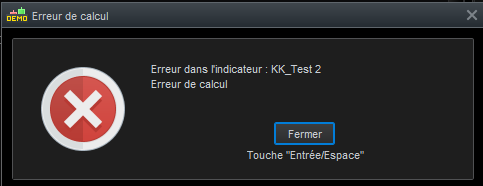
    I’m running PRT v11 (demo account) and trying to code the follwing indicator with TF M2 and TF M5, but I keep getting an error message. Can you please help?

    Thanks

    DEFPARAM CALCULATEONLASTBARS=2000
    
    TIMEFRAME(5 minutes, UPDATEONCLOSE)
    
    Price1=(open+high+low+2*close)/5
    Period1 = 8//21
    nbChandelier1= 1
    BullBearThreshold1=1
    
    //                                Moving Averages Slope
    MM1 = VolumeAdjustedAverage[Period1](Price1)
    Slope1 = (MM1-MM1[nbchandelier1])/nbchandelier1
    EMASlope1=ExponentialAverage[Period1](Slope1)
    
    ca1m2= ((slope1>EMASlope1 and slope1>slope1[1]) or (slope1>slope1[1] and slope1[1]>slope1[2]))
    cv1m2= ((slope1<EMASlope1 and slope1<slope1[1]) or (slope1<slope1[1] and slope1[1]<slope1[2]))
    
    //                                  Elder Ray
    TIMEFRAME(2 minutes, UPDATEONCLOSE)
    BullPower1 = ElderrayBullPower[13](close)
    BearPower1 = ElderrayBearPower[13](close)
    
    ADJASUROPPO1 = (BullPower1-BullPower1[nbchandelier1]) / nbChandelier1
    ANGLE1 = (ATAN(ADJASUROPPO1))
    
    ADJASUROPPO2 = ((BearPower1-BearPower1[nbchandelier1]) / nbChandelier1)
    ANGLE2 = (ATAN(ADJASUROPPO2))
    
    TrendUp1=0
    TrendDown1=0
    if angle1>45 and angle2>45 then
    TrendUp1=1
    elsif angle1<-45 and angle2<-45 then
    TrendDown1=-1
    endif
    /////////////////////////////////////////////////////////////
    
    Bullm2=0
    Bearm2=0
    Bullm2= ca1m2 
    Bearm2= -cv1m2
    
    if (bullm2+bearm2)>=BullBearThreshold1 and trendup1 then
    r=0
    g=102
    b=0
    DRAWARROWUP(barindex, -5) coloured(0,102,0)
    elsif (bullm2+bearm2)>0 then
    r=0
    g=255
    b=0
    endif
    
    if (bullm2+bearm2)<=-BullBearThreshold1 and trenddown1 then
    r=204
    g=0
    b=0
    DRAWARROWDOWN(barindex, 5) coloured(204,0,0)
    elsif (bullm2+bearm2)<0 then
    r=255
    g=51
    b=51
    endif
    //////////////////////////////////
    return 6, -6, (Bullm2+Bearm2) coloured(r, g, b) as "Bull M2M5", 0 as "Base"
    2021-02-19-152459.png 2021-02-19-152459.png
    #162013 quote
    KhaledKhaled
    Participant
    Veteran

    To be precise, I’m trying to run the above on a M1 graph, so should be compatible with M2 and M5.

    #162016 quote
    NicolasNicolas
    Keymaster
    Legend

    The problem seems to be located with lines 20 and 21 (definition of Elderraybullpower and Elderraybearpower), if you change them with:

    BullPower1 = average[13]//ElderrayBullPower[13](close)
    BearPower1 = average[13]//ElderrayBearPower[13](close)

    the error message disappear.

    Please send a report to PRT within the help tool in the platform, i’ll do the same.

    A workaround would be to recode these 2 indicators, so we get rid of the instructions, will  try to find their codes.

    Khaled thanked this post
    #162031 quote
    KhaledKhaled
    Participant
    Veteran

    Thank you Nicolas, like usual, quick and efficient! Much appreciated.

    I replaced Elder Ray with:

    ema13=ExponentialAverage[13](Price1)
    HH=high
    LL=Low
    BullPower1=HH-ema13
    BearPower1=LL-ema13

    it works, but doesn’t want to draw the arrow 🙂

    #162852 quote
    NicolasNicolas
    Keymaster
    Legend

    I confirm that a fix will be deployed very soon.

    Khaled thanked this post
Viewing 5 posts - 1 through 5 (of 5 total)
  • You must be logged in to reply to this topic.

ProRealAI ProRealAI New

Stuck on this ProBuilder code?

Describe what this topic is trying to build, in plain English, and ProRealAI writes the ProRealTime™ indicator, screener or system for you.

Available in 7 languages
Try ProRealAI

MTF Indicator generating error message


ProBuilder: Indicators & Custom Tools

New Reply
Author
author-avatar
Khaled @khaled Participant
Summary

This topic contains 4 replies,
has 2 voices, and was last updated by NicolasNicolas

5 years, 6 months ago.

Topic Details
Forum: ProBuilder: Indicators & Custom Tools
Language: English
Started: 02/19/2021
Status: Active
Attachments: 1 files
ProRealCode ProRealCode
Loading...

