




Pullback sur moyenne mobile

Viewing 15 posts - 16 through 30 (of 53 total)
  • Author
    Posts
  • #249127 quote
    JS
    Participant
    Senior

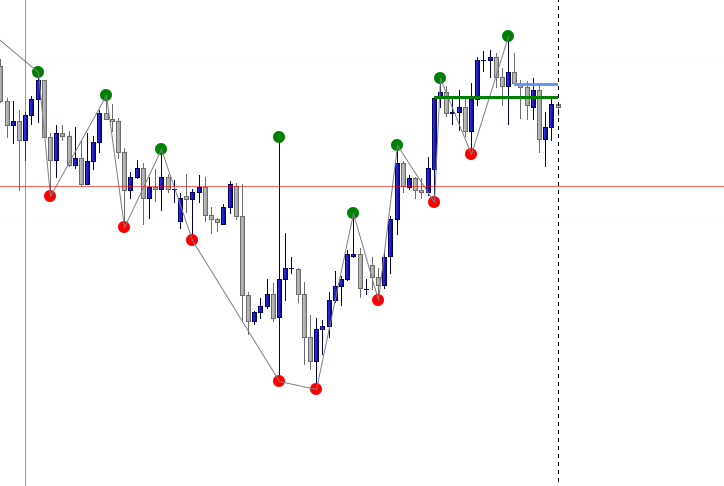
    Les points SH et SL sont peut-être reliés à un “Zig Zag”…

    Depth = 5
    
    If Highest[Depth*2+1](High) = High[Depth] then
    swingPoint = High[Depth]
    swingBar = BarIndex - Depth
    isHigh = 1
    DrawPoint(swingBar, swingPoint, 3) Coloured("Green")
    EndIf
    
    If Lowest[Depth*2+1](Low) = Low[Depth] then
    swingPoint = Low[Depth]
    swingBar = BarIndex - Depth
    isHigh = 0
    DrawPoint(swingBar, swingPoint, 3) Coloured("Red")
    EndIf
    
    If swingBar <> 0 Then
    If lastSwingBar <> 0 Then
    DrawSegment(lastSwingBar, lastSwingValue, swingBar, swingPoint) Coloured("Gray")
    EndIf
    lastSwingBar = swingBar
    lastSwingValue = swingPoint
    EndIf
    
    Return
    paatof69 thanked this post
    #249130 quote
    paatof69
    Participant
    New

    Merci beaucoup JS,  c est top ça fonctionne ….

    Bonne soiree…

    JS thanked this post
    #249132 quote
    paatof69
    Participant
    New

    Merci encore pour vos réponses précédentes, c’est toujours très apprécié ! 😊

    Je souhaiterais cette fois un indicateur qui affiche uniquement des polarités horizontales basées sur les clôtures des bougies.

    – Un trait horizontal bleu lorsque la polarité est calculée sur une fenêtre de 8 bougies
    – Un trait horizontal vert lorsque la polarité est calculée sur une fenêtre de 21 bougies
    – Les traits doivent se prolonger automatiquement vers la droite jusqu’à cassure du niveau

    Cet indicateur doit être indépendant, sans autre affichage (pas de structure ni de zigzag), uniquement les lignes horizontales des polarités.

    Encore merci ,,,,

    Paatof69,

    #249559 quote
    paatof69
    Participant
    New

    bonjour

    je souhaite corrige ce codage ..

    sur proreal pouvez vous m aider a corriger …

    merci

    // ===============================
    // Vertical_Sessions (PRT)
    // Lignes verticales : 06:00, 08:00, 09:30, 14:30, 15:30, 17:00
    // ===============================

    DEFPARAM CumulateOrders = False

    // —- Paramètres
    offsetHours = 0 // Décalage horaire (ex : +1 hiver, +2 été selon ton flux)
    lineWidth = 1
    col = RGB(0,170,255) // Couleur des lignes
    showLabels = 1 // 1 = affiche l’heure, 0 = pas de libellé

    // —- Horaires cibles (minutes depuis minuit)
    target1 = 6*60 // 06:00
    target2 = 8*60 // 08:00
    target3 = 9*60 + 30 // 09:30
    target4 = 14*60 + 30 // 14:30
    target5 = 15*60 + 30 // 15:30
    target6 = 17*60 // 17:00

    // —- Minute locale de la bougie (avec offset)
    locMin = ((HOUR + offsetHours) * 60 + MINUTE) MOD 1440

    // —- Hauteur pour couvrir la fenêtre de prix
    hi = Highest[20](High)
    lo = Lowest[20](Low)

    // —- Procédure de tracé
    PROCEDURE DrawAt(targetm, label$)
    IF locMin = targetm THEN
    DRAWSEGMENT(BarIndex, lo, BarIndex, hi) COLOURED(col) STYLE(DottedLine) WIDTH(lineWidth)
    IF showLabels THEN
    DRAWTEXT(label$, BarIndex, hi)
    ENDIF
    ENDIF
    ENDPROCEDURE

    // —- Appels
    CALL DrawAt(target1, “06:00”)
    CALL DrawAt(target2, “08:00”)
    CALL DrawAt(target3, “09:30”)
    CALL DrawAt(target4, “14:30”)
    CALL DrawAt(target5, “15:30”)
    CALL DrawAt(target6, “17:00”)

    cdt.

    #249564 quote
    JS
    Participant
    Senior

    Bonjour,
    J’ai examiné le code mais je ne peux pas l’exécuter à cause des fonctions Call…
    Il serait peut-être préférable d’intégrer les horaires des fonctions Call directement dans le code…
    Par ailleurs, il y a pas mal d’erreurs de syntaxe dans le code par exemple:
    DefParam CumulateOrders=False utilisé pour ProOrder mais interdit dans ProBuilder
    Col=RGB(0,170,255) ne fonctionnera pas ainsi avec Coloured
    Procedure DrawAt(targetm, labels$) Procedure et EndProcedure ne sont pas des fonctions reconnues par ProBuilder
    Un indicateur doit toujours se terminer par Return…

    paatof69 thanked this post
    #249572 quote
    paatof69
    Participant
    New

    merci de votre reponse

    Est  ce que vous pouvez corriger  ce code pour qu il soit compatible  a  prorealtime?

    cdt.

    #249580 quote
    JS
    Participant
    Senior

    Salut,

    Vous pouvez peut-être utiliser cela comme base… ?

    hh=Highest[100](High)
    
    target1 = 060000 // 06:00
    If OpenTime=Target1 then
    DrawVLine(BarIndex)Coloured(0,170,255)
    DrawText("06:00",barindex,hh)
    EndIf
    
    target2 = 080000 // 08:00
    If OpenTime=Target2 then
    DrawVLine(BarIndex)Coloured(0,170,255)
    DrawText("08:00",barindex,hh)
    EndIf
    
    target3 = 093000 // 09:30
    If OpenTime=Target3 then
    DrawVLine(BarIndex)Coloured(0,170,255)
    DrawText("09:30",barindex,hh)
    EndIf
    
    target4 = 143000 // 14:30
    If OpenTime=Target4 then
    DrawVLine(BarIndex)Coloured(0,170,255)
    DrawText("14:30",barindex,hh)
    EndIf
    
    target5 = 153000 // 15:30
    If OpenTime=Target5 then
    DrawVLine(BarIndex)Coloured(0,170,255)
    DrawText("15:30",barindex,hh)
    EndIf
    
    target6 = 170000 // 17:00
    If OpenTime=Target6 then
    DrawVLine(BarIndex)Coloured(0,170,255)
    DrawText("17:00",barindex,hh)
    EndIf
    
    Return

    paatof69 and robertogozzi thanked this post
    #249584 quote
    paatof69
    Participant
    New
     Merci infiniment pour ton aide … MES ZONES HORAIRE S AFFICHE… au top..
    JS thanked this post
    #249626 quote
    paatof69
    Participant
    New
    bonjour mon idee est de creer un indicateur si je t explique ce que je souhaite … il s agit de polaritee pourrai tu essaye de le coder …?? merci cdt
    #249628 quote
    JS
    Participant
    Senior
    Salut, Quand vous me direz exactement ce que vous avez en tête, j’essaierai de le convertir en ProBuilder…
    paatof69 thanked this post
    #249631 quote
    paatof69
    Participant
    New
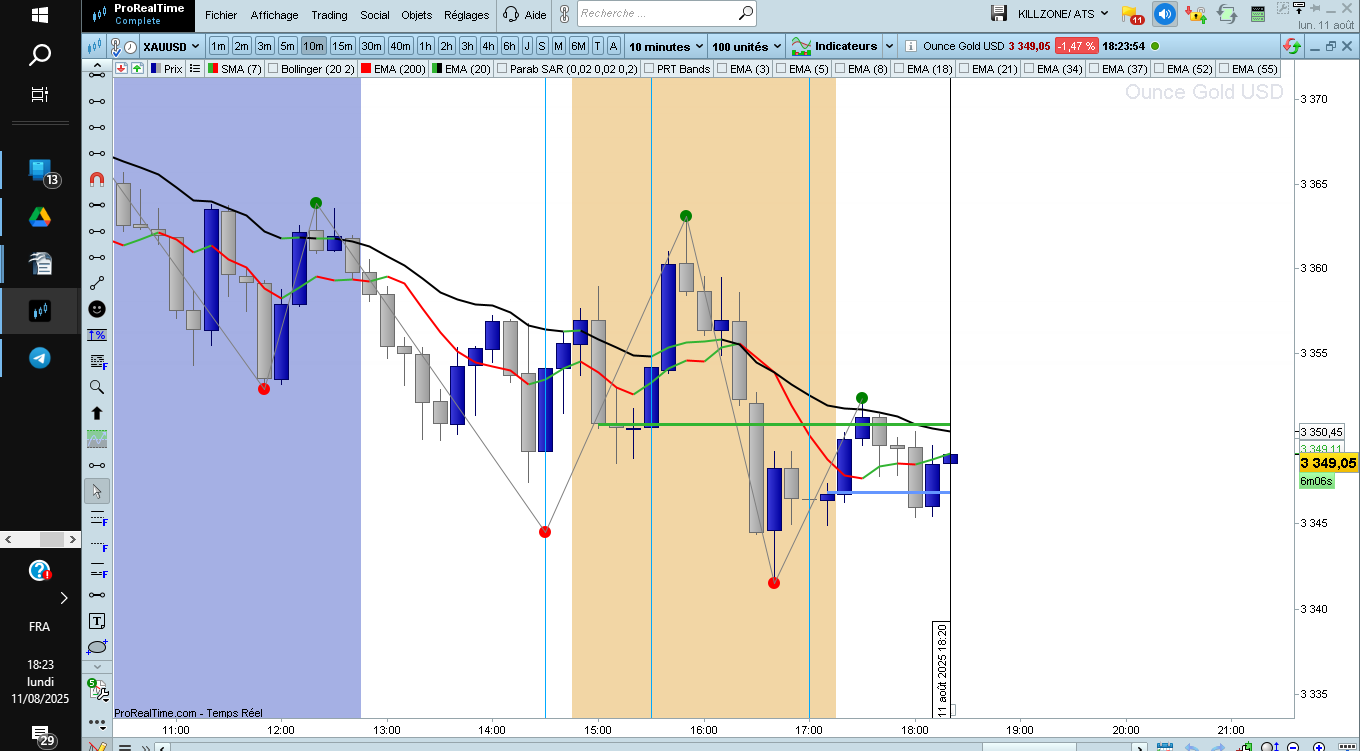
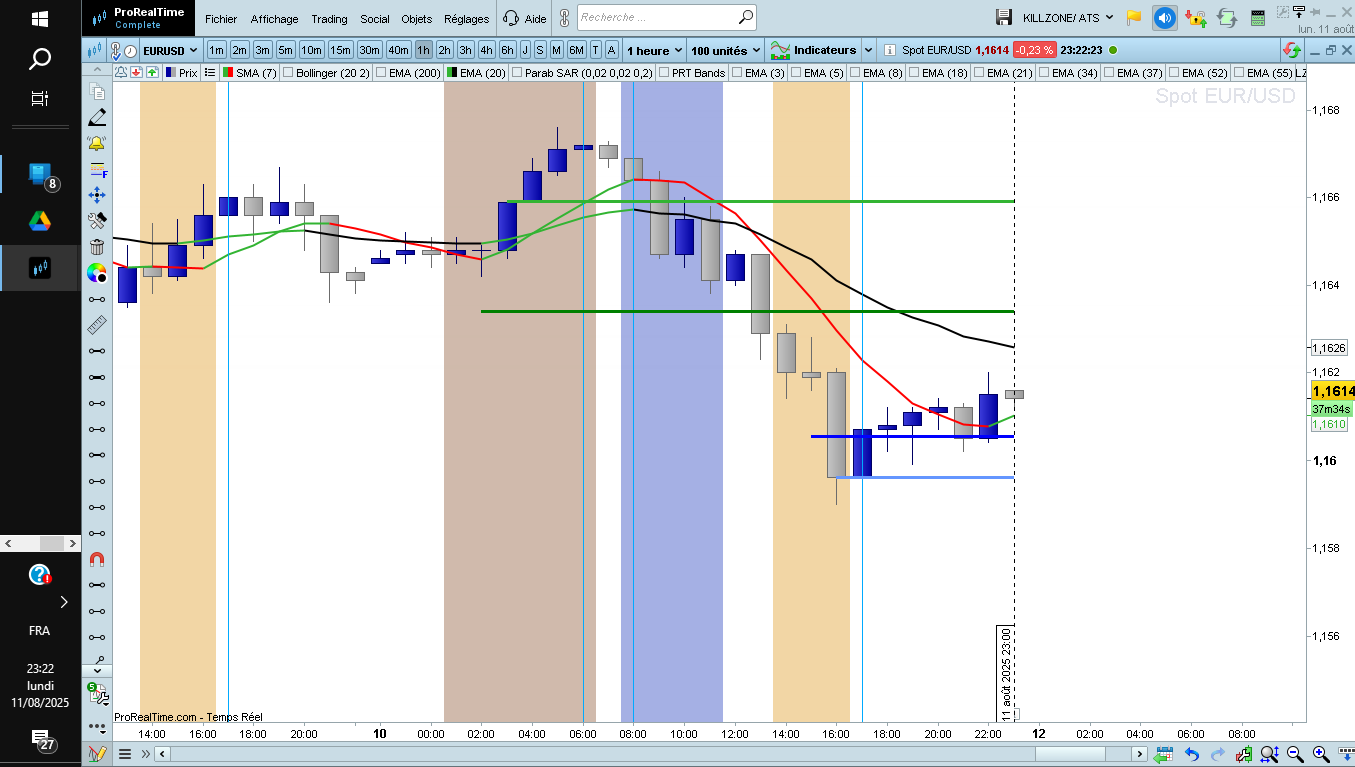
    Bonjour, Je souhaite afficher deux lignes horizontales calculées sur les cours de clôture : – En bleu, représentant la polarité sur 8 bougies – En vert, représentant la polarité sur 21 bougies voir screen… Il s’agit bien de lignes horizontales fixes et non de courbes dynamiques. Merci pour votre aide !
    #249634 quote
    JS
    Participant
    Senior

    Salut,

    Qu’entendez-vous exactement par « polarité »… ?

    paatof69 thanked this post
    #249639 quote
    paatof69
    Participant
    New
      suite a votre  message , les polarites se sont ces deux lignes bleu 8 bougie et verte 21 qui marque une zone de resistance ou de support par rapport au prix , les algorytmes recherhe ces niveaux.. cdt.
    #249641 quote
    JS
    Participant
    Senior

    Bonjour,

    Voulez-vous dire quelque chose comme ça…

    DefParam DrawOnLastBarOnly=True
    
    H8Close=Highest[8](Close)
    L8Close=Lowest[8](Close)
    Polarity8=(H8Close+L8Close)/2
    
    H21Close=Highest[21](Close)
    L21Close=Lowest[21](Close)
    Polarity21=(H21Close+L21Close)/2
    
    DrawSegment(BarIndex-8,Polarity8,BarIndex,Polarity8) Style(Line,3) Coloured("Blue")
    DrawSegment(BarIndex-21,Polarity21,BarIndex,Polarity21) Style(Line,3) Coloured("Green")
    
    Return

    paatof69 thanked this post
    #249642 quote
    paatof69
    Participant
    New
    merci de votre aide c est tout a fait ce que je souhaite , sauf probleme sur cloture : lorsque bougie grise le trait est en dessous bougie , bougie bleu le trait est dessus comme photo … cdt.
Viewing 15 posts - 16 through 30 (of 53 total)
  • You must be logged in to reply to this topic.

Pullback sur moyenne mobile


ProBuilder : Indicateurs & Outils Personnalisés

New Reply
Author
author-avatar
paatof69 @paatof69 Participant
Summary

This topic contains 52 replies,
has 7 voices, and was last updated by bertrandpinoy

4 months, 4 weeks ago.

Topic Details
Forum: ProBuilder : Indicateurs & Outils Personnalisés
Language: French
Started: 07/22/2025
Status: Active
Attachments: 18 files
Logo Logo
Loading...
