


Entry Setup indicator

Viewing 8 posts - 1 through 8 (of 8 total)
  • Author
    Posts
  • #42235 quote
    robertogozzi
    Moderator
    Master

    I was wondering if there is any indicator showing when a setup, either Long or Short, presents for a trade to be eventually entered.

    I admit I did not spend much time investigating. I was just willing to experience a bit, so I ended up with this code:

    DEFPARAM CalculateOnLastBars = 1000
    
    //                     initialization of variables
    Up               = close > open
    Dn               = close < open
    ONCE PipDistance = 0
    // ----------------------------- Macd ------------------------------------
    IF Macd1 < 1 OR Macd1 > 999 THEN
       Macd1  = 12                                               //default 12
    ENDIF
    IF Macd2 < 1 OR Macd2 > 999 THEN
       Macd2  = 26                                               //default 26
    ENDIF
    IF Macd3 < 1 OR Macd3 > 999 THEN
       Macd3  = 9                                                //default 9
    ENDIF
    MacdVal                     = MACD[Macd1,Macd2,Macd3](close)
    MacdSignal                  = MACDline[Macd1,Macd2,Macd3](close)
    Up = Up AND MacdVal > MacdVal[1] AND MacdSignal > MacdVal
    Dn = Dn AND MacdVal < MacdVal[1] AND MacdSignal < MacdVal
    
    // ----------------------------- Rsi -------------------------------------
    IF RsiNum < 1 OR RsiNum > 999 THEN
       RsiNum = 14                                               //default 14
    ENDIF
    IF RsiUpperLimit < 1 OR RsiUpperLimit > 999 THEN
       RsiUpperLimit  = 70                                       //default 70
    ENDIF
    IF RsiLowerLimit < 1 OR RsiLowerLimit > 999 THEN
       RsiLowerLimit  = 30                                       //default 30
    ENDIF
    IF RsiMiddleLimit < 1 OR RsiMiddleLimit > 999 THEN
       RsiMiddleLimit = 50                                       //default 50
    ENDIF
    RsiVal                      = Rsi[RsiNum]
    Up = Up AND RsiVal > RsiVal[1] AND RsiVal > RsiMiddleLimit
    Dn = Dn AND RsiVal < RsiVal[1] AND RsiVal < RsiMiddleLimit
    
    // ----------------------------- Stochastic ------------------------------
    IF Stoc1 < 1 OR Stoc1 > 999 THEN
       Stoc1  = 8                                                //default 8
    ENDIF
    IF Stoc2 < 1 OR Stoc2 > 999 THEN
       Stoc2  = 3                                                //default 3
    ENDIF
    IF Stoc3 < 1 OR Stoc3 > 999 THEN
       Stoc3  = 3                                                //default 3
    ENDIF
    IF StocUpperLimit < 1 OR StocUpperLimit > 999 THEN
       StocUpperLimit = 80                                       //default 80
    ENDIF
    IF StocLowerLimit < 1 OR StocLowerLimit > 999 THEN
       StocLowerLimit = 20                                       //default 20
    ENDIF
    StocD                       = Stochastic[Stoc1,Stoc2](close)
    StocK                       = Average[Stoc3](StocD)
    Up = Up AND StocK > StocD
    Dn = Dn AND StocK < StocD
    
    // ----------------------------- Moving Averages -------------------------
    // variable AVGTYPE can hold values:
    //
    //       0 = SMA
    //       1 = EMA
    //       2 = WMA
    //       3 = Wilder MA
    //       4 = Triangular MA
    //       5 = End point MA
    //       6 = Time series MA
    //
    IF FastAvg < 1 OR FastAvg > 999 THEN
       FastAvg        = 3                                        //default 3
    ENDIF
    IF SlowAvg < 1 OR SlowAvg > 999 THEN
       SlowAvg        = 9                                        //default 9
    ENDIF
    IF AvgType < 0 OR AvgType > 6 THEN
       AvgType        = 1                                        //default 1 (Ema)
    ENDIF
    MAfast                      = Average[FastAvg, AvgType]
    MAslow                      = Average[SlowAvg, AvgType]
    //Up = Up AND MAfast CROSSES OVER  MAslow
    //Dn = Dn AND MAfast CROSSES UNDER MAslow
    Up = Up AND MAfast > MAslow
    Dn = Dn AND MAfast < MAslow
    
    // ----------- Draw Arrows on return (some pips below BAR) ---------------
    IF Up THEN
       DRAWARROWUP(barindex,low   - (PipDistance * pipsize)) coloured(50,205,50)  //green
    ELSIF Dn THEN
       DRAWARROWDOWN(barindex,high + (PipDistance * pipsize)) coloured(255,0,0)   //red
    ENDIF
    RETURN Up OR Dn

    As you can see it evaluates Macd, Rsi, Stochastic and Moving Averages, either UP (long) or DOWN (short) and displays an arrow accordingly. Other indicators/Oscillators may be added.

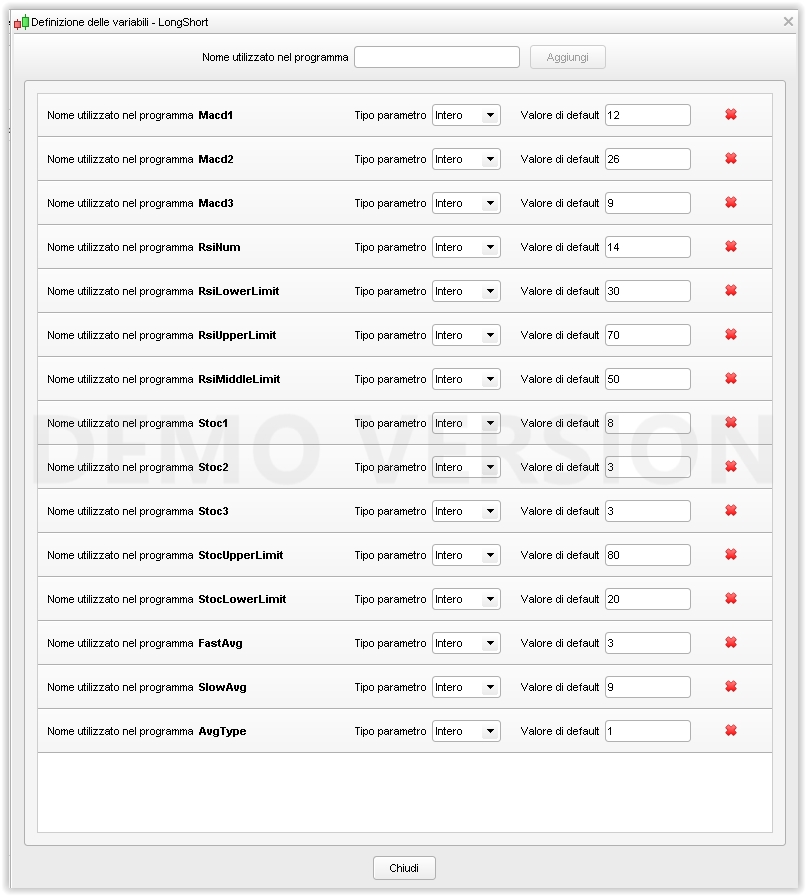
    It allows many variables (some of them, especially limits, not yet used for the most part) to be tailored by the user.

    Many default values come from some (not much) testing on daily Eur/Usd bars.

    It returns either ZERO (no setup) or NOT ZERO (1 or -1)  for “good” setups. A trade may entered according to the colour of the arrow on the chart, after considering other patterns, support and resistance areas etc….

    Variable “PipDistance” was meant to be the distance, in pips, above/below the candle to make it more visible, but it did not work as expected, so I reset it to ZERO by default.

    I always check that if variables are either < 1 or > 999 they will default to embedded values.

    It could be used in automated strategies by cheking if the returned value is either -1 or 1 (0 = no setup).

    If there is already some PRT code published about setups I would appreciate receiving a link.

    Any suggestion or further development is encouraged, if anyone is interested.

    Roberto

    Nicolas and AVT thanked this post
    #42265 quote
    Nicolas
    Keymaster
    Master

    Nice idea Roberto, thanks for sharing. May I change a bit your code? You could have code the periods’ range of indicators like this instead:

    Macd1 = max(macd1,1)
    Macd1 = min(macd1,999)
    #42268 quote
    AVT
    Participant
    Senior

    Going to test that, Roberto. Thanks

    #42274 quote
    robertogozzi
    Moderator
    Master

    Anything you like Nicolas, any suggestion/improvement is welcome.

    I also think I should change the last line as follows:

    RETURN Up OR (Dn * -1)

    so that it returns 1 for UP and -1 (instead of 1) for DOWN,  because the way it is now it always returns either ZERO for no setup or 1 for any setup, no matter if a Long or Short one!

    #42275 quote
    robertogozzi
    Moderator
    Master

    Nicolas, can your two-line code be shrinked to:

    Macd1 = max(min(macd1,999),1)

    ?

    #42284 quote
    robertogozzi
    Moderator
    Master

    Sorry, I wrote SHRINKED, but it should have been written SHRUNK.

    #42288 quote
    Nicolas
    Keymaster
    Master

    Yes Roberto, it is far more elegant like you did 🙂

    robertogozzi thanked this post
    #42364 quote
    Derek
    Participant
    Veteran

    Hi Roberto!

    I have created whole trading systems in probuilder a while back and my generalized solution to your initial question was to create different statuses for different indicator combinations. This was important to me to efficiently factor in the time it took for a set-up actually leading to the actual event and the trade.

    robertogozzi thanked this post
Viewing 8 posts - 1 through 8 (of 8 total)

  • You must be logged in to reply to this topic.

Entry Setup indicator


ProBuilder: Indicators & Custom Tools

New Reply
Author
Summary

This topic contains 7 replies,
has 4 voices, and was last updated by Derek

8 years, 6 months ago.

Topic Details
Forum: ProBuilder: Indicators & Custom Tools
Language: English
Started: 08/01/2017
Status: Active
Attachments: 2 files
Logo Logo
Loading...

