enhancing Fibo Levels

Viewing 4 posts - 1 through 4 (of 4 total)
  • Author
    Posts
  • #144113 quote
    ammar.berrou
    Participant
    New

    here’s my first post on this forum, I hope you find it useful:
    In this post, I’ll explain how I enhanced Fibo levels, share the code, and the ready indicator attached for convenience.

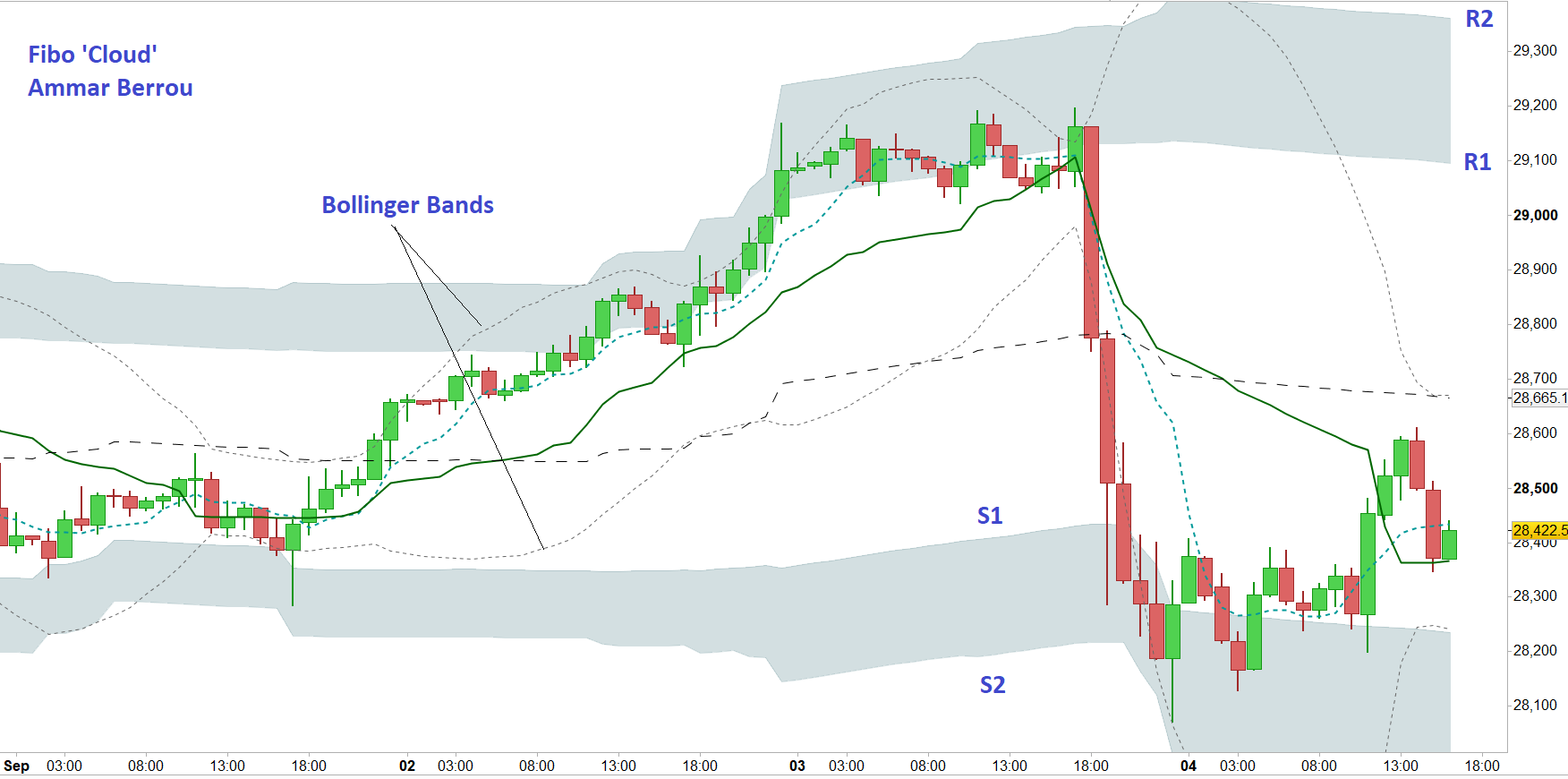
    check the below image

    The image is DOW future Hourly chart (Fri 4th Sep), as you see it gives much better bounds to the market compared to Bollinger Bands, I also added a grey color fill between R1/R2 and S1/S2 for more clarity, the lower grey zone would be the ‘ground’ and the upper is the ‘cloud’. Needless to say, the longer time frames (day, week) respects those boundaries even more, but it is stronger proof of my claim to use it on hourly chart.

    Conventionally in Fibo levels, it is calculated for last price only, here it is continuous, and visually this one is easier to comprehend.

    How to trade it: whenever the price reaches one of the grey zones look for a rebound (swing) or a new trend, a higher time frame would help. as usual wait for 2nd or 3rd confirmation, volume shall confirm the signal.

    here’s the pro-real-time code:

    parameters:

    extreme (boolean) to calculate the range based on open/close or high/low
    P (integer) how many candles to search for the range, I suggest 50
    av (integer) average period, I suggest 50 also

    reason I made P different from av, is to allow the indicator to see more history than the average if needed.


    You need a color fill between R1 & R2, S1 & S2
    I hide S3, R3 and dif

    if extreme then
    hh= Highest[P](high)
    else
    hh = Highest[p](close)
    endif
    
    if extreme then
    ll=lowest[P](low)
    else
    ll=lowest[p](close)
    endif
    
    PP = (hh + ll + average[av](close)) / 3
    dif = (hh - ll)
    dif3 = (dif* 1.000)
    dif2=(dif * 0.618)
    dif1 = (dif * 0.382)
    Rr3 = PP + dif3
    Rr2 = PP + dif2
    Rr1 = PP + dif1
    
    Ss1 = PP - dif1
    Ss2 = PP - dif2
    Ss3 = PP - dif3
    
    return PP as "Pivot", dif as "Histogram", rr1 as "R1", rr2 as "R2",rr3 as "R3", ss1 as "S1",ss2 as "S2",ss3 as "S3"
    
    AFPivot.itf 0-1.png 0-1.png
    #144178 quote
    Nicolas
    Keymaster
    Master

    Thanks a lot ammar, very interesting and useful. I think that this indicator desserve to be shared into our indicators library, is it possible that you post it here please? It would attract more the attention of people! Share your ProRealTime code in the library

    ammar.berrou thanked this post
    #144252 quote
    ammar.berrou
    Participant
    New

    Getting this kind message from you Nicolas has made my day,

    without your posts/ support it would have not been so easy to effectively use Pro Realtime.

    As you suggested, I posted it there, a more user-friendly names were given to the parameters, and the indicator: ‘fibo bounds’

    Nicolas thanked this post
    #144279 quote
    Nicolas
    Keymaster
    Master

    Thanks again ammar, I appreciate your time and effort to give back to the community, have a nice day.

Viewing 4 posts - 1 through 4 (of 4 total)
  • You must be logged in to reply to this topic.

enhancing Fibo Levels


ProBuilder: Indicators & Custom Tools

New Reply
Author
Summary

This topic contains 3 replies,
has 2 voices, and was last updated by Nicolas

5 years, 5 months ago.

Topic Details
Forum: ProBuilder: Indicators & Custom Tools
Language: English
Started: 09/13/2020
Status: Active
Attachments: 2 files
Logo Logo
Loading...