hi @fifi743
Can you be a little clearer in what you say, There is a problem of misunderstanding I don’t know if it’s me or you or both of us
When you say that you can put both functions in the same algorithm, I will answer yes because it is just lines of code, however if the long market function is executed first then the short market function will not be executed as a short but as a sale of the first long position,
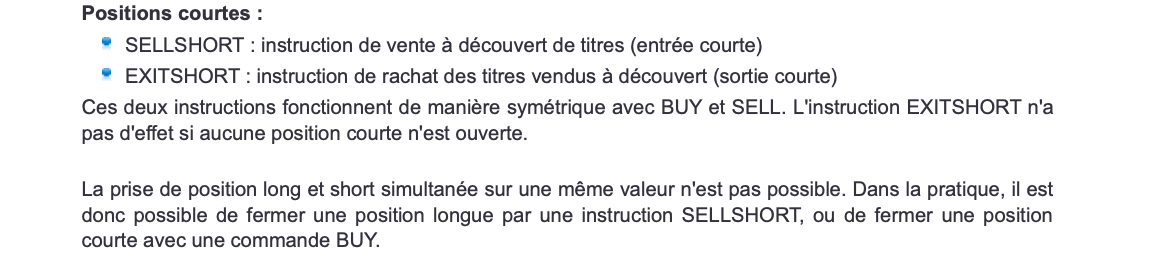
According to the documentation it is not possible to be long and short at the same time with the same algorithm, when we talk about being long and short at the same time on a market we talk about Hedging (2 opposite positions)
Or am I wrong ?
Would you perhaps have an example of an algorithm to propose for better understanding?
You can see an image capture with an extract of the documentation in French
Note that really “don’t draw” does not exist. Here you see the exit from this morning (in the coffee-spoiling topic 😉 ) and it is depicted by the green line. So this line changes position because I tell it to, but when the position is exited I stop drawing that green line (and more). Now this line keeps on drawing automatically, but while this seems strange, it is even convenient. See 2nd screenshot. You can easily see where this green line was in action, and can zoom in to it when you want. In my case these are the trailing stop exits (the darker green line). Just learn a bit to utilize this feature. You will see it is quite handy.
Your solution doesn’t seem to work, we’re back to the debugging problem, in this particular example I suspect that the last trailing Stop value remains in memory and the program uses it anyway, even if it is undefined
but it’s ok, we will not lose more time for this graph problem, I will start tomorrow to use more option for traling and why not include the short position in the same time and lest do the result
When you say that you can put both functions in the same algorithm, I will answer yes because it is just lines of code, however if the long market function is executed first then the short market function will not be executed as a short but as a sale of the first long position,
Try to understand what is happening;
Nothing prevents you from putting a PENDING Limit and Stop order at the same time. If this is not understood, then go to the manual once more and look up how an order like
Buy x Contracts at PriceY Limit
and
SellShort x Contracts at PriceY Stop
works, and while you’re at it, how that would work with manual trading.
If I’d like, I could place 100 (and more) Limit and Stop orders all at the same time. And they would really all be there in Live (or Demo), including their order labels. Whether this is useful, is something else.
It is totally unrelated to having two opposite positions (!) in the system at the same time.
🙂
I guarantee you it works. But with the conditions I described. And notice that you asked for not Graphing when Not OnMarket.
The remainder of that code (snippet) does not work at all, obviously. The Undefined also does not work.
Again I misspoke, your solution Works but not in the way I want, (the way I want to is : Not drawing anything when I am not in a position on the market), I understood that it was not possible to do this, So this is clear
The information collected on this form is stored in a computer file by ProRealCode to create and access your ProRealCode profile. This data is kept in a secure database for the duration of the member's membership. They will be kept as long as you use our services and will be automatically deleted after 3 years of inactivity. Your personal data is used to create your private profile on ProRealCode. This data is maintained by SAS ProRealCode, 407 rue Freycinet, 59151 Arleux, France. If you subscribe to our newsletters, your email address is provided to our service provider "MailChimp" located in the United States, with whom we have signed a confidentiality agreement. This company is also compliant with the EU/Swiss Privacy Shield, and the GDPR.
For any request for correction or deletion concerning your data, you can directly contact the ProRealCode team by email at privacy@prorealcode.com
If you would like to lodge a complaint regarding the use of your personal data, you can contact your data protection supervisory authority.
Get Assistance
Assistance Type
Your Need
Proposed Solutions
Do you like cookies? 🍪 We use cookies to ensure you get the best experience on our website.
(Learn more)