Hi,
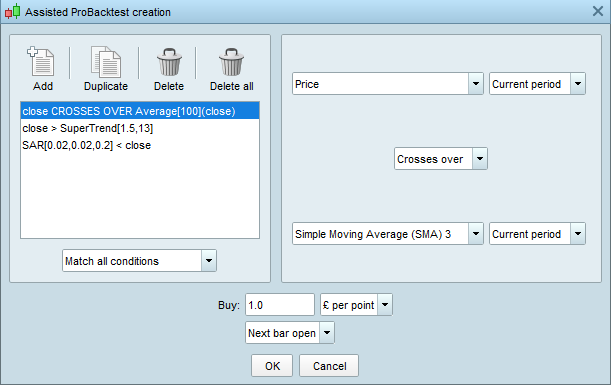
I have created a simple test using “Assisted Probacktest creation” in the simplified creation method. (See Test1 attached).
Whilst I remain logged in I can edit all criteria.
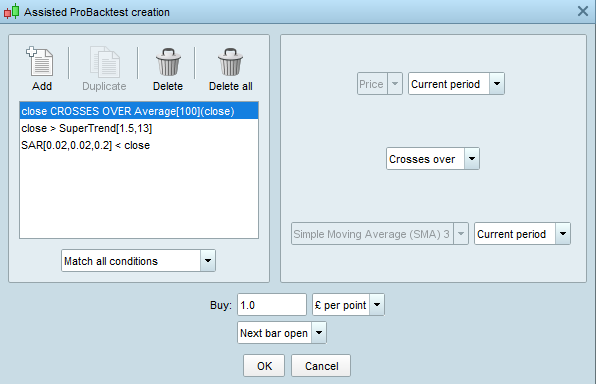
Once the document is saved & I log out I am only permitted to edit it in a partial manner when I log back in (See Test2).
Is there a way to enable editing when I log back in?
Any work arounds would be greatly appreciated.
KR
P
edit it in a partial manner when I log back in (See Test2).
You certain / have checked that (SMA) 3 is still showing on your Chart when you log back in?
Not sure what you mean.
The point I am demonstrating can be seen by looking at line 1 on each attachment.
You will see that “Price” is darkened in (Test2) meaning I am unable to edit it.
KR
Paul.
If I had what you have got then what I suggested is the first thing I would check.
Can you see SMA 3 on your chart NOW?
Reason I say above is because if SMA 3 is NOT on your chart then you would not be able to edit the code.
Can you edit the other indicators other than SMA 3?
I can’t think of any other reason, maybe others can?
Having studied your screenshots again, I see that Duplicate is also greyed out on T2 … is this something to do with the odd Issue (not normal) you are experiencing?
Hi GraHal,
I have always experienced this issue & its very frustrating.
Forget the back test issue I actually submitted this was just to send a simplified comparison of before I save it and exit PRT (Test1) & when I log back in to make amendments (Test2).
You mention SMA 3 in your previous response & I do not understand what this means in relation to the problem I have described.
Thanks for your help.
P
SMA 3 in your previous response & I do not understand what this means
Simple Moving Average (SMA) 3 which is shown greyed out in your T2 screenshot.
Hi GraHal,
Apologies, I done the example so quickly I didn’t think I had an SMA in the test.
In answer to your original question though the SMA 3 is in the chart as are all the other indicators.
KR
P
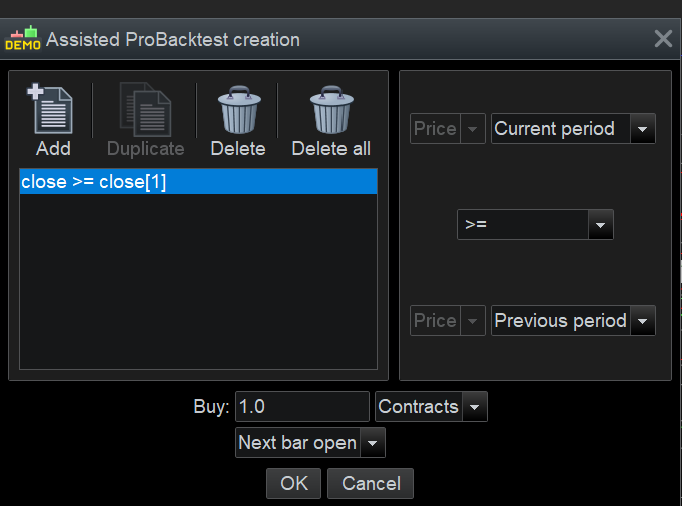
Ha, now we have a ‘baseline’, I did a test as attached and after I logged back in my Indicator (Price only to keep it simple) is greyed out just like yours!
So it seems that what you experiencing is the default behaviour??
I agree this is strange as it limits the Assisted Creation Tool to a ‘get it right first time as theres is no second chance’!? 🙁
You could of course modify your code (within the code using the code editor) whereupon the code becomes savable and modifiable in the future, but only using the code editor.
For anyone who cant code beyond using the Assisted Creation Tool then a user would need to set aside enough time to get it right first time! Not very practicable at all??
Anyone else got any comments on this please … are we missing something??
Only work around I can think of is – using the Assisted Creation Tool – to ADD a new condition exact same as unmodifiable-old condition and then delete the old condition. Then you can continue to modify / add new conditions as you wish.
But then – when you log out and back in again – you would have to repeat above all over again.
How come this has never beeen flagged up before?? Well weird!??
I understand what you mean but when you delete a line & then add a new line, it always appear on the bottom. I want to be able to copy a back test & then just alter the affected line(s) so effectively copying & adjusting a template if you know what I mean.
I wasn’t sure if this was done deliberately & is a subscription option! Either way, its frustrating & not clear if it can be changed.
Thanks for your help.
P
copy a back test & then just alter the affected line(s) so effectively copying & adjusting a template if you know what I mean.
You can do above using the normal code editor in the code editing window.