Dynamic Zone RSI

Viewing 8 posts - 1 through 8 (of 8 total)

  • Author
    Posts
  • #24305 quote
    Sofitech
    Participant
    Master

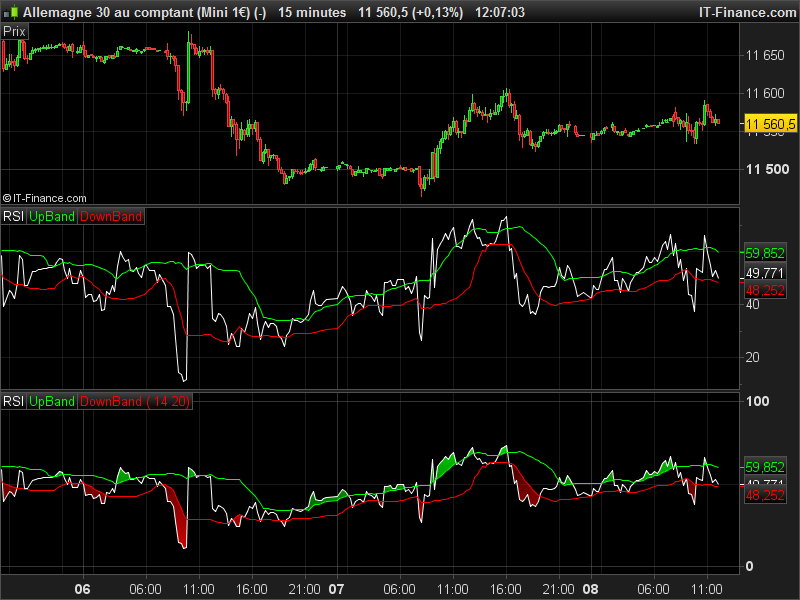
    L’indicateur Dynamic Zone RSI est mis à disposition dans Prorealtime.
    Toutefois, son code n’est pas visible et on ne peut donc y travailler à aucun “aménagement” alors que l’indicateur présente beaucoup d’avantages.
    Est-il possible d’en obtenir le code ? Ou de le coder ?

    #24306 quote
    zen83
    Participant
    Senior

    Bonjour Sofitech,

    disponible à http://sohocool-trading.blogspot.fr/2015/10/rsi-dynamic-zone-prorealtime.html

    Cordialement

    Zen

    Nicolas and atxeel thanked this post
    #24310 quote
    Nicolas
    Keymaster
    Master

    Voici le code interne du Dynamic Zone RSI, je n’ai pas testé si il était semblable, mais je pense que oui:

    periodmoy=20
    periodeRSI=14
    coeff=0.8
    monrsi=RSI[periodeRSI](close)
    
    ind = SQUARE(monrsi)
    ind1 = Average[periodmoy](monrsi)
    ind2 = Average[periodmoy](ind)
    
    variance = ind2 - SQUARE(ind1)
    ecart = SQRT(variance)
    
    UpBand = ind1 + coeff*ecart
    DownBand = ind1  - coeff*ecart
    
    RETURN monrsi AS "RSI", UpBand COLOURED (0, 255, 0) AS "UpBand", DownBand COLOURED (255, 0, 0) AS "DownBand"
    

    EDIT: oui il est bien semblable! 🙂

    atxeel thanked this post
    dynamic-zone-rsi-prorealtime.png dynamic-zone-rsi-prorealtime.png
    #106705 quote
    Bard
    Participant
    Master
    Thanks for this indicator @Nicolas, it looks like it gives very good indications to trend changes — at least every time I look at a 4 hr chart and see the that RSI cross-over of the upper and lower bands (using 10 periods). Is there any way of backtesting it? I get a “”indicator not available in Probuilder language” when using assisted creation? Cheers. Traduction:

    Merci pour cet indicateur @Nicolas, il semble que cela donne de très bonnes indications sur les changements de tendance – au moins à chaque fois que je regarde un graphique sur 4 heures et que je vois le croisement RSI des bandes supérieure et inférieure (sur 10 périodes) . Y a-t-il un moyen de faire un backtesting? Je reçois un indicateur “” non disponible dans la langue de Probuilder “lors de l’utilisation de la création assistée? À votre santé.

    #106708 quote
    robertogozzi
    Moderator
    Master
    @Bard Merci de parler français sur ce forum.
    #106715 quote
    Nicolas
    Keymaster
    Master
    Il faut simplement faire un CALL de l’indicateur, ou utiliser le code dans une stratégie après un copier/coller.
    #154065 quote
    Manu L.
    Participant
    Average
    Bonjour a tous,   je voudrais créer un screnner pour cette indicateur mais je suis novice dans le domaine de la programmation. Une âme charitable qui pourrait transposer ces lignes de codes indicateur vers un screnner qui j’adapterais a mes besoins. D’avance, une GRAND merci
    #154072 quote
    Nicolas
    Keymaster
    Master
    Le screener ci-dessous détecte si le RSI casse les bandes dynamique haute ou basse :
    periodmoy=20
    periodeRSI=14
    coeff=0.8
    monrsi=RSI[periodeRSI](close)
    
    ind = SQUARE(monrsi)
    ind1 = Average[periodmoy](monrsi)
    ind2 = Average[periodmoy](ind)
    
    variance = ind2 - SQUARE(ind1)
    ecart = SQRT(variance)
    
    UpBand = ind1 + coeff*ecart
    DownBand = ind1  - coeff*ecart
    
    test = monrsi crosses over upband or monrsi crosses under downband
    
    screener[test]
Viewing 8 posts - 1 through 8 (of 8 total)

  • You must be logged in to reply to this topic.

Dynamic Zone RSI


ProBuilder : Indicateurs & Outils Personnalisés

New Reply
Author
author-avatar
Sofitech @sofitech Participant
Summary

This topic contains 7 replies,
has 6 voices, and was last updated by Nicolas

5 years, 1 month ago.

Topic Details
Forum: ProBuilder : Indicateurs & Outils Personnalisés
Language: French
Started: 02/08/2017
Status: Active
Attachments: 1 files
Logo Logo
Loading...