Dynamic stop loss not moving

Viewing 13 posts - 1 through 13 (of 13 total)
  • Author
    Posts
  • #181796 quote
    ProRealP
    Participant
    Senior

    Hello!

    I’m trying to use a stop loss that follows an MA in one of my systems. In backtesting it works great, but not when I run systems in Demo. Rather, it only works sometimes. I have a set stop loss as well for protection against big draw downs, and at times it just sets the stop loss and ignores the trailing, but I can’t seem to figure out why.

    Let’s assume the system below is the on I’m using. Can anyone see a reason for why the system would sometimes only set the stop to 0.5% and not use the trailing when the system is in profit and above the MA?

    DefParam CumulateOrders = False
    
    
    If not longonmarket and high >= DHigh(1) then
    buy at market
    ENDIF
     
    
    If Longonmarket and close < Average(250) Then
    Sell at Market
    Endif
    set stop %loss 0.5
    
    //
    
    If LongOnMarket and PositionPerf > 0 then
    TP = Close - average[100](close)
    If TP > 0 then
    SELL AT average[100](close) STOP
    Endif
    Endif
    
    If ShortOnMarket and PositionPerf > 0 then
    TP = Close - average[100](close)
    If TP > 0 then
    SELL AT average[100](close) STOP
    Endif
    Endif
    #181805 quote
    robertogozzi
    Moderator
    Master

    Some errors:

    • Line 9 requires 250 to be within brackets with AVERAGE, like the other lines. It’s also better to add (close) despite it is assumed by default (if no pantheses are used). The way it is written it uses the default periods (I think it’s 20) and makes an average of the number 250 over those periods, which is still 250;
    • line 24 needs to be reversed as average[100](close) – Close
    • line 26 requires EXITSHORT to exit from a short trade, but there is no short entry, so it’s useless.

    Where was a short entry supposed to be?

    #181814 quote
    ProRealP
    Participant
    Senior

    Thank you for your reply, Roberto!

    The system I added here is just an example. The problem isn’t that the stop loss doesn’t work. It’s that it doesn’t always trigger. Imagine that sometimes it sets the stop loss to 0.5, and then when the system is in profit and above/below the MA, the stop loss follows it. But sometimes it sets the stop loss to 0.5, but the MAstop never triggers. Even if the system is in profit and well above/below the MA.

    If we assume that this is the system I use. Can you see a reason as to why the trailing/ma-stop sometimes just wont trigger at all?

    DefParam CumulateOrders = False
     
     
    If not longonmarket and high >= DHigh(1) then
    buy at market
    ENDIF
     
     
    If Longonmarket and close < Average[250](close) Then
    Sell at Market
    Endif
    
    set stop %loss 0.5
     
    //
     
    If LongOnMarket and PositionPerf > 0 then
    TP = Close - average[100](close)
    If TP > 0 then
    SELL AT average[100](close) STOP
    Endif
    Endif
    #181846 quote
    ProRealP
    Participant
    Senior

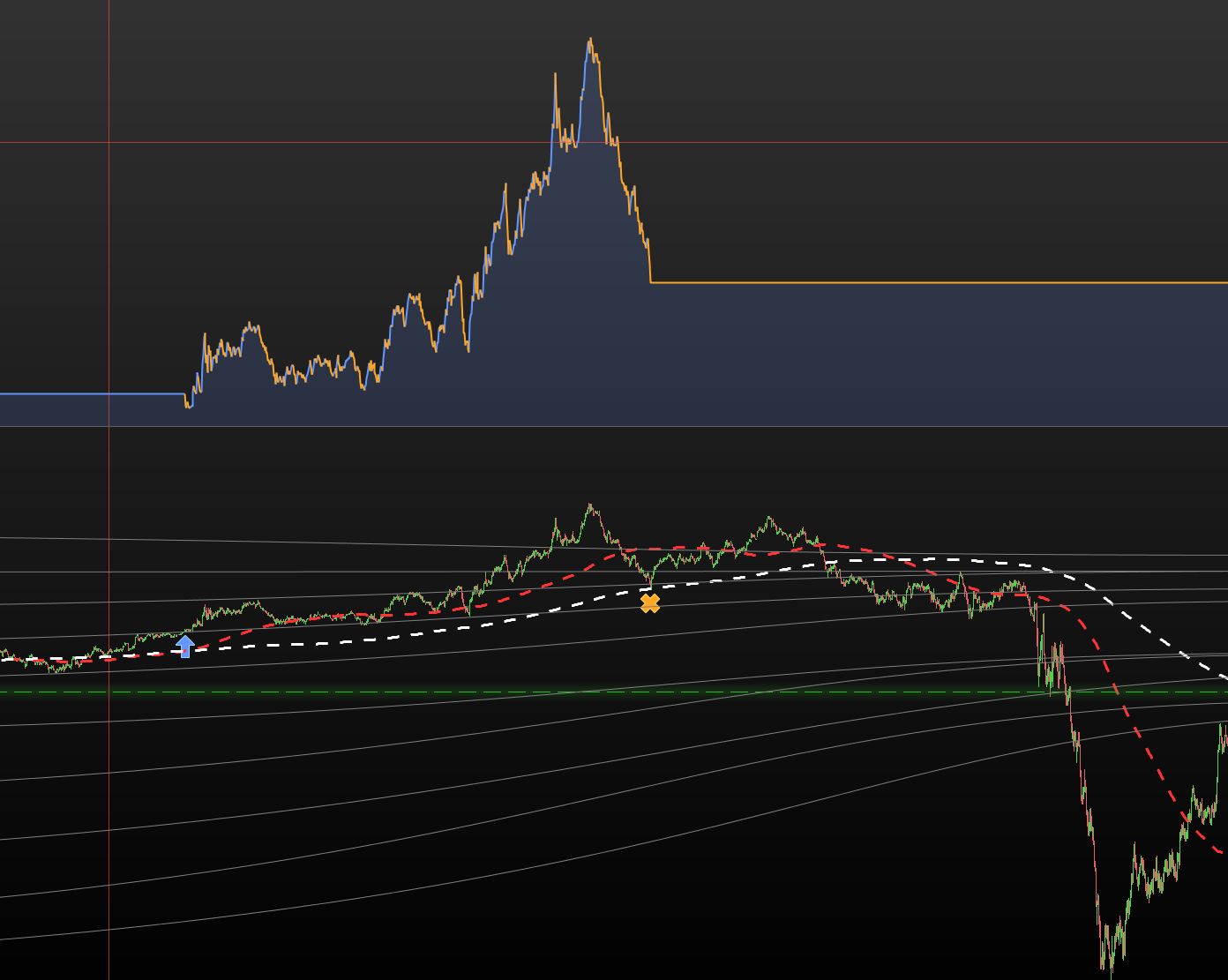
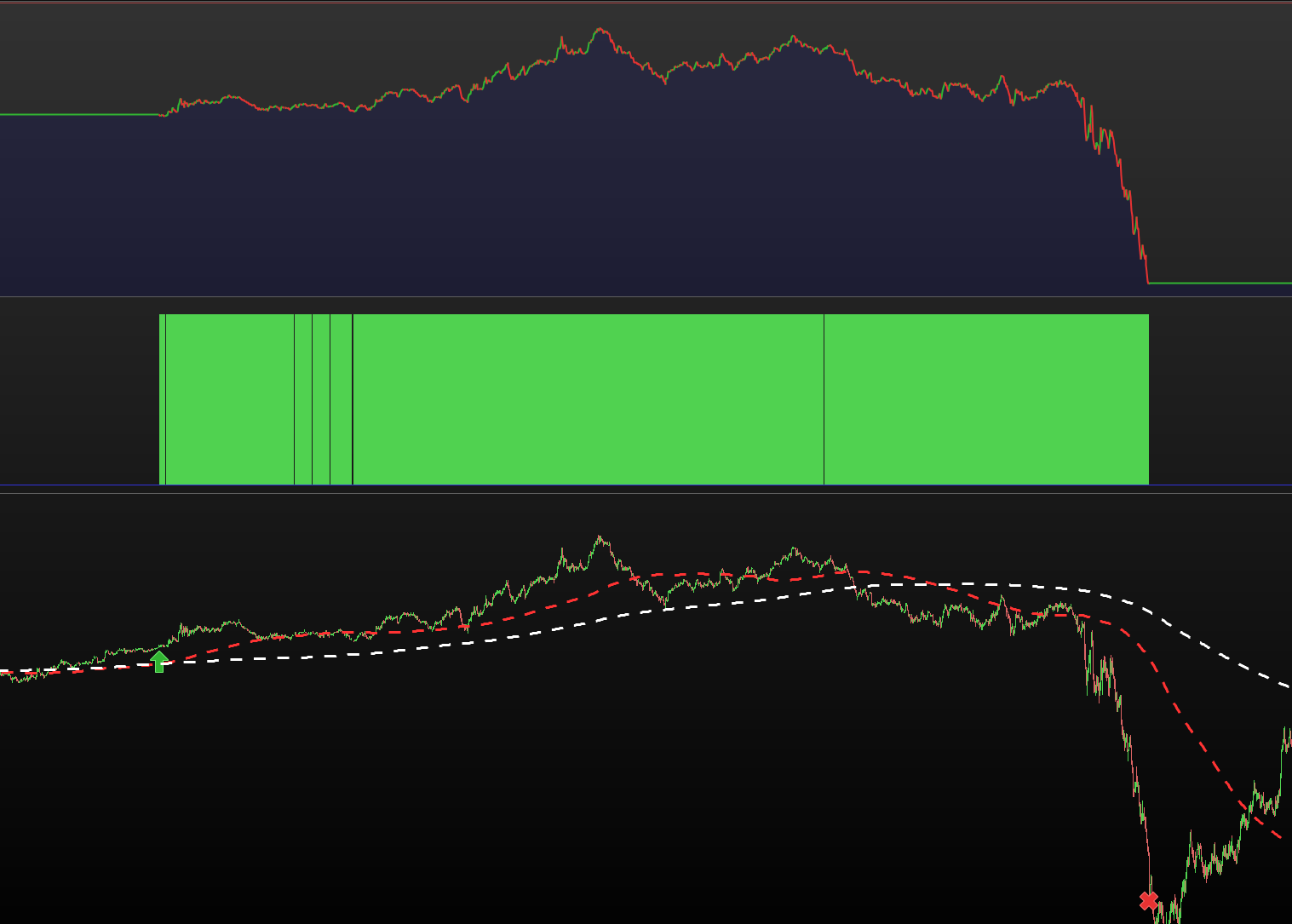
    I’ve attached a couple of pictures to illustrate the issue. This happened earlier this week and as you can see, in back testing the system stops at the correct spot where it just tags the slow MA. However the system I’m running in demo for whatever reason decided not to use the dynamic stop loss. Rather it always sets the stop to 0, but only sometimes uses the dynamic stop. Any ideas?

    Backtesting.png Backtesting.png SystemRunningInDemo.png SystemRunningInDemo.png
    #181849 quote
    PeterSt
    Participant
    Master

    Dear PRP,

    If I would be your program parser, I would go bananas at line 6 because it is not clear what you are doing (at all). You are dealing with mutual exclusive conditions while you did not create them as that at all. This means that all can happen at the same time … which it can’t

    Line 13, your Set Stop %Loss is put there by you, while you need not to be in the market at all. Harmless ? sure. Only that you won’t understand your own program(ming) because of it.

    If you take care that all which is mutually exclusive really is that and is visible as such, someone like me may start to look for the issue. Now my brains refuse. 😉
    But you will see that it starts to work for real when you organised all for the better. 🙂 And if not we will find the culprit.

    Best regards,
    Peter

    PS: Sorry to interfere.

    #181850 quote
    Nicolas
    Keymaster
    Master

    You don’t have to set the 0.5% stoploss continuously, move it below line 5 just after you buy.

    Then, it can happen that the price is too close and the pending stop order can’t be placed by the broker due to the distance from price condition. Bear in mind that a pending stop order only last one bar and have to be renewed on each new bar close.

    To ensure the stop order is set at the minimum distance required, you can try with:

    minDistance = 5 //x points required from price
    
    SELL AT min(close-minDistance*pointsize,average[100])
    #181854 quote
    ProRealP
    Participant
    Senior

    @PeterSt
    Fair points! I didn’t spend much time writing that as the system itself is not an issue, and not remotely close to what I’m using. It’s just an example. The dynamic stop loss is what isn’t working properly. Perhaps it would better if I just didn’t add any system at all, or what do you reckon?


    @Nicolas

    Okay, that sounds like it might be the problem then. If I understand you correctly this is what you recommend?

    DefParam CumulateOrders = False
     
     
    If not longonmarket and high >= DHigh(1) then
    buy 1 contract at market
    set stop %loss 0.5
    ENDIF
     
     
    If Longonmarket and close < Average[250](close) Then
    Sell at Market
    Endif
     
    //
    
    minDistance = 5 //x points required from price
     
    If LongOnMarket and PositionPerf > 0 then
    TP = Close - average[100](close)
    If TP > 0 then
    SELL AT min(close-minDistance*pointsize,average[100])
    Endif
    Endif
    #181855 quote
    PeterSt
    Participant
    Master

    Perhaps it would better if I just didn’t add any system at all, or what do you reckon?


    @ProRealPierre
    , I like to answer that decently; what do you mean with “system” in this case ?

    #181857 quote
    ProRealP
    Participant
    Senior

    I suppose it’s all part of the system/algorithm. My point is that everything other than the dynamic stop loss is irrelevant for my question.

    #181862 quote
    PeterSt
    Participant
    Master

    Ah OK. But since I fear that it is related to the way you code things, I am not so sure (and yes, I understand that it’s a quick and dirty to show us).

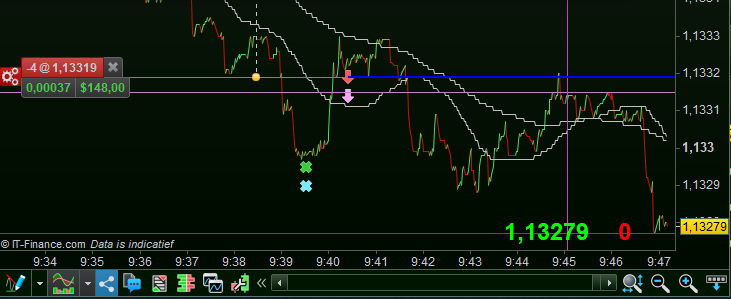
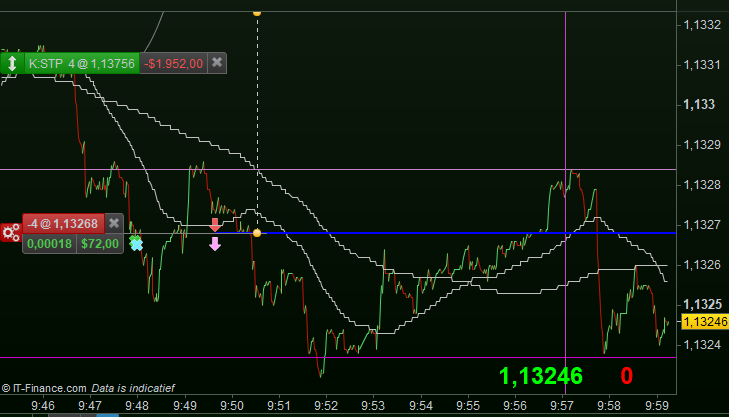
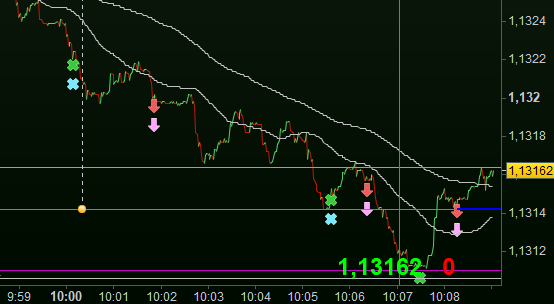
    In the attachment you see a running (in “live”) system and a “tracking” means (per BackTest of the same code) that should always do exactly the same. Thus, compare the green/blue and the red/pink.
    In very rare occasions the tracking means is not the same, and it is my task to find the culprit and take measures so the next time it will behave better (more equal).

    A kazillion causes can make the tracking to be off, one of the first obviously the spread not being equal in Backtest vs Live. Still it is also often the code itself by doing things which are not “allowed” in Live vs Backtest. “Allowed” between quotes because it is often about rules of the broker, like that minimum distance of a StopLoss, which I *thus* simply avoid. How ? well, by just selling when my code finds it appropriate. IOW, I don’t leave that to the broker (which is what a Set Stop would do – mind you, this is NOT PRT doing it for you !). I have that Set Stop (in %) all right – see second attachment – but this is only for the case that my code would fail (unimaginable – hahaha), *OR* that something in the PRT server fails. Thus again, that SL resides at the Broker-side and he will take care of failures elsewhere (and if the broker fails I will get my money back :-)).

    What I thus do is convert all from % to my internal SL code, and that fires when it wants. This is never at the SL you see in the 2nd attachment and it always fires earlier. It is still a % as applied to the PRT SL and it never ever failed. A distance to close to whatever ? … it can’t exist. It can’t exist because I (my program) sell when I want.

    Anyway, 11 trades (in plus out) further during the writing of this, and all is still in sync. See 3rd attachment for motivation. Moral, you can make such tracking yourself and will see where it goes off. Of course this is not about the SL’s but they are hard to show. Haha. Ok, see the last attachment.

    Apologies for all this text; I’m just having great fun with this stuff.

    image_2021-11-19_094728.png image_2021-11-19_094728.png image_2021-11-19_095944.png image_2021-11-19_095944.png image_2021-11-19_100943.png image_2021-11-19_100943.png image_2021-11-19_101152.png image_2021-11-19_101152.png
    #181886 quote
    ProRealP
    Participant
    Senior

    Not at all! I appreciate the input. I don’t believe I understand everything you write though.

    The issue I’m facing is most likely what Nicolas pointed out and you said, that the minimum distance is too close when trying to set the stop. I’ll try to change the stop with the snippet Nicolas provided.

    Having said that, I don’t understand what you mean when you say “selling when my code finds it appropriate”. Isn’t that what I’m trying to do? My goal is to get the dynamic stop to work, do you mean that it isn’t possible without putting “unfounded” trust in the broker? If yes, do you have any ideas for how I could achieve this goal? Your pictures don’t tell me much, but it sounds like you’ve done exactly what I’m trying to do?

    #181893 quote
    PeterSt
    Participant
    Master

    This is my SL at such a far end that it will never trigger (unless something goes wrong) :

    SET STOP %LOSS StopLossCustomP

    Thus exactly the same as yours, except that it will never be at a too close distance. In my case this works out as what you saw in the previous post, 1900+ or so USD. In itself this is dynamic (StopLossCustomP) but this is unimportant.

    In the first attachment you see the bluw lone at 141.xx which is the real dynamic StopLoss divided by 100 (thus curently it is at  USD 1410). That trade (not visible) just finished, and the SL resets to the maximum of 1940; you see that in attachment #2.

    Still for this same example, this simple line determines the StopLoss in its basis :

    StopLossA = 520

    with the notice that in my case this is normalised to an amount of 100000, while the amount I use in this example from today is always 400000. Thus 4x 520 is in order, BUT this is related to an ever existing currency factor between the euro and the USD. And the USD has risen quite a bit (today alone already 1%). Thus yes, how can one make things complicated *or* … how can one make things independent of changing factors out of our control. However :
    Where today your 0.5% suffices, tomorrow it may just not because of a lower price of the instrument you are dealing with. And there you’ll have your message again (too close, etc.).

    Then we make a percentage of it, which is not what I want but which is needed because some kind of transactions require it :

    If Not OnMarket then   // 21-03-2021,PS, This If is functionally new and implies that no StopLoss changes underway.
    
      // 21-03-2021,PS, Phew, it took me several hours to get the below right, hence to what it now is;
      // StopLossP is the StopLoss in Percentage, with the strict goal it had to remain the same as how
      // it was in absolute $. Thus, our calculated $325 (as of lately), should remain exactly that,
      // taking into account :
      // - That the 325 (or other optimal value) works on an ever rate of the 2nd Fx pair (EUR/USD);
      // - That today this rate may be different but all the relations should remain in-tact (CurrencyFactor);
      // - That all indirectly relates to the *original* set up buy qty of 100.000 pieces (of EUR);
      // - That we already went triple crazy of the contract amounts vs buy qty vs changing that;**
      // **): All the hours of attempt let remain those original numbers, see below.
      // In addition the normal StopLoss must also remain, because else things don't work elsewhere
      // (hence the StopLossP).
    
      StopLossP = 100 / (((100000 * Close) * CurrencyFactor) / StopLossOrg)
    
    endif
    

    Of course you notice my If Not OnMarket which is similar to what Nicolas advised. In my case this is merely related to having set things consistently in advance, like for example underway the currency factor difference (while trading currencies) should not play a role. Btw, you see the CurrencyFactor being used there as well. This is (and has to be) in everything.

    It may also be good to notice that working with percentages is not really something usable, while “money” as such is. Thus I work with values (amounts) related to the invested money-amount (similar to the StopLoss of 520 you saw).

    Blablabla ?
    Only this part is left :

    If TrendNet = -1 and GainOpen < -SignificantLoss then
      MustSell = 1
      If Grph5 then   // 30-07-2021,PS.
        Trigger = close + DevTrigger
        graphonprice(((Trigger))) COLOURED (0,0,255) as 
        "Exit market because of trend in wrong direction, etc. (SL)"
    endif

    with the Notice that SignificantLoss is the representative of StopLoss which in itself emerges by this :

    If OnMarket then
      SignificantLoss = SignificantLoss - StopLossDecrease
      StopLoss = StopLoss - StopLossDecrease // (StopLossDecrease * BuySellAmount * ExtraFactor)
    
      // 20-08-2021,PS, WATCH OUT :
      // I take it that it is not even possible but this does *not* adjust the formal StopLoss dynamically. Maybe
      // this can be done after all by once in the minute or so removing the formal StopLoss (by making it equal to
      // 0) and next set a new one. Notice, however, that my own custom StopLoss surely works with this.
      // See more below under this date and SignificantLoss.
    
    endif

    … which is only a recursive trailing means I pointed out by the blue line.

    And thus : again a lot of text but what happens is relatively easy. The moral again : I don’t leave it to the broker and just do it myself. This is nothing special in itself, but everybody uses his own means. Also keep in mind the importance of stuff like currency, and which may – or will not work out in backtesting but influence live. Especially when your account is in euros but you trade USD stuff, then things influence in an uncontrollable fashion. Not here (ehm, after a couple of years “finding out”).

    Have fun !

    ProRealP thanked this post
    image_2021-11-19_134315.png image_2021-11-19_134315.png image_2021-11-19_134530.png image_2021-11-19_134530.png
    #182226 quote
    murre87
    Participant
    Senior

    What did u end up using ProRealPierre


    Would be nice to see an example

Viewing 13 posts - 1 through 13 (of 13 total)
  • You must be logged in to reply to this topic.

Dynamic stop loss not moving


ProOrder: Automated Strategies & Backtesting

New Reply
Author
author-avatar
ProRealP @prorealpierre Participant
Summary

This topic contains 12 replies,
has 5 voices, and was last updated by murre87
4 years, 3 months ago.

Topic Details
Forum: ProOrder: Automated Strategies & Backtesting
Language: English
Started: 11/18/2021
Status: Active
Attachments: 8 files
Logo Logo
Loading...