drawtext left alignment

Viewing 3 posts - 1 through 3 (of 3 total)
  • Author
    Posts
  • #235807 quote
    pableitor
    Participant
    Master

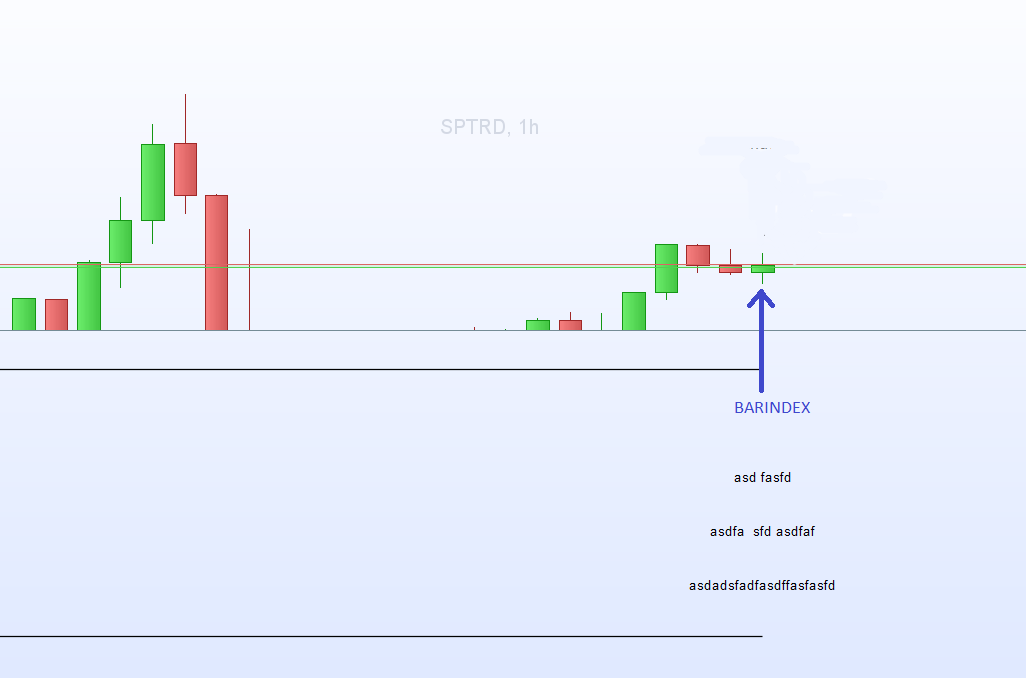
    Hi, it seems  that drawtext draws the text center aligned at the barindex position but I would like to draw text left-aligned at barindex (first character at barindex position)  . How can it be done?
    Thx

    defparam DRAWONLASTBARONLY = true
    //Drawtext CENTERED at barindex 
    drawtext("asdadsfadfasdffasfasfd",BarIndex, 1  )
    drawtext("asdfa  sfd asdfaf" ,BarIndex, 2)
    drawtext("asd fasfd" ,BarIndex, 3)
    //How to drawtext left aligned at barindex ?
    RETURN 0, 4
    2024-07-26-131702.png 2024-07-26-131702.png
    #235809 quote
    druby
    Participant
    New

    Unfortunately there is no basic test alignment commands.

    The way I get around this is to use the monospaced text style.

    Monospaced, is the only style which give the same width for each text character.

    Since all characters are the same width,  prefacing the required text with spaces,

    gives an element of control and allows you to move the text in relationship to the overall centred text block.

    A example of left aligning would be to pre fill the same number of space of the text before the text.

    The equal spacing of characters, moves the wanted text to start at approximately the middle of block, depending on odd/even number of characters.

    Using a combination of monospaced characters, and spaces before and/or after can give enough control to place and align text in most places.

    With other styles this doesn’t work as well, because different characters have different widths relative to the space character.


    defparam DRAWONLASTBARONLY = true
    //Drawtext Left alligned at barindex
    drawtext("                     asdadsfadfasdffasfasfd",BarIndex, 1,monospaced,standard,12  )
    drawtext("                asdfa  sfd asdfaf" ,BarIndex, 2,monospaced,standard,12)
    drawtext("         asd fasfd" ,BarIndex, 3,monospaced,standard,12)
    //How to drawtext left aligned at barindex ?
    RETURN 0, 4
    pableitor and Iván González thanked this post
    #235812 quote
    robertogozzi
    Moderator
    Master

    You can take advantage of these new graphical instructions (actually they were added over 1 year ago, in V11):

    Xshift      : defines an abscissa coordinate in pixel offset from the anchor point
    Yshift      : defines an ordinate coordinate in vertical pixel offset from the anchor point
    Index       : Defines an abscissa coordinate in barindex (classic way)
    Value       : Set an ordinate coordinate in price/value (classic way)
    bottomright : bottom-right corner of the chart, the offset values will always be negative to shift left (X axis) and positive to shift up (Y axis).
    bottomleft  : bottom-left  corner of the graph - the offset values will always be positive in order to shift to the right (X axis) and up (Y axis).
    topright    : top-right    corner of the graph - the offset values will always be negative in order to shift to the left (X axis) and down (Y axis).
    topleft     : top-left     corner of the graph - the offset values will always be positive in order to shift to the right (X axis) and negative in order to shift down (Y axis).
    right       : middle-right point  of the graph - the shift values will always be negative to shift to the left (X axis) and can be positive or negative to shift up(+)/down(-) (Y axis)
    left        : middle-left  point  of the graph - the shift values will always be positive to shift to the right (X axis) and can be positive or negative to shift up(+)/down(-) (Y axis)
    top         : middle-top   point  of the graph - the shift values can be positive or negative for shift right(+)/left(-) (X axis) and will always be negative to shift down (Y axis)
    bottom      : middle-low   point  of the graph - the shift values can be positive or negative for shift to the right(+)/left(-) (X-Axis) and will always be positive in order to shift up (Y-Axis)
    middle      : middle       point  of the graph - the shift values can be positive or negative for shift to the right(+)/left(-) (X-Axis) and can be positive or negative for shift up(+)/down(-) (Y-Axis)

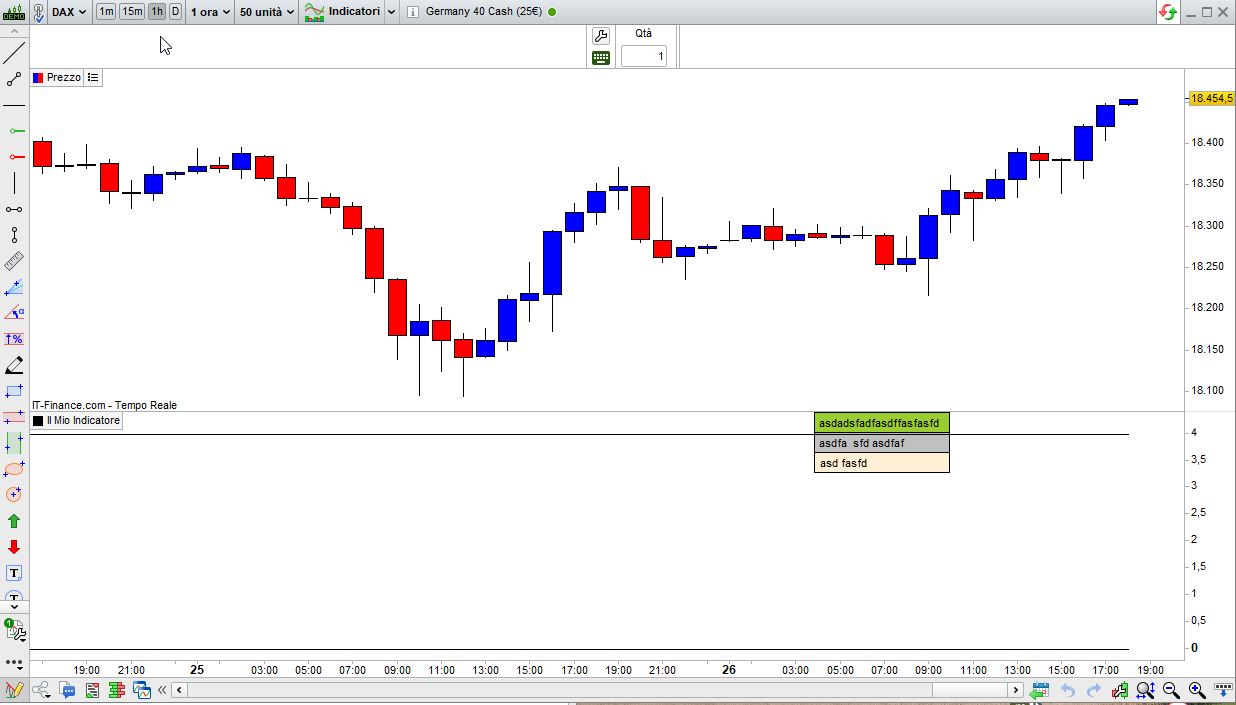
    so that your code could be written as (see attached pic):

    defparam DRAWONLASTBARONLY = true
    ////Drawtext CENTERED at barindex
    //drawtext("asdadsfadfasdffasfasfd",BarIndex, 1  )
    //drawtext("asdfa  sfd asdfaf" ,BarIndex, 2)
    //drawtext("asd fasfd" ,BarIndex, 3)
    //--------------------------------------------------------------------------------------------------------------------
    drawrectangle(-370,0,-235,-20)                 anchor(TopRight) coloured("YellowGreen") bordercolor("Black")
    drawtext ("asdadsfadfasdffasfasfd", -305 ,-10) anchor(TopRight) coloured("Black")
    //
    drawrectangle(-370,-20,-235,-40)               anchor(TopRight) coloured("Silver")      bordercolor("Black")
    drawtext ("asdfa  sfd asdfaf",      -323 ,-30) anchor(TopRight) coloured("Black")
    //
    drawrectangle(-370,-40,-235,-60)               anchor(TopRight) coloured("PapayaWhip")  bordercolor("Black")
    drawtext ("asd fasfd",              -341 ,-50) anchor(TopRight) coloured("Black")
    //--------------------------------------------------------------------------------------------------------------------
    RETURN 0, 4
    pableitor, Iván González and druby thanked this post
    x-2.jpg x-2.jpg
Viewing 3 posts - 1 through 3 (of 3 total)

  • You must be logged in to reply to this topic.

drawtext left alignment


Platform Support: Charts, Data & Broker Setup

New Reply
Author
author-avatar
pableitor @pableitor Participant
Summary

This topic contains 2 replies,
has 3 voices, and was last updated by robertogozzi
1 year, 6 months ago.

Topic Details
Forum: Platform Support: Charts, Data & Broker Setup
Language: English
Started: 07/26/2024
Status: Active
Attachments: 2 files
Logo Logo
Loading...