ProRealCode - Trading & Coding with ProRealTime™
Hi All,
When I use DRAWHLINE or DRAWLINE on 1Hr chart for example, the result stays confined to the 1Hr chart and does not show on higher or lower timeframes. Only manually drawn horizontal lines show on all timeframes.
Is there a way to show DRAWHLINE or DRAWLINE on ALL timeframes?
Tnx.
“DrawLine’s” can be seen in every time frame, so something else goes wrong.
Probably the line gets out of the picture when using a different time frame…
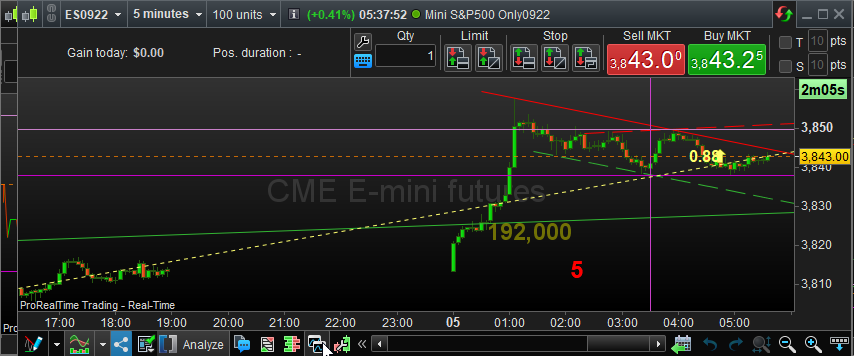
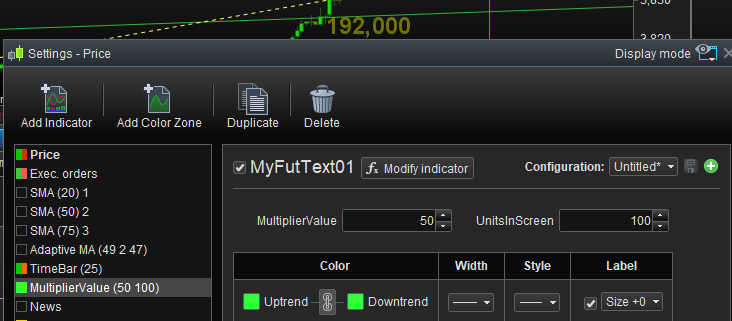
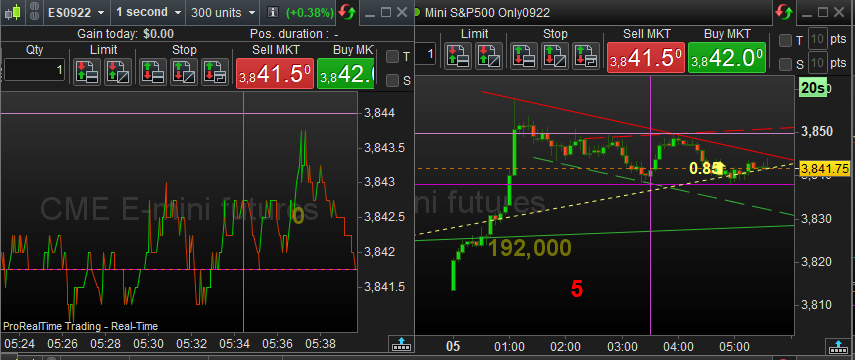
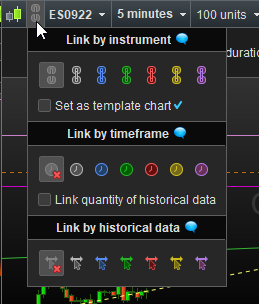
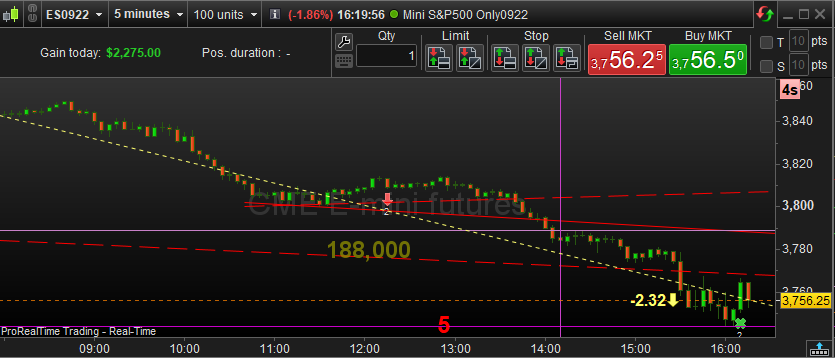
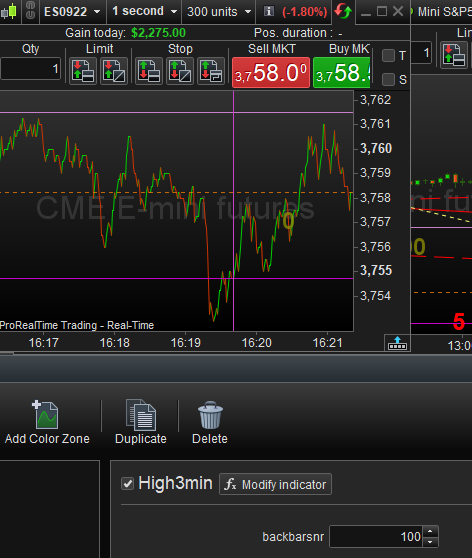
Another thing I’ve noticed is the Price panel is special in the way of its ‘TF’ options because other non Price panels don’t have a option, there limited to there time frame. This means if manual objects are drawn on them they will only be seen in other charts if, the appropriate indicator is added, the time frames are the same and within limits.So Yes, the button you see under the mouse arrow in the 1st attachment. Btw, this copies everything regardless lower or higher timeframe, and including all your custom indicators. Of course you can add parameters which relate to the timeframe so you can adapt this to certain standard TF’s you show. See foe example “UnitsInScreen” in the second attachment. So you still have one indicator, but a parameter keeps it visible. The 3rd attachment shows how all can be kept in view, no matter the amount of data shown is different – look at the vertical purple bar (which relates to the two horizonal bars – use your imagination for what it does 🙂 ). Anyway both are obviously the same instruments. The one is 1 second and the other is 5 minutes. I have many of these on-screen and when I need a new set, I copy from one of the others. Might you have a custom “zoom” applied (mousewheel) then even that is not only always saved – its setting can also be copied. That all said, now investigate the Link button under the mouse pointer you see in the 4th attachment. The only person I see talking about this is myself now and then, while it implies one of the most powerful features. Possibly people hardly know it because it is only available fully-fletched in PRT Premium and I would get Premium for that alone; Now you can let load PRT all the same data we just talked about but this time “dynamically” and determined by one master chart you give the same link colour and where this master card is triggered by a List or Search function with also that same link colour. This master chart can load as many other charts as you link automatically (I suppose there will be a limit somewhere), and if you now have a new (or changed) Indicator, you change it one time, and all newly loaded charts will now automatically show the newly set data. This is similar to the Copy function, but the difference is that if you copied 10 charts and change one, nothing will change to the others. Unless, I suppose (I never even tried), all the copied charts have a same link (colour) again, and what you change in one, will be applied to all of the others (use a separate colour for each different TF you use). Too much to explain and you should just start investigating this. It may take you a long while to discover all the possibilities (like my “I suppose” in the previous sentence 😉 ).
So Yes, the button you see under the mouse arrow in the 1st attachment. Btw, this copies everything regardless lower or higher timeframe, and including all your custom indicators.I don’t get the ‘lower or higher’ reference since I only know that A chart can only be on one timeframe at a time. So, a duplicate is initially on the same time frame, until you change it. Unless linked by timeframe.
Of course you can add parameters which relate to the timeframe so you can adapt this to certain standard TF’s you show. See foe example “UnitsInScreen” in the second attachment. So you still have one indicator, but a parameter keeps it visible.When you say ‘add parameters, are you referring to a custom indicator which in general works on all timeframes that has a dynamic variable(s), which allows you to manually tweak some value in code depending on which timeframe your indicator happens to be on. And NOT that you can control the charts unit settings . 5min chart 25units = 25 bars on screen and 525 bars of historic data. And i’m totally lost with “but a parameter keeps it visible.” Now I get a strong impression from your later comments when you talk about ‘Master Chart’, ‘Link’ and copying multiple charts etc that there may be some dis-connect between our descriptions based on our version experience. You did remind me to look at the link button on the charts top bar, which I can see offers some additional options. I’ll look into these and the difference in version. Thanks for your comments.
I don’t get the ‘lower or higher’ reference since I only know that A chart can only be on one timeframe at a time. So, a duplicate is initially on the same time frame, until you change it.Correct. And if we take out the confusion with the “Link” icon (forget that I have that), then it is all as simple as you just said. Point is : you can next indeed change the timeframe and nothing gets lost. So in this copy you change as you please and next you have two charts of the same instrument, all your (also custom) indicators there; both charts are now ready to be copied from again. And druby, I was only repeating/confirming what you already told BUT I added the “and higher” because I did not understand the comment from Roberto. Nor did I understand his “custom code”. So :
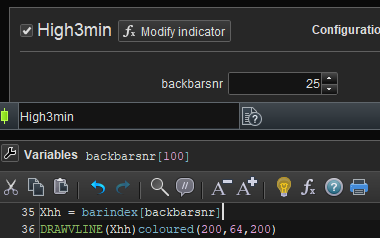
When you say ‘add parameters, are you referring to a custom indicator which in general works on all timeframes that has a dynamic variable(s), which allows you to manually tweak some value in code depending on which timeframe your indicator happens to be on.Sure. See below. This is about the vertical purple line I think I talked about. It works on all timeframes, but depending on the chart and timeframe I may want to change the offset from the (right-hand) end of the chart. Easy. Btw the purpose of that is determining high and low on the right side of that line (now see the horizontal purple lines). Thus in this case from the past 25 bars of 5 minutes. In the 3rd attachment you see it for the 1 second timeframe, and there I want to know it from the last 100 (x1) seconds. You could say that the “backbarsnr” parameter I show here, “keeps the vertical line visible”. Notice though that it also functions as a bandwidth limiter of the horizontal lines and in the end what I want to see. Thus, let shift out the vertical line all the way to the left, and the horizontal lines would also be out of view (though coincidentally they – or one could be visible). I am not sure whether this is too much offtopic or helpful, but personally I don’t see things which are not possible. And the Indicator code is thus always the same, but a parameter controls its “bandwidth” ?
DRAWLINE and DRAWHLINE
This topic contains 13 replies,
has 7 voices, and was last updated by PeterSt

3 years, 10 months ago.
| Forum: | ProBuilder: Indicators & Custom Tools |
| Language: | English |
| Started: | 07/02/2022 |
| Status: | Active |
| Attachments: | 7 files |
The information collected on this form is stored in a computer file by ProRealCode to create and access your ProRealCode profile. This data is kept in a secure database for the duration of the member's membership. They will be kept as long as you use our services and will be automatically deleted after 3 years of inactivity. Your personal data is used to create your private profile on ProRealCode. This data is maintained by SAS ProRealCode, 407 rue Freycinet, 59151 Arleux, France. If you subscribe to our newsletters, your email address is provided to our service provider "MailChimp" located in the United States, with whom we have signed a confidentiality agreement. This company is also compliant with the EU/Swiss Privacy Shield, and the GDPR. For any request for correction or deletion concerning your data, you can directly contact the ProRealCode team by email at privacy@prorealcode.com If you would like to lodge a complaint regarding the use of your personal data, you can contact your data protection supervisory authority.