


DrawHline not working

Viewing 4 posts - 1 through 4 (of 4 total)
  • Author
    Posts
  • #220279 quote
    miric94miric94
    Participant
    New

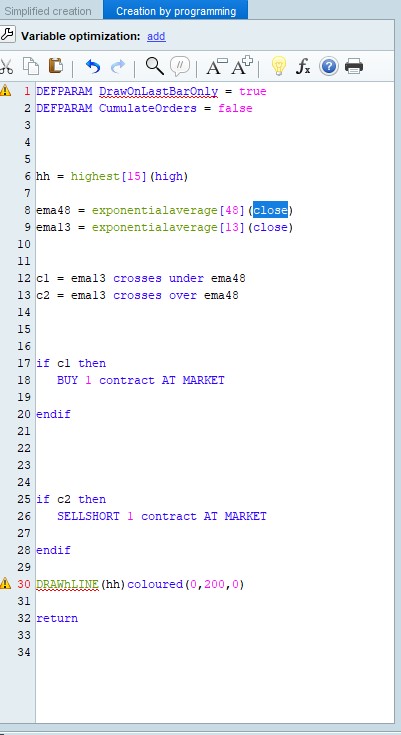
    Hey, im having trouble getting my lines to show up

    i get error on:

    DRAWhLINE(hh)coloured(0,200,0)

    tried messing around with it and always get an error

    i have “DEFPARAM DrawOnLastBarOnly = true” as well, also error.

    Is there some setting i’ve missed? I havn’t found any topic with similar problem.

    Pic related.

    pic.jpg pic.jpg
    #220285 quote
    JSJS
    Participant
    Master

    Hi,

    In an automatic trading system you cannot use graphical elements, hence the error message in the first line of your code…

    This is also where the error message in line 30 comes from, you are trying to use a graphical element in an automatic trading system and that is not allowed…

    miric94 thanked this post
    #220286 quote
    JSJS
    Participant
    Master

    So there are differences between an indicator (may not have buy or sell signals and must end with “return”, etc.) and a trading system (may not contain graphic elements, etc)…

    So, make a (right) choice between an indicator and a trading system…

    miric94 thanked this post
    #220332 quote
    miric94miric94
    Participant
    New
    Ah, many thanks.
Viewing 4 posts - 1 through 4 (of 4 total)

  • You must be logged in to reply to this topic.

ProRealAI ProRealAI New

Stuck on this ProBuilder code?

Describe what this topic is trying to build, in plain English, and ProRealAI writes the ProRealTime™ indicator, screener or system for you.

Available in 7 languages
Try ProRealAI

DrawHline not working


ProBuilder: Indicators & Custom Tools

New Reply
Author
author-avatar
miric94 @miric94 Participant
Summary

This topic contains 3 replies,
has 2 voices, and was last updated by miric94miric94

3 years ago.

Topic Details
Forum: ProBuilder: Indicators & Custom Tools
Language: English
Started: 09/03/2023
Status: Active
Attachments: 1 files
ProRealCode ProRealCode
Loading...

