


draw segments around signal bar

Viewing 6 posts - 1 through 6 (of 6 total)

  • Author
    Posts
  • #227238 quote
    samm85
    Participant
    New

    Hi, I have a problem, I cannot get this to draw a segment around the signal bar in question. What I am aiming to do is bracket the closing bar with horizontal segments if the conditions (below) are met at the bar close. I have it drawing the arrows but I have taken out my attempt to draw segments. Ideally I would like it to remove the segments around previous signals so only one set of segments are shown at a time. I would like the segments to span 8 bars into the future. I cannot get it to even draw the segments and coding the removal of the last signal is beyond my understanding. Any help would be greatly appreciated.


    DEFPARAM DRAWONLASTBARONLY = TRUE


    CONDITIONS = CLOSE > HIGH[1] AND CLOSE > HIGH[2]

    CONDITION2 =CLOSE < LOW[1] AND CLOSE < LOW[2]


    if conditions and not conditions[1] then

    drawarrowUP(barindex,low-10) COLOURED (0,255,0)

    ELSIF CONDITION2 AND NOT CONDITIONS THEN

    drawarrowDOWN(barindex,HIGH+10) COLOURED (255,0,0)

    endif

    return

    #227251 quote
    JC_Bywan
    Moderator
    Master

    Hi,

    I understand the part about seeing only the latest set of segments implying a set has to disappear when a new one comes along, not just be visible on signal bar only and disappear. However it doesn’t say if you want segments to remain drawn from latest barindex to barindex+8 while bars slide, or if you want the segments to stay attached to signal barindex and slide into the past with it (so stop segments on bar8,+7,+6 etc… each time a new barindex starts). Here is a version making the assumption to let them slide into the past until replaced:

    //
    DEFPARAM DRAWONLASTBARONLY = TRUE
    
    CONDITIONS = CLOSE > HIGH[1] AND CLOSE > HIGH[2]
    CONDITION2 =CLOSE < LOW[1] AND CLOSE < LOW[2]
    
    if conditions and not conditions[1] then
    
    drawarrowUP(barindex,low-10) COLOURED (0,255,0)
    memobar=barindex
    memolow=low
    memohigh=high
    
    ELSIF CONDITION2 AND NOT CONDITIONS THEN
    
    drawarrowDOWN(barindex,HIGH+10) COLOURED (255,0,0)
    memobar=barindex
    memolow=low
    memohigh=high
    
    endif
    
    DRAWSEGMENT(memobar, memohigh, memobar+8, memohigh)
    DRAWSEGMENT(memobar, memolow, memobar+8, memolow)
    
    return
    samm85 thanked this post
    #227252 quote
    samm85
    Participant
    New

    Yes this is exactly what I meant. Thank you so much!

    Thanks

    Sam

    #227327 quote
    samm85
    Participant
    New

    Hi, I wonder if you could help me again.

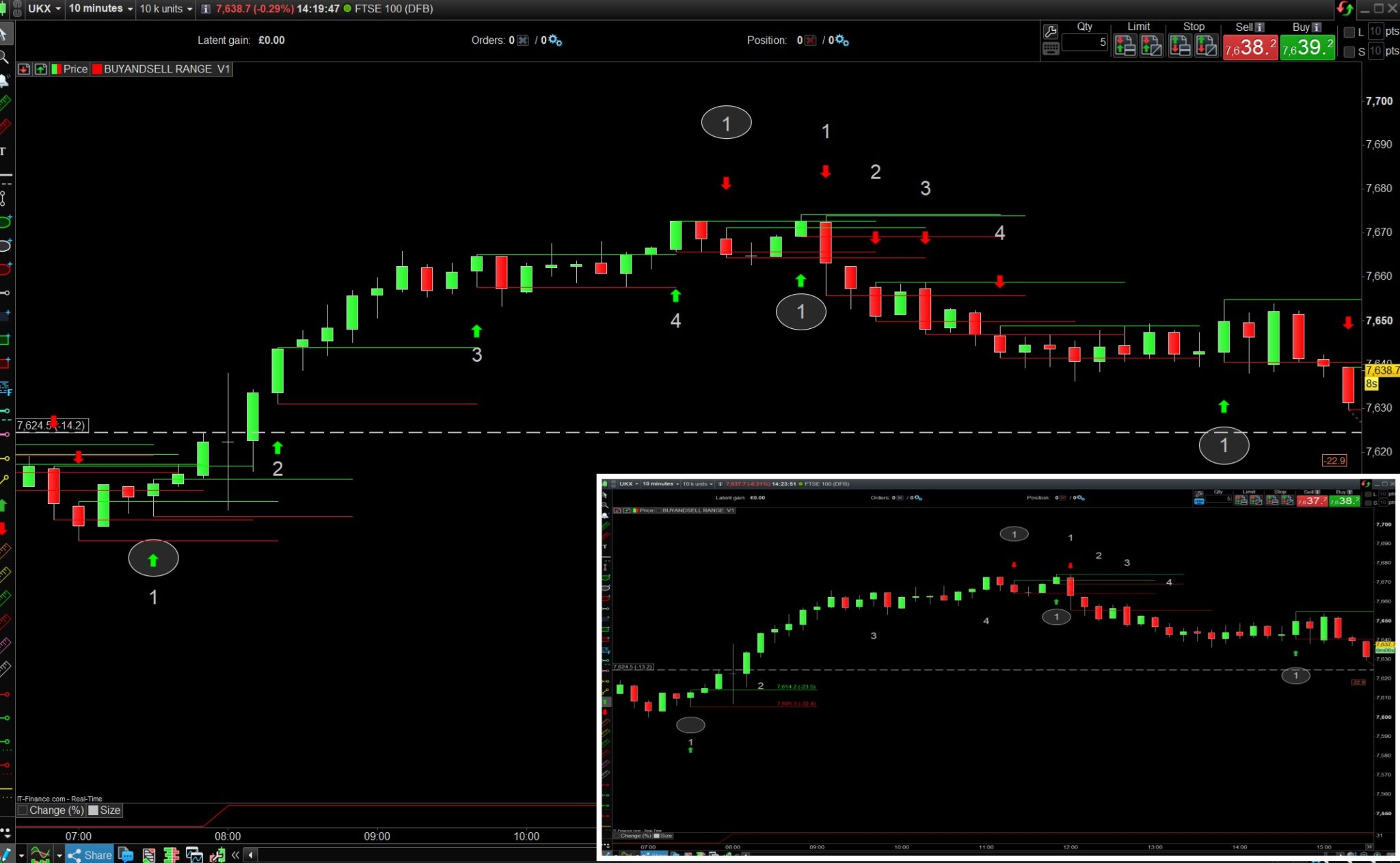
    For back testing purposes I removed the “drawonlastbaronly” condition but rather obviously it displays every instance the signal was made. Can the code be modified to display the condition only after an opposite signal has been made. I have tried to illustrate the idea with the attached, the main image being what it displays now and the inset image is what im aiming for. So it would display the first buy signal bracket and then doesn’t bracket another bar unless a sell signal arrives, then a buy signal then a sell signal and so on.

    Thanks

    Sam

    #227340 quote
    JC_Bywan
    Moderator
    Master

    Hi,

    switching to drawonlastbaronly=false, and ignoring signals on same side as previous one until an opposite signal occurs:

    DEFPARAM DRAWONLASTBARONLY = false//TRUE
    
    once sigup=1
    once sigdown=1
    
    CONDITIONS = CLOSE > HIGH[1] AND CLOSE > HIGH[2]
    CONDITION2 =CLOSE < LOW[1] AND CLOSE < LOW[2]
    
    if conditions and not conditions[1] and sigdown then
    
    drawarrowUP(barindex,low-10) COLOURED (0,255,0)
    memobar=barindex
    memolow=low
    memohigh=high
    sigup=1
    sigdown=0
    
    ELSIF CONDITION2 AND NOT CONDITIONS and sigup THEN
    
    drawarrowDOWN(barindex,HIGH+10) COLOURED (255,0,0)
    memobar=barindex
    memolow=low
    memohigh=high
    sigup=0
    sigdown=1
    
    endif
    
    DRAWSEGMENT(memobar, memohigh, memobar+8, memohigh)
    DRAWSEGMENT(memobar, memolow, memobar+8, memolow)
    
    return
    samm85 thanked this post
    #227351 quote
    samm85
    Participant
    New

    Hi, Thank you so much, so grateful!

Viewing 6 posts - 1 through 6 (of 6 total)
  • You must be logged in to reply to this topic.

draw segments around signal bar


ProBuilder: Indicators & Custom Tools

New Reply
Author
author-avatar
samm85 @samm85 Participant
Summary

This topic contains 5 replies,
has 2 voices, and was last updated by samm85

2 years ago.

Topic Details
Forum: ProBuilder: Indicators & Custom Tools
Language: English
Started: 02/01/2024
Status: Active
Attachments: 1 files
Logo Logo
Loading...
