Hi
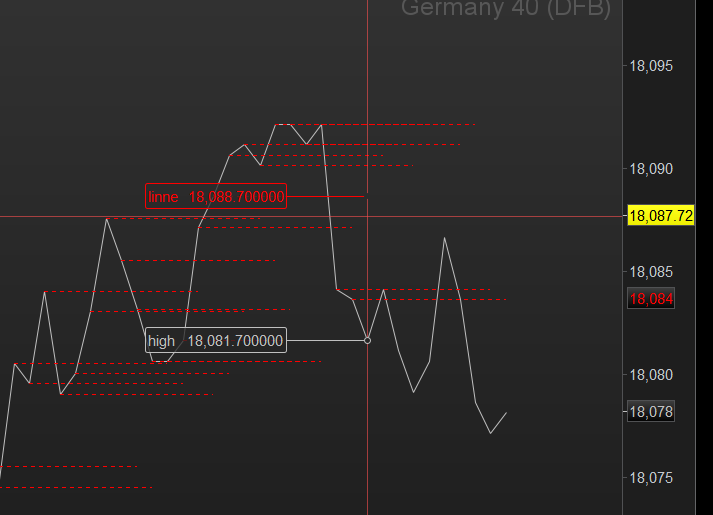
I have an indicator which draws a horizontal segment for a given set of conditions, i would like to have it display the price that the segment is drawn at and have played around with various Anchor commands and drawtext options but cannot get it draw the price on the segment. Is there a way of doing this? Thanks
The relevant section of the code:
if conditions and not conditions[1] and sigdown then
drawarrowUP(barindex,low-10) COLOURED (0,255,0)
memobar=barindex
memolow=low
memohigh=high
sigup=1
sigdown=0
DRAWSEGMENT(memobar, memohigh+1, memobar+5, memohigh+1)STYLE (DOTTEDLINE,1)COLOURED (255,255,0)
DRAWSEGMENT(memobar, memohigh+1, memobar+5, memohigh+1)COLOURED (0,255,0)
DRAWSEGMENT(memobar, memoLOW, memobar+5, memoLOW)COLOURED (0,255,0)
Hi!
Here you have an example:
You have to write drawtext("#yourvar#",x,y)
ma1 = average[20](close)
ma2 = average[100](close)
if ma1 crosses over ma2 then
myprice=close
drawtext("#myprice#",barindex,low-0.25*tr)
endif
return ma1 coloured("red"), ma2 coloured("blue")
Hi..
Using ‘drawtext()’ can get a bit tricky, since no ‘mask’ of text, creating a smudge effect when chart scrolls.
Often you have to use ‘DEFPARAM drawOnLastBarOnly = true’ to avoid that, but this affects historical drawn items, if there required!
Then you may decide on using two similar indicators, one =true for text and other = false for historical draw items, overlapped on same chart pane.
Here’s a different example I thought up after seeing your post, didn’t realise this myself till trying it, so may be gremlins out of sight!
druby
// display a line segment's 'y' value as label in 'y' scale bar
if islastbarupdate then // my condition block
// if condition is true draw line segment
drawsegment(barindex[10],high[10],barindex,high[10])coloured(255,0,0,255)style(dottedline,1)
// also, set a variable to the 'y' value of segment inside the condition block!
linne = high[10] // this is current segment's 'y' level
else
linne = undefined // defaults to '0' before condition sets, avoid auto 'y' scale issue on chart!
// if extreme values used, mainly on independent indicator panels, no price!
// doesn't have to be set 'undefined' here, could be at beginning of program.
endif // end of condition block
return high as "high", linne coloured(255,0,0,0) as "linne" // set name and colour but transparency to zero
// colour sets both the return variable's line and label colour
// setting transparency to 'zero' hides line,
// but it doesn't work on label, leaving visible.
// a bonus!..., each line segments 'y' value is available at the 'rhs' end of each
// segments line if probed with cursor.