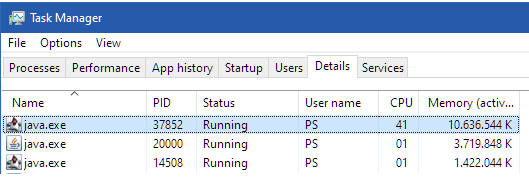
Hi Nicolas, thanks for the swift response there, any simple draw code poses the issue.
PRT support sent me some commands to try and they all lagged, literally any draw command in the code created a lag, but only after a certain point in time during the development stage..
So I was asked to add the code and I’ll put it into a code box also, but it produces the lag all the same but only in Version 12. Bear in mind I have 2 cheapy cards in though they are reasonable, and Version 11 is not currently posing an issue with any draw commands, olny version 12, so to me I believe there has been a change to draw more from local graphics processing in the upgrade, purely based on the fact that V11 on the same machine runs perfectly smoothly. I do also usually run through Java and you cant do that in version 12, but it was initially not an issue when I started using the beta, it came some months later.
DRAWTEXT(“H”, barindex, high)
DRAWTEXT(“L”, barindex, low)
return close
&
DRAWTEXT(“H”, barindex, high,dialog,standard,11)
DRAWTEXT(“L”, barindex, low,dialog,standard,11)
return close
defparam calculateonlastbars=500
DRAWTEXT("H", barindex, high)
DRAWTEXT("L", barindex, low)
return close
defparam calculateonlastbars=500
DRAWTEXT("H", barindex, high,dialog,standard,11)
DRAWTEXT("L", barindex, low,dialog,standard,11)
return close
defparam calculateonlastbars=500
drawtext("L", barindex[1] , low[1]-((high[1]-low[1])/100)*25)coloured(0,0,255)
return
So thats just a percentile way to keep the distance so that different timeframes dont need adjusting, but it doesnt really matter, they all cause lag.
The indicator is far more complex than that, but the complexity not the issue, drawing a simple letter on price causes lag. Obviouly calculateonlastbars is not required in this short bit of code but I do limit it with the indicator..