draw a frame with a text together

Viewing 6 posts - 1 through 6 (of 6 total)
  • Author
    Posts
  • #202492 quote
    ZeroCafeine
    Participant
    Senior

    Hi everyone

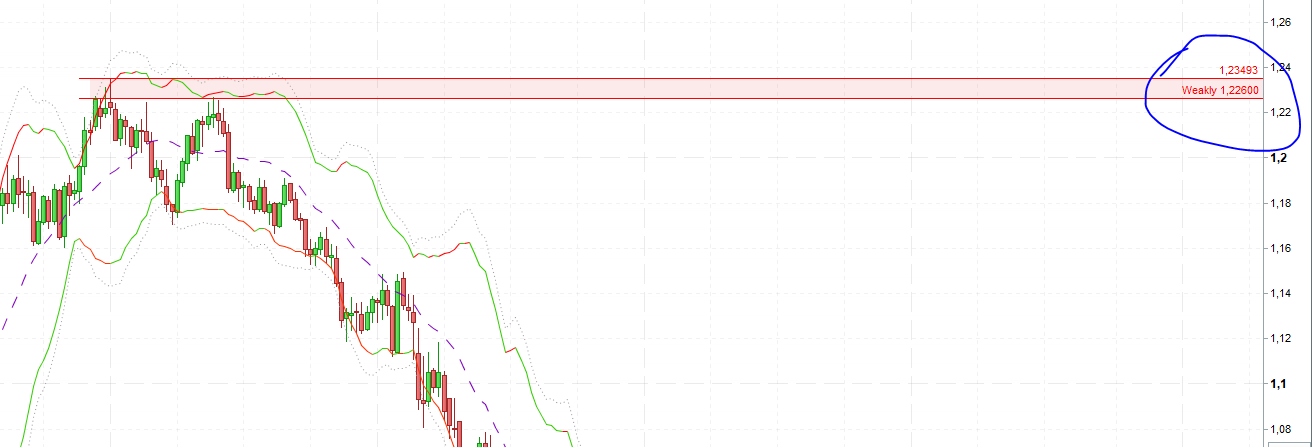
    is it possible to draw a rectangle with a text at the same time so that the text moves automatically ?

    you can see on the photo, I have to move the text all the time, or maybe I can draw a rectangle with a name ?

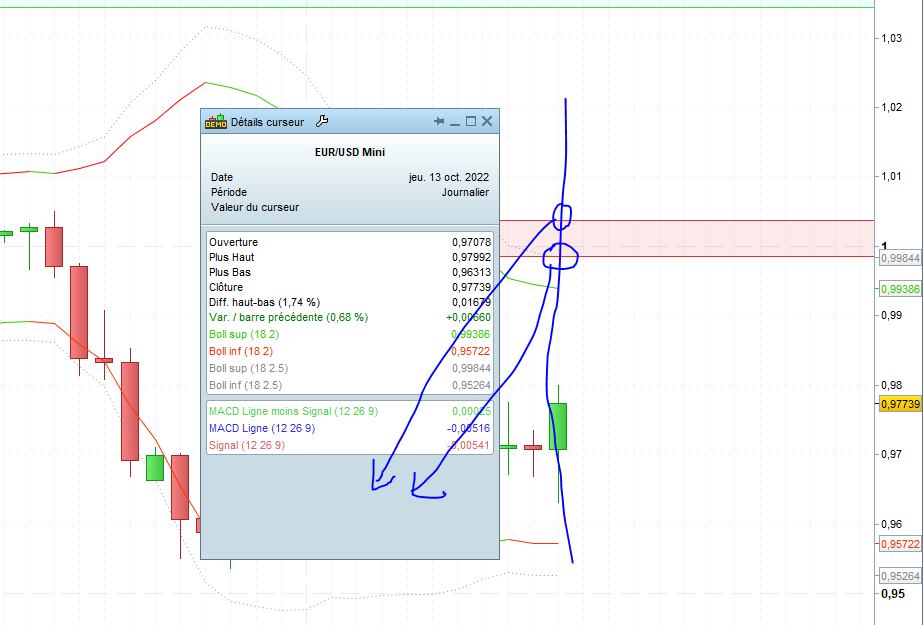
    Is it possible to have the values of the rectangle on the cursor detail ?

    rectangle-texte.png rectangle-texte.png curseur.png curseur.png
    #202499 quote
    ZeroCafeine
    Participant
    Senior

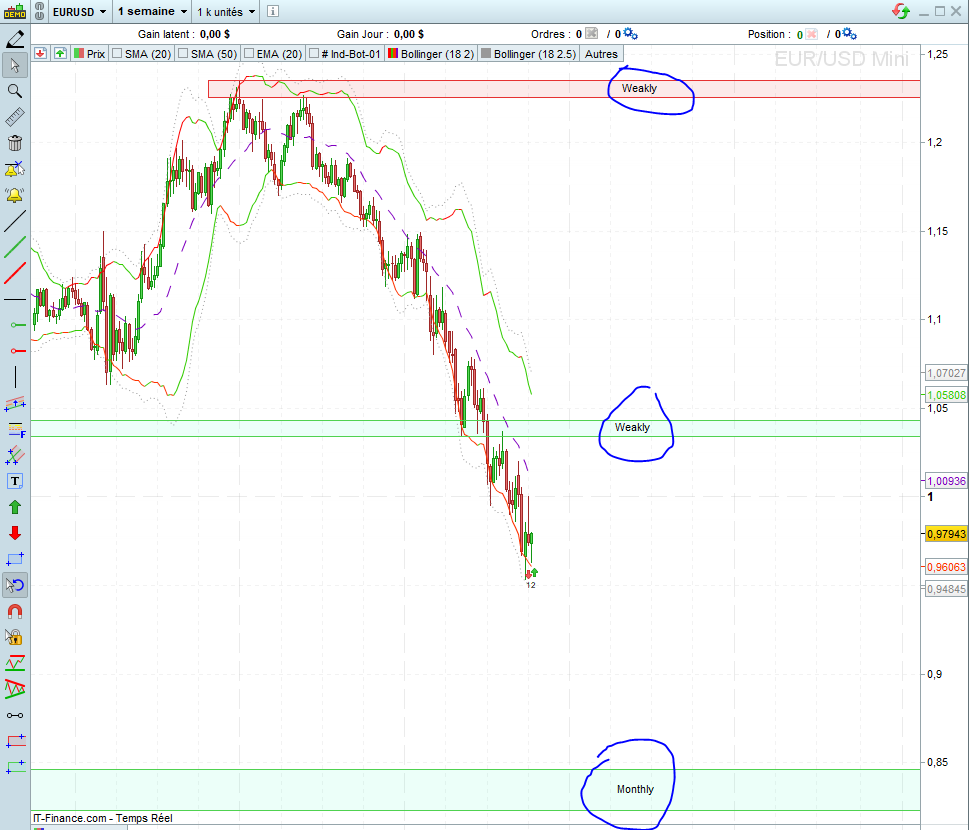
    for the picture 1, I found this solution for now, I draw 2 resistance with the value and write it right side, and on one of them I write the word “Weakly”, and I use a rectangle between this 2 resistance for colored the space between in red, if some one have other best solution because I have to draw 3 object with my solution

    weakly.png weakly.png
    #202514 quote
    Nicolas
    Keymaster
    Master

    Tips for using only 2 objects:

    1. Draw a rectangle
    2. Add text in it.

    Or, just create rectangles of different color for each of your zone type: example blue for weekly, red for monthly, ..

    ZeroCafeine thanked this post
    #202553 quote
    ZeroCafeine
    Participant
    Senior

    tks you Nicolas, your idea is good, but I prefer write some think inside, it’s better for me then many different color (Now as a beginner I prefer the very clear chart), and Also with your solution I can’t see the upper and lowest value of my rectangle even with curser information, maybe for next update with PRT, I will wait some days, if they haven’t other Tips from other, I will change the thread to Solved

    #202584 quote
    JC_Bywan
    Moderator
    Master

    Mix a little bit of all of the above, with a custom indicator drawing 2 lines, writing text in the middle of these lines, refreshing at each new bar thanks to drawonlastbaronly=true, and with both values w1 and w2 in the return line so that they appear in your cursor details.

    All you have to do is customise your w1 and w2 values and add as many occurences of the custom indicator as you need on the graph, you can also create variation of it for text “monthly”, and change color. And to use it even more easily, you can make w1 and w2 as two entry parameters to set from properties window instead of changing their value in the code script:

    defparam drawonlastbaronly = true
    
    w1=1.22
    w2=1.23
    
    ytext=(w1+w2)/2
    DRAWTEXT("weekly", barindex, ytext)
    COLORBETWEEN(w1,w2,"blue",80)
    
    return w1 as "w1", w2 as "w2"
    ZeroCafeine and ashehzi thanked this post
    #202793 quote
    ZeroCafeine
    Participant
    Senior

    tks for all for your answers, at this time I will do like this with 2 line for drawing like a rectangle, and using red for resistance, blue for middle and Green for support, I will see if it’s help me in the future

Viewing 6 posts - 1 through 6 (of 6 total)
  • You must be logged in to reply to this topic.

draw a frame with a text together


Platform Support: Charts, Data & Broker Setup

New Reply
Author
Summary

This topic contains 5 replies,
has 3 voices, and was last updated by ZeroCafeine
3 years, 5 months ago.

Topic Details
Forum: Platform Support: Charts, Data & Broker Setup
Language: English
Started: 10/13/2022
Status: Active
Attachments: 3 files
Logo Logo
Loading...