Donchian Channel .. without channel displaying on recent candle

Viewing 11 posts - 1 through 11 (of 11 total)
  • Author
    Posts
  • #119525 quote
    Holy Grail
    Participant
    Average

    Hope somebody can help me

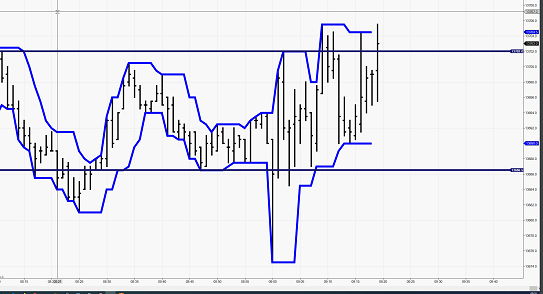
    How can i display a Donchian Channel with xPeriods that do not print channel on the resent candlestick like in attached example file

    How have to change the code?

    Upper = HIGHEST[a](HIGH[1])
    Lower = LOWEST[a](LOW[1])
    Middle = (Upper + Lower) / 2
    Donchian.png Donchian.png
    #119529 quote
    robertogozzi
    Moderator
    Master

    >> For clarity of messages on ProRealCode’s forums, please use the “insert code PRT” button to separate the text of the code part! Thank you! <<
    🙂

    #119531 quote
    robertogozzi
    Moderator
    Master

    Your code is fine, but you cannot use RETURN since it will not allow you to skip the current candle.

    You’ll have to use DRAWSEGMENT, instead, to plot data between the second last candle and the previous candle.

    #119535 quote
    robertogozzi
    Moderator
    Master

    Try this (not tested):

    Upper = HIGHEST[a](HIGH[1])
    Lower = LOWEST[a](LOW[1])
    Middle = (Upper + Lower) / 2
    If barindex > 2 Then
       Drawsegment(barindex-2,Upper,barindex-1,Upper)   coloured(0,0,255,255)
       Drawsegment(barindex-2,Lower,barindex-1,Lower)   coloured(0,0,255,255)
       Drawsegment(barindex-2,Middle,barindex-1,Middle) coloured(0,255,0,255)
    Endif
    Return

    But you won’t be able to change the style of plotted lines in versions prior to 11.

    #119538 quote
    Holy Grail
    Participant
    Average

    Thank you very much Robert,

    is it possible to draw lines without brakes (like in “original” Donchain)?

    #119543 quote
    robertogozzi
    Moderator
    Master

    Unfortunately segments are straight llines, so it’s not possible.

    #119545 quote
    Holy Grail
    Participant
    Average

    Ok, thanks

    Last Question … how can i print price label of the resent segment?

    #119558 quote
    robertogozzi
    Moderator
    Master

    You cannot, since there’s an instruction to allow drawing object only on the last bar, but then you wouldn’t see the previous bars, only the last one drawn. It is useless in your case.

    If we display a price label everytime your chart would become so messy!

    Try this modified version:

    Upper = HIGHEST[a](HIGH[1])
    Lower = LOWEST[a](LOW[1])
    Middle = (Upper + Lower) / 2
    If barindex > 2 Then
       Drawsegment(barindex-2,Upper[1],barindex-1,Upper)   coloured(0,0,255,255)
       Drawsegment(barindex-2,Lower[1],barindex-1,Lower)   coloured(0,0,255,255)
       Drawsegment(barindex-2,Middle[1],barindex-1,Middle) coloured(0,255,0,255)
    Endif
    Return
    Holy Grail thanked this post
    #119572 quote
    Holy Grail
    Participant
    Average

    SUPER Roberto … your last version is exactly what i want to use


    Thanks a lot !!

    #119582 quote
    Vonasi
    Moderator
    Master

    You could create a separate indicator that just draws the text of the value you want on the last bar only then apply it as a separate indicator to the price chart as well as Roberto’s last code.

    defparam drawonlastbaronly = true 
    Upper = HIGHEST[a](HIGH[1]) 
    Lower = LOWEST[a](LOW[1]) 
    Middle = (Upper + Lower) / 2 
    
    If barindex > 2 Then 
    upper1 = upper[1]
    lower1 = lower[1]
    middle1 = middle[1]
    
    DRAWTEXT("                         #Upper1#",barindex,Upper,SansSerif,Bold,11)coloured(0,0,255)
    DRAWTEXT("                         #Lower1#",barindex,Lower,SansSerif,Bold,11)coloured(0,0,255)
    DRAWTEXT("                         #Middle1#",barindex,Middle,SansSerif,Bold,11)coloured(0,255,0) 
    Endif 
    Return
    robertogozzi and Holy Grail thanked this post
    Screenshot_1-1.png Screenshot_1-1.png
    #119609 quote
    Holy Grail
    Participant
    Average

    Super idea !


    Done! It works.


    Thank you Vonasi

Viewing 11 posts - 1 through 11 (of 11 total)
  • You must be logged in to reply to this topic.

Donchian Channel .. without channel displaying on recent candle


ProBuilder: Indicators & Custom Tools

New Reply
Author
author-avatar
Holy Grail @holy-grail Participant
Summary

This topic contains 10 replies,
has 3 voices, and was last updated by Holy Grail
6 years ago.

Topic Details
Forum: ProBuilder: Indicators & Custom Tools
Language: English
Started: 02/13/2020
Status: Active
Attachments: 2 files
Logo Logo
Loading...