Display Line Name of Fibonacci Lines

Viewing 9 posts - 16 through 24 (of 24 total)
  • Author
    Posts
  • #134149 quote
    robertogozzi
    Moderator
    Master

    Yes, PDF.

    #135105 quote
    Razz
    Participant
    Master

    @ Vonasi

    Good Morning
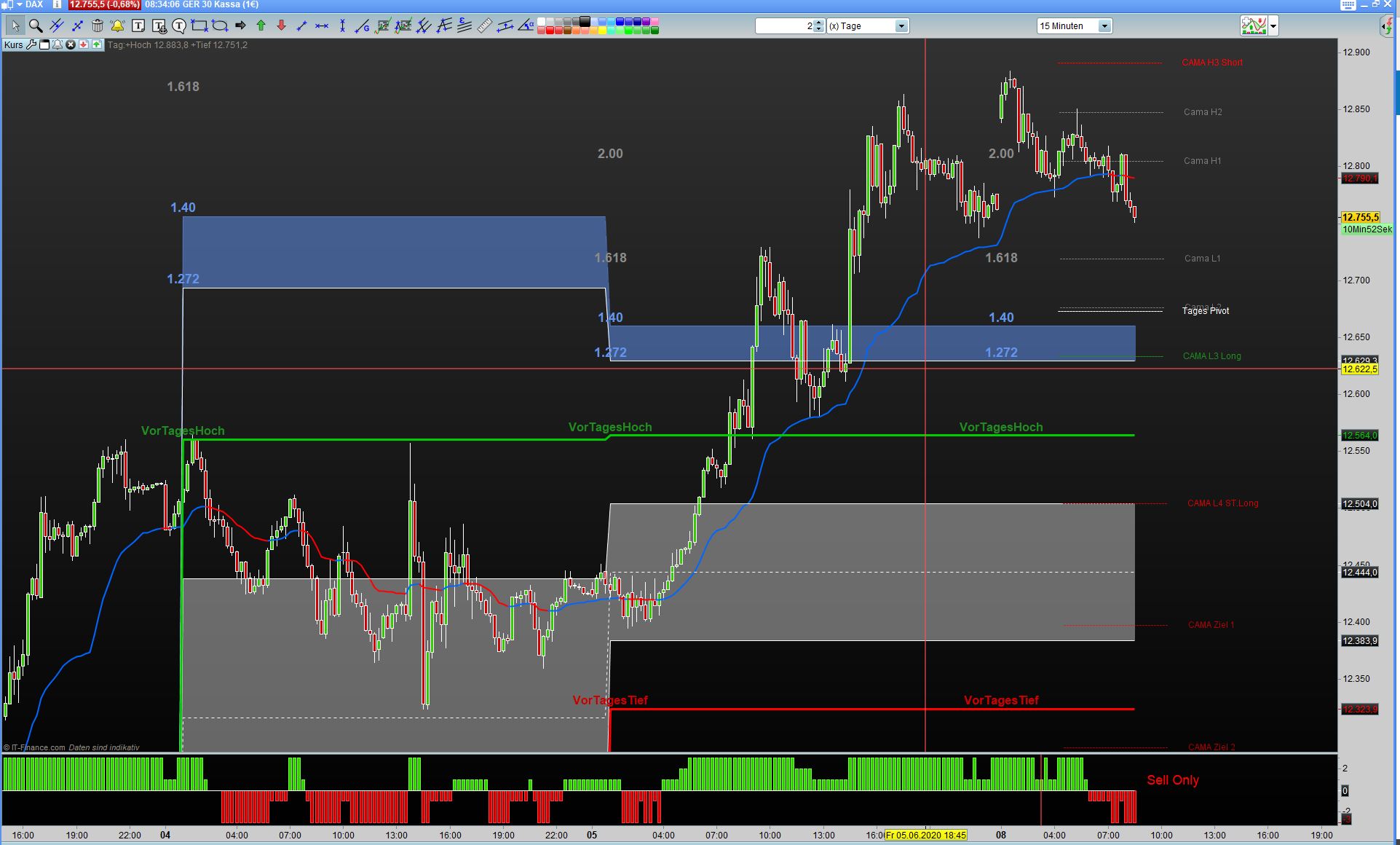
    Your code for previous days high and low does not work on Mondays, Thursday courses are used.
    What needs to be changed?

    thank you

    Tages-High-Low-falsch.jpg Tages-High-Low-falsch.jpg
    #135114 quote
    Vonasi
    Moderator
    Master

    Sorry – not sure how that happened must have had some brain fade!

    Try this code. It should use the previous days high and low on Wednesday, Thursday and Friday. On Sunday and Monday it uses the high and low from Friday. On Tuesday it uses the highest high and lowest low from Sunday and Monday combined.

    Not tested!

    if d <> d[1] then
    if (D=0 or D=3 or D=4 or D=5) then
    H1=DHigh(1)
    L1=DLow(1)
    C1=DClose(1)
    O=DOpen(1)
    endif
    
    if D=2 then
    H1=max(DHigh(1),dHigh(2))
    L1=min(DLow(1),dLow(2))
    C1=DClose(1)
    O=DOpen(2)
    endif
    
    if d=1 then
    H1=DHigh(2) 
    L1=DLow(2) 
    C1=DClose(2) 
    O=DOpen(2) 
    endif
    
    Razz thanked this post
    #135123 quote
    Razz
    Participant
    Master

    Hi
    Thanks for the quick implementation it worked.

    Have a nice Day

    #135745 quote
    parthapersonal
    Participant
    Average

    Many thanks Vonasi. It worked. One last requirement is if I want to have discrete lines for each day, instead of continuous lines with no break between days as it is appearing now, what should be done? For example, as it appears for standard Pivot Points discrete for each day and not joined from previous day.

    Regards,

    #135911 quote
    Vonasi
    Moderator
    Master

    You would need to use DRAWSEGMENT.

    I’ve also added a small fix to stop it drawing text on Mondays as it clashes with the same text drawn on Sundays.

    D=openDayOfWeek
    
    if d <> d[1] then
    if (D=0 or D=3 or D=4 or D=5) then
    H1=DHigh(1)
    L1=DLow(1)
    C1=DClose(1)
    O=DOpen(1)
    endif
    
    if D=2 then
    H1=max(DHigh(1),dHigh(2))
    L1=min(DLow(1),dLow(2))
    C1=DClose(1)
    O=DOpen(2)
    endif
    
    if d=1 then
    H1=DHigh(2)
    L1=DLow(2)
    C1=DClose(2)
    O=DOpen(2)
    endif
    
    r=h1-l1
    R236=L1+R*0.236
    R382=L1+R*0.382
    R50=L1+R*0.5
    r6=l1+r*0.618
    r7=l1+r*.786
    r1=l1+r*1.272
    r11=l1+r*1.618
    R22=L1+R*2
    R2618=L1+R*2.618
    R33=L1+R*3.33
    DH=H1-r*1
    DL=H1-r*0
    Lr1=H1-r*1.272
    L11=H1-r*1.618
    L22=H1-R*2
    L2618=H1-R*2.618
    L33=H1-R*3.33
    WPH=(H1+L1+C1)*2/3-H1
    WPL=(H1+L1+C1)*2/3-L1
    P=H1+L1+C1
    
    if O>C1 then
    X=(P+H1)/2
    elsif O<C1 then
    X=(P+L1)/2
    elsif O=C1 then
    X=(P+C1)/2
    endif
    DPH=X-L1
    DPL=X-H1
    
    if d<>1 then
    voff=5*pipsize
    DRAWTEXT("1.618", barindex,r11+voff, Dialog , Bold, 18) COLOURED(255,255,0)
    DRAWTEXT("0.236", barindex,r236+voff, Dialog , Bold, 18) COLOURED(255,255,0)
    DRAWTEXT("0.382", barindex,r382+voff, Dialog , Bold, 18) COLOURED(255,255,0)
    DRAWTEXT("0.5", barindex,r50+voff, Dialog , Bold, 18) COLOURED(255,255,0)
    DRAWTEXT("0.618", barindex,r6+voff, Dialog , Bold, 18) COLOURED(255,255,0)
    DRAWTEXT("0.786", barindex,r7+voff, Dialog , Bold, 18) COLOURED(255,255,0)
    DRAWTEXT("1.272", barindex,r1+voff, Dialog , Bold, 18) COLOURED(255,255,0)
    DRAWTEXT("2.0", barindex,r22+voff, Dialog , Bold, 18) COLOURED(255,255,0)
    DRAWTEXT("2.618", barindex,r2618+voff, Dialog , Bold, 18) COLOURED(255,255,0)
    DRAWTEXT("3.33", barindex,r33+voff, Dialog , Bold, 18) COLOURED(255,255,0)
    DRAWTEXT("DH", barindex,DH+voff, Dialog , Bold, 18) COLOURED(255,255,0)
    DRAWTEXT("DL", barindex,DL+voff, Dialog , Bold, 18) COLOURED(255,255,0)
    DRAWTEXT(" - 1.272", barindex,LR1+voff, Dialog , Bold, 18) COLOURED(255,255,0)
    DRAWTEXT(" - 1.618", barindex,L11+voff, Dialog , Bold, 18) COLOURED(255,255,0)
    DRAWTEXT(" - 2.0", barindex,L22+voff, Dialog , Bold, 18) COLOURED(255,255,0)
    DRAWTEXT(" - 2.618", barindex,L2618+voff, Dialog , Bold, 18) COLOURED(255,255,0)
    DRAWTEXT(" - 3.33", barindex,L33+voff, Dialog , Bold, 18) COLOURED(255,255,0)
    DRAWTEXT("DPRH", barindex,DPH+voff, Dialog , Bold, 18) COLOURED(255,255,0)
    DRAWTEXT("DPRL", barindex,DPL+voff, Dialog , Bold, 18) COLOURED(255,255,0)
    DRAWTEXT("WPRH", barindex,WPH+voff, Dialog , Bold, 18) COLOURED(255,255,0)
    DRAWTEXT("WPRL", barindex,WPL+voff, Dialog , Bold, 18) COLOURED(255,255,0)
    endif
    endif
    
    drawsegment (barindex, wph, barindex-1,wph)
    drawsegment (barindex, dph, barindex-1,dph)
    drawsegment (barindex, wpl, barindex-1,wpl)
    drawsegment (barindex, dpl, barindex-1,dpl)
    drawsegment (barindex, r236, barindex-1,r236)
    drawsegment (barindex, r382, barindex-1,r382)
    drawsegment (barindex, r50, barindex-1,r50)
    drawsegment (barindex, r6, barindex-1,r6)
    drawsegment (barindex, r7, barindex-1,r7)
    drawsegment (barindex, r1, barindex-1,r1)
    drawsegment (barindex, r11, barindex-1,r11)
    drawsegment (barindex, r22, barindex-1,r22)
    drawsegment (barindex, r2618, barindex-1,r2618)
    drawsegment (barindex, r33, barindex-1,r33)
    drawsegment (barindex, dh, barindex-1,dh)
    drawsegment (barindex, dl, barindex-1,dl)
    drawsegment (barindex, lr1, barindex-1,lr1)
    drawsegment (barindex, l11, barindex-1,l11)
    drawsegment (barindex, l22, barindex-1,l22)
    drawsegment (barindex, l2618, barindex-1,l2618)
    drawsegment (barindex, l33, barindex-1,l33)
    
    RETURN
    #135960 quote
    parthapersonal
    Participant
    Average

    Brilliant Vonasi. Much appreciated.

    #135997 quote
    parthapersonal
    Participant
    Average

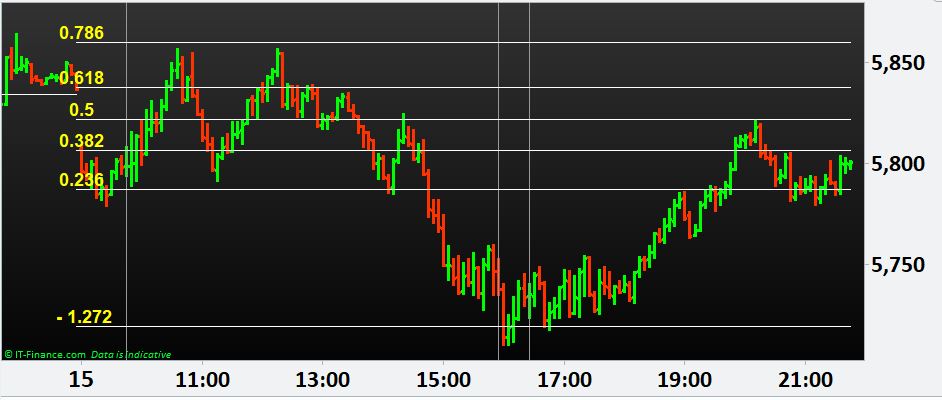
    Hello Vonasi, it is now looking neat as enclosed, however the corresponding price levels for the Fibonacci ratios are not appearing in the Y axis. e.g. 0.786 price level as 5,860. What should we do now, please?

    Fibonacci-Value-missing.jpg Fibonacci-Value-missing.jpg
    #136008 quote
    Vonasi
    Moderator
    Master

    The values on the Y axis can only be shown of RETURN’ed values. A segment is just a graphical instruction to draw a line between two points and so no value is shown on the Y axis.

    The only fix that I can think of is to create a separate indicator that draws on the last bar only and draws text on the last bar of the chart showing the values.

Viewing 9 posts - 16 through 24 (of 24 total)
  • You must be logged in to reply to this topic.

Display Line Name of Fibonacci Lines


ProBuilder: Indicators & Custom Tools

New Reply
Author
Summary

This topic contains 23 replies,
has 4 voices, and was last updated by Vonasi

5 years, 8 months ago.

Topic Details
Forum: ProBuilder: Indicators & Custom Tools
Language: English
Started: 05/28/2020
Status: Active
Attachments: 7 files
Logo Logo
Loading...