display CAGR* on line or channel ? (one-year growth equivalent)

Viewing 4 posts - 1 through 4 (of 4 total)

  • Author
    Posts
  • #243990 quote
    utestit75
    Participant
    New

    Hi,

    I wondered if any PRT object would display the one-year growth rate for a line or channel ? Many thanks !

    To make things fully explicit, I would expect the following calculation, as an example :

    • for a price moving from 2,0 to 4,0 in 30 days, displayed in a PRT window over 1 quarter;
    • a line (or channel) joining the first day (price 2,0) to the last day (4,0) would display +5,9%;
    • calculated as +5,9%= (4,0 / 2,0) ^ (30/365)


    side-note:

    my value doesn’t need to be very exact (it’s an indication), so something calculating based on 360 days a year, or whatever, would be fine !

    the value doesn’t change with a change of display scale (one quarter or one week)


    If this doen not exist as a standard, what would be needed to develop it as a custom-designed tool ?


    Hope my request is fairly clear. My apologies if the answer is too obvious. Feel free to refer me to any post/resource.


    Many thanks !

    #244032 quote
    JS
    Participant
    Senior

    As far as I know, there is no (standard) PRT object available for this…
    You can use Ivan’s indicator and set the number of days via the number of units used…
    Additionally, you can have the indicator draw two extra lines for the start and end points…

    //-------------------------------------------------------//
    //PRC_CAGR and Growth rate
    //version = 1
    //22.03.24
    //Iván González @ www.prorealcode.com
    //Sharing ProRealTime knowledge
    //-------------------------------------------------------//
    //-----Inputs--------------------------------------------//
    defparam drawonlastbaronly = true
    FinValue = Close[0]
    IniValue = close[barindex]
    //-------------------------------------------------------//
    //-----Calculate number of periods-----------------------//
    tm = gettimeframe
    if tm > 86400 then
    period = barindex
    else
    if day <> day[1] then
    period = 1+period
    else
    period = period
    endif
    endif
    //-------------------------------------------------------//
    //---Check timeframe for CAGR calculation----------------//
    if tm = 2592000 then //monthly timeframe
    n = 12
    drawtext("Period: #period# months",-100,+60)anchor(BOTTOMRIGHT ,XSHIFT ,YSHIFT )
    elsif tm = 604800 then //weekly timeframe
    n = 52
    drawtext("Period: #period# weeks",-100,+60)anchor(BOTTOMRIGHT ,XSHIFT ,YSHIFT )
    elsif tm <=86400 then //Other timeframes (daily or less)
    n = 252
    drawtext("Period: #period# days",-100,+60)anchor(BOTTOMRIGHT ,XSHIFT ,YSHIFT )
    else
    drawtext("Period: #period# bars",-100,+60)anchor(BOTTOMRIGHT ,XSHIFT ,YSHIFT )
    endif
    //-------------------------------------------------------//
    //-----CAGR and Growth Rate------------------------------//
    if barindex < n then
    CAGR = undefined
    else
    CAGR = round((POW((FinValue/IniValue),(n/period))-1)*100,2)
    GR = round((FinValue / IniValue - 1) * 100,2)
    endif
    //-------------------------------------------------------//
    //-----Plot----------------------------------------------//
    if tm=2592000 or tm=604800 or tm<=86400 then
    drawtext("Growth rate: #GR# %",-100,100)anchor(BOTTOMRIGHT ,XSHIFT ,YSHIFT )
    drawtext("CAGR: #CAGR# %",-100,+80)anchor(BOTTOMRIGHT ,XSHIFT ,YSHIFT )
    drawrectangle(-200,110,-10,50)anchor(BOTTOMRIGHT ,XSHIFT ,YSHIFT )fillcolor("blue",50)
    else
    drawtext("Growth rate: #GR# %",-100,100)anchor(BOTTOMRIGHT ,XSHIFT ,YSHIFT )
    drawrectangle(-200,110,-10,50)anchor(BOTTOMRIGHT ,XSHIFT ,YSHIFT )fillcolor("blue",50)
    endif
    //-------------------------------------------------------//
    DrawHLine(Close[0])
    DrawHLine(Open[BarIndex])
    return
    
    robertogozzi, Iván González and utestit75 thanked this post
    Scherm­afbeelding-2025-02-19-om-13.04.32.png Scherm­afbeelding-2025-02-19-om-13.04.32.png
    #244073 quote
    utestit75
    Participant
    New

    So many thanks for the rapid feed-back, jS !

    Going to try & see what I can do with that (I need to get familiar with PRCode for a start ! but that should be a good thing to have…)

    Have a great day !

    #244104 quote
    utestit75
    Participant
    New

    Hi,

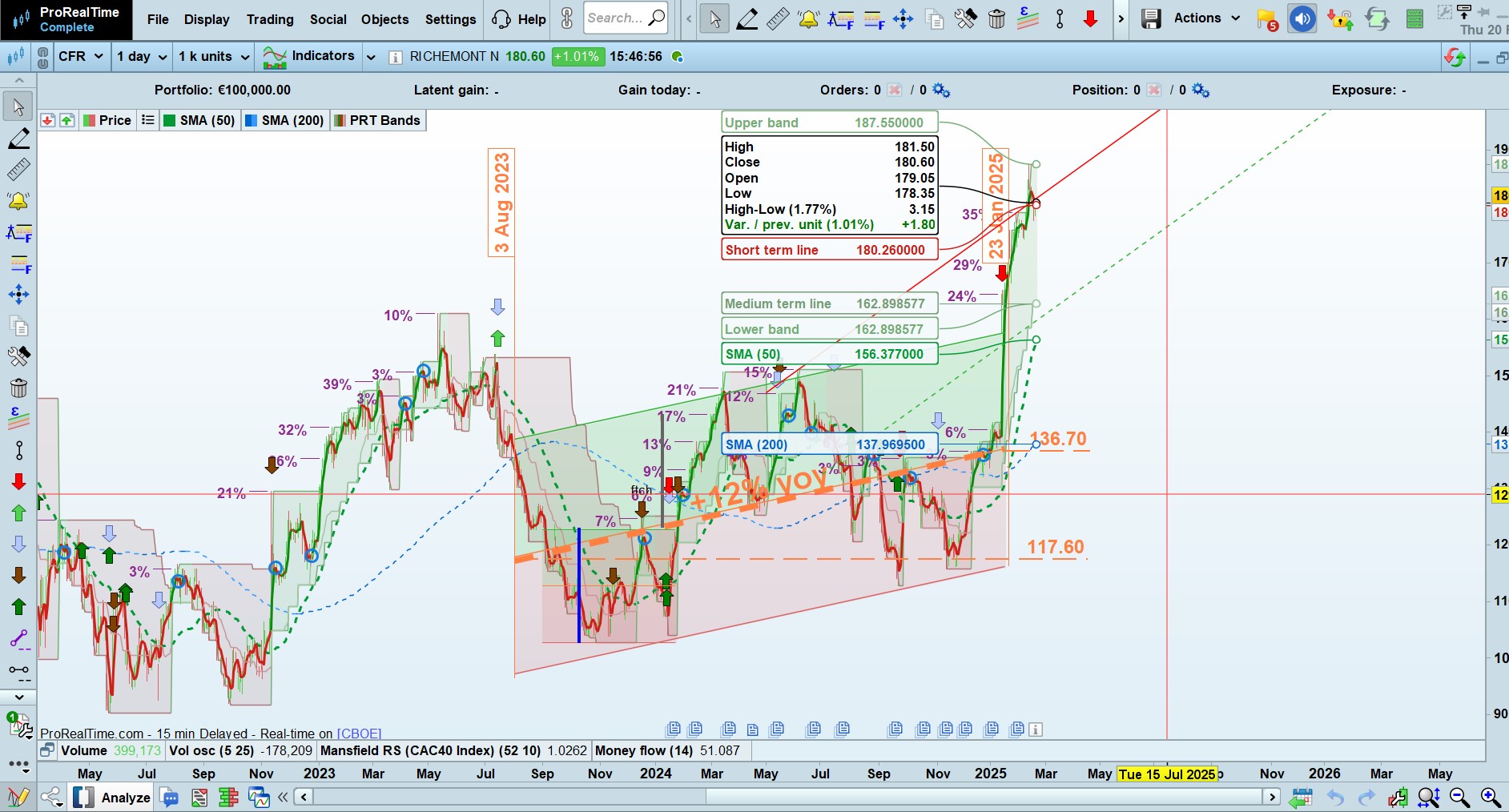
    thanks again JS, although what I meant to have was different from above: I’m looking for an object, with a calculated metric, calculated from the start and end point of that object, upon drwaing the object (whereas above “indicator path” adds a window, which displays that metric, which parameters to be given)

    To clarify: a graph should be clearer than a long talk, attached is a simulated graph of what I’m looking for :

    • the bold line in orange, with +12% automaticaly calculated, is the expected result;
    • the date- and level-  lines are here just to illustrate the calculation of +12%, and wouldn’t be displayed.
    • note: +12% = (136,7 / 117,6) ^ (360/524) -1,
      • with 524 being the number  of days from 3/8/23 (ini date) to 23/1/25 (final date).


    This metric could be displayed on top of a segment, line, or channel (here a standard-error channel).

    It could even be added as a tick box in the parameter window for any of these objects (it’s a most basic metric, if not the most …)

    From JS earlier post, I assume it does not exist in PRT “as-is”. But I would very much appreciate if it could !

    I guess I should request it for a future PRT release (shouldn’t be too heavy to implement – but would be mooost helpful).

    Thanks in advance for your inputs !

    PRT_Cagr_250220.jpg PRT_Cagr_250220.jpg
Viewing 4 posts - 1 through 4 (of 4 total)
  • You must be logged in to reply to this topic.

display CAGR* on line or channel ? (one-year growth equivalent)


Platform Support: Charts, Data & Broker Setup

New Reply
Author
author-avatar
utestit75 @utestit75 Participant
Summary

This topic contains 3 replies,
has 2 voices, and was last updated by utestit75
12 months ago.

Topic Details
Forum: Platform Support: Charts, Data & Broker Setup
Language: English
Started: 02/18/2025
Status: Active
Attachments: 2 files
Logo Logo
Loading...