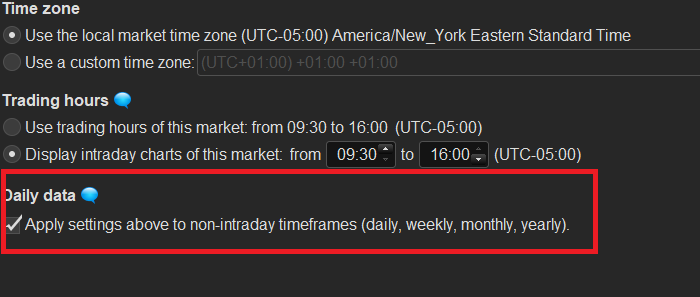
Is there a way in which I can get the current day percentage change of US equities to be the percentage change in US trading hours in the day (GMT 14:30 – 21:00)? At the moment there seems to be a large difference between the quoted daily change on PRT and the actual daily change (during US Market Hours).
I assume PRT is using all data available for the whole day (time 00:00 to current time) to calculate the day % changes? Ideally I want to ‘ignore’ any price movement outside of US trading hours for US equities when calculating % change. Is there some way I can ‘turn off’ before/after market hours?
Sorry if this is unclear, Thanks in advance!
eg. today PRT quotes a 2% change in SPY where the move during trading hours for SPY was actually 3.75%.
Hello,
The time zones and trading hours of your intraday charts are built in can be easily personalized.
– To access the interface, just go to “Options” => “Platform options” and select “Set time zone and trading hours”.
– From here, you can select your chosen market and adjust the trading hours to your preference.
– In order to build daily candles based on your customized trading hours please activate the option “Apply settings above to non-intraday timeframes” as shown in the picture below.
[attachment file=62821]