I’m seeking for help with the following:
I have a big difference in the outcome of my system in the backtest and automated trading
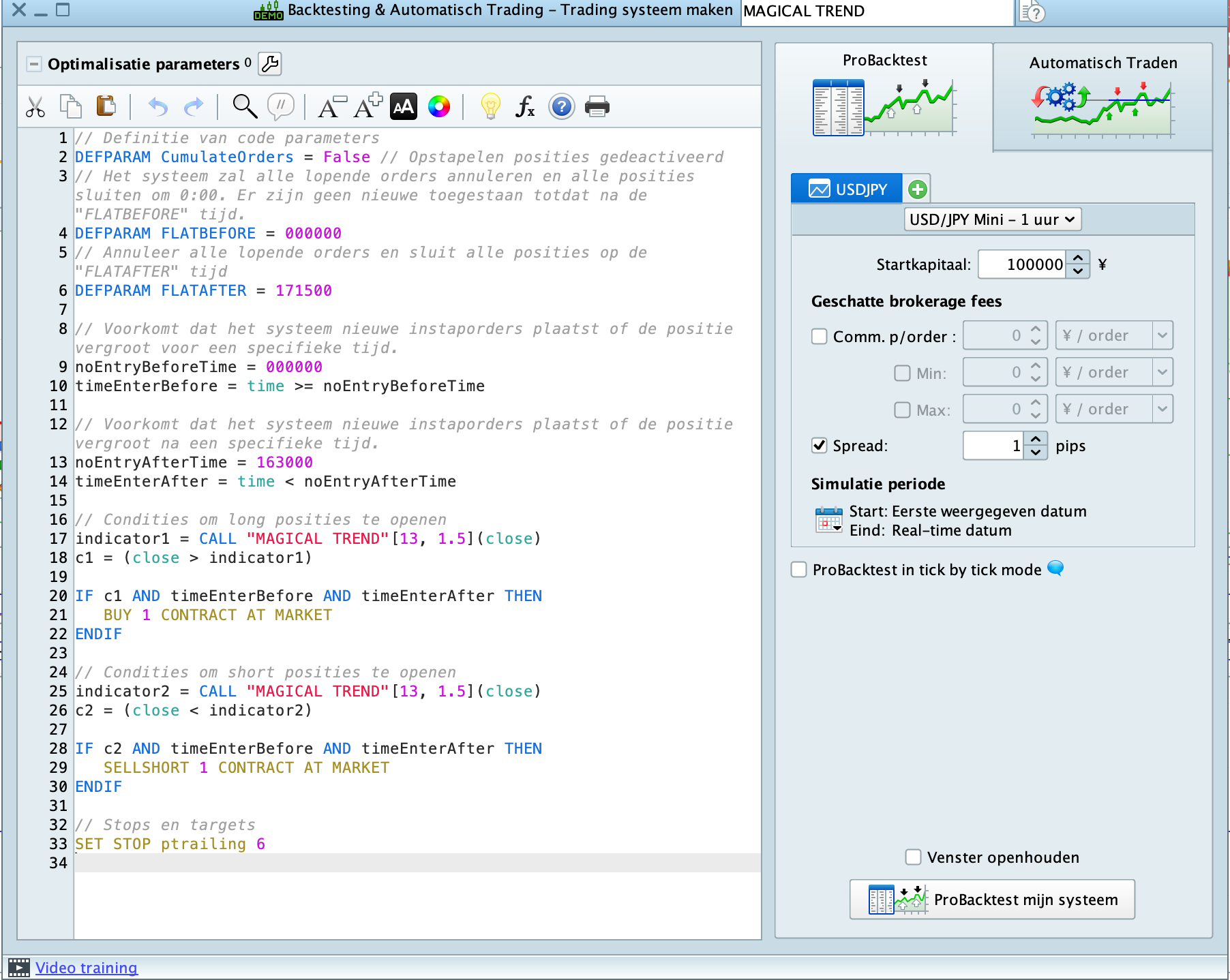
All settings are the same, including brokerage.
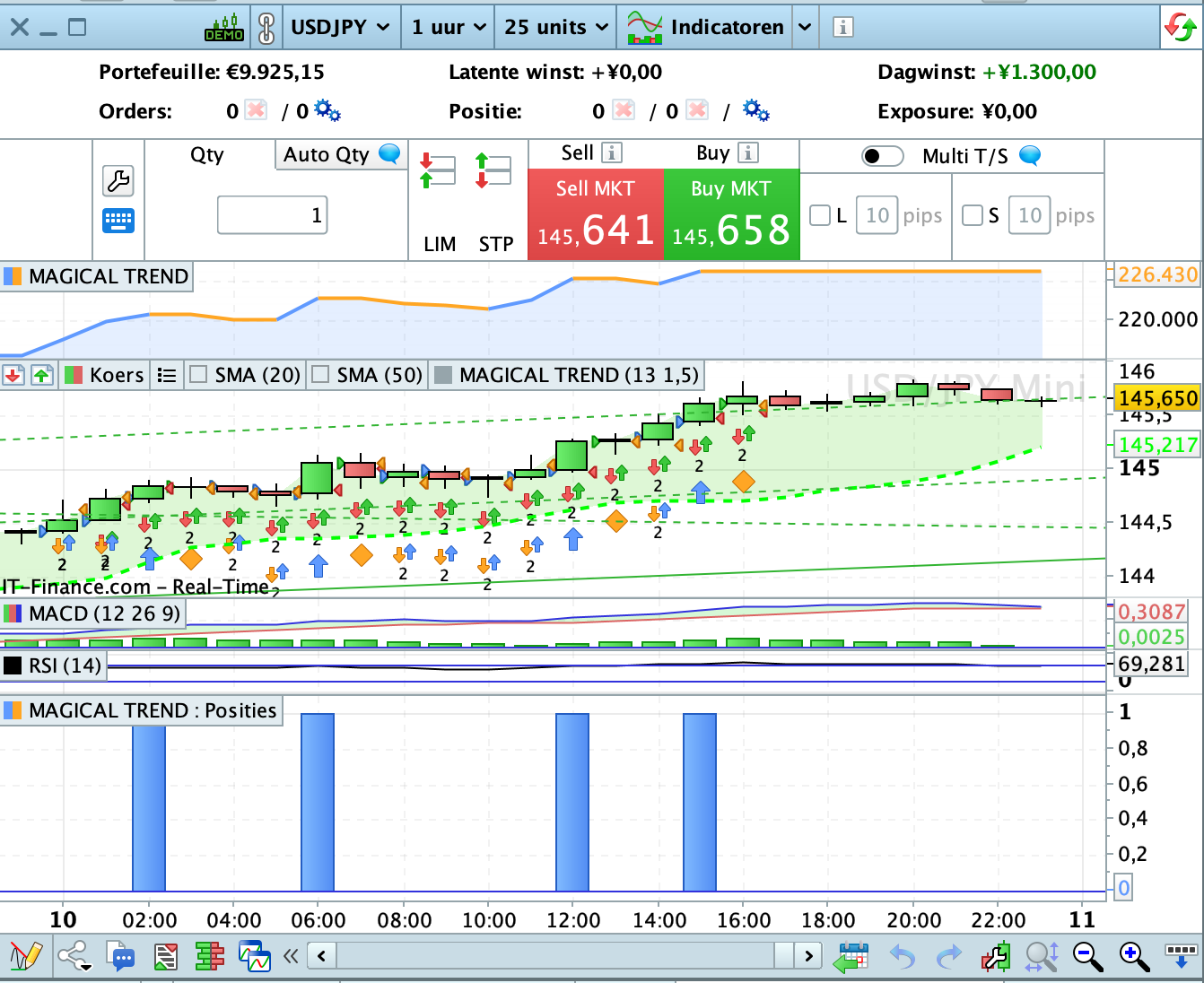
I´m dealing automatic USD/JPY in the one hour time frame and today the automated trading had JPY 1.300 profit, where the backtest made an profit of JPY 10.550
A difference of 92.5 pips and this is not the first time.
Maybe I’m doing something wrong and if so, I’m happy to hear this
I´m using Prorealtime V12 in the IG platform.
Find below the screenshots of today
Ps, when I use a larger trailing stop it makes no difference
Thanks for your help
Martin
Sorry I forgot to attach the files
Maybe turn on “tick by tick” and then see that the system doesn’t work that way?
I tried it as well, but I’m keeping a big difference still.
In the tick by tick method, the backtest performance is worse and live trading is much better.
My main problem is the big difference between the backtesting in live modus and the automated trading
They run both at the same time , but make a huge difference.
The question who is wrong here, is odd as Prorealtime is getting the input from IG
I´m really confused as I have the differences every day
Here are some clues about differences https://www.prorealcode.com/topic/backtesting-and-demo-account-algo-doesnt-match-live-algo/#post-175691.
Try changing line 33 with a greater value, such as 10 or 20.
A better solution would be to use a custom made trailing stop. here is the easiest to use https://www.prorealcode.com/blog/trading/complete-trailing-stop-code-function/. Just comment out line 33, then append lines 17 through 56 from the code snippet. Its settings are 20 and 5, you may also try 20 and 10 or 20 and 20, etc…
In this spreadsheet https://docs.google.com/spreadsheets/d/1rgboqj7sVwsP9ZRhOduOefye48QMWC07jWVXCl-KJPU/edit#gid=0, maintained by GraHal, you will find so many links to useful code snippets.
Really thanks for all the links Roberto.
I will read them and see which one will work better.
Probably I will have more questions afterwards and will come back to
Good afternoon Roberto,
I looked over all solutions as well as the various the code snippets in the spreadsheet.
As you said https://www.prorealcode.com/blog/trading/complete-trailing-stop-code-function/ was the most easiest solution
Only one problem, it is not working as it doesn’t stop when the trade is not in profit, like the normal trailing stop.
Did I do something wrong? I attached my ITF file and a snapshot of yesterdays trading.
Thanks for your help in this
That code was not made for that, it immediately sets the SL at breakeven once there is enough profit.
This is another snippet you that does what you mean:
// Trailng STOP starting from the actual SL and increasing TrailingStep pips each time the profit
// rises by TrailingInc pips
//
ONCE SL            = 400
ONCE TrailingStep  = 50
ONCE TrailingInc   = TrailingStep * 2
//
IF LongOnMarket AND Not LongOnMarket[1] THEN
   NewSL = TradePrice - SL * PipSize
ELSIF ShortOnMarket AND Not ShortOnMarket[1] THEN
   NewSL = TradePrice + SL * PipSize
ENDIF
//
IF LONGONMARKET THEN
   IF close >= NewSL + TrailingInc * PipSize THEN
      NewSL = NewSL + TrailingInc * PipSize
   ENDIF
ELSIF SHORTONMARKET THEN
   IF close <= NewSL - TrailingInc * PipSize THEN
      NewSL = NewSL - TrailingInc * PipSize
   ENDIF
ENDIF
//
IF NewSL > 0 THEN
   SELL      AT NewSL STOP
   EXITSHORT AT NewSL STOP
ENDIF
Thanks Roberto, really appreciate your help in this.
Unfortunately the latest solution does not work well in the system as it gives big losses, which I don’t have in live trading.
My starting point was the big difference in live trading and backtest mode running simultaneously.
As I’m not using DMA, I’m dependent on the input of IG and I’m aware that there are some differences, but in my opinion the differences are too big!
I aiming to do 20 trades per day in the 1 hour TF and I don’t mind to have 15 small losses, a long as the other 5 make up for the losses and preferably more.
Therefore I´m using a small standard trailing stop.
I´m just looking for a way to have more or less the same results in both systems simultaneously .
Independently whether the system used is good or bad
I think 20 trades per day in a 1 hour time frame only sounds practical if the trade evaluation is done in a smaller time frame like 5 minutes or 1 minute.
Hi there Martin,
// Definitie van code parameters
DEFPARAM CumulateOrders = False // Opstapelen posities gedeactiveerd
// Het systeem zal alle lopende orders annuleren en alle posities sluiten om 0:00. Er zijn geen nieuwe toegestaan totdat na de "FLATBEFORE" tijd.
DEFPARAM FLATBEFORE = 000000
// Annuleer alle lopende orders en sluit alle posities op de "FLATAFTER" tijd
DEFPARAM FLATAFTER = 171500

// Voorkomt dat het systeem nieuwe instaporders plaatst of de positie vergroot voor een specifieke tijd.
noEntryBeforeTime = 000000
timeEnterBefore = time >= noEntryBeforeTime

// Voorkomt dat het systeem nieuwe instaporders plaatst of de positie vergroot na een specifieke tijd.
noEntryAfterTime = 163000
timeEnterAfter = time < noEntryAfterTime

// Condities om long posities te openen
indicator1 = CALL "MAGICAL TREND"[13, 1.5](close)
c1 = (close > indicator1)

IF not onmarket and c1 AND timeEnterBefore AND timeEnterAfter THEN   // !
  BUY 1 CONTRACT AT MARKET
ENDIF

// Condities om short posities te openen
indicator2 = CALL "MAGICAL TREND"[13, 1.5](close)
c2 = (close < indicator2)

IF not c1 and not OnMarket and c2 AND timeEnterBefore AND timeEnterAfter THEN   // !
  SELLSHORT 1 CONTRACT AT MARKET
ENDIF

//************************************************************************
//trailing stop function
trailingstart = 20 //trailing will start @trailinstart points profit
trailingstep = 10 //trailing step to move the "stoploss"

//reset the stoploss value
IF NOT ONMARKET THEN
  newSL=0
ENDIF

//manage long positions
IF LONGONMARKET THEN
  //first move (breakeven)
  IF newSL=0 AND close-tradeprice(1)>=trailingstart*pipsize THEN
    newSL = tradeprice(1)+trailingstep*pipsize
  ENDIF
  //next moves
  IF newSL>0 AND close-newSL>=trailingstep*pipsize THEN
    newSL = newSL+trailingstep*pipsize
  ENDIF
ENDIF

//manage short positions
IF SHORTONMARKET THEN
  //first move (breakeven)
  IF newSL=0 AND tradeprice(1)-close>=trailingstart*pipsize THEN
    newSL = tradeprice(1)-trailingstep*pipsize
  ENDIF
  //next moves
  IF newSL>0 AND newSL-close>=trailingstep*pipsize THEN
    newSL = newSL-trailingstep*pipsize
  ENDIF
ENDIF

//stop order to exit the positions
IF newSL>0 THEN
  SELL AT newSL STOP
  EXITSHORT AT newSL STOP
ENDIF
//************************************************************************
I applied two small changes at the // ! lines. Now it works technically OK. Whether functionally is up to you.
Notice that in Backtest it was already wrong; please observe the immediate exits in your original code.
I hope this helps you !
Peter
PS: I would never having those pending stop (at the end of your code) commands unconditionally. This is because they inherently contradict. So make that under a condition LongOnMarket and ShortOnMarket respectively and it will be better again.
Dear Peter, I really appreciate your help and your comments.
I will make the tests during the night in live trading and will let you know the outcome.
Thanks again,
Martin
Thanks for your comment Phoentzs.
Please take into account that I perform live trading with the system in the 1 hour TF and that I watch live what is happening.
Therefore there is no direct need at this moment to analyse on the smaller TF
I see live that there is a real discrepancy between the two systems and I’m looking for a way to minimize this discrepancy.
Apologies if already been discussed, but do you have the exact same spread set in the backtesting engine as in Live (varies over 24 hours)?
Apart from a few points + or – in profit, differing spreads (backtest to Live) could even affect trades being placed or not (depending on code).