Dialog and SansSerif text the same

Viewing 5 posts - 1 through 5 (of 5 total)

  • Author
    Posts
  • #57577 quote
    Vonasi
    Moderator
    Master

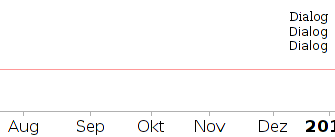
    I am writing an indicator and I thought that I would try different text styles in the DRAWTEXT command but the DIALOG style and SANSSERIF styles are identical.

    GraHal thanked this post
    #57612 quote
    AVT
    Participant
    Senior

    Mono, Sans and Serif are the spacings. Dialog is a font name (like Arial also Sans) as are Courier (Mono) or Times Roman (Serif). A bit confusing that mixing of font names and spacing category.

    #57616 quote
    Vonasi
    Moderator
    Master

    Confusing….. not half!

    I was working from this description which is nothing like what you have suggested.

    DRAWTEXT

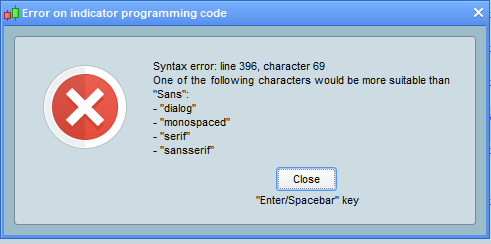
    If I insert an incorrect term I get this suggestion:

    [attachment file=57617]

    But SansSerif and Dialog appear exactly the same.

    #57629 quote
    AVT
    Participant
    Senior

    Sorry, I was maybe a bit unclear in writing. What I meant was, that in the syntax for DRAWTEXT there’s a confusing mixture of 2 different things: font names and font category, that’s got nothing to do with the correctness of the syntax itself but with the underlying program.

    Mono: is common short form of Monospaced, meaning every letter/number/sign has the same width-space (be that small letter L or capital letter W).

    Sans: is common short form of SansSerif, meaning all superfluous little hooks on letters/numbers are eliminated (a small vertical line with dot above is enough to make an i, it does not need little hooks at the vertical line).

    Serif: is Serif, which has all those little hooks on letters/numbers/signs which make them 1. nicer to look and 2. easier to spot differences in doubt (big letter i, small letter L, number one).

    (There are sub divisions like (semi-)condensed = narrow and wide; and there are other ways of catagorizing like unicode range (math symbols/emojis/chinese chars), but that’s just aside.)

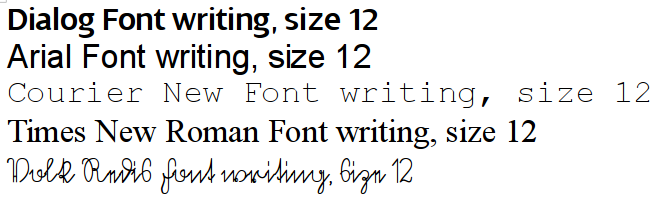
    Now, Dialog is a font name for a Linotype(TM) font and all it has to to with the catagories above is to fit into one (the Sans or SansSerif one). In the attached pic you see diffences in all those writings – note the special way the small letter G is written compared to others. I do have a free Dialog font variant installed here (dowload here: https://ufonts.com/download/dialog/125431.html ) and I did a test.

    1. change in PRT options the font for everything to Dialog (instead of my standard Arial)
    2. DRAWTEXT with a) zero-line Dialog b) above SansSerif c) above Serif

    Result: neither the program itself (see the G in Aug) nor the drawtext uses this at first glance. Well, I could go and change the systemwide font substitution file as usually what you see is dependend on the fonts you have installed and the order in which they are substituted if not available – but I am really to too lazy to break it down to that level!

    With regard to using what in code, I personally avoid Dialog cause once in the source without comment, it’s later not very intuitive to substitute it with something working.

    GraHal thanked this post
    #57635 quote
    Vonasi
    Moderator
    Master

    OK – I think I understand but I do have this feeling that the answer may have been rather more complicated than the question which in my mind usually means forget there ever was a problem! I’ve decided to just stick with default SanSerif and whatever that produces and live with it. Sometimes life seems too short to worry about how letters are drawn!

    GraHal thanked this post
Viewing 5 posts - 1 through 5 (of 5 total)
  • You must be logged in to reply to this topic.

Dialog and SansSerif text the same


ProBuilder: Indicators & Custom Tools

New Reply
Author
author-avatar
Vonasi @vonasi Moderator
Summary

This topic contains 4 replies,
has 2 voices, and was last updated by Vonasi

8 years, 1 month ago.

Topic Details
Forum: ProBuilder: Indicators & Custom Tools
Language: English
Started: 01/07/2018
Status: Active
Attachments: 3 files
Logo Logo
Loading...