Developing Gauss indicator

Viewing 15 posts - 1 through 15 (of 17 total)
  • Author
    Posts
  • #182236 quote
    JS
    Participant
    Senior

    I’m looking for some kind of Gaussian indicator (normal distribution).

    There has been a lot of talk about it on the PRT forum, for example by @Bard, but no real indicator has yet emerged from it.

    Perhaps it is possible, with the help of everyone who is interested in this, to shape this indicator.

    The basic shape comes from a negatively squared exponent:

    f(x) = e ^ (- x ^ 2)

    By adding a variable mean and the standard deviation, the “complete” normal distribution is created.

    f(x) = 1 / (σ√2π) exp ( -1/2 [ (x-μ) / σ ] ² )

    The first challenge will be to program this complex formula in ProBuilder 🙂

    #182237 quote
    JS
    Participant
    Senior

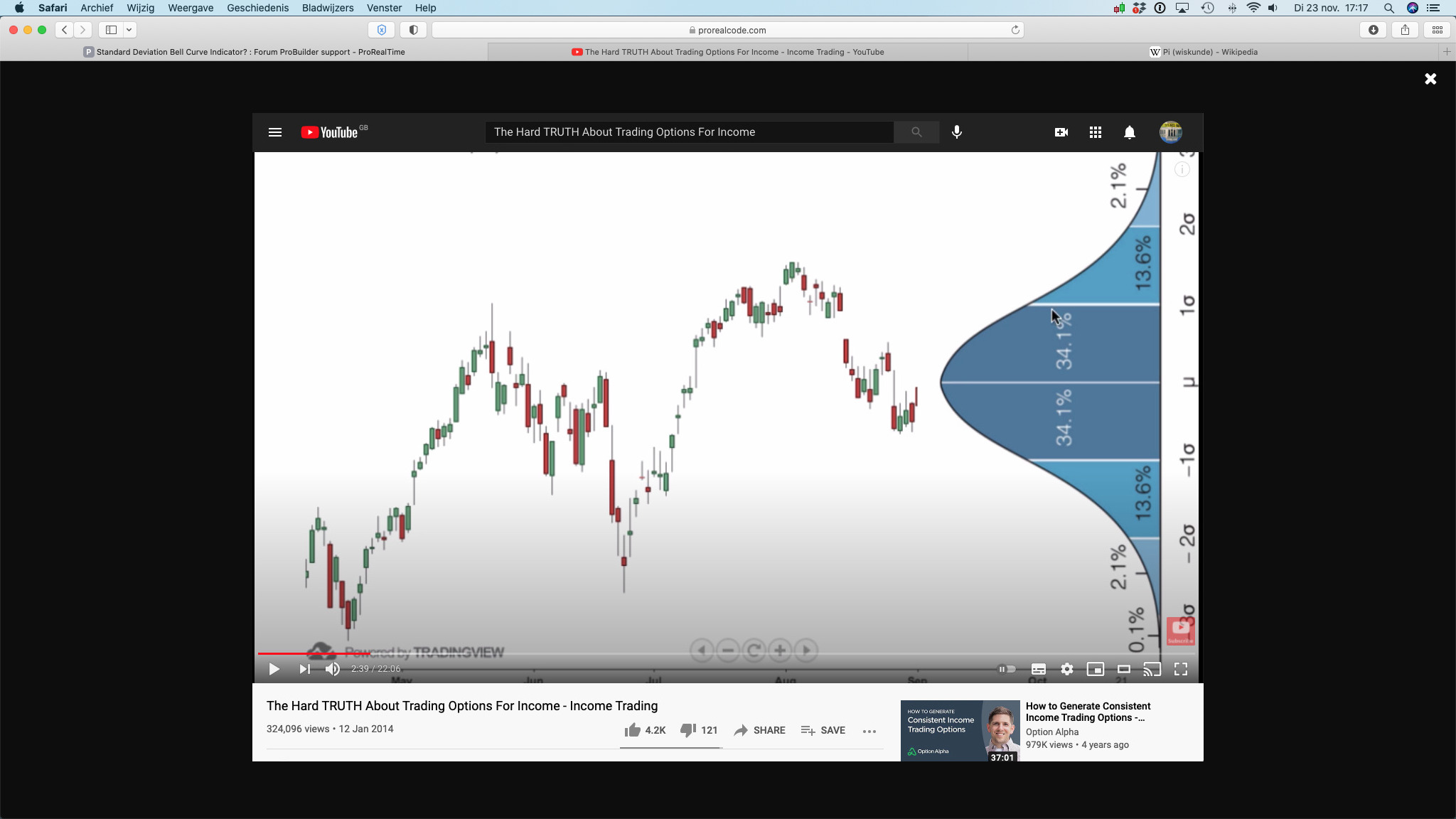
    This example was used by @Bard in one of  his topics about the Gauss indicator.

    Schermafbeelding-2021-11-23-om-17.17.52.jpg Schermafbeelding-2021-11-23-om-17.17.52.jpg
    #182274 quote
    JS
    Participant
    Senior

    It is an exponential function with the base e (2.7183), the base of the natural logarithm. This function is standard in PRT as Exp(a) so Exp(1) = e

    Pi (π) = 3,1416

    Sigma (σ) = Std[n](Close)

    Mu (μ) = Close

    f(x) = 1 / (Std[n](Close) * √ 6,2832) * Exp(-1 * (x – Close) ² / 2 * (Std[n](Close)) ²)

    #182878 quote
    Quino
    Participant
    Average

    All,

    I have modified the "Quino Statistics Plotter" indicator created last August,
    to map the theoretical Gaussian curve to a distribution of "Close" on a defined number of bars.
    This allows to have an idea if this distribution (Price) has the contours of a Gaussian curve[attachment file="182879"]
    
    .
    See the old version in the indicator library for more information on the other functionalities.


    // Quino Statistics Plotter
    // By Quino
    // version of 05/12/2021
    //===================================================================================
    // NbrOfSamples : Number of consecutive close
    // NbrOfClasses : Number of intervals of values ​​in which we store the values ​​of “close”
    // InformationDisplay :
    // – false : display of the histogram only
    // – true : display of limit values ​​for each class and % of occurrence
    // ClassTracer :
    // – false : indicator that can be used stand-alone (curve and information)
    // – true : indicator usable in the price indicator. By locating the class of the last “close” or another class. Class boundaries are represented by two horizontal lines on the price chart.
    // ClassIndex : manual search for the class number corresponding to the last “close” or another class. Alignment of the cue point under the value of the last close (in red)
    // GaussianShape
    // – false : No Gaussian curve drawn
    // – true : Gaussian curve drawn from avrerage and standard deviation of the selected number of consecutive close

    //Typical use : NbrOfSamples=150 ; NbrOfClasses=30 (5 samples per class minimum)
    //===================================================================================
    NbrMaxFrequency=1000 // Number max of occurency per class
    AdjustA=30 // Scale calibration
    AdjustB=4 // Position calibration
    //———————————-
    if islastbarupdate then
    for k =0 to NbrOfSamples-1 do
    $v[k]=close[k]
    next
    for i= NbrOfSamples-1 downto 0 do
    $d[i]=arraymax($v)
    for j=NbrOfSamples-1 downto 0 do
    if $v[j]=$d[i] then
    $v[j]=0
    break
    endif
    next
    next
    Bin=(arraymax($d)-arraymin($d))/(NbrOfClasses)
    For i=0 to NbrOfClasses do
    $r[i]=0
    next
    BinA=arraymin($d)
    for j=0 to NbrOfClasses-1 do
    Dtemp=0
    for i=0 to NbrOfSamples-1 do
    if j < NbrOfClasses then
    if $d[i]>=BinA+ j*Bin and $d[i] <BinA+(j+1)*Bin then
    Dtemp=Dtemp+1
    else
    if $d[i]>=BinA+ j*Bin and $d[i] =<BinA+(j+1)*Bin then
    Dtemp=Dtemp+1
    endif
    endif
    endif
    next
    $r[j]=Dtemp
    next
    Vmoy=average[NbrOfSamples](close)
    Vect=std[NbrOfSamples](close)
    for k =0 to NbrOfClasses-1 do
    $Vg[k]=((exp(-0.5*square(((BinA+ k*Bin)-Vmoy)/Vect)))/Vect*sqr(6.18))
    next
    if GaussianShape Then
    Scale=max(arraymax($r),arraymax($Vg))+12
    else
    Scale=arraymax($r)+12
    endif
    If scale < AdjustA then
    CorrecYY=1
    CorrecY=1
    endif
    For i=1 to (NbrMaxFrequency/AdjustA) do
    if scale>=i*AdjustA and scale<(i+1)*AdjustA then
    CorrecYY=i+1
    CorrecY=(i+1)*AdjustA/AdjustB
    endif
    next
    for i= 0 to NbrOfClasses-1 do
    if ClassTracer then
    ValCaseMax=(BinA+ClassIndex*Bin)
    ValCaseMin=(BinA+(ClassIndex-1)*Bin)
    drawsegment(barindex[NbrOfSamples-1-i],ValCaseMax,barindex[NbrOfClasses-i-1],ValCaseMax)coloured (51,153,255)
    drawsegment(barindex[NbrOfSamples-1-i],ValCaseMin,barindex[NbrOfClasses-i-1],ValCaseMin)coloured (0,51,153)
    if i=ClassIndex then
    tag=1
    else
    tag=undefined
    endif
    else
    drawsegment(barindex[NbrOfClasses-i],$r[i],barindex[NbrOfClasses-i],0)coloured (0,0,0)
    drawsegment(barindex[NbrOfClasses-i],$r[i],barindex[NbrOfClasses-i+1],$r[i])coloured (0,0,0)
    drawsegment(barindex[NbrOfClasses-i+1],0,barindex[NbrOfClasses-i+1],$r[i]) coloured (0,0,0)
    drawpoint(barindex[NbrOfClasses-ClassIndex+1],tag)coloured (0,0,50)
    if GaussianShape then
    drawsegment(barindex[NbrOfClasses-i+1],$Vg[i],barindex[NbrOfClasses-i],$Vg[i+1])coloured (255,0,0)
    endif
    if InformationDisplay then
    for i= 0 to NbrOfClasses-1 do
    temp=round(($r[i]/(NbrOfSamples))*10000)/100
    temp1=round((BinA+(i)*Bin),2)
    temp2=round((BinA+(i+1)*Bin),2)
    drawtext(“%= #temp#”,barindex[NbrOfClasses-i],Scale+CorrecY-2*CorrecYY)coloured (0,0,255)
    if close >= temp1 and close < temp2 then
    drawtext(“#temp1#”,barindex[NbrOfClasses-i],Scale+CorrecY-6*CorrecYY)coloured (255,0,0)
    drawtext(“#temp2#”,barindex[NbrOfClasses-i],Scale+CorrecY-4*CorrecYY)coloured (255,0,0)
    else
    drawtext(“#temp1#”,barindex[NbrOfClasses-i],Scale+CorrecY-6*CorrecYY)coloured (0,0,0)
    drawtext(“#temp2#”,barindex[NbrOfClasses-i],Scale+CorrecY-4*CorrecYY)coloured (0,0,0)
    endif
    next
    drawtext(“Average= #Vmoy#”,barindex-4,Scale-8*CorrecYY)coloured (0,0,0)
    drawtext(“STD= #Vect#”,barindex-4,Scale-10*CorrecYY)coloured (0,0,0)
    endif
    endif
    next
    endif
    if GaussianShape Then
    Scale=max(arraymax($r),arraymax($Vg))+12+CorrecY
    else
    Scale=arraymax($r)+12+CorrecY
    endif
    if not ClassTracer then
    zero=0
    else
    zero=undefined
    Scale=undefined
    endif
    return Scale as “Vertical Reference”,zero as “Zero”

    [attachment file="182879"]

    
    
    JS thanked this post
    Quino-Statistics-Plotter-V3.itf
    #182886 quote
    JS
    Participant
    Senior

    Hi @Quino

    Thanks for sharing, good work.

    I tried to program the theoretical Gaussian but ran into a scaling problem.

    The theoretical Gaussian is (only) fixed by the mean (Close) and the standard deviation.

    Do you think it is possible to shape this as shown in the posted example?

    Regards JS

    #182898 quote
    Quino
    Participant
    Average

    Hello JS,

    If you refer to the example of @Bard with the Gaussian curve on the Y axis and compare it with the price curve,
    you cannot extract any statistical information.
    To calculate a statistic following a Gaussian distribution from the mean and the standard deviation,
    you do have to construct the histogram of your series of price "e.g : close" and compare the two shapes of the curves.
    If your histogram follows the theoretical Gaussian curve, then you can do a statistical calculation.
    If your histogram is different from the theoretical Gaussian curve, then you cannot do this calculation.
    (I don't speak about the goodness of fit. It is another history)
    The indicator I have created, allows this comparison of curve shapes to be made on any trading supports
    #182901 quote
    Quino
    Participant
    Average

    Hello JS

    If you refer to the example of @Bard with the Gaussian curve on the Y axis and compare it with the price curve,
    you cannot extract any statistical information.
    To calculate a statistic following a Gaussian distribution from the mean and the standard deviation,
    you do have to construct the histogram of your series of price “e.g : close” and compare the two shapes of the curves.
    If your histogram follows the theoretical Gaussian curve, then you can do a statistical calculation.
    If your histogram is different from the theoretical Gaussian curve, then you cannot do this calculation.
    (I don’t speak about the goodness of fit. It is another history)
    The indicator I have created, allows this comparison of curve shapes to be made on any trading supports

    Sorry with the issues wih my text

    #182902 quote
    JS
    Participant
    Senior

    Hi @Quino

    Is it possible to calculate the (theoretical) Gaussian/drawing based on the mean (Close) and the corresponding standard deviation?

    So, a calculation/drawing from the Theoretical Function and not from the histogram.

    #182911 quote
    JS
    Participant
    Senior

    @Quino

    Maybe I wasn’t entirely clear in my explanation but what I mean:

    1. Calculate/determine the standard deviation of the price over a certain period of time.
    2. Take the current Close as the average (mu).
    3. Enter 1 and 2 in the Gaussian formula.
    4. Plot the theoretical Gaussian as in the example.

    Do you think that’s possible for programming?

    #182916 quote
    Quino
    Participant
    Average

    Hi JS,
    Maybe it’s possible to do it.
    It calls a new developement. Not easy to do it.
    If I undersand your need, I suggest to use the Bollinger Bands indicator that perform a price analysis from the mean and the SD.
    This indicator don’t care if the price curve is a Gausssian distribution or not.
    As it is popular in the trading world, il has some interesting properties.

    JS thanked this post
    #182947 quote
    Zigo
    Participant
    Master
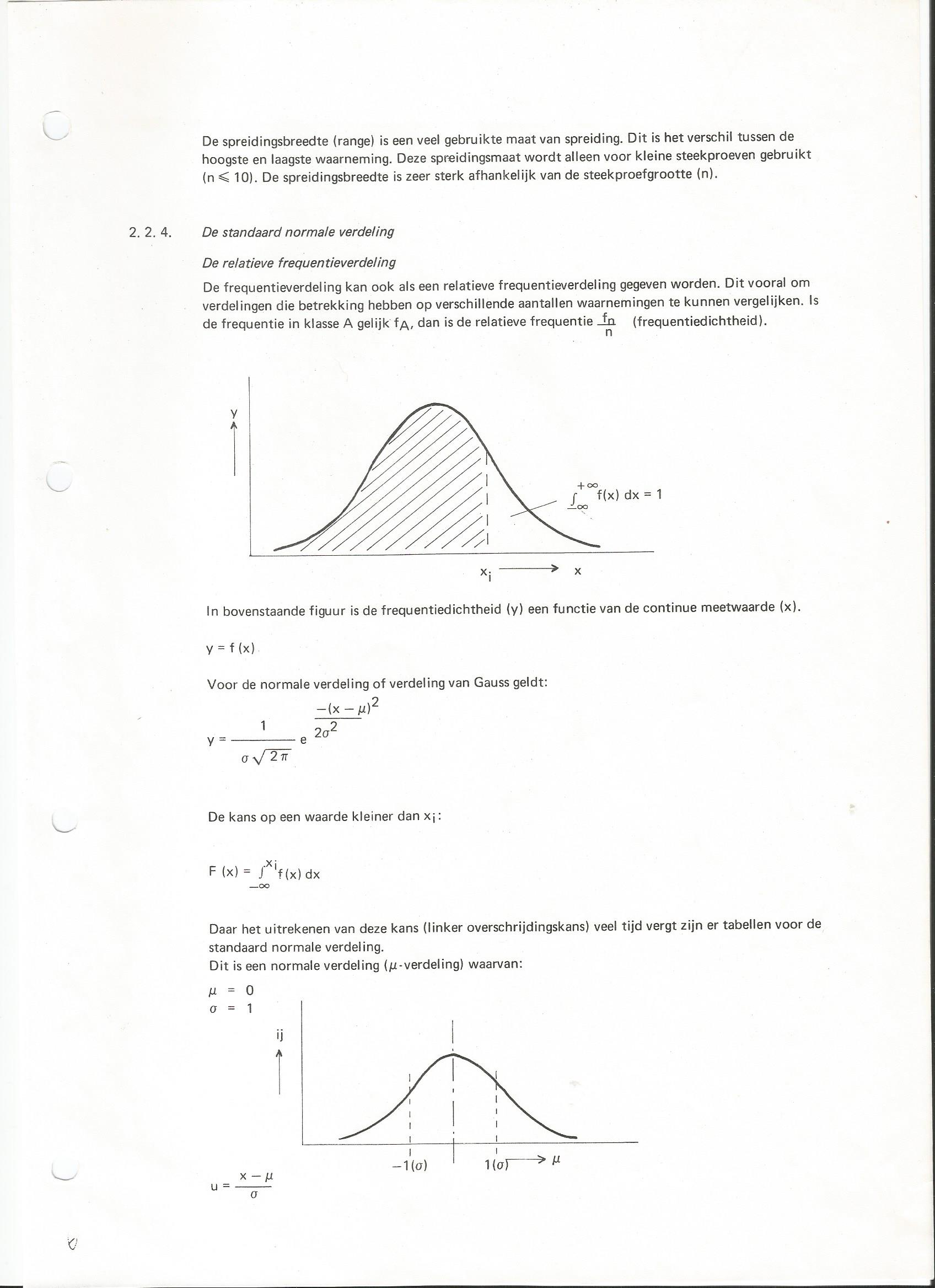
    I have programmed the formule as in the attachement. I think that it is possible, by mean of arrows, to calculate future upper and lower limits.
    
    pogingGauss.itf
    Scan0007.jpg Scan0007.jpg
    #182949 quote
    Zigo
    Participant
    Master
    a=(high+low)/2
    aa=Average[24](a)
    b=STD[10](a)
    cl=close
    
    y1=a+1/(b*SQRT(44/7))*exp(-1*(SQUARE((cl[n]-aa)))/2*square(b))
    y2=a-1/(b*SQRT(44/7))*exp(-1*(SQUARE((cl[n]-aa)))/2*square(b))
    
    return y1, y2
    JS thanked this post
    #182961 quote
    JS
    Participant
    Senior

    Thanks @Zig

    I will dive into it as soon as possible.
    #182975 quote
    JS
    Participant
    Senior

    Hi @Quino

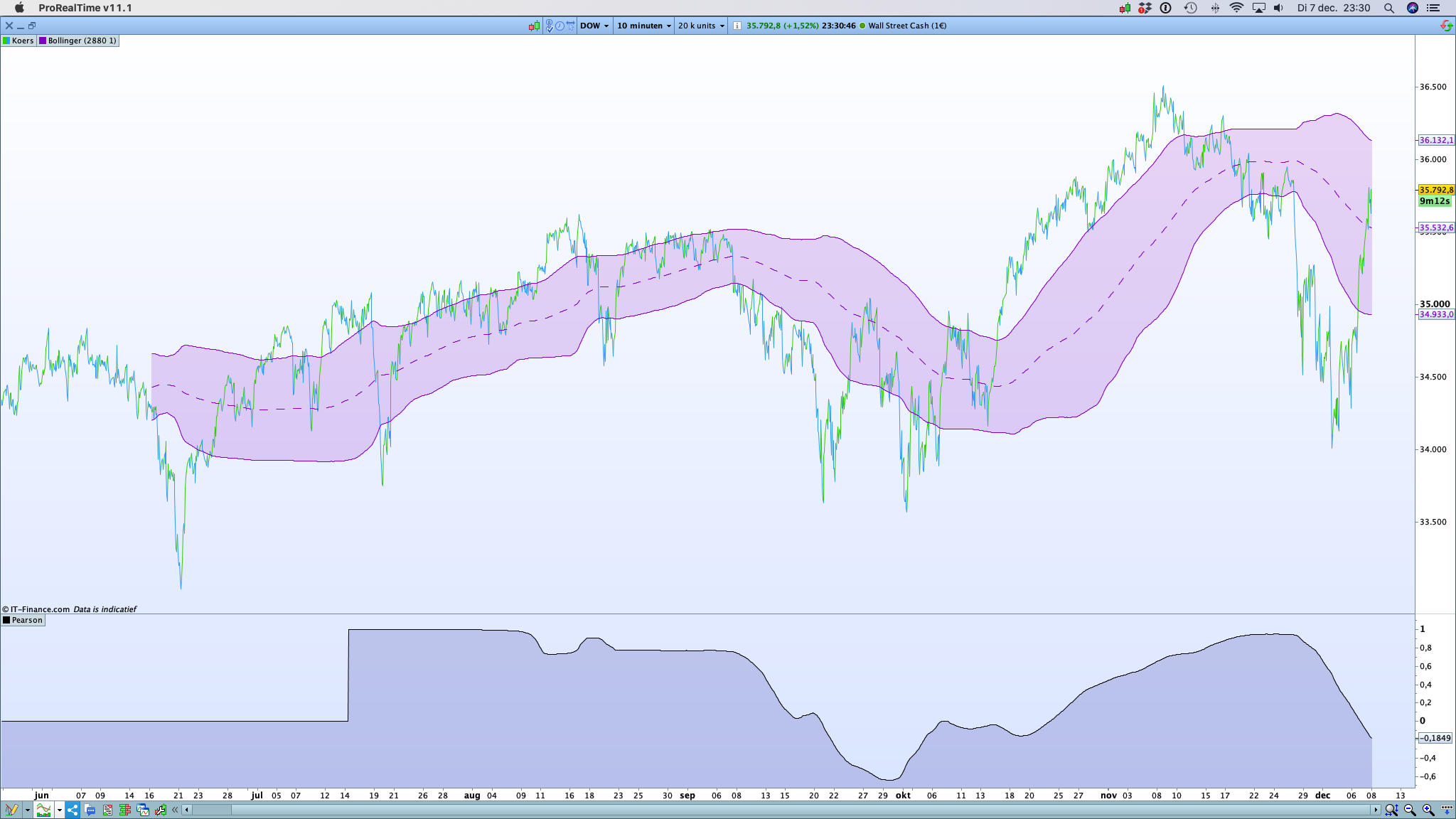
    The problem with BB, in a non-stationary process, is that the (slowly) changing mean interferes with the calculation of the standard deviation.

    Now that we have Pearson 🙂 you can see that the correlation with the price is going to vary due to the changing average.

    Schermafbeelding-2021-12-07-om-23.30.49.png Schermafbeelding-2021-12-07-om-23.30.49.png
    #182978 quote
    JS
    Participant
    Senior

    Hi @Zigo

    I understand what you are doing but are the future limits not simply:

    y1 = mu + standarddeviation (Close + Std[n](Close))

    y2 = mu – standarddeviation (Close – Std[n](Close))

Viewing 15 posts - 1 through 15 (of 17 total)
  • You must be logged in to reply to this topic.

Developing Gauss indicator


ProBuilder: Indicators & Custom Tools

New Reply
Author
author-avatar
JS @js Participant
Summary

This topic contains 16 replies,
has 3 voices, and was last updated by Zigo
4 years, 2 months ago.

Topic Details
Forum: ProBuilder: Indicators & Custom Tools
Language: English
Started: 11/25/2021
Status: Active
Attachments: 4 files
Logo Logo
Loading...