Detailed report different to optimize report

Viewing 4 posts - 1 through 4 (of 4 total)
  • Author
    Posts
  • #156360 quote
    trevor
    Participant
    Senior

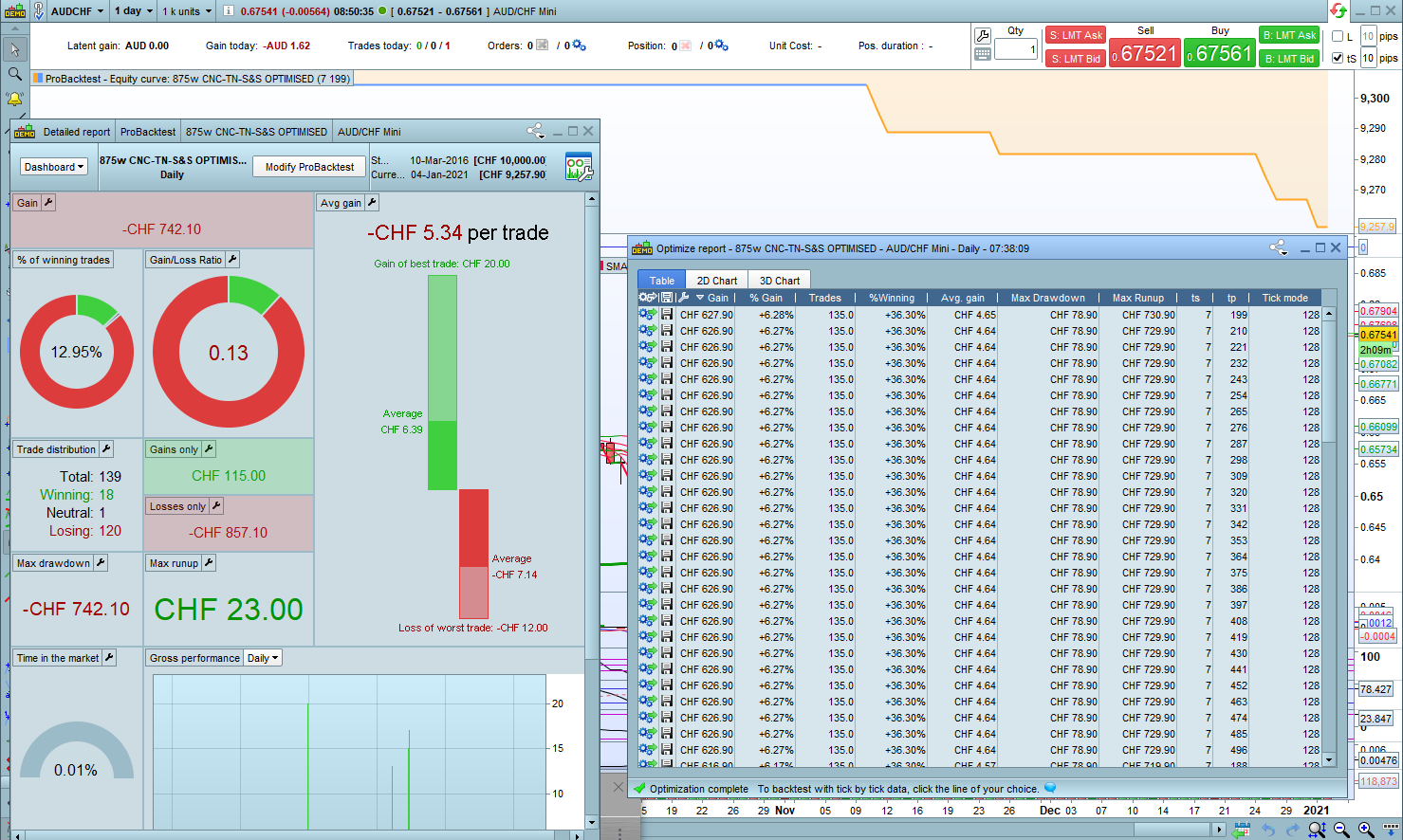
    I have run backtests on my PRT platform.

    When it is backtesting, the ‘optimize report’ shows the progress of the strategy.

    But, when the ‘detailed report’ arrives, the values are  totally different!

    The ‘optimize report’ has an icon to create a strategy based on its results.

    The results should be the same. Why are they different?

    PRT-report-variation.png PRT-report-variation.png
    #156365 quote
    XORANDNOT
    Participant
    Senior

    There are tons of bugs in the optimization reports (drawdown, runup, position details). Especially when you cumulate positions, it seems to me that almost nothing is right. PRT has to do a lot of work here.

    #156385 quote
    Nicolas
    Keymaster
    Master

    Optimizer do not use tick by tick mode (checking intra bar when exactly the TP/SL are triggered), that’s why there is a column named ‘tick mode’ which count how many bars during the backtests this could have happened. The less the better of course, but with 128 bars like in your picture, it is a real problem 😉 That’s why when you click individually on a row, the backtest with tick mode enable come with a rather different result.

    #156519 quote
    trevor
    Participant
    Senior

    Thanks Nicolas for your reply. When I started using PRT, I was not aware of the different results using tick by tick mode. I created a strategy, without tick by tick mode, and it showed a reasonable profit, but when I forward tested the strategy, it did not have the same results, and the strategy was not profitable. Just to clarify, does the equity curve graph include ‘tick by tick’ mode?

    When I shorten the time period to one month, it shows the same results, and in the ‘optimise report’ window under tick mode the top line shows 1 tick. Over a month there is more like a thousand ticks. Could you please explain what the ‘1’ represents.

    Thanks in advance for your reply.

Viewing 4 posts - 1 through 4 (of 4 total)

  • You must be logged in to reply to this topic.

Detailed report different to optimize report


Platform Support: Charts, Data & Broker Setup

New Reply
Author
Summary

This topic contains 3 replies,
has 3 voices, and was last updated by trevor
5 years, 1 month ago.

Topic Details
Forum: Platform Support: Charts, Data & Broker Setup
Language: English
Started: 01/04/2021
Status: Active
Attachments: 1 files
Logo Logo
Loading...