


Demo Account – Backtesting and Live Trading disparity

Viewing 6 posts - 1 through 6 (of 6 total)

  • Author
    Posts
  • #95590 quote
    MrMUCKIE
    Participant
    Junior
    I am looking to open my Live Account with ProRealTime, but I’ve uncovered an issue which has worried me, my backtested data seemed to perform very well, so I decided to trade live with the strategy, made some losses and when I backtested across the same time frame, I realise something went wrong in the live trading.
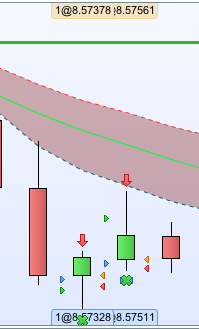
    The Blue and Orange pointers are reflective of the backtest.
    The Green and Red pointers are reflective of the live trade.
    Correct me if I’m wrong but surely they should be identical if they’re both the outcome of the same strategy.
    (Also I have a 5pip (the distance between the orange and blue pointers) stop loss on this strategy, but the Live Test shows that on the second candle stick, my stop loss was ignored. Why was that?)
    Thank you all for your help and let me know if you need anymore information from me.
    Screen-Shot-2019-04-06-at-01.59.12.png Screen-Shot-2019-04-06-at-01.59.12.png
    #95592 quote
    Vonasi
    Moderator
    Master

    Back testing is with a fixed spread that you set yourself whereas real life testing is with a spread set by your broker which can vary due to time of day  or current volatility. Slippage could also be the reason for the differences.

    The missed stop loss might be due to minimum stop distances for the instrument that you are trading. I believe that if you send an order that is too close to price then it gets placed at whatever the current minimum stoploss distance is. I might be wrong on this and others might have more experience as I don’t use stop losses in my strategies.

    #95600 quote
    GraHal
    Participant
    Master

    I believe that if you send an order that is too close to price then it gets placed at whatever the current minimum stoploss distance is. I might be wrong on this and others might have more experience as I don’t use stop losses in my strategies.

    I always get Rejects together with the error message … “Your Order was too close to market price, current minimum  stop distance is x points! (or similar as quoting from memory).

    #95629 quote
    MrMUCKIE
    Participant
    Junior

    Hey, thanks for this!

    Is there a way to mimic spreads in backtests?
    And also, is there a way to find out about the minimum stop loss distances?

    (Just to clarify, I’m using a demo account)

    #95634 quote
    GraHal
    Participant
    Master

    Here’s spreads and how they vary over a 24 hour.

    But bear in mind that at periods of high volatility that spreads can also flash widen for a few milliseconds!  In other words the link below is not a fixed / definitive figure.

    https://www.ig.com/uk/help-and-support/spread-betting-and-cfds/fees-and-charges/what-are-igs-indices-spread-bet-product-details

    #95669 quote
    Nicolas
    Keymaster
    Master

    is there a way to find out about the minimum stop loss distances?

    No, there is no way to get that value either in backtest or live trading.
    You will find this info on the IG website for each instrument, then use that value in your code to limit the rejected order error.

Viewing 6 posts - 1 through 6 (of 6 total)
  • You must be logged in to reply to this topic.

Demo Account – Backtesting and Live Trading disparity


ProOrder: Automated Strategies & Backtesting

New Reply
Author
author-avatar
MrMUCKIE @mrmuckie Participant
Summary

This topic contains 5 replies,
has 4 voices, and was last updated by Nicolas

6 years, 10 months ago.

Topic Details
Forum: ProOrder: Automated Strategies & Backtesting
Language: English
Started: 04/06/2019
Status: Active
Attachments: 1 files
Logo Logo
Loading...


