Define (and count) a trade as a WIN or as a LOSS

Viewing 12 posts - 16 through 27 (of 27 total)
  • Author
    Posts
  • #241169 quote
    PeterSt
    Participant
    Master

    For now again the short question : is this at IB or at IG ?
    This is not related to actual trading – just to which data you use with its side effects. But it is of no use to overcomplicate matters if we don’t know where you use the PRT platform (IB or IG).

    If it is the web version, then I myself am not sure how to see/know that.

    #241170 quote
    PeterSt
    Participant
    Master

    Because the close happens at the end of the bar, it will only try to go long at the next bar, which is not ideal but I don’t think I should worry about that aspect right now while I still have several things to polish/fix.

    It is very correct that you should not be bothered by this now. But for later, write down : MultiTimeFrame (you can use a faster timeframe for quicker responses). But indeed not know, as you first need to get the base right.

    Watanabix thanked this post
    #241171 quote
    PeterSt
    Participant
    Master
    Graph 0 as "ReadyForTrade1Check"
    Graph Tally  as "Tally"
    Graph 0 as "OrderPlaced"

    You can change that to

    Graph 0 as "ReadyForTrade1Check" Coloured("blue")
    Graph Tally Coloured("green")
    Graph 0 as "OrderPlaced" Coloured("orange")

    Also look at the 2nd line – there I left out the naming of the graph. It then defaults to the name of the variable (“Tally” again).
    But by giving the graphs explicitly a name, you can have several graphs for the same variable. With Tally that can be useful for you – all up to you of course.

    Watanabix thanked this post
    #241172 quote
    PeterSt
    Participant
    Master
    IF close >= LongEntryPoint  AND Tally < MaxTrades  THEN 
     
      Graph 2 as "ReadyForTrade1Check"
     
      BUY CON CONTRACTS At LongEntryPoint limit  
      Graph Tally  as "Tally"
      SET TARGET PPROFIT PT 
      SET STOP PRICE LO - Candlelength * StopAdjuster
     
      if LONGTRIGGERED THEN // tried to use this function to help with the tally variable accumulated number but didn't go much farther
        Graph 5 as "OrderPlaced"
        Tally = Tally +1
      ENDIF 
    ENDIF

    You can clearly (?) see that this can never work. So when your code is called after this 15 minutes where you want to enter, the order is not there yet, so LongTriggered will still be false (0).
    This should solve that :

    IF close >= LongEntryPoint  AND Tally < MaxTrades  THEN 
     
      Graph 2 as "ReadyForTrade1Check"
     
      BUY CON CONTRACTS At LongEntryPoint limit  
      Graph Tally  as "Tally"
      SET TARGET PPROFIT PT 
      SET STOP PRICE LO - Candlelength * StopAdjuster
    Endif
    
    if LONGTRIGGERED THEN // Was a Long order created during the previous bar ?
      Graph 5 as "OrderPlaced"
      Tally = Tally +1
    ENDIF 
    

    For you it is crucial to realise that both If’s above do not become true during the same call of your code; the first may be true when your Entry condition complies and the 2nd If may be true later or much later, when the Limit order was filled, which always occurs in the previous bar (never in the bar AFTER which your code is called at the close).
    If you can’t grasp this latter sentence (which is imaginable), sit back and think as long as needed to get what actually happens. For understanding, it could be a good idea to make it a normal Market order first. Then you’re not dependent on the invisible (is your order filled or not). Do you have that working ? then make it a Limit order again.

    IF close >= LongEntryPoint  AND Tally < MaxTrades  THEN 
     
      Graph 2 as "ReadyForTrade1Check"
     
      BUY CON CONTRACTS At LongEntryPoint limit  
      Graph Tally  as "Tally"
      SET TARGET PPROFIT PT 
      SET STOP PRICE LO - Candlelength * StopAdjuster
    

    This is an example again which will make it unreadable to  yourself. Out of context I cannot understand what you’re doing there. Change that to this :

    If Tally < MaxTrades  THEN   // Number of trades for the day not reached yet ?
    
      IF close >= LongEntryPoint
     
        Graph 2 as "ReadyForTrade1Check"
     
        BUY CON CONTRACTS At LongEntryPoint limit  
        Graph Tally  as "Tally"
        SET TARGET PPROFIT PT 
        SET STOP PRICE LO - Candlelength * StopAdjuster
    

    and suddenly I don’t NEED the context. It does exactly the same as how you have it, but in one go your eyes can go to under the main EndIf of this when needed.
    It will make you see where things are – or can be wrong elsewhere.

    The same thing is going on with your line checking the dead times (100000 and 160000) and the On Market. You should have a main if for not OnMarket and under that the remainder. Now suddenly your code becomes “small”, never mind additional lines were added. Just try it.

    If Not OnMarket then
    
      if OpenTime >= 100000 and opentime < 160000
     
        Graph 12 as "StartOfSystem"
        Graph 1 as "ReadyForTrade1Check"
        Graph Tally  as "Tally"
     
          If Tally < MaxTrades  THEN 
    
            [...]

    You will now soon get there. You will see … 🙂
    And in case you now readily achieve things : I think you should do something about the dead time logic because you will (?) soon see that this makes things unworkable for you, before it starts to work. Thus next advice is, remove the FlatBefore and FlatAfter commands for now. They WILL be in your way of understanding, because things happen which are out of your control and they will obfuscate. The If for the Entry times is fine.
    Anyway just think of what happens when you enter at 15:45 (which of course will be 16:00 because of being one bar behind always). Your further logic in the program does not cope with this by any means (that I can see).
    When the base works you can add those commands again, and you may soon see that they are impossible to work with to begin with. But this is for later.

    Have fun !

    Watanabix thanked this post
    #241231 quote
    Watanabix
    Participant
    New

    MANY THANKS Peter.

    This is extremely helpful and I did understand the rational behind your fixes, especially the “IFs”. WIll also delete the “FLATs” and start from “scratch”.

    I confess that since I started coding this strategy, I have felt that I don’t quite understand what will get executed in a given session (I am referring to the several IF+ENDIF blocks, especially if some are nested inside others).

    Regarding which data I get, I will email support and see if they can help me. I just purchased one month of the Complete package because my Premium trial expired.

    The tip regarding the colourlines and the non-naming of variables for charting was great. I myself had thought about a way to distinguish the variables I am now “tracking” by using the graph funciton as per your suggestion. It definitely opened my eyes to waht is happening “under the rug: :).

    Regarding the multitimeframe, I had already thought about using a smaller interval, say 1 minute, just to place the order (if conditions met) much sooner than waiting 15 minutes until the bar is over and the closed is defined. Won’t worry about that for now… I have bigger fish to fry as you correctly mentioned it.

    Really appreciate your time with me. Many thanks.

    tiago

    PeterSt thanked this post
    #241236 quote
    JS
    Participant
    Senior

    Hi,
    Here is the base code with the adjustments…
    The code will execute one profitable order per day, and if this order is a losing one, an additional order will be executed…

    DefParam CumulateOrders=False
    
    DefParam FlatBefore=094500
    DefParam FlatAfter=160000
    
    Once MaxTrades=2
    Once Buffer=0
    Once PT=200
    
    IF IntraDayBarIndex=0 THEN
    TradeCount=0
    TradeOn=1
    ENDIF
    
    If StrategyProfit>StrategyProfit[1] then
    TradeOn=0
    EndIf
    
    If LongTriggered or ShortTriggered then
    TradeCount=TradeCount+1
    EndIf
    
    If OpenTime=094500 then
    HI=High
    LO=Low
    CandleLength=HI-LO
    EndIf
    
    If NOT ONMARKET and TradeOn=1 and TradeCount<MaxTrades then
    If Close>HI+buffer then
    BUY 1  CONTRACTS AT HI+buffer limit
    SET STOP PRICE LO
    SET TARGET pProfit PT
    EndIf
    
    IF Close<LO-buffer then
    SELLSHORT 1 CONTRACTS AT LO-buffer limit
    SET STOP PRICE HI
    SET TARGET pProfit PT
    EndIf
    EndIf
    
    Graph TradeCount as "TradeCount"
    Graph TradeOn as "TradeOn"
    GraphOnPrice HI as "HI"
    GraphOnPrice LO as "LO"
      
    
    Watanabix and NeoTrader thanked this post
    #241294 quote
    Watanabix
    Participant
    New

    Hi JS,

    Many thanks for your help. I copied and pasted your code exactly as is and it worked extremely well.

    Some observations:

    1. It does stop when the first trade is a winner and there were no days with more than two trades. No hiccups here in any situation.
    2. The exit works well as it always respects the SL
    3. The only thing I changed was defining “buffer” as a variable (because it was still part of the conditions to enter the market) with fixed value = 5
      • Even after defining “buffer as 5”, it seems that the entry always matches the HI or LO, meaning, the buffer is zero when we get to testing the conditions for placing long or short orders


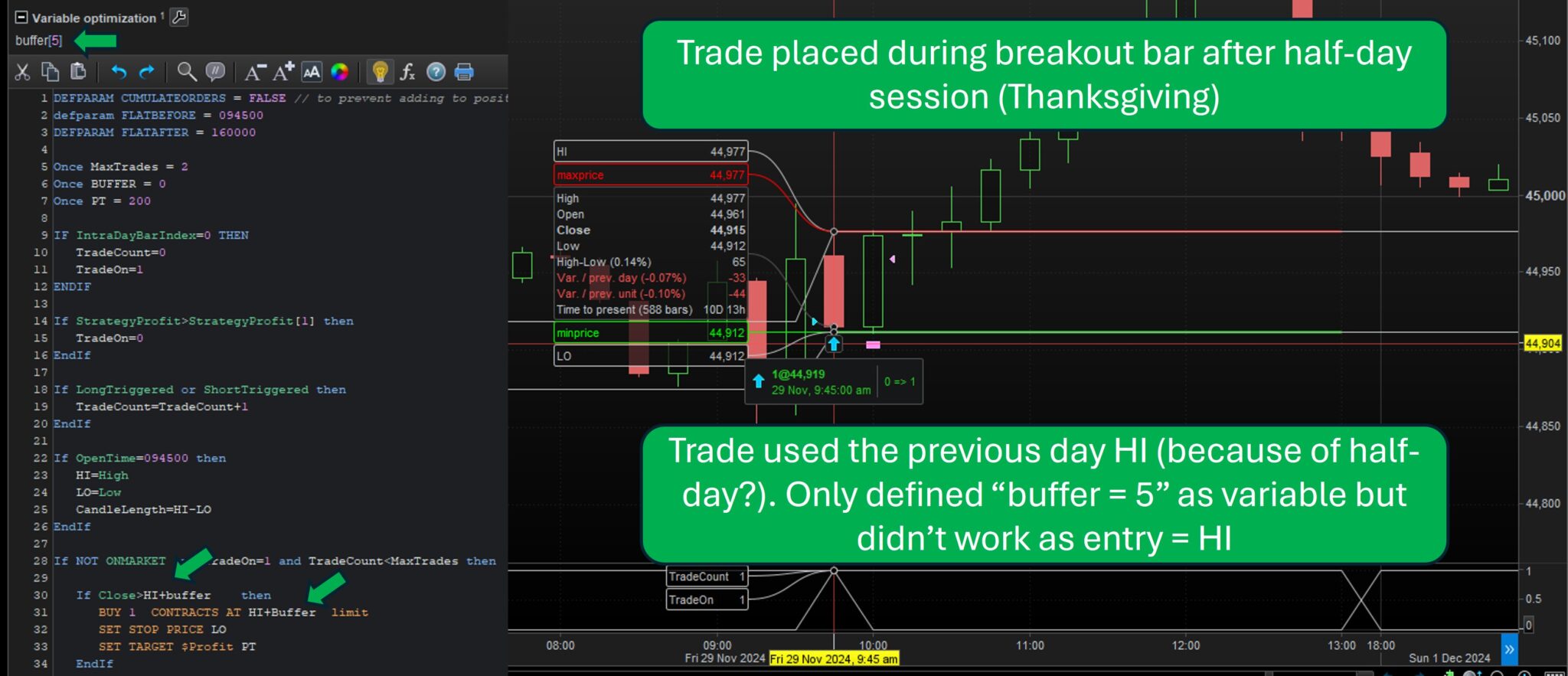
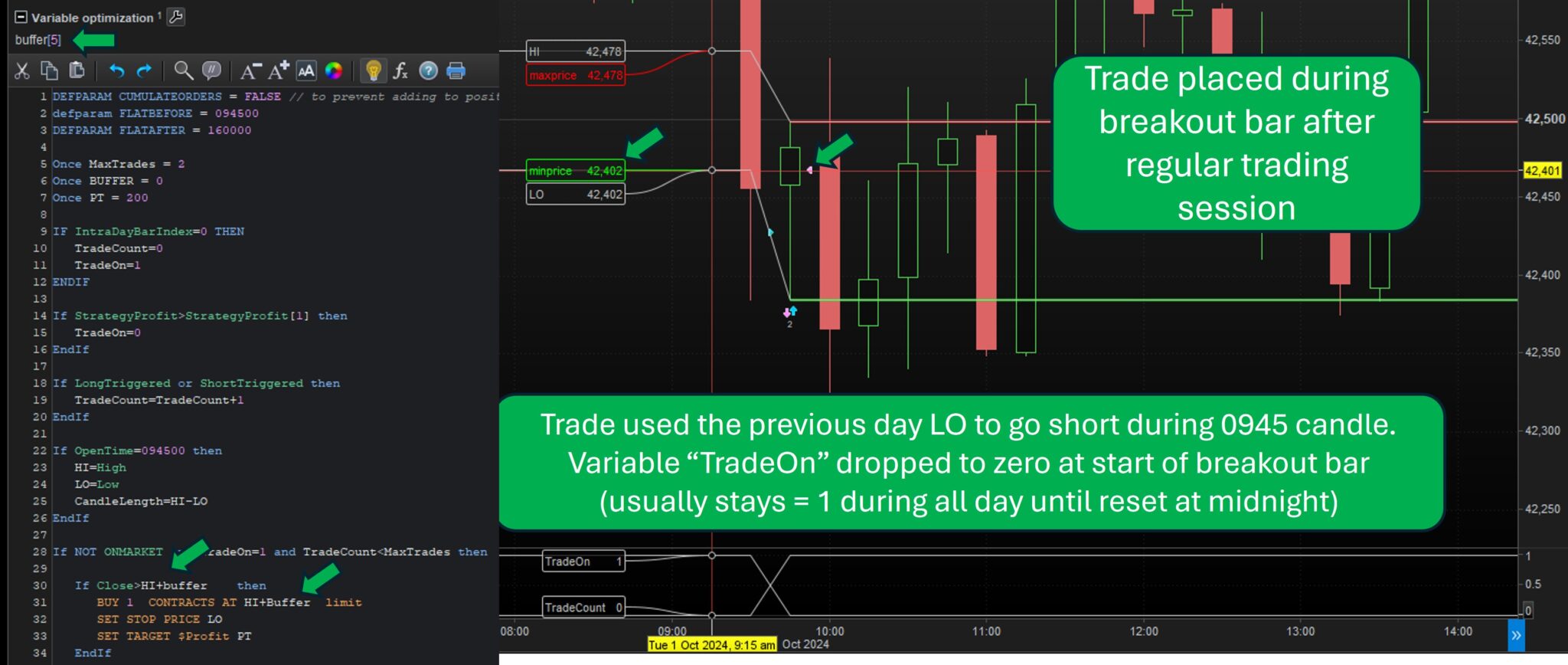
    1. I am attaching, however, just a few instances where it behaved differently (half-day session days like Thanksgiving/Labour Day + and a few days where it placed a trade during the breakout bar):

    Orders placed during the 0945 breakout candle:

    1. a) On 11/29, somehow it placed one trade still during the breakout bar (0945-1000), using the previous day (Thanksgiving) HI.
    2. b) On 10/1, it also placed one trade during the breakout bar (0945-1000), also using the previous day (regular session) LO. In this case, the variable “TradeOn” dropped to zero right at the 0945 candle.

    There are a few more days where it also placed orders in the 0945 candle.

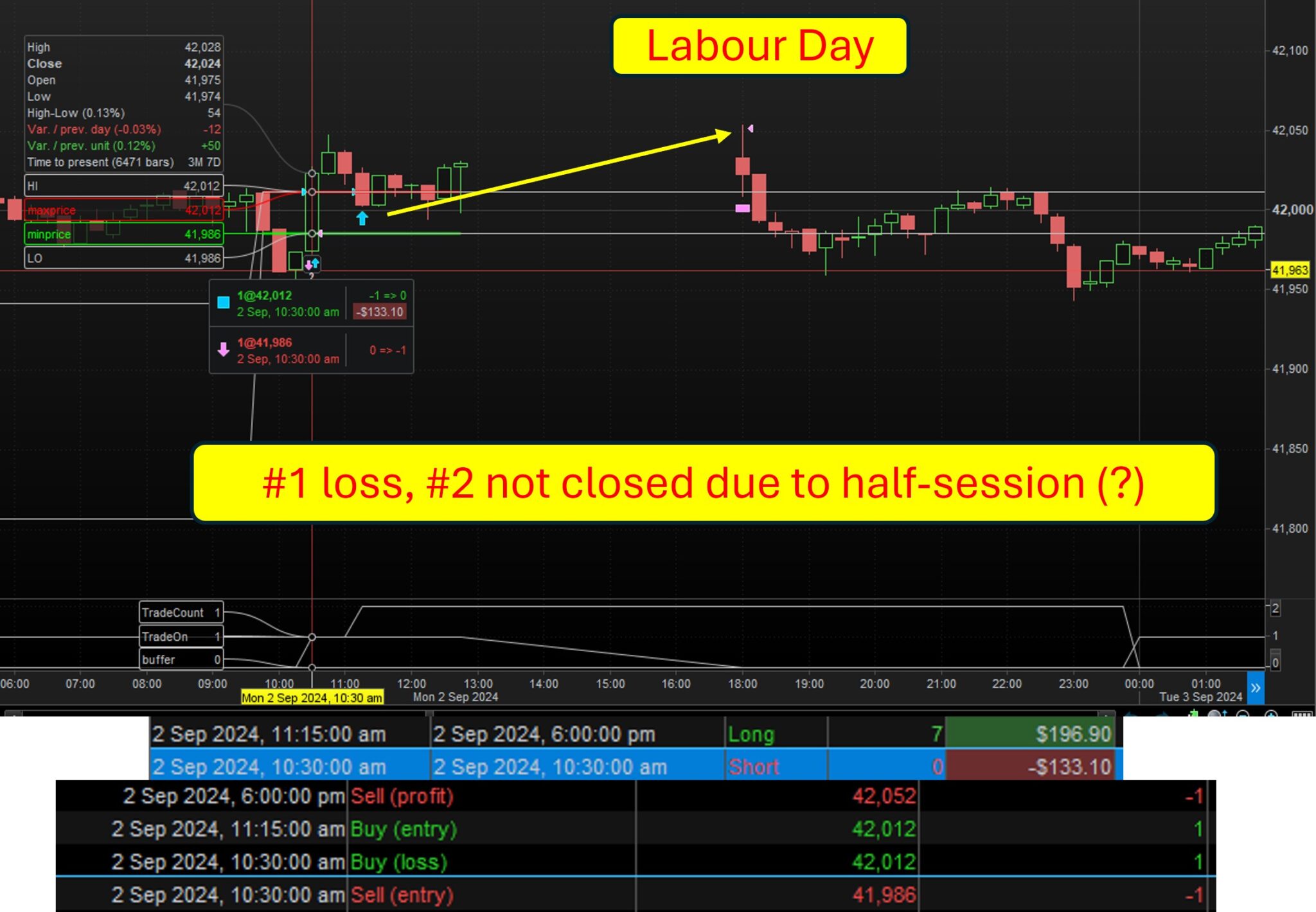
    Orders not closed during half-day trading sessions (ie. Labour Day and Thanksgiving)

    c) On Labour Day, the 2nd trade didn’t close when the market closed (1300). Only when it reopened at 1800.

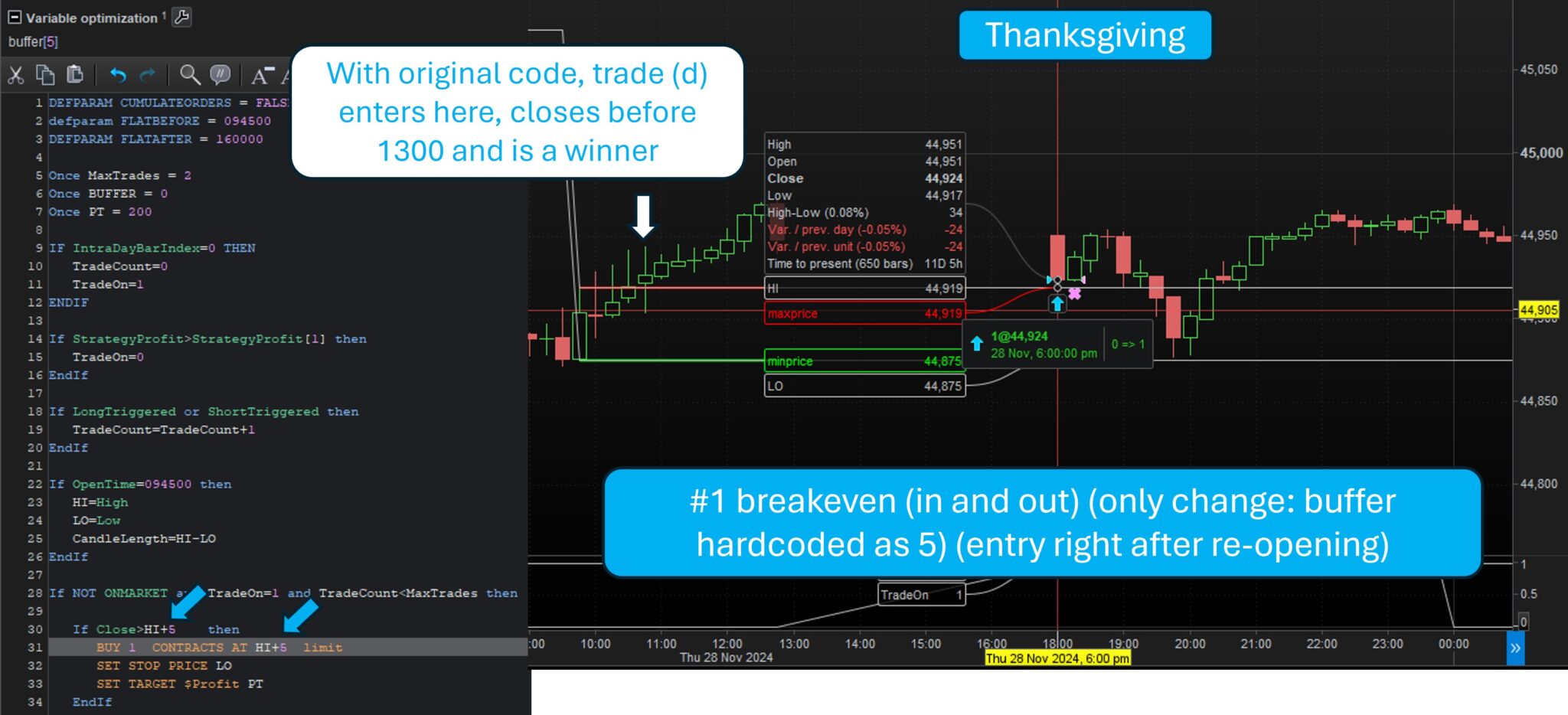
    d) On Thanksgiving Day, it placed the first correctly (same entry as HI but buffer “not working” as already mentioned)

    e) On same Thanksgiving Day, I hard-coded and replaced the “buffer” with the number 5 in two lines of the code (entry conditions) just to see the difference and somehow, the previous winning trade (described on “d”) didn’t happen and there was a trade right when the market re-opened. Even with the buffer hardcoded as “5”, there was still plenty of room for the trade described in “d” to happen, where the buffer basically was considered as “0”. So not sure why this behaviour. Tried to troubleshoot but couldn’t find a solid reason.

    For transparency, I am pasting the code JS provided, with that slight adjustment at the top (define buffer as 5), however that adjustment was completely innocuous in terms of entries, as they kept taking place exactly at the HI or LO.


    Many thanks again for everyone trying to help. This was definitely a big step forward. I just wonder what is happening with these 0945 trades… I am sure (I hope!) the half-day sessions issue might be something that can be identified more easily.


    Time to rest.


    PS: Peter, I will work on your suggestions tomorrow. Today I spent the whole day trying to check JS’s code. Thank you again as well.


    DEFPARAM CUMULATEORDERS = FALSE // to prevent adding to positions
    defparam FLATBEFORE = 094500
    DEFPARAM FLATAFTER = 160000
    
    Once MaxTrades = 2
    Once BUFFER = 0
    Once PT = 200
    
    IF IntraDayBarIndex=0 THEN
    TradeCount=0
    TradeOn=1
    ENDIF
    
    If StrategyProfit>StrategyProfit[1] then
    TradeOn=0
    EndIf
    
    If LongTriggered or ShortTriggered then
    TradeCount=TradeCount+1
    EndIf
    
    If OpenTime=094500 then
    HI=High
    LO=Low
    CandleLength=HI-LO
    EndIf
    
    If NOT ONMARKET and TradeOn=1 and TradeCount<MaxTrades then
    
    If Close>HI+buffer     then
    BUY 1  CONTRACTS AT HI+buffer  limit
    SET STOP PRICE LO
    SET TARGET $Profit PT
    EndIf
    
    IF Close<LO-Buffer  then
    SELLSHORT 1 CONTRACTS AT LO-Buffer  limit
    SET STOP PRICE HI
    SET TARGET $Profit PT
    EndIf
    EndIf
    
    Graph TradeCount as "TradeCount"
    Graph TradeOn as "TradeOn"
    GraphOnPrice HI as "HI"
    GraphOnPrice LO as "LO"
    
    a-trade-during-0945-candle-after-half-day-session.jpg a-trade-during-0945-candle-after-half-day-session.jpg b-trade-during-0945-candle-after-regular-session.jpg b-trade-during-0945-candle-after-regular-session.jpg c-Labour-Day-trade-not-closed-during-half-day-session.jpg c-Labour-Day-trade-not-closed-during-half-day-session.jpg e-Thanksgiving-hard-coded-5-to-replace-buffer-and-changed-previous-trade-to-after-market-reopening.jpg e-Thanksgiving-hard-coded-5-to-replace-buffer-and-changed-previous-trade-to-after-market-reopening.jpg
    #241299 quote
    Watanabix
    Participant
    New

    Update:

    I added HI and LO = 0 when day starts and it got rid of the 0945 trades:

    IF IntraDayBarIndex=0 THEN
    TradeCount=0
    TradeOn=1
    HI =0
    LO =0

    I guess the only thing left is that weird trade on thanksgiving right after the market reopened, which was closed at breakeven. really weird, we don’t have any breakeven code.


    Now definitely time to rest 🙂

    #241314 quote
    druby
    Participant
    New

    Just theorising.

    When everything resets at intradaybarindex = 0,  the FlatBefore and FlatAfter are in affect, no trade is on market.

    However, the ‘not on market’ block and the long and short code blocks within can still be executed.

    Therefore, its possible to trigger the limit order code, with the Flat… instruction stopping an actual order if that’s the last thing in the process.

    When the FlatBefore expires there could already be a limit order set in the works straight away.

    If so, the first candle 09:45:00 may be triggered if it returns to the trigger level.


    Setting HI and LO to zero may stop a short code from triggering, because close can never  reach the trig level . No 1st bar trade.

    But for Hi, close will always be above, so biased towards long. Under this scenario you may see a long trade if this happens on first bar.


    Only when intradaybarindex =0 and HI and LOW are set to that candles high  and low will close be guaranteed not  able to be above or below the trigger levels, assuming Buffer = 0.

    Or to put it another way, at any time other than that situation a trigger could happen while not on market.

    When on market, the ‘not onmarket’ block is disabled and blocks within, till trade exited by stop/target/ flatAfler.


    There maybe a subtle combination that’s getting through with the times of the FLAT instruction expiring and the open time  of the already executing code.

    Therefore is improved control of the code blocks required to ensure there not continually executing if not required.

    PeterSt thanked this post
    #241315 quote
    JS
    Participant
    Senior

    Hi Tiago,

    As you already mentioned, undesirable actions occur after partial sessions due to holidays.

    Naturally, this happens because the code cannot be executed “normally” on these days.

    The best solution is to avoid such days, for example, with:

    Date1=20241001

    Date2=20241129

    If OpenDate<>Date1 and OpenDate<>Date2 then

    (Your Strategy)

    EndIf

    (This topic has also been extensively discussed on the forum)

    #241320 quote
    PeterSt
    Participant
    Master

    There maybe a subtle combination that’s getting through with the times of the FLAT instruction expiring and the open time  of the already executing code. Therefore is improved control of the code blocks required to ensure there not continually executing if not required.

    Yes. And this is how you should end up with no FlatBefore and FlatAfter commands at all. In combination with “doing it yourself” all will be in control and better comprehensible.

    Btw :

    However, the ‘not on market’ block and the long and short code blocks within can still be executed. Therefore, its possible to trigger the limit order code, with the Flat… instruction stopping an actual order if that’s the last thing in the process.

    If all is right that won’t happen. It will be the same situation as Preloadbars executing – your code will be called for each bar during this process (in itself a huge bug IMO), while “ProOrder” (so to speak) is inactive. Thus for example, a Limit order will not be repeated (the line of code of concern is just ignored) and therefore any pending Limit order will be cancelled (because they must be repeated to be maintained).
    If all is right, I said, because I never tested such a situation.


    PS: Peter, I will work on your suggestions tomorrow.

    Heads up ! 🙂

    #242662 quote
    Watanabix
    Participant
    New

    Hi everyone and happy new year.

    I went home (Portugal) to spend the holidays with my Family and let this thread on standby.

    1) – Obviously I have been reflecting on this system and have concluded that for now it makes more sense to keep the maximum trades to ONE per day. This does also eliminate some “erratic” behaviour of the system when trade #1 was a loser, specifically, the re-entry for trade #2 (and last trade) was a bit messy. With all your help, the code is now very stable with regards to defining and counting a trade as a WIN or as a LOSS.

    Say, trade #1 was a SHORT on the LOW and the price would go all the way up to the stop (the HIGH of the 094500 bar) and make the trade a loser. The re-entry conditions for trade #2 would be enter only in the other direction (LONG) as soon as the price crossed the previously established HIGH of the 094500 + buffer of 5 points. This would be the conditions for the second and last trade of the day (only if first trade was a loser). Enter at the opposite entry point of the loser trade. Maybe in the future I will focus on adding this condition for a second trade (hopefully is something we can do here with PRT).

    2) – My goal now is to “fix” the issue I shared before. The code is using the funtion CLOSE to compare the price with the 2 entry points above/below the 0945 bar, however it seems that only does that check from the end of the 1000 bar onwards (I had the tick-by-tick option enable d previously but that din’t solve anything). Is there a possible way to compare the current price with the entry points right from the 1000 start? I am using a 15m interval for my strategy. Would the only “fix” be to change the interval to 1m but still define the entry points based on the 0945-1000 bar?


    Thank you again for all your support. I will open a new thread, related to the frequency of the comparison of the current price with other price levels, should be a new one.


    tiago

Viewing 12 posts - 16 through 27 (of 27 total)
  • You must be logged in to reply to this topic.

Define (and count) a trade as a WIN or as a LOSS


ProOrder: Automated Strategies & Backtesting

New Reply
Author
author-avatar
Watanabix @watanabix Participant
Summary

This topic contains 26 replies,
has 6 voices, and was last updated by Watanabix
1 year, 1 month ago.

Topic Details
Forum: ProOrder: Automated Strategies & Backtesting
Language: English
Started: 12/03/2024
Status: Active
Attachments: 8 files
Logo Logo
Loading...