ProRealCode - Trading & Coding with ProRealTime™
Hello Traders,
I searched a lot of pages with posts on this forum but wasn’t able to find (at least to the point where I decided to stop) a post with this topic: a code that tells you if a trade was a win or a loss. I searched on the ProBuider function list but nothing looked like addressing the P&L of a single closed trade.
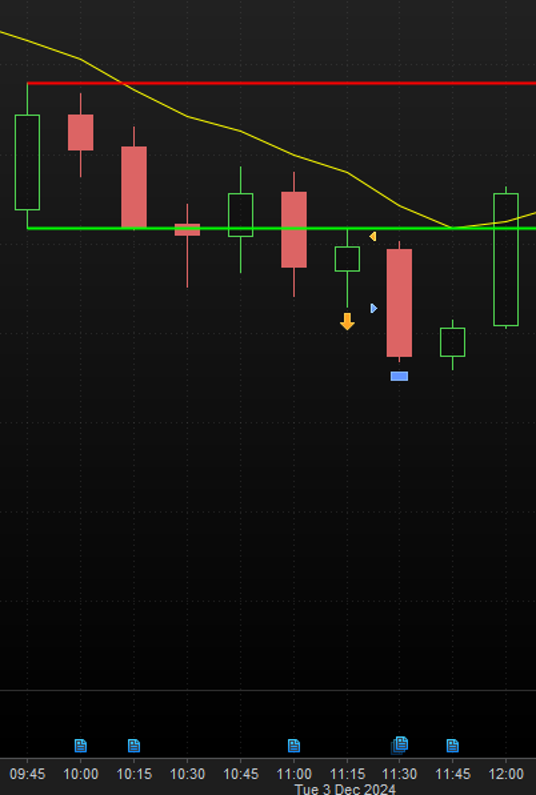
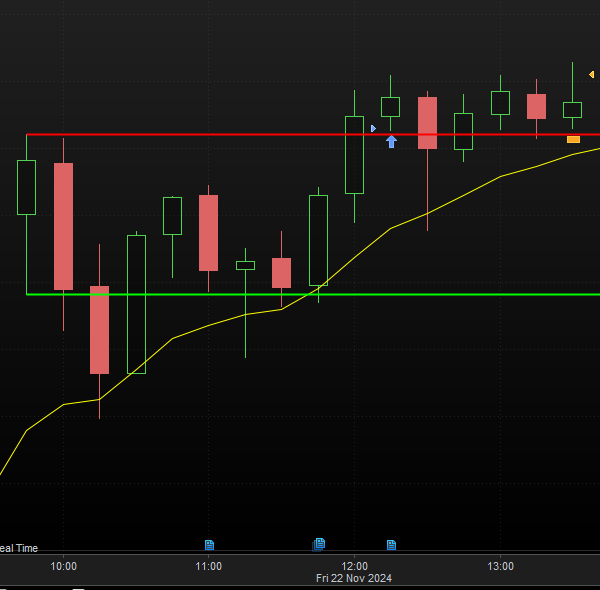
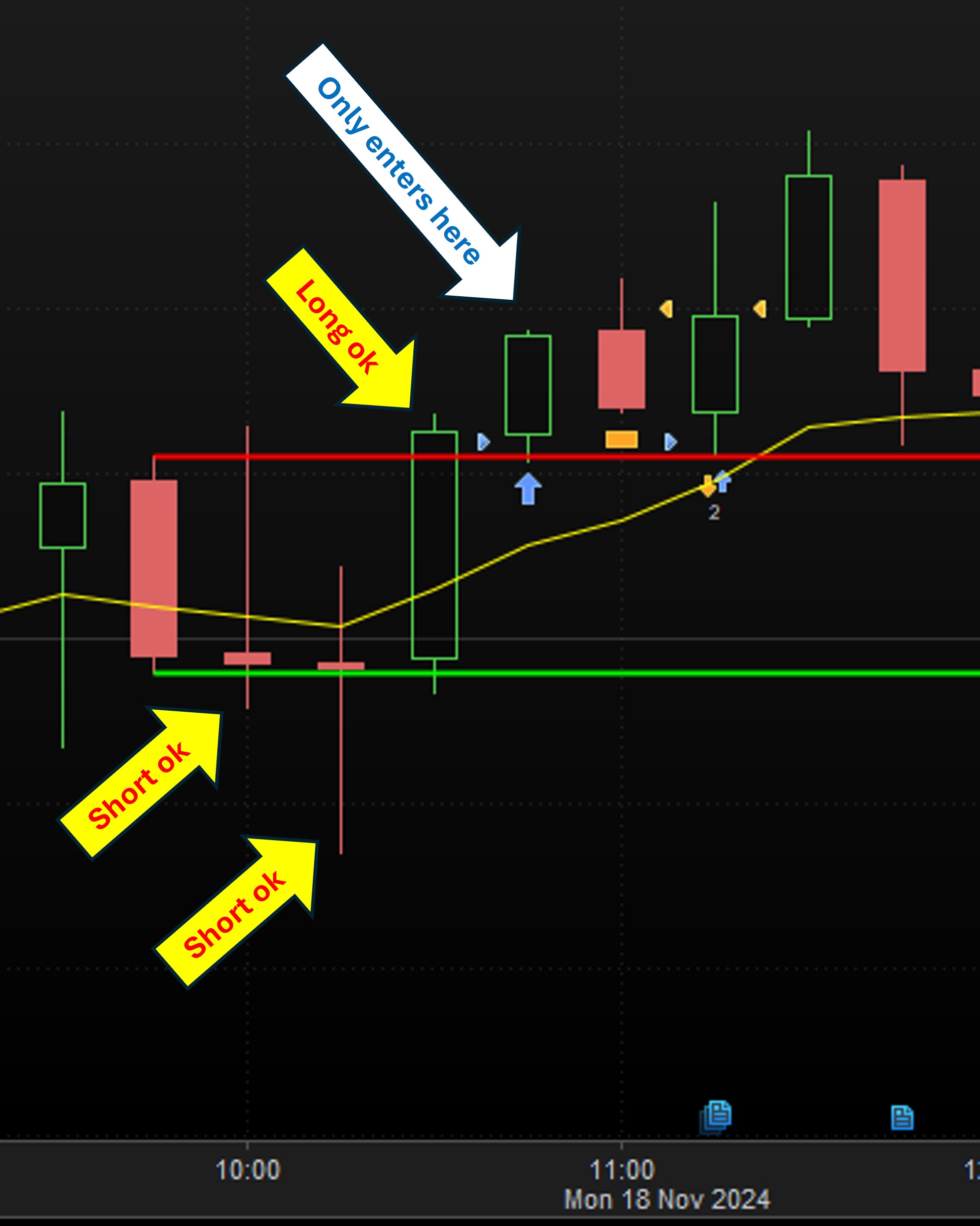
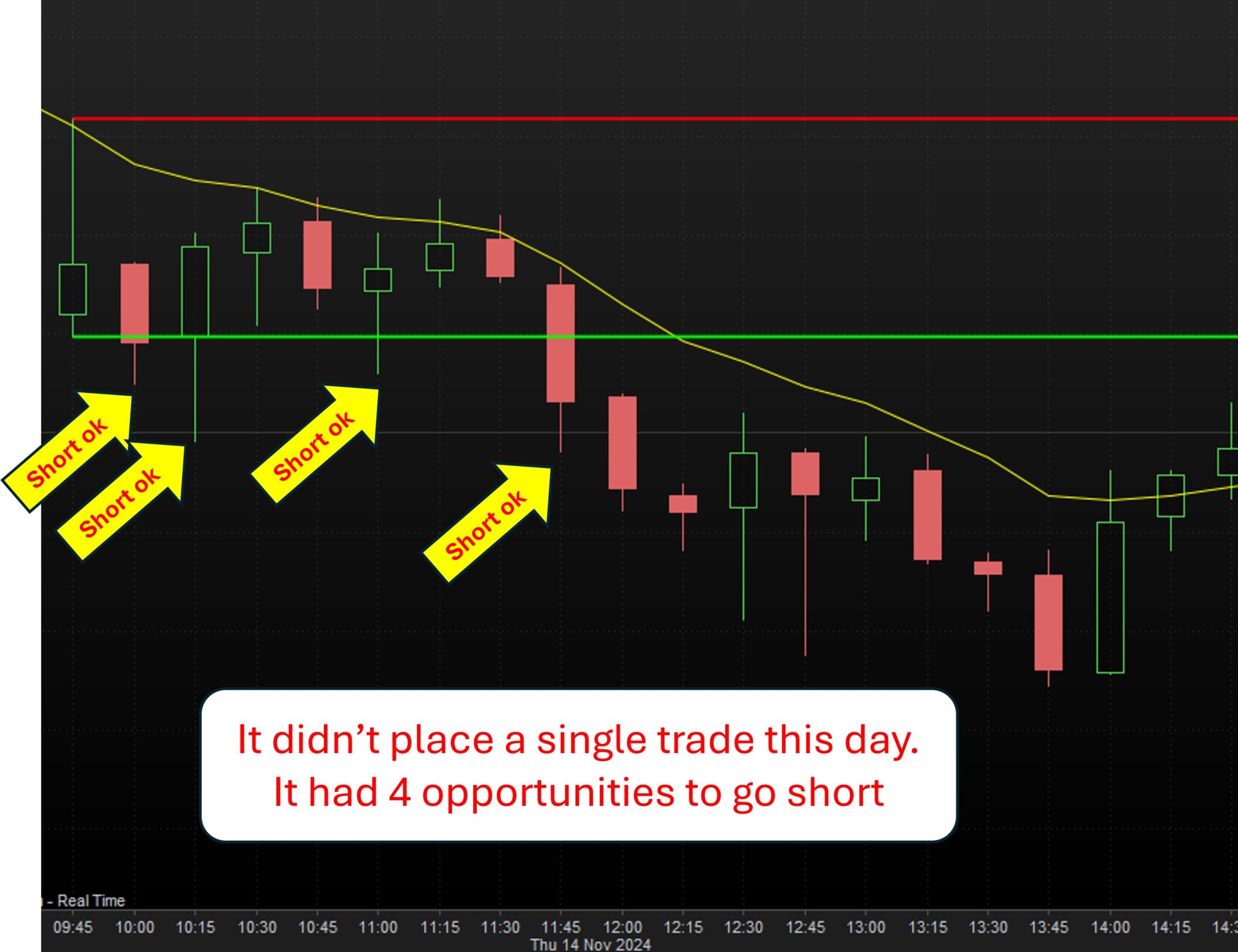
My idea is to use this code to limit my number of trades in one day:
I already found several posts that cover the “max number of trades per day” topic, however couldn’t see anything related with how to classify a trade based on its P&L.
Many thanks in advance for the guidance/suggestions.
tiago
Hi!
You can use positionperf(1) to check the performance of last trade.
Many thanks Ivan.
I followed your advice and used the function ‘positionperf’, however the strategy still executes two wins in one day. It is now stopping at two trades per day but mainly because my variable ‘MaxTrades’ is set to 2. Unless I am using the function ‘positionperf’ wrong, it makes sense to give the instruction to make the tradecount = maxtrades if the trade is a winner, hence not allowing more trades during the day, otherwise if the first trade is a loser, then add 1 trade to the tradecounter and perform the same calculations again.
Any help from the community is highly appreciated. Thank you again.
DEFPARAM FlatAfter = 160000
DEFPARAM CUMULATEORDERS =FALSE
defparam flatbefore = 094500
Once FirstTradeResult = 0 // 0 for not yet determined, 1 for win, -1 for loss
Once TradeCount = 0
//
// reset the TradeCount each new day
//
IF IntraDayBarIndex = 0 THEN
TradeCount = 0
ENDIF
//
// enter a trade when conditions are met AND the trade to be opened doesn't exceed MaxTrades
If OpenTime >= 094500 and OpenTime < 100000 then
HI = high
LO = low
Candlelength = HI - LO
EndIf
IF Opentime >= 100000 AND NOT ONMARKET THEN
IF close > HI+buffer AND (TradeCount < MaxTrades) THEN
BUY CON CONTRACTS AT HI+buffer limit
SET STOP PRICE LO - Candlelength * Stopsmoother
SET TARGET pProfit PT
if POSITIONPERF (1)> 0 THEN
TradeCount = MaxTrades
Else
TradeCount = TradeCount + 1
ENDIF
ELSE
IF close < LO-buffer AND (TradeCount < MaxTrades) THEN
SELLSHORT CON CONTRACTS AT LO-buffer limit
SET STOP PRICE HI + Candlelength * Stopsmoother
SET TARGET pProfit PT
if POSITIONPERF (1)> 0 THEN
TradeCount = MaxTrades
ELSE
TradeCount = TradeCount + 1
ENDIF
ENDIF
ENDIF
ENDIF
StrategyProfit is the correct instruction to know whether a trade was a LOSS or a GAIN, as PositionPerf only reports the temporary performance while the trade is open.
Moreover, the check should be done within an IF…ENDIF block of its own, prior to entry. Try this one:
DEFPARAM FlatAfter = 160000
DEFPARAM CUMULATEORDERS =FALSE
defparam flatbefore = 094500
Once FirstTradeResult = 0 // 0 for not yet determined, 1 for win, -1 for loss
Once TradeCount = 0
//
// reset the TradeCount each new day
//
IF IntraDayBarIndex = 0 THEN
TradeCount = 0
ENDIF
if StrategyProfit > StrategyProfit[1] THEN
TradeCount = MaxTrades
ELSE
TradeCount = TradeCount + 1
ENDIF
//
// enter a trade when conditions are met AND the trade to be opened doesn't exceed MaxTrades
If OpenTime >= 094500 and OpenTime < 100000 then
HI = high
LO = low
Candlelength = HI - LO
EndIf
IF Opentime >= 100000 AND NOT ONMARKET THEN
IF close > HI+buffer AND (TradeCount < MaxTrades) THEN
BUY CON CONTRACTS AT HI+buffer limit
SET STOP PRICE LO - Candlelength * Stopsmoother
SET TARGET pProfit PT
//if POSITIONPERF (1)> 0 THEN
//TradeCount = MaxTrades
//Else
//TradeCount = TradeCount + 1
//ENDIF
ELSE
IF close < LO-buffer AND (TradeCount < MaxTrades) THEN
SELLSHORT CON CONTRACTS AT LO-buffer limit
SET STOP PRICE HI + Candlelength * Stopsmoother
SET TARGET pProfit PT
//if POSITIONPERF (1)> 0 THEN
//TradeCount = MaxTrades
//ELSE
//TradeCount = TradeCount + 1
//ENDIF
ENDIF
ENDIF
ENDIF
Hi Roberto and ProRealTime community,
Roberto, thank you for trying to help with the function strategyprofit but it didn’t work unfortunately. I copied your block of code and when I run it, it wouldn’t place any trade…
Unfortunately I feel I am about to hit a brickwall, which is very demoralizing. I am a resilient guy but this idea of creating a simple breakout range system that stops if the 1st trade is a win or else it just executes one last trade, is apparently way more complex than I enviosioned it…
Right now I have theseissues (I have been working on them 24/7 for the last couple of days):
Here is the code as is, complying with doing max 2 trades a day if entry/exit conditions are met (but not checking for winner or loser) and always placing trades at the 2nd bar after the breakout bar or later.
If anyone can give me a hand, that would be highly appreciated. I am 100% convinced that ProRealTime can handle what I am asking it to do. I will keep digging…
Many thanks
// Variables for reference PT = 40, CON = 1, Buffer = 5, MaxTrades = 2, StopAdjuster = 0.25
DEFPARAM FlatAfter = 160000
DEFPARAM CUMULATEORDERS =FALSE
defparam flatbefore = 100000
ONCE Tally = 0
//
// reset the TALLY each new day
//
IF IntraDayBarIndex = 0 THEN
Tally = 0
ENDIF
//
// enter a trade when conditions are met AND the trade to be opened doesn't exceed MaxTrades
If OpenTime >= 100000 and OpenTime < 100000 then
HI = high
LO = low
Candlelength = HI - LO
EndIf
//IF Opentime >= 100000 AND NOT ONMARKET THEN
if opentime >= 100000 and not ONMARKET then
IF close > HI+buffer AND (Tally < MaxTrades) THEN
BUY CON CONTRACTS AT HI+buffer limit
SET STOP PRICE LO - Candlelength * StopAdjuster
SET TARGET pProfit PT
Tally = Tally + 1
ELSE
IF close < LO-buffer AND (Tally < MaxTrades) THEN
SELLSHORT CON CONTRACTS AT LO-buffer limit
SET STOP PRICE HI + Candlelength * StopAdjuster
SET TARGET pProfit PT
tally = Tally + 1
ENDIF
ENDIF
ENDIF
Line
If OpenTime >= 100000 and OpenTime < 100000 then
is logically incorrect, as it will never be true since the TIME cannot be >= AND < 100000 at the same time; you probably wanted to write < 160000.
In addition the line
IF close > HI+buffer AND (Tally < MaxTrades) THEN
will never be true, as CLOSE cannot be > HIGH+buffer. I tested it using “minus” instead of “plus”.
Also, the code I posted had an incorrect ELSE (it should have been ELSIF….) with STRATEGYPROFIT.
This will do:
// Variables for reference PT = 40, CON = 1, Buffer = 5, MaxTrades = 2, StopAdjuster = 0.25
DEFPARAM FlatAfter = 160000
DEFPARAM CUMULATEORDERS = FALSE
defparam flatbefore = 100000
ONCE Tally = 0
ONCE MaxTrades = 2
ONCE Buffer = 5 * PipSize
ONCE CON = 1
ONCE PT = 200
ONCE StopAdjuster = 1.0
//
// reset the TALLY each new day
IF IntraDayBarIndex = 0 THEN
Tally = 0
ENDIF
if StrategyProfit > StrategyProfit[1] THEN
Tally = MaxTrades
ELSif StrategyProfit > StrategyProfit[1] THEN
Tally = Tally + 1
ENDIF
//
// enter a trade when conditions are met AND the trade to be opened doesn't exceed MaxTrades
If OpenTime >= 100000 and OpenTime < 160000 then
HI = high
LO = low
Candlelength = HI - LO
EndIf
//IF Opentime >= 100000 AND NOT ONMARKET THEN
if opentime >= 100000 and not ONMARKET then
IF close > HI-buffer AND (Tally < MaxTrades) THEN
BUY CON CONTRACTS AT HI+buffer limit
SET STOP PRICE LO + Candlelength * StopAdjuster
SET TARGET pProfit PT
Tally = Tally + 1
ENDIF
IF close < LO-buffer AND (Tally < MaxTrades) THEN
SELLSHORT CON CONTRACTS AT LO-buffer limit
SET STOP PRICE HI + Candlelength * StopAdjuster
SET TARGET pProfit PT
tally = Tally + 1
ENDIF
ENDIF
I also changed the IF…ENDIF nesting for entries.
StrategyProfit > StrategyProfit[1] THEN
Tally = MaxTrades
ELSif StrategyProfit > StrategyProfit[1] THEN
Tally = Tally + 1
ENDIF
Yes, we saw that that was wrong. But it still is 🙂
If this is on IB it will keep on being wrong. Watanabix – which version do you use ? PRT-IG or PRT-IB ?
IF IntraDayBarIndex = 0 THEN
Tally = 0
ENDIF
This may never occur in your situation.
Change it to this so you can check :
Graph 0 as "Bar0Check" // This will show in the bottom pane as a flat line.
IF IntraDayBarIndex = 0 THEN
Tally = 0
Graph 1 as "Bar0check" // This will show in the bottom pane as a peak.
ENDIF
Sorry, this line is incorrect
ELSif StrategyProfit > StrategyProfit[1] THEN
replace it by
ELSif StrategyProfit < StrategyProfit[1] THEN
Unfortunately I feel I am about to hit a brickwall, which is very demoralizing.
Nah, wait … not so fast … 🙂
I myself have been reluctant to respond to issues in your code, because there’s just too many of them. This is not necessarily your not-so-decent way of coding, but merely is about what PRT allows you to code (which can be wrong).
But for example, I see you use variables under conditions which make it unreadable for me, because plain wrong. Here is one :
If OpenTime >= 094500 and OpenTime < 100000 then
HI = high
LO = low
Candlelength = HI - LO
EndIf
and it is still there in Roberto’s version(s), because, well, it is allowed. But still plain wrong;
None of there variables have been “declared” by you. This means that they will receive a random value at first, but say it will be zero, or else an infitely large negative number.
Now, please go through your code as it is, and envision this If not to be true initially. Go on reading, and in your mind make something of this part :
if opentime >= 100000 and not ONMARKET then
IF close > HI-buffer AND (Tally < MaxTrades) THEN
Right. So what is HI ? ah wait, this probably can’t be an issue because opentime will be <= 100000 or else ONMARKET may be false. But it it ? let’s check.
… and then from the one comes the other and all is very tiring and the most error-prone. So for example, if now your If elsewhere with the check for > 100000 and < 100000 (as Roberto pointed out) then the snippet above suddenly has a great issue. So now you have two issues at the same time. One because of not-so-nice coding, and the other because of an accidental bug.
So for your sheer self you should make the coding much more decent. Robust if you will. You will immediately notice that it helps.
Let me add that inherently you do all correctly. But you will not be able to read your own code well (because of what I just said). And there it goes wrong after all.
And of course use Graph and GraphOnPrice commands. They will be your greatest help.
No brick walls in sight. No demoralization to be seen. 🙂 🙂
None of there variables have been “declared” by you. This means that they will receive a random value at first, but say it will be zero, or else an infitely large negative number.
This can be overcome by adding these lines just before line 27:
ONCE HI = high
ONCE LO = low
ONCE Candlelength = HI - LO
Hi Peter. I just use PRT as a backtesting software. I don’t place any trades with PRT. Is this what you were asking? Thanks for trying to help.
Great idea, Peter. Many thanks. I used it and it is working well. It goes to one at midnight and also on sundays at 6pm, when it reopens after the friday close (no impact on code). Really interesting (and useful) to test it this way. Will proceed to yours and Roberts’ “longer” replies.
Thanks for spending some time here and also challenging me in a constructive way. I haven’t coded for more than 30 years and am enjoying every bit of it. Definitely it will take time to also acquire some coding best practices, etc…
Hoping to share some good news soon.
Hi everyone. Unfortunately, and after more than 10 hours of dedication to solving this issue based on your generous help, I have advanced very little, to say the least…
1 – I am only focusing on trying to get the LONG side done therefore there is no point on having any piece of code for SHORT just yet
2 – I have tried so many different ways to get a variable that shows me the accumulated orders placed for the day (tally), so that I can then add the condition to stop if first trade is a win, but I haven’t been successful. This means I haven’t tried adding the code from Robert based on ‘strategyprofit’ function just yet.
3 – I have used Peter’s advice to graph variables and it definitely helped me a lot seeing what is going on
4 – The first two blocks of the code, where (1) it resets everything at midnight and (2) calculates the high and low of the 0945-1000 bar is also working. I used the “graph approach” suggested by Peter and the entry point for longs (HI+buffer) shows up in the chart correctly
5 – The issues arise right when the system starts comparing the close of any bar after the breakout bar to the entry point (high+buffer). Because the close happens at the end of the bar, it will only try to go long at the next bar, which is not ideal but I don’t think I should worry about that aspect right now while I still have several things to polish/fix.
6 – based on the “show on graph” approach, it seems that the variable ‘tally‘ is increased by 1 after the position is exited (it should be when it is entered) but then it drops to zero and restarts the same process again, which defeats the purpose of using the variable as an accumulated number for the total number of orders placed&exited during the day
If anyone can contribute with some further guidance, that will be highly appreciated. I have a feeling that the functions that I am using might be limiting my options but because I am new with PRT and honestly haven’t coded in so many years, this is the best thought process I can think of in terms of coding instructions.
Thanks again for all the patience. Time to call it a day now…
// Variables for reference PT = 40, CON = 1, Buffer = 5, MaxTrades = 2, StopAdjuster = 0.25
DEFPARAM FLATAFTER = 160000
DEFPARAM CUMULATEORDERS = FALSE // to prevent adding to positions
defparam FLATBEFORE = 100000
Graph 10 as "StartOfSystem" // I added this one to "see" which section of the code is being processed at a specific point in time in the chart
Graph 0 as "Bar0Check" // suggested by Peter
// Instructions to reset the following variables on a daily basis
IF IntraDayBarIndex = 0 THEN
Tally = 0
HI = 0
LO = 0
LongEntryPoint=0
Graph 1 as "Bar0check"
Graph Tally as "Tally" // Added a few of these to see where the 'tally' variable was in the chart
GRAPHONPRICE LongEntryPoint as "DailyLongEntryPoint" // This will check the daily entrypoint for Longs is reset at midnight
ENDIF
// Instructions to calculate the High and Low of the breakout candle 0945-1000 and also the entry points based on those High and Low values, on a daily basis
IF OpenTime >= 094500 and OpenTime < 100000 THEN
HI = High
LO = Low
Candlelength = HI-LO
LongEntryPoint = HI+BUFFER
GRAPHONPRICE LongEntryPoint as "DailyLongEntryPoint" // This will check the daily entrypoint for Longs is updated from the start of the breakout bar onwards (it is working as intended)
Graph 11 as "StartOfSystem" // to show me that the code has moved into this section when we get to the breakout bar (working as intended)
Graph Tally as "Tally"
ENDIF
// Instructions to enter the market on a daily basis if conditions are met
Graph 0 as "ReadyForTrade1Check"
Graph Tally as "Tally"
Graph 0 as "OrderPlaced"
if OpenTime >= 100000 and opentime < 160000 and not ONMARKET THEN
Graph 12 as "StartOfSystem"
Graph 1 as "ReadyForTrade1Check"
Graph Tally as "Tally"
IF close >= LongEntryPoint AND Tally < MaxTrades THEN
Graph 2 as "ReadyForTrade1Check"
BUY CON CONTRACTS At LongEntryPoint limit
Graph Tally as "Tally"
SET TARGET PPROFIT PT
SET STOP PRICE LO - Candlelength * StopAdjuster
if LONGTRIGGERED THEN // tried to use this function to help with the tally variable accumulated number but didn't go much farther
Graph 5 as "OrderPlaced"
Tally = Tally +1
ENDIF
ENDIF
ENDIF
Define (and count) a trade as a WIN or as a LOSS

This topic contains 26 replies,
has 6 voices, and was last updated by Watanabix
1 year, 1 month ago.
| Forum: | ProOrder: Automated Strategies & Backtesting |
| Language: | English |
| Started: | 12/03/2024 |
| Status: | Active |
| Attachments: | 8 files |

The information collected on this form is stored in a computer file by ProRealCode to create and access your ProRealCode profile. This data is kept in a secure database for the duration of the member's membership. They will be kept as long as you use our services and will be automatically deleted after 3 years of inactivity. Your personal data is used to create your private profile on ProRealCode. This data is maintained by SAS ProRealCode, 407 rue Freycinet, 59151 Arleux, France. If you subscribe to our newsletters, your email address is provided to our service provider "MailChimp" located in the United States, with whom we have signed a confidentiality agreement. This company is also compliant with the EU/Swiss Privacy Shield, and the GDPR. For any request for correction or deletion concerning your data, you can directly contact the ProRealCode team by email at privacy@prorealcode.com If you would like to lodge a complaint regarding the use of your personal data, you can contact your data protection supervisory authority.