Fei_Participant
Junior
Hi All,
In the default volume indicator, there are green volume histogram and red volume histogram to indicate up volume/ down volume.
while the native function volume(n) only allow provide the abstract volume(regardless of green volume or red volume)
How can i specifically use green volume/red volume instead ?
i tried to create 2 separate volume below base on the function but it seems incorrect.
Can provide some guidance ? Thanks
if Close > Close[1] then
Gvolume=volume
RVolume=0
elsif Close 0 then
Rvolume=volume
GVolume=0elsif Close=Close[1] and Gvol[1]>0 then
Rvol=volume
GVol=0
elsif Close=Close[1] and Rvol[1]>0 then
Gvolume=volume
RVolume=0
endif
Volume histogram colors are based only on color of the candlesticks (bullish or bearish ones). So if Close>Open then Volume is green and if Close<Open, Volume histogram is red.
Fei_Participant
Junior
Hi Nicolas,
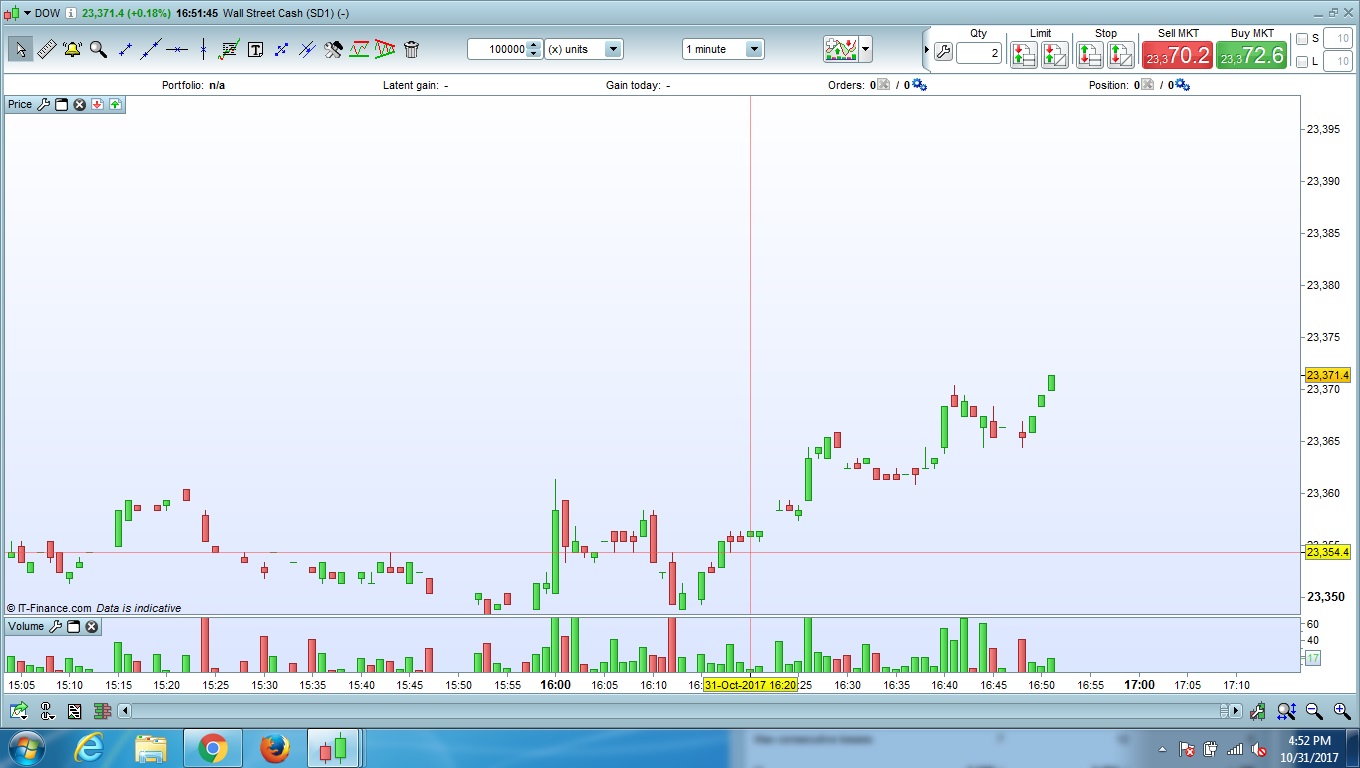
i think that may not be correct, i use the Dow 1 min chart and the built-in function Volume indicator, the Green Volume(Open<Close) or Red Volume(Close>Open) doesn’t always match.
Please see the below screenshot (31 Oct 16:41 and multiple others)
It should be Close> Close[1] for green and vice versa.
However my question will be when Close=Close[1], then i cant figure out accurately when it will appear as Green or red.
Thanks
OMG you are right, I made confusion with a code I’m actually working on for a customer .. sorry for that 🙁
With this little indicator applied on your price chart, you’ll see arrows when Close=Close[1], so you could make your own analysis about the Volume color when it happened.
if Close=Close[1] then
drawarrow(barindex,close)
endif
return