Hello guys,
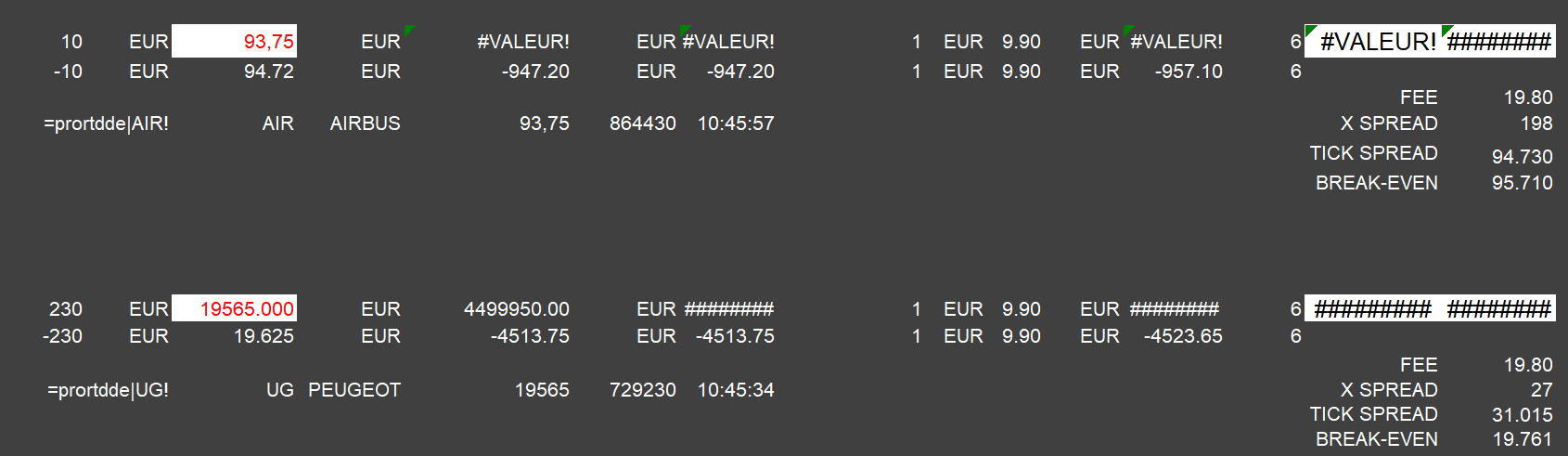
I have an urgent problem to solve in exporting prorealtime data with DDE link to excel.
In the excel spreadsheet, data format returns alternatively prices as “33395” or “33,395” depending on the stock.
As I work with a US/UK data formats, coma “,” can’t be used a decimal separator insteed of “.” point. I can”t find where to modify this as you can’t change” 33,365″ by “33.365”. It’s not, possible with the Excel cell format options. Finally it returns an error in my formulas
Thanks guys for your help.
Cheers,
Gerard
Sorry but are you asking Excel support in the ProRealTime platform support forum? 🙄
I will move your topic in the general trading discussions.
I’m sure there is an option to change the number format value, but it is not located in the cell formatting option, it is in the general option of Excel.
Hi Nicolas,
I am here for prorealtime matter which returns DDE data formats in a “strange way” [alternatively at each tick as “33395” then “33,395”] as mentionned in my post. It’s not first an excel issue.
Thanks for help.
Gerard, look here : https://www.officetooltips.com/excel_2016/tips/change_the_decimal_point_to_a_comma_or_vice_versa.html
I don’t think your problem stops at the thousand-separator, because you’d also be dealing with the decimal separator (depending on the instrument you have in your list).
My personal opinion : Indeed it should be settable in PRT because for various reasons we can not change the decimal / thousand separator at the higher level in Excel; then other imports etc. won’t work any more.
@PRT : It would be a convenience matter just the same, because if you in France read larger numbers like 10.200,55 then you like to use software which presents it like that. People in the UK and USA like to read (or type) this as 10,200.55.
Peter
FYI, we do not use thousands separator in France.