Hi All,
This is probably the most basic indicator to make but as I’ve no experience building them I’d love some help please.
Simply put, I’d like to be able to identify specific days of the week on a daily chart without looking at the dates on the axis on the bottom and working them out mannually.
The way I see this working would be to have, for example, all the wednesdays highlighted by shading on the daily chart.
How would I go about achieving this?
Thanks for your help in advance.
Hi Coddey, are you using v10.3 already or are you still on version 10.2? What is your broker?
Hi Nicolas
I’m using 10.3 but just the downloaded version from the website to analyse end of day data.
I don’t have real-time plugged jnto any brokers. I only use it for end of day analysis.
Any idea how to highlight specific days of the week on all daily charts? Would be great to have specific days able to stand out if possible.
Thanks
http://www.prorealcode.com/documentation/backgroundcolor/
If you’re using the 10.3 version you can color chart background with a new instruction called Backgroundcolor. You can find example of how to use it here in the website prorealtime documentation.
That’s great. Thanks Nicolas, how do I go about identifying days of the week as on pro real-time the trading days are displayed as dates rather than Monday Tuesday etc. ?
Help much appreciated
You can identify the day of week with DayOfWeek instruction.
You can also have a look on this category of the prorealtime documentation, for a complete list of instructions to find anything related to “Date and Time” : http://www.prorealcode.com/documentation/category/dateandtime/
HI Nicolas,
Thanks for your help so far. I must admit I’m struggling a bit, having never coded at all in my life. Steep learning curve.
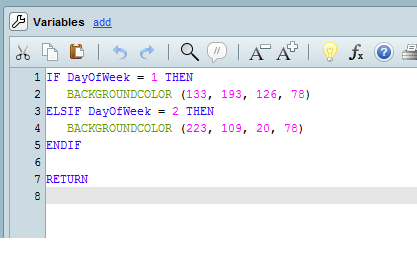
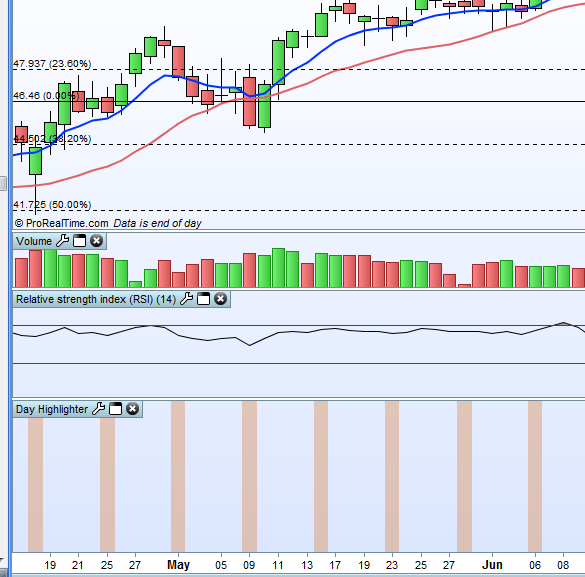
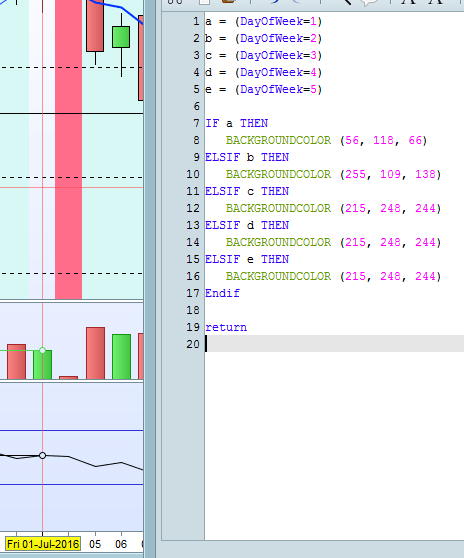
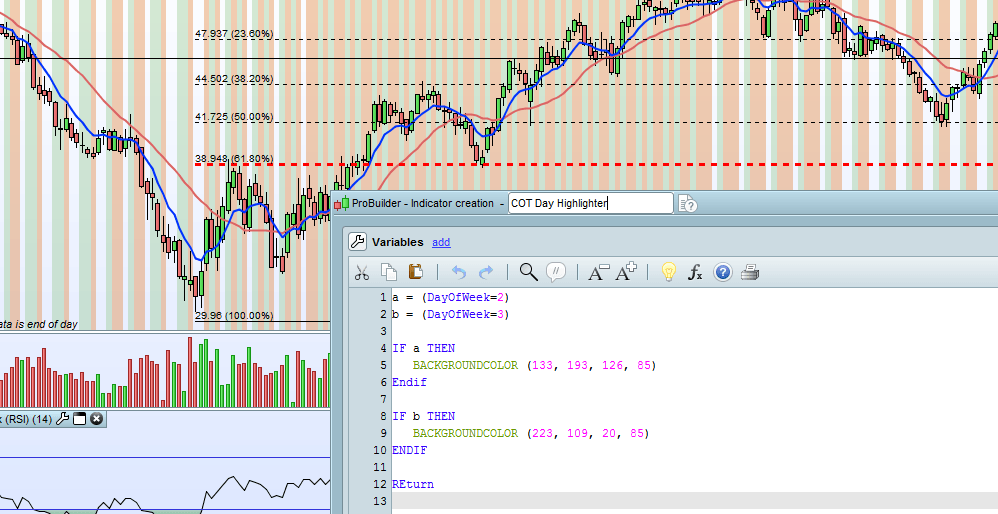
I’ve attempted to build what I was after but seemed to have failed a bit. Can you see my attached files. One’s the code, one’s the indicator.
The Indicator seems to be showing only Monday and not Tuesday too. It’s showing the colour for Tuesday in Monday… Finally, I’d like this indicator on the price chart, rather than below the chart.
Any thoughts?
Much appreciated. [attachment file=11819]
[attachment file=11820]
 Wing
WingParticipant
Veteran
To put it on the price chart, you right click on the price chart and click ‘settings price’. In that window you add the indicator to the price.
Add all the weekdays. When you set Tuesday to a certain colour, all days after that until Monday will have that colour.
Okay, so, I’ve added the indicator to the price (simple, should have known that…)
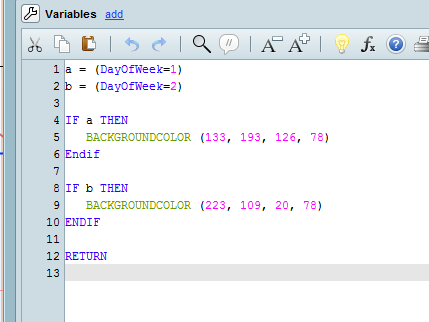
I’ve rewritten the code slightly, but I’m still getting the same results, see attached pics.
Any other thoughts? I’m stumped.
WingParticipant
Veteran
You have to add ALL weekdays. When Tuesday comes, you set the background colour to a colour. This colour does not change back until Monday, unless you specify a colour for Wednesday etc.
Okay, I’m still stuck with this.
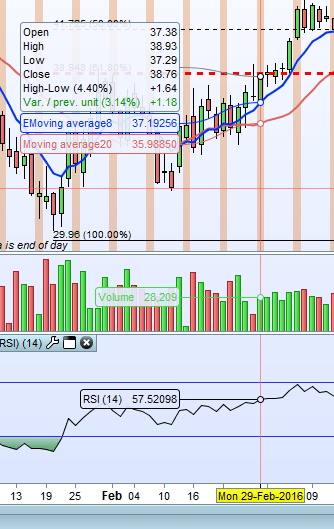
See the screenshot below. I’ve tried this with both 5 weekdays as well as all 7 days.
Still the days are showing inconsistently with the wrong colors assigned to them. For instance below, Fridays are displaying with no colours whereas in the code it’s set as the same as the other non important days.
I’m clearly coding this incorrectly but no idea how to get this working as I’d desire.
I’d like Mondays highlighted and Tuesdays highlighted (with separate colours). All other days can remain as they would normally appear.
Does anyone know what the code should look like to achieve that goal?
Help apprecieted
Thanks.
WingParticipant
Veteran
What is happening, since you are running this on daily bars is: Monday comes, and since you are on daily, it checks what day it is at the end of the Monday bar. It finds out that the last day was a Monday, so it sets the Background colour until the end of Tuesday. In other words it colours Tuesday but not Monday. You need to colour Monday at the end of Friday etc. Just try the code below.
a = (DayOfWeek=5)
b = (DayOfWeek=1)
c = (DayOfWeek=2)
d = (DayOfWeek=3)
e = (DayOfWeek=4)
Hey coddey,
clearly DayOfWeek = 1 means Sundays on your system.
Try DayOfWeek = 2 for Mondays and 3 for Tuesdays
Cheers
Great help. Thanks Chaps. I thought the day of the week would have been consistent with the help guide but clearly not! must be something with timezones or something.
Anyway, solved it. 2= Monday, 3=tuesday.
Thanks again.
Okay, I think I may have spoken too soon. when closed and reapplied the indicator works kind of.
When applied to a chart, then scrolling through a variety of securities / instruments it turns very messy and doesn’t seem to work at all. See attached.
Is there a better coding solution to this? or maybe works better with 10.2?
happy to have your thougts on this. Seems like a very simple thing to solve but I’m lost…
Thanks