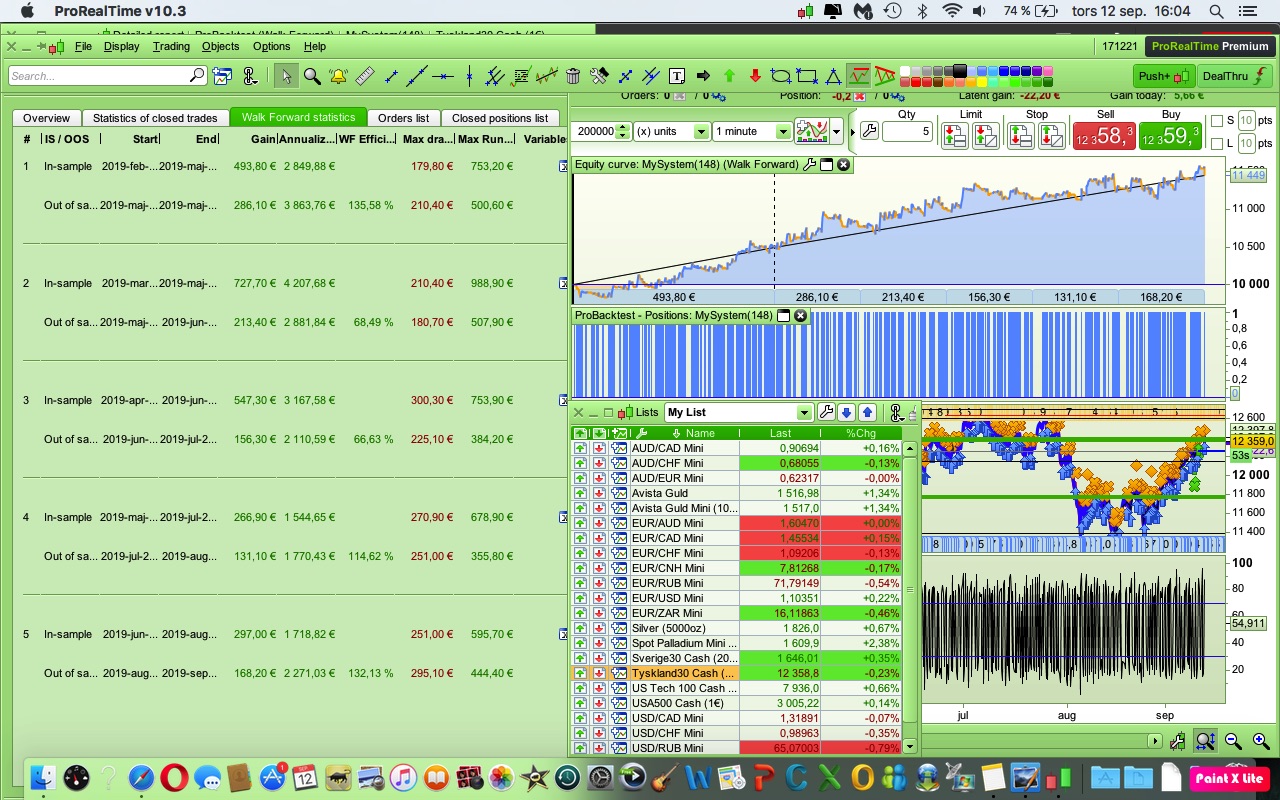
Well, what do you think?
Optimized the code on 70% data.
Made a WF of 5 periods of 70%.
Here is the result.
Do you think the code looks good or did I miss something?
Was looking for an active algo, this one makes 3 trades a day.
The reason I want an active algo is because I am tempted to do manual trades if my algo is flat.
Then it really goes to hell
It’s a simple code that you see.
Have heard a lot of people say that of all the codes you have, it is the easiest one that goes best, you should perhaps not complicate it?
DAX 1 min
Spread=1
What code? You haven’t shared it. 🙂
Sorry for that..
The code.
// Definition of code parameters
DEFPARAM CumulateOrders = False // Cumulating positions deactivated
TIMEFRAME (15 minute, default)
// Conditions to enter long positions
indicator1 = Average[53](close)
c1 = (close CROSSES OVER indicator1)
indicator3 = RSI[14](close)
c3 = (indicator3 > 10)
// Conditions to exit long positions
indicator2 = Average[35](close)
c2 = (close CROSSES UNDER indicator2)
//
TIMEFRAME (default)
IF c1 AND c3 and Not OnMarket THEN
BUY 1 CONTRACT AT MARKET
ENDIF
IF c2 AND LongOnMarket THEN
SELL AT MARKET
ENDIF
// Stops and targets
// --- NOT ALLOWED ---> SET STOP pLOSS a pTRAILING b
//uncomment one of the following lines
//SET STOP pLOSS a
SET STOP pTRAILING 59
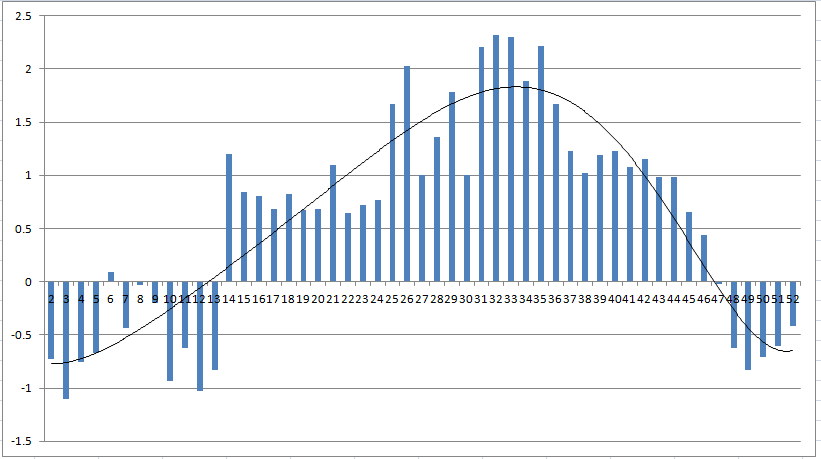
Whenever I see something with averages as entry and exit filters I worry about curve fitting and so like to optimise each one separately and see how important each variables variable is by graphing them in Excel. Attached is the image for the period in the exit average for values 2 to 52. Clearly there is a peak curve fitted value for the data sample you have – either side profit and performance falls away rapidly. Perhaps a little curve fitted.
@Vonasi
Thanks for your input.
You have a point there.
Thought to make a simple algo, but it was perhaps too simple.
Let’s add some filters and see if the result stands 🙂
My quick test of one variable does not mean that as a strategy it is a complete failure it just says that that one variable is quite optimised for the data we are testing it on. On a 1 minute time frame we have very limited data for in sample and out of sample testing. You have found something that works on the sample we have. Perhaps if we re-optimised the variables very often it would keep working… or perhaps we would always be just slightly behind the curve on such a fast moving time frame?