Date and time for drawtext

Viewing 5 posts - 1 through 5 (of 5 total)

  • Author
    Posts
  • #37285 quote
    Goeran
    Participant
    New

    Hi. Hope someone can understand and maybe help me

    I have made an simple indicator who shows the highs and low in a chart.

    I use “drawtext “to write date or time for the highs and lows

    The problem is I don’t find the right code for time and date. For time I would like to show hhmm as 09.00, 10.20 and so on. Not only 9 or 10.2.

    And for date as 04 May, 10 April and so on.  For date I have wrote as this

    a=(opendate[2]/1000)
    DRAWTEXT(“#a#”, BarIndex[2], high[2]+4, dialog,bold,12) This not work good Shows on the screen like this 20,170.523

    and for time as this
    a=OpenTime[2]/10000
    DRAWTEXT(“#a#”, BarIndex[2], high[2]+0.5, dialog,Bold,12) Time is ok but can be better.

    /Goeran

    #37317 quote
    Nicolas
    Keymaster
    Master

    Variables can’t store strings. So you’ll always get numbers for months for example. Unless you make a conditional statement for each month : if month=4 then DRAWTEXT (“April”, …)

    Why not use Day + Month + Year to write the date instead of OpenDate? Same for OpenTime, you could use Hour + Minute instead.

    #232526 quote
    repropel
    Participant
    New

    Hi Nicolas,

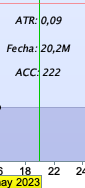
    Could you help me with a problem similar to the previous one. In version 12 of the platform, the M appears and I cannot know what date it is.

    Mi código es el siguiente:

    DayN = Date[N]
    
    DRAWTEXT("Fecha: #DayN#",barindex,17,Dialog,Italic,10)

    Thank you so much.

    Captura-de-Pantalla-2024-05-10-a-las-14.07.26.png Captura-de-Pantalla-2024-05-10-a-las-14.07.26.png
    #232533 quote
    robertogozzi
    Moderator
    Master

    M stands for MILLIONS, date 20240510 is a number over 20M and is displayed as such.

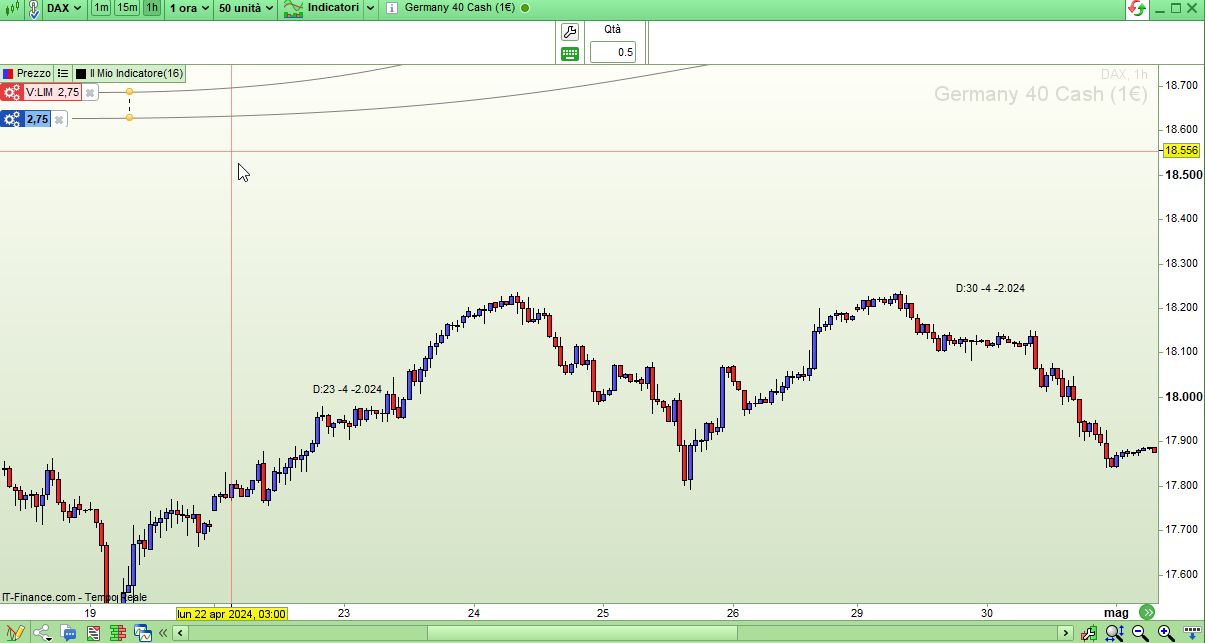
    You need to decompose it into Day, Month, Year, then using the 3 separate values with DRAWTEXT:

    IF (OpenDayOfWeek <> OpenDayOfWeek[1]) AND (OpenDayOfWeek = 2) THEN
       myDAY   = OpenDay
       myMONTH = OpenMonth
       myYEAR  = OpenYear
       Drawtext("D:#myDAY#-#myMONTH#-#myYEAR#",BarIndex,highest[20](high) + range)
    ENDIF
    RETURN
    repropel thanked this post
    x.jpg x.jpg
    #232542 quote
    repropel
    Participant
    New

    Hi Roberto,

    This way of visualizing the date has been very useful to me.

    Thank you so much.

    robertogozzi thanked this post
Viewing 5 posts - 1 through 5 (of 5 total)

  • You must be logged in to reply to this topic.

Date and time for drawtext


ProBuilder: Indicators & Custom Tools

New Reply
Author
author-avatar
Goeran @goeran Participant
Summary

This topic contains 4 replies,
has 2 voices, and was last updated by repropel

1 year, 10 months ago.

Topic Details
Forum: ProBuilder: Indicators & Custom Tools
Language: English
Started: 06/02/2017
Status: Active
Attachments: 2 files
Logo Logo
Loading...