Daily Time Frame

Viewing 4 posts - 1 through 4 (of 4 total)

  • Author
    Posts
  • #6463 quote
    MacroT
    Participant
    Average

    If I have a script running on a daily time frame. Is there  a way of setting the start and end time of the day for the instrument just for a particular script without setting it as a default for the instrument as a whole (which is used for other strats using multiple timeframes)

    For this daily script I would like to set the daily time frame to start at X and end at Y.

    Any orders generated as a result of the script should be placed on the start of following day at X

    #6471 quote
    Nicolas
    Keymaster
    Master

    I’m sorry, but do you want your script trading from time to time or do you want to change the daily timeframe to start at X and end at Y?

    You can setup trading time into your code, but I don’t think that it is possible to restrain the daily timeframe.

    Or maybe I’m totally wrong with your request 🙂

    #70387 quote
    cgraubner
    Participant
    Junior

    So it is not possible to only consider a time frame from 9:00 to 17:30 for DHigh(1), DLow(1), DClose(1) and DOpen(1)?

    #70410 quote
    robertogozzi
    Moderator
    Master

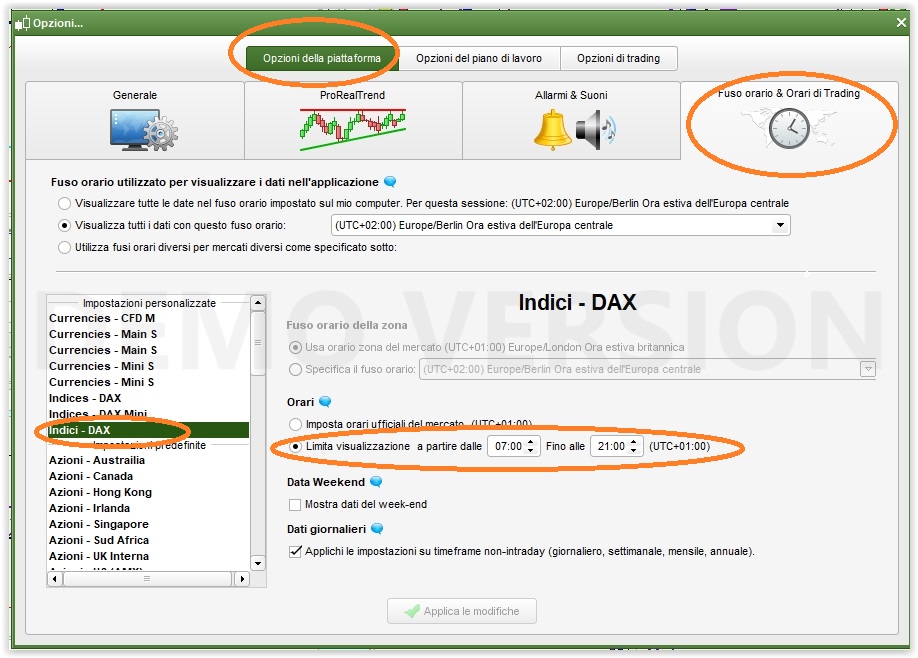
    It’s possible to change the time an instrument trades; I did it for DAX from 7 through 21 GMT (8-22 CET) and the candles in between are displayed as a GAP.

    But I cannot tell you what values DHigh(1), DLow(1), DClose(1) and DOpen(1) may return. You may wite a simple strategy and usze GRAPH to see what happens.

    Options.jpg Options.jpg
Viewing 4 posts - 1 through 4 (of 4 total)

  • You must be logged in to reply to this topic.

Daily Time Frame


General Trading: Market Analysis & Manual Trading

New Reply
Author
author-avatar
MacroT @macrot Participant
Summary

This topic contains 3 replies,
has 4 voices, and was last updated by robertogozzi
7 years, 9 months ago.

Topic Details
Forum: General Trading: Market Analysis & Manual Trading
Language: English
Started: 05/04/2016
Status: Active
Attachments: 1 files
Logo Logo
Loading...