


DAILY RANGE for INTRADAY CHART

Viewing 5 posts - 1 through 5 (of 5 total)

  • Author
    Posts
  • #184019 quote
    abel1986
    Participant
    New

    Hello,

    I would like to add the average daily range histogram to the intraday chart.

    The original code for DAILY TF is the following:

    How can I see the same info in the Intra chart? thanks a lot for your support

    HI = High
    LO = Low
    
    rng = (HI - LO)
    avgrng = average[10](rng)
    
    wide = avgrng* 1.25
    narrow = avgrng* 0.65
    
    wideavg = avgrng * 1.25
    narrowavg = avgrng * 0.65
    
    if rng >= wide then
    r = 0
    g = 0
    b = 255
    else
    if rng <= narrow then
    r = 77
    g = 12
    b = 82
    else
    r = 85
    g = 86
    b = 86
    endif
    endif
    
    RETURN rng coloured(r,g,b) STYLE(histogram,1) as "RNG", avgrng coloured(255,255,255) STYLE(dottedline,1) as "AVG RNG", wideavg coloured(255,0,0) STYLE(dottedline,1) as "AVG WIDE", narrowavg coloured(84,185,209) STYLE(dottedline,1) as "AVG WIDE"
    #184022 quote
    JC_Bywan
    Moderator
    Master

    Hi, replacing first 2 lines by these should do it:

    HI = dhigh(0)
    LO = dlow(0)
    #184026 quote
    abel1986
    Participant
    New

    Hi JC,
    thanks for your reply.
    Unfortunately the indicator returns nothing if I substitute those two lines as you suggest,  independently from the TF used.

    #184034 quote
    JC_Bywan
    Moderator
    Master

    Sorry, was too fast not seeing how it was used for averages further down and not just range of one day, so need timeframe keyword.

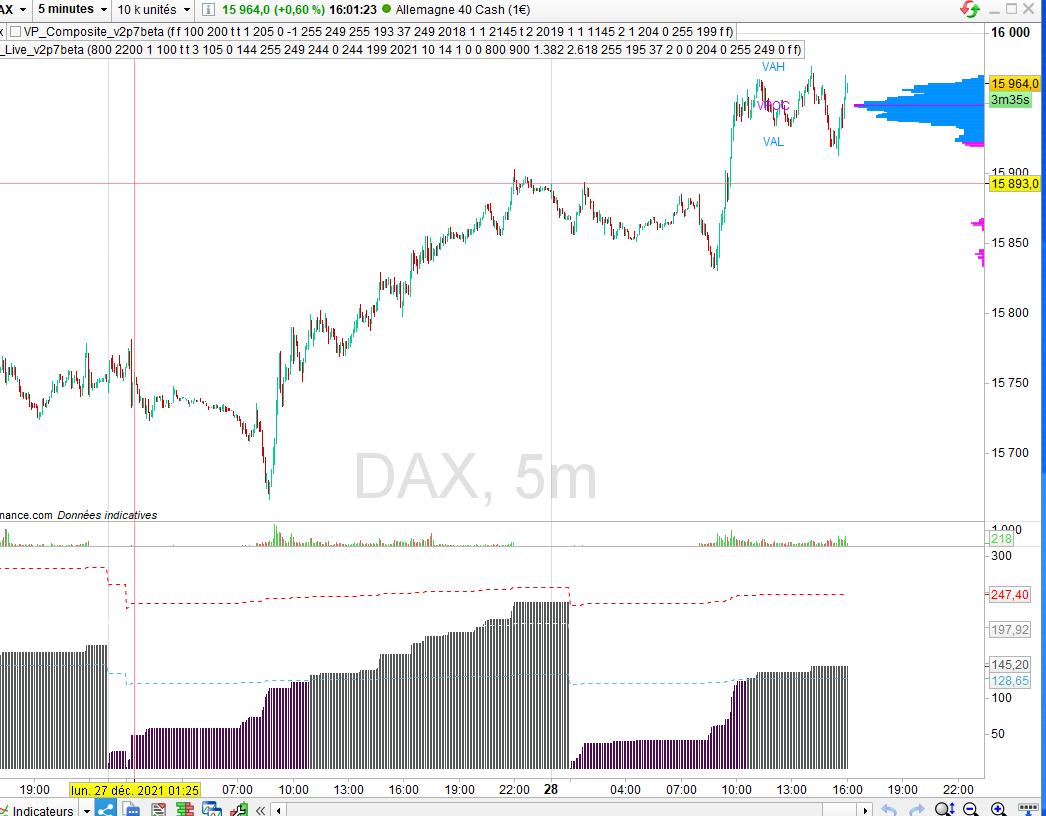
    With this I get example attached for Dax TF 5mn bottom window assuming you wish to keep same return last line:

    timeframe (daily)
    HI = dhigh(0)//High
    LO = dlow(0)//Low
    
    rng = (HI - LO)
    avgrng = average[10](rng)
    
    wide = avgrng* 1.25
    narrow = avgrng* 0.65
    
    wideavg = avgrng * 1.25
    narrowavg = avgrng * 0.65
    
    if rng >= wide then
    r = 0
    g = 0
    b = 255
    else
    if rng <= narrow then
    r = 77
    g = 12
    b = 82
    else
    r = 85
    g = 86
    b = 86
    endif
    endif
    
    timeframe(default)
    
    RETURN rng coloured(r,g,b) STYLE(histogram,1) as "RNG", avgrng coloured(255,255,255) STYLE(dottedline,1) as "AVG RNG", wideavg coloured(255,0,0) STYLE(dottedline,1) as "AVG WIDE", narrowavg coloured(84,185,209) STYLE(dottedline,1) as "AVG WIDE"
    abel1986 thanked this post
    Capture-decran-2021-12-28.png Capture-decran-2021-12-28.png
    #184039 quote
    abel1986
    Participant
    New

    Thanks a lot JC, now it works 😉

Viewing 5 posts - 1 through 5 (of 5 total)
  • You must be logged in to reply to this topic.

DAILY RANGE for INTRADAY CHART


ProBuilder: Indicators & Custom Tools

New Reply
Author
author-avatar
abel1986 @abel1986 Participant
Summary

This topic contains 4 replies,
has 2 voices, and was last updated by abel1986

4 years, 1 month ago.

Topic Details
Forum: ProBuilder: Indicators & Custom Tools
Language: English
Started: 12/28/2021
Status: Active
Attachments: 1 files
Logo Logo
Loading...
