


Custom TRIX indicator

Viewing 6 posts - 1 through 6 (of 6 total)

  • Author
    Posts
  • #174885 quote
    eckaw
    Participant
    Veteran

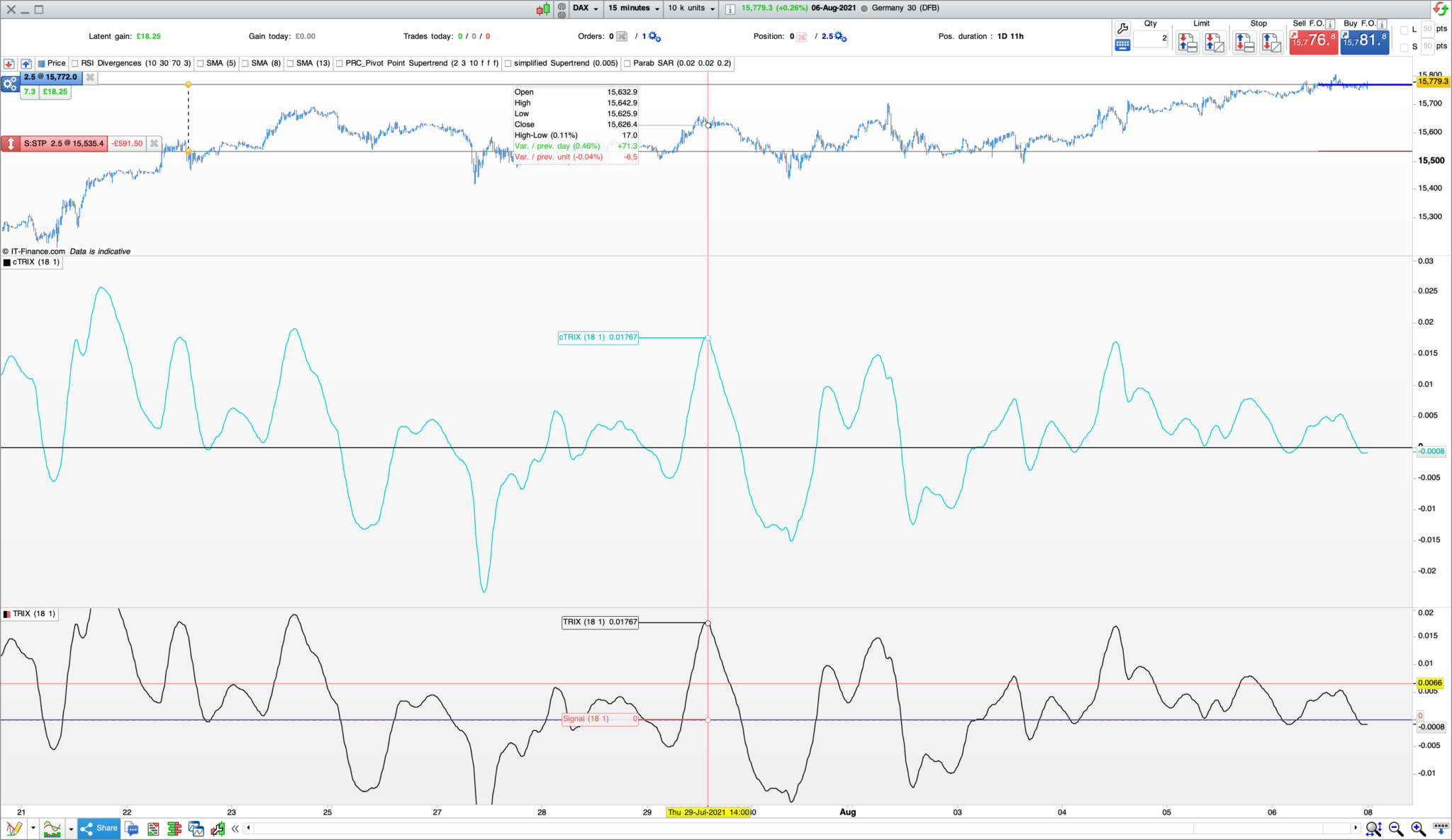
    I have found that TRIX indicator gives interesting results for entry positions, possible turning points in the market.

    I searched the forums but couldn’t find the code for TRIX so I coded it.

    The results seems identical to the built in TRIX indicator, however it gives you the option to use different types of Moving Averages. I have found that Time Series gives interesting results with either Zero Line Crossing (how the indicator is intended to be used, I believe) or when the direction of the indicator changes:

    //Bull

    c1 = cTRIX[1] < cTRIX[2] and cTRIX > cTRIX[1]

    //Bear

    c2 =cTRIX[1] > cTRIX[2] and cTRIX < cTRIX[1]

    If you end up using (or already using?) this indicator in your strategies it would be great if you like to share how.

    Reference for PRT Moving Averages (‘Type’ variable in the cTRIX indicator)

    0 = SMA

    1 = EMA

    2 = WMA

    3 = Wilder

    4 = Triangular

    5 = End point

    6 = Time series

    7 = Hull (PRT v11 only)

    8 = ZeroLag  (PRT v11 only)

    Nicolas thanked this post
    cTRIX.itf Screenshot-2021-08-07-at-21.41.40.png Screenshot-2021-08-07-at-21.41.40.png
    #174889 quote
    eckaw
    Participant
    Veteran

    Ah… sorry moderators of PRC, this should have been posted in ProBuilder. It’s my first attempt to make an indicator and the fact that I spend most of my time in the ProOrder section of this forum, I totally forgot that it should have been posted in a different section. I can’t see how I can move it over so would appreciate if you can do so, if necessary.

    #174895 quote
    JC_Bywan
    Moderator
    Master

    No problem I’ll move it

    #175464 quote
    Nicolas
    Keymaster
    Master

    Trix indicator is also an available instruction of the ProBuilder Language: TRIX

    #175491 quote
    eckaw
    Participant
    Veteran

    Hi Nicolas,

    Yes, I noticed that too but I wanted to add the ability to change type of MA. There is no way to do this with the built in TRIX indicator, is there? Perhaps it’s not longer a TRIX once MA is changed but I’m getting interresting results with Times Series Average applied to this instead of EMA.

    #175501 quote
    robertogozzi
    Moderator
    Master

    There you go:

    // TRIX indicator custom
    //
    // Periods  = 15
    // AvgType  = 1   //type of MA
    // SignalP  = 9
    // SignalT  = 1   //type of MA
    src        = close
    Periods    = max(2,min(999,Periods))
    AvgType    = max(0,min(6,AvgType))
    SignalP    = max(2,min(999,SignalP))
    SignalT    = max(0,min(6,SignalT))
    //
    IF BarIndex > Periods THEN
       MA1     = Average[Periods,AvgType](src)
       MA2     = Average[Periods,AvgType](MA1)
       MA3     = Average[Periods,AvgType](MA2)
       MyTrix  = ((MA3 - MA3[1]) / MA3[1]) * 100
       IF BarIndex > (Periods + SignalP) THEN
          Signal  = Average[SignalP,SignalT](MyTrix)
       ENDIF
    ELSE
       MyTrix  = 1
       Signal  = 1
    ENDIF
    RETURN MyTrix AS "Trix",Signal AS "Signal"
    eckaw thanked this post
Viewing 6 posts - 1 through 6 (of 6 total)
  • You must be logged in to reply to this topic.

Custom TRIX indicator


ProBuilder: Indicators & Custom Tools

New Reply
Author
author-avatar
eckaw @eckaw Participant
Summary

This topic contains 5 replies,
has 4 voices, and was last updated by robertogozzi
4 years, 5 months ago.

Topic Details
Forum: ProBuilder: Indicators & Custom Tools
Language: English
Started: 08/07/2021
Status: Active
Attachments: 2 files
Logo Logo
Loading...


