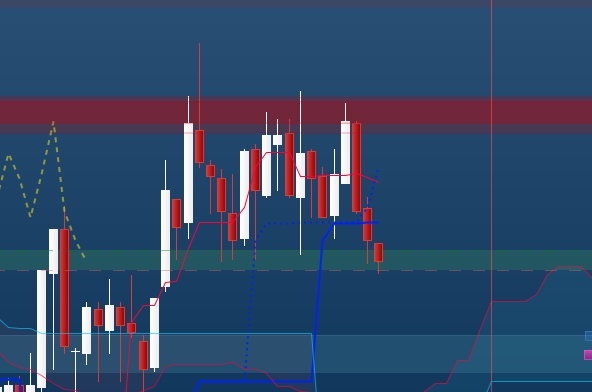
Bonjour,
J’aimerais avoir une indication sur mon graphique lorsque le prix d’une bougie va traverser un support défini à l’avance dans un tableau.
Voici le code que j’ai écris avec comme exemple: si le plus haut d’une bougie vient a croisé un support ou une résistance nous avons une indication sur le graphique.
/////////////////Resistance ///////////////////////////
if close>=highest[length1](close) then
t1 = 0
top1 = close
else
top1 = top1
t1 = t1+1
if t1>lenght2 and t1<lenght2+2 then
$TOPy[lastset($TOPy)+1] = top1
endif
ENDIF
/////////////////Support ///////////////////////////
if close<=lowest[length1](close) then
b1 = 0
bot1 = close
else
bot1 = bot1
b1 = b1+1
if b1>lenght2 and b1<lenght2+2 then
$boty[lastset($boty)+1] = bot1
endif
endif
///////////////////////////////////Conditions baissière///////////////////////////////////
for s=0 to 15 do
if highest[1](high) CROSSES OVER $BOTy[s] or highest[1](high)CROSSES UNDER $BOTy[s] or highest[1](high) CROSSES OVER $TOPy[s]or highest[1](high)CROSSES UNDER $TOPy[s] then
if ViewArrow then
DRAWARROWDOWN(barindex[p],(high[p]+(Margin*MultiplicateurFleche))) COLOURED(ColorR,ColorV,ColorB)
endif
ENDIF
NEXT
return
J’ai mis ci joint un screen d’un exemple de situation dans laquelle j’aimerais avoir une indication (La ligne rouge est la matérialisation du premier indicateur de support et résistance).
J’ai beau essayer tous les type de cross over ou under (sur le close, sur le high, sur le highest[1] (high)) rien n’y fait, je n’ai jamais de flèche qui apparait. Je suis dans une impasse.
Merci de votre aide
Hola, il a légèrement adapté votre code :
defparam drawonlastbaronly = true

length1=20
lenght2=40
/////////////////Resistance ///////////////////////////
if close>=highest[length1](close) then
t1 = 0
top1 = close
else
top1 = top1
t1 = t1+1
if t1>lenght2 and t1<lenght2+2 then
$TOPy[t+1] = top1
$TOPx[t+1] = barindex
t=t+1
endif
ENDIF
/////////////////Support ///////////////////////////
if close<=lowest[length1](close) then
b1 = 0
bot1 = close
else
bot1 = bot1
b1 = b1+1
if b1>lenght2 and b1<lenght2+2 then
$boty[r+1] = bot1
$botx[r+1] = barindex
r=r+1
endif
endif
////////////Conditions baissière///////////////////////////////////
if islastbarupdate then
for j=1 to barindex do

for i=r downto max(0,r-15) do
if barindex[j]>$botx[i] and low[j] < $BOTy[i] and low[j-1] > $BOTy[i] then
DRAWARROWDOWN(barindex[j],$BOTy[i]) COLOURED("red")
break
ENDIF
NEXT

for s=t downto max(0,t-15) do
if barindex[j]>$TOPx[s] and high[j] > $TOPy[s] and high[j-1] < $TOPy[s]then
DRAWARROWup(barindex[j],$TOPy[s]) COLOURED("green")
break
endif
next

next
endif

return $boty[r] coloured("red"),$TOPy[t] coloured("blue")
Merci beaucoup Ivan, j’ai travaillé toute la journée pour implémenter cette condition dans mon algorithme.
J’ai une dernière question. Est-il possible de supprimer une donnée d’un tableau après x période pour qu’elle ne soit prisent en compte dans les conditions.
Voici comment j’ai modifier pour qu’il fonctionne dans mon algorithme.
//defparam drawonlastbaronly = true
DEFPARAM CALCULATEONLASTBARS=1000
//////////////////////////////Average candle size//////////////////////////////
x = 96

XGreen = 0
GreenSUM = 0
For i = 0 To x-1 Do
GreenSUM = GreenSUM + Range[i]
XGreen = XGreen + 1
A = GreenSUM / XGreen
next
///////////////////////////////////////////////
length1=70
lenght2=50
/////////////////Resistance ///////////////////////////
if close>=highest[length1](close) then
t1 = 0
top1 = close
else
top1 = top1
t1 = t1+1
if t1>lenght2 and t1<lenght2+2 then
$TOPy[t+1] = top1
$TOPx[t+1] = barindex
$TopA[t+1]= A
t=t+1
endif
ENDIF
/////////////////Support ///////////////////////////
if close<=lowest[length1](close) then
b1 = 0
bot1 = close
else
bot1 = bot1
b1 = b1+1
if b1>lenght2 and b1<lenght2+2 then
$boty[r+1] = bot1
$botx[r+1] = barindex
$BotA[r+1]= A
r=r+1
endif
endif
p=1
//////////////////Condition with supports///////////////////////////////////
for i=r downto max(0,r-30) do
if  (low[p] < $BOTy[i] and high[p] > $BOTy[i]) or (low[p] < ($boty[i]+($BotA[i]*0.1)) and high[p] > ($BOTy[i]-($BotA[i]*0.2))) then
DRAWARROWDOWN(barindex[1],$BOTy[i]) COLOURED("red")
break
endif
NEXT
//////////////////Condition with resistances///////////////////////////////////
for s=t downto max(0,t-15) do
if (high[1] > $TOPy[s] and low[1] < $TOPy[s]) or (high[1] > ($TOPy[s]-($TopA[s]*0.05)) and low[1] < ($TOPy[s]+$TOPA[s]*0.2)) then
DRAWARROWup(barindex[1],$TOPy[s]) COLOURED("green")
break
endif
next
return
Merci
Bonjour, Pour réinitialiser les données d'un tableau, vous pouvez utiliser unset . D'un autre côté, pour réinitialiser une valeur particulière, vous pouvez l'écraser.