Count of intraday ticks

Viewing 10 posts - 1 through 10 (of 10 total)

  • Author
    Posts
  • #16330 quote
    EzioEzio
    Participant
    New

    Hi all, I am fairly new to the forum. I posted this request as reply to another post but probably the wrong place.

    Do you know if there is a way in PRC of reading/counting intraday ticks? The best I could do is to build the below indicator to be applied to an (x)ticks chart. This way I can see when the number of ticks in a certain amount of time have exceeded a defined threshold (say 15 mins as in the code below). However this indicator lacks a fundamental information: direction. Any way that I can read Up and DOWN ticks from the “tick by tick” list?

    Ezio

    tick = 0
    if (time - time[1]) <= 1500 then
    TICK = 1
    endif
    return TICK 
    #16339 quote
    NicolasNicolas
    Keymaster
    Legend

    You can store the Close value each tick received in a variable and test if the current one is above or below the last stored one. Then you could count positive and negative variation.

    #16341 quote
    EzioEzio
    Participant
    New

    Thanks Nicolas for the fast reply. How do I do that? Only thing that comes to mind is to setup a 1-tick chart and do the count. Is there a more efficient way?

    #16381 quote
    NicolasNicolas
    Keymaster
    Legend

    New Close[0] means new tick received in real time only.

    #16397 quote
    EzioEzio
    Participant
    New

    Hi Nicolas,

    Thanks for the advice. I have now incorporated that close[0] value in the code.

    The problem I am facing is that I do not know how to store the close[0] value to be able to compare it with the the previous one. In the code below DELTA is measured between latest tick and previous bar close which is not what I am shooting for.

    My final objective is to create an indicator that counts UP and DOWN ticks in a given amount of time (i.e. 5, 10, 15 minutes). Any other  suggestions?

    tickUP = 0
    tickDOWN = 0
    
    MyTick = Close[0]
    
    Delta = close[0] - close[1]
    
    if Delta > 0 then
    tickUP = tickUP + 1
    elsif Delta < 0 then
    tickDOWN = tickDOWN - 1
    endif
    
    return Delta as "Delta", close[0] as "close[0]", close as "close", tickUP as "UP", tickDOWN as "DOWN", MyTick as "MyTick"
    #16412 quote
    NicolasNicolas
    Keymaster
    Legend

    You can try it like this instead:

    once tickUP = 0
    once tickDOWN = 0
    once lastsaved = close
    
    Delta = close - lastsaved
    
    if Delta > 0 and close<>lastsaved then
     tickUP = tickUP + 1
     lastsaved = close
    elsif Delta < 0 and close<>lastsaved then
     tickDOWN = tickDOWN - 1
     lastsaved = close
    endif
    
    return tickUP as "UP", tickDOWN as "DOWN"

    Market is close so I can’t test it. Next is to find a way to reset tickUP and tickDOWN on a time basis you have to define yourself .

    cantillon and Paul thanked this post
    #162714 quote
    PaulPaul
    Participant
    Master

    this code is interesting and it perhaps could supplement a fast paced strategy if the reset is properly used

    #162874 quote
    PaulPaul
    Participant
    Master

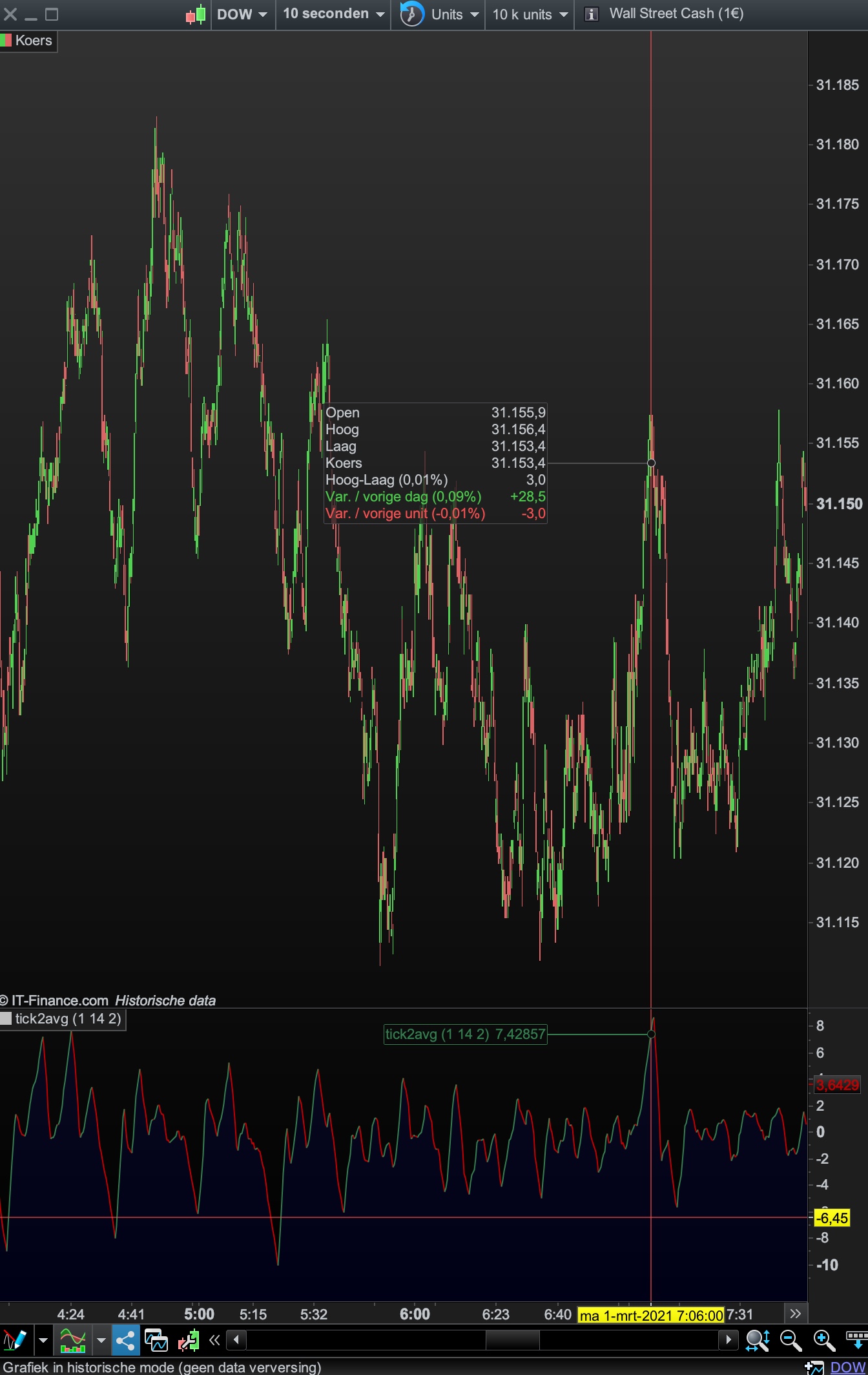
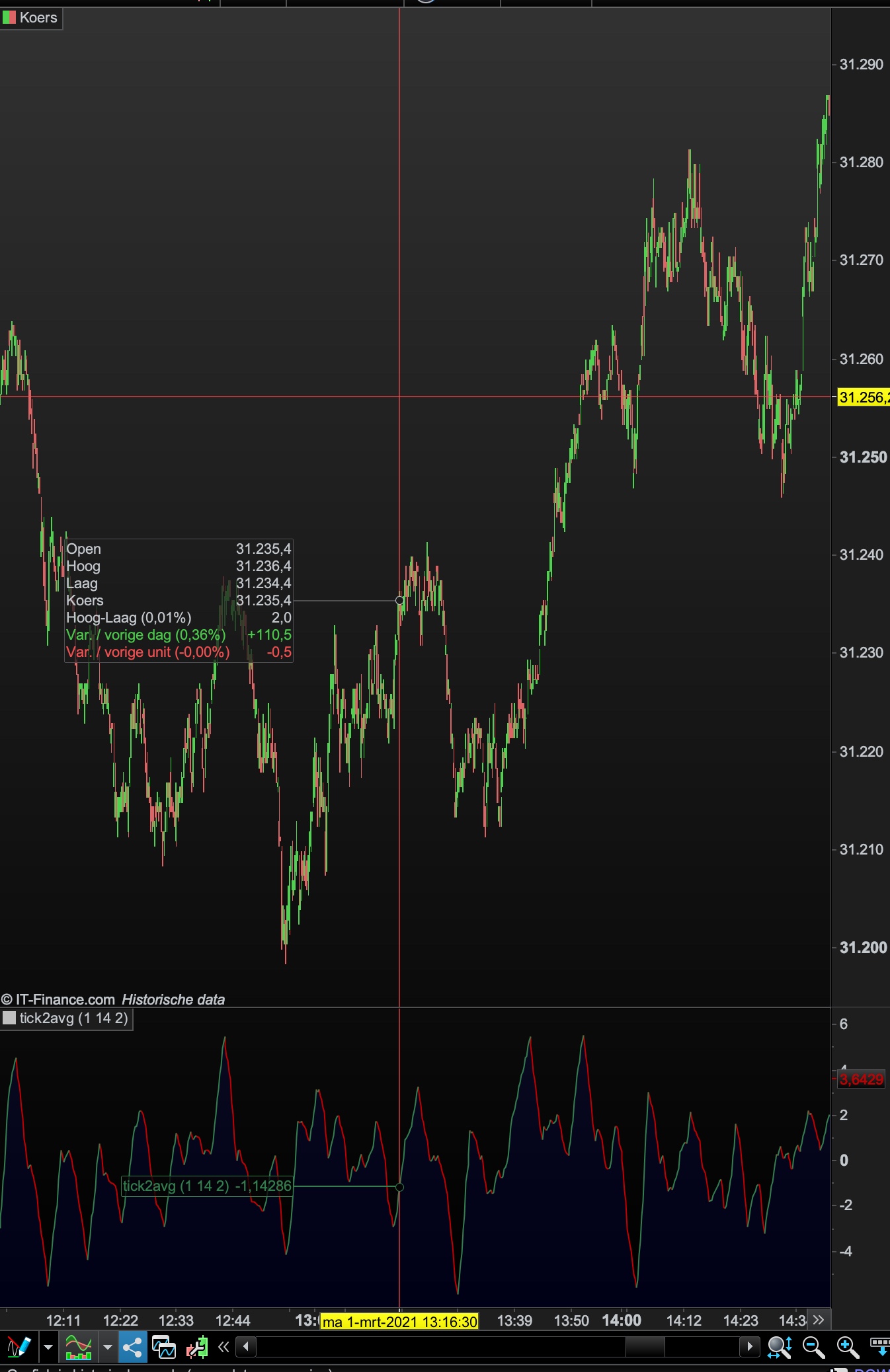
    here are 2 examples of a reset based on priceaction.

    Because it reset, the scale is limit from about -10 to +10 and especially the spikes are interesting points.

    It’s tested on the dow 10s tf

    Tickdirection.itf Screenshot-2021-03-01-at-15.44.58.jpg Screenshot-2021-03-01-at-15.44.58.jpg Screenshot-2021-03-01-at-15.36.29.jpg Screenshot-2021-03-01-at-15.36.29.jpg
    #162879 quote
    NicolasNicolas
    Keymaster
    Legend

    array variables don’t reset, there are examples: array variables availability in ProRealTime: examples and discussions

    #162884 quote
    PaulPaul
    Participant
    Master

    I have no experience in array’s, but the code doesn’t use array’s.

    It’s based on your code from 2016,  just added a reset to 0 when certain priceaction appears.

    //Heikin Ashi candlestick definition according Investopedia, tested with the default values of Heiki Ashi bar values within PRT
    
    once a1=2 //method //1-2
    once a2=14 //period //2-5
    once a3=2 //AVGtick
    
    if barindex < 1 then
    HOpen = open
    HClose = close
    HHigh = high
    HLow = low
    else
    HOpen = 0.50 * (hOpen[1]+hClose[1])
    HHigh = max(HOpen,max(high,Close))
    HLow = min(HOpen,min(low,Close))
    HClose = 0.25 * (Open+Close+Low+High)
    endif
    
    AvHA = average[a2]((HOpen+HHigh+HLow+Hclose)/4)
    
    // conditions
    
    once tickUP = 0
    once tickDOWN = 0
    once lastsaved = close
    
    Delta = close - lastsaved
    
    if method=1 then
    if close>highest[a2](high)[1] then
    tickdown=0
    elsif close<lowest[a2](low)[1] then
    tickup=0
    endif
    elsif method=2 then
    if AvHA > AvHA[1] then
    tickdown=0
    elsif AvHA < AvHA[1] then
    tickup=0
    endif
    endif
    
    if Delta > 0 and close<>lastsaved then
    tickUP = tickUP + 1
    lastsaved = close
    elsif Delta < 0 and close<>lastsaved then
    tickDOWN = tickDOWN - 1
    lastsaved = close
    endif
    
    tickavg=(tickup+tickdown)/2
    tick2avg=average[a3](tickavg)
    
    if tick2avg > tick2avg[1] then
    r = 51 //51  128
    g = 125 //125  128
    b = 79 //79  128
    else
    r = 192 //192  48
    g = 0 //0  84
    b = 0 //0  150
    endif
    
    RETURN tick2avg coloured(r,g,b) style(line,1) as "tick2avg"
    
Viewing 10 posts - 1 through 10 (of 10 total)

  • You must be logged in to reply to this topic.

ProRealAI ProRealAI New

Stuck on this ProBuilder code?

Describe what this topic is trying to build, in plain English, and ProRealAI writes the ProRealTime™ indicator, screener or system for you.

Available in 7 languages
Try ProRealAI

Count of intraday ticks


ProBuilder: Indicators & Custom Tools

New Reply
Author
author-avatar
Ezio @ezio Participant
Summary

This topic contains 9 replies,
has 3 voices, and was last updated by PaulPaul

5 years, 7 months ago.

Topic Details
Forum: ProBuilder: Indicators & Custom Tools
Language: English
Started: 11/10/2016
Status: Active
Attachments: 3 files
ProRealCode ProRealCode
Loading...