Convertir indicador RSI modificado de Tradinview a PRT

Viewing 6 posts - 1 through 6 (of 6 total)

  • Author
    Posts
  • #212413 quote
    jtornex111
    Participant
    New

    Hola, me gustaría poder usar el indicador de RSI modificado, que está programado en PineScript de Tradingview a la plataforma de ProRealTime.

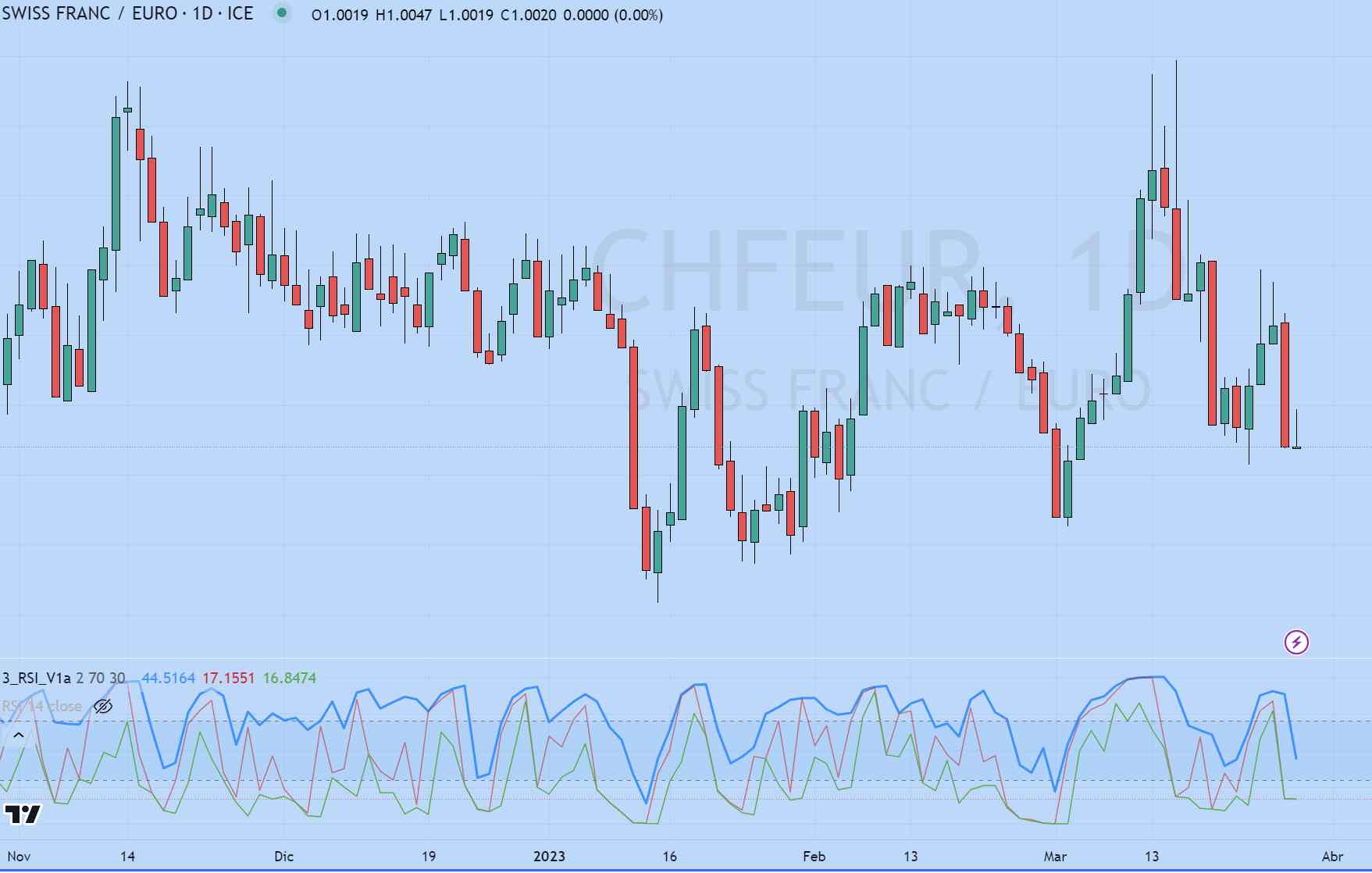
    El indicador, muestra el histórico de valores que el RSI fue alcanzando en los extremos de cada vela, dibujando dos lineas más.

    Os dejo el código de PineScript. Gracias

    ==========

    study(“3_RSI_V1a”)
    inpPeriod= input(title=”Period”, type=input.integer, defval=9)
    Sobrecompra= input(title=”Sobrecompra”, type=input.integer, defval=70)
    Sobreventa= input(title=”Sobreventa”, type=input.integer, defval=30)
    alpha=1.0/max(inpPeriod,1)
    RSI=rsi(close,inpPeriod)
    Changa_High=0.0
    Change_High=0.0
    Change_Low=0.0
    RSI_High=0.0
    Changa_Low=0.0
    RSI_Low=0.0
    FLT_MIN=1.175494351e-38
    diff=0.0
    if bar_index<=6
        Changa_High := close/max(inpPeriod,1)
        RSI_High := 50.0*(Change_High/max(Changa_High,FLT_MIN)+1)
        Changa_Low := close/max(inpPeriod,1)
        RSI_Low := 50.0*(Change_Low/max(Changa_Low,FLT_MIN)+1)
    else
        diff := high – close[1]
        Change_High := Change_High[1] + alpha*(diff – Change_High[1])
        Changa_High := Changa_High[1] + alpha*(abs(diff) – Changa_High[1])
        RSI_High := 50.0*(Change_High/max(Changa_High,FLT_MIN)+1)
        diff := close – close[1]
        Change_High := Change_High[1] + alpha*(diff – Change_High[1])
        Changa_High := Changa_High[1] + alpha*(abs(diff) – Changa_High[1])
        diff := low – close[1]
        Change_Low := Change_Low[1] + alpha*(diff – Change_Low[1])
        Changa_Low := Changa_Low[1] + alpha*(abs(diff) – Changa_Low[1])
        RSI_Low := 50.0*(Change_Low/max(Changa_Low,FLT_MIN)+1)
        diff := close – close[1]
        Change_Low := Change_Low[1] + alpha*(diff – Change_Low[1])
        Changa_Low := Changa_Low[1] + alpha*(abs(diff) – Changa_Low[1])
    plot(RSI_High, title=’RSI High’, color=color.rgb(30,144,255), linewidth=1, style=plot.style_line,  offset=0, trackprice=true)
    plot(RSI, title=’High’, color=color.yellow, linewidth=1, style=plot.style_line,  offset=0, trackprice=true)
    plot(RSI_Low, title=’RSI Low’, color=color.rgb(250,128,114), linewidth=1, style=plot.style_line, offset=0, trackprice=true)
    band1 = hline(Sobrecompra, “Upper Band”, color = #787B86)
    band0 = hline(Sobreventa, “Lower Band”,  color = #787B86)
    fill(band1, band0, color.rgb(33, 150, 243, 90), title = “Background”)
    #212416 quote
    Nicolas
    Keymaster
    Master

    ¿Podría proporcionar un enlace al código original y también capturas de pantalla de cómo se ve el indicador? Gracias.

    #212430 quote
    jtornex111
    Participant
    New

    Hola Nicolas, gracias por tu rápida atención. Te adjunto cómo se ve, funcionando en el par chfeur diario y respecto al código que he pegado, te adjunto el código en archivo txt, es como lo metí al Tradingview…no sé si me estás pidiendo otras cosa…

    un saludo

    #212433 quote
    jtornex111
    Participant
    New

    Por cierto, en la captura adjunta, el rsi está dibujado con periodo 2, pero vamos, se puede configurar con cualquier periodo (14 es lo habitual). El actual indicador, permite meterle cualquiero periodo.

    gracias

    #212483 quote
    Nicolas
    Keymaster
    Master

    El código está convertido y disponible para descargar aquí: 3 RSI

    #212535 quote
    jtornex111
    Participant
    New

    Muchísimas gracias, funciona perfectamente. Dá gusto tratar con gente profesional.

Viewing 6 posts - 1 through 6 (of 6 total)
  • You must be logged in to reply to this topic.

Convertir indicador RSI modificado de Tradinview a PRT


ProBuilder: Indicadores y Herramientas

New Reply
Author
author-avatar
jtornex111 @jtornex111 Participant
Summary

This topic contains 5 replies,
has 2 voices, and was last updated by jtornex111
2 years, 10 months ago.

Topic Details
Forum: ProBuilder: Indicadores y Herramientas
Language: Spanish
Started: 03/29/2023
Status: Active
Attachments: 2 files
Logo Logo
Loading...