Converting 200 SMA on 4hr chart to show on 15 min chart

Viewing 6 posts - 1 through 6 (of 6 total)

  • Author
    Posts
  • #96000 quote
    Sascha
    Participant
    Average

    Hello,

    How can I convert a 200 Simple Moving Average (SMA) on the 4hr chart to show up on the 15 min chart?

    Thanks.

    Sascha

    #96022 quote
    Nicolas
    Keymaster
    Master

    It is not really possible, the most accurate solution is to use a workaround with a backtest continuously running, like the example of this post: https://www.prorealcode.com/topic/timeframe-3/#post-94066

    or in examples of our online documentation here: https://www.prorealcode.com/documentation/graphonprice/

    #96032 quote
    Vonasi
    Moderator
    Master

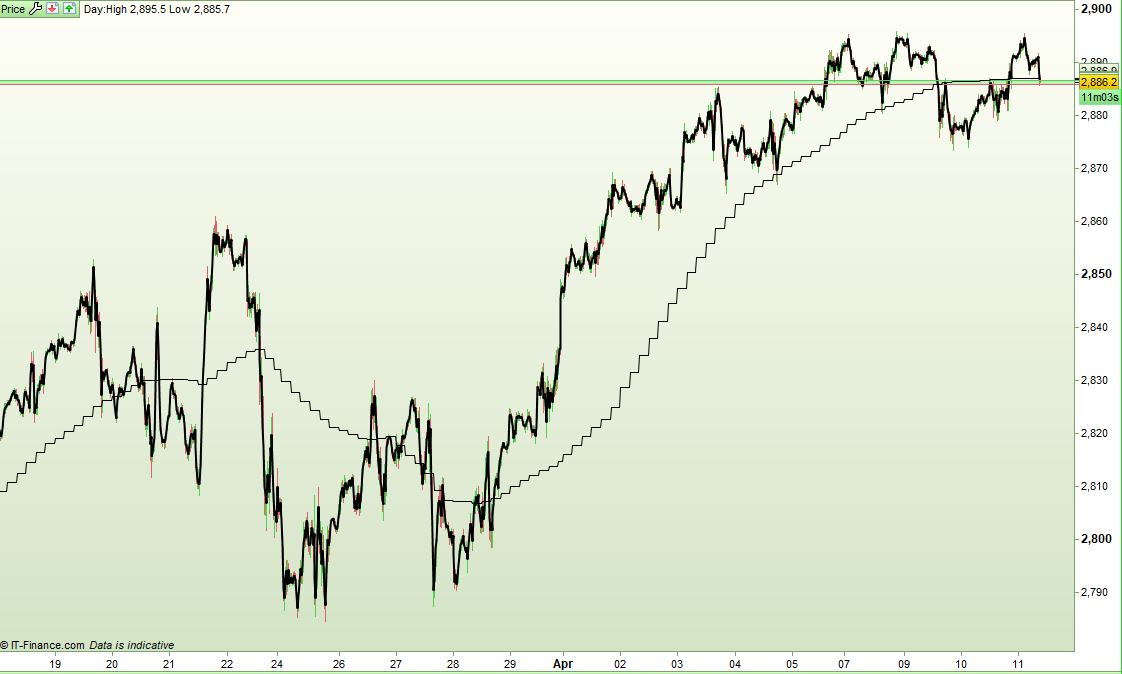
    You can code an indicator that only updates at the start of each new 4 hour candle. This gives a stepped result.

    Here is an example for a 4 hour 20MA. If you increase the stored variables to 200 and then divide the sum of them by 200 you will have a 200MA. I got bored with the typing after 20 so I’ll leave the rest up to you!

    Obviously you will need to make sure that your chart has at least 200 4 hour closes on it. A 10k 15 minute chart has over 3200 on it so you should be good to go. Happy typing and share the result here when you finish it please!

    Making it update every fifteen minutes would be a coding nightmare and probably very slow to draw so I think this stepped MA is about as good as it gets. If it is just an indicator on a chart rather than a value from an indicator that you want then Nicolas’ MTF idea will probably suit you better.

    if opentime = 000000 or opentime = 040000 or opentime = 080000 or opentime = 120000 or opentime = 160000 or opentime = 200000 then
    a1 = a2
    a2 = a3
    a3 = a4
    a4 = a5
    a5 = a6
    a6 = a7
    a7 = a8
    a8 = a9
    a9 = a10
    a10 = a11
    a11 = a12
    a12 = a13
    a13 = a14
    a14 = a15
    a15 = a16
    a16 = a17
    a17 = a18
    a18 = a19
    a19 = a20
    a20 = open
    endif
    
    if a1 <> 0 then
    ave20 = (a1+a2+a3+a4+a5+a6+a7+a8+a9+a10+a11+a12+a13+a14+a15+a16+a17+a18+a19+a20) / 20
    else
    ave20 = undefined
    endif
    
    return ave20
    
    Screenshot_1-2.png Screenshot_1-2.png
    #96036 quote
    Nicolas
    Keymaster
    Master

    ~* making a prayer to get variables array possible one day *~

    #96096 quote
    Sascha
    Participant
    Average

    Thank you Nicolas and Vonasi for your replies!

    The original question came to be because I have a strategy on the 15 min chart and I want to add a condition to check if the 200 SMA on the 4hr chart is slightly above the current price.

    And if so, then not to place an order as the trade against resistance would result in a loss.

    I thought drawing the 200 SMA of the 4hr chart on the 15 min chart would be the easiest solution to create that condition.

    But maybe there is a solution with the Timeframe function?

    #96098 quote
    Nicolas
    Keymaster
    Master

    If you are talking about an automated trading strategy, that’s right the solution is to use the TIMEFRAME instruction like in the example of that pages:

    https://www.prorealcode.com/documentation/timeframe-probacktest-proorder/

    https://www.prorealcode.com/topic/echelle-de-temps-multiples/#post-82039

Viewing 6 posts - 1 through 6 (of 6 total)

  • You must be logged in to reply to this topic.

Converting 200 SMA on 4hr chart to show on 15 min chart


ProBuilder: Indicators & Custom Tools

New Reply
Author
author-avatar
Sascha @goedelsa Participant
Summary

This topic contains 5 replies,
has 3 voices, and was last updated by Nicolas

6 years, 10 months ago.

Topic Details
Forum: ProBuilder: Indicators & Custom Tools
Language: English
Started: 04/10/2019
Status: Active
Attachments: 1 files
Logo Logo
Loading...