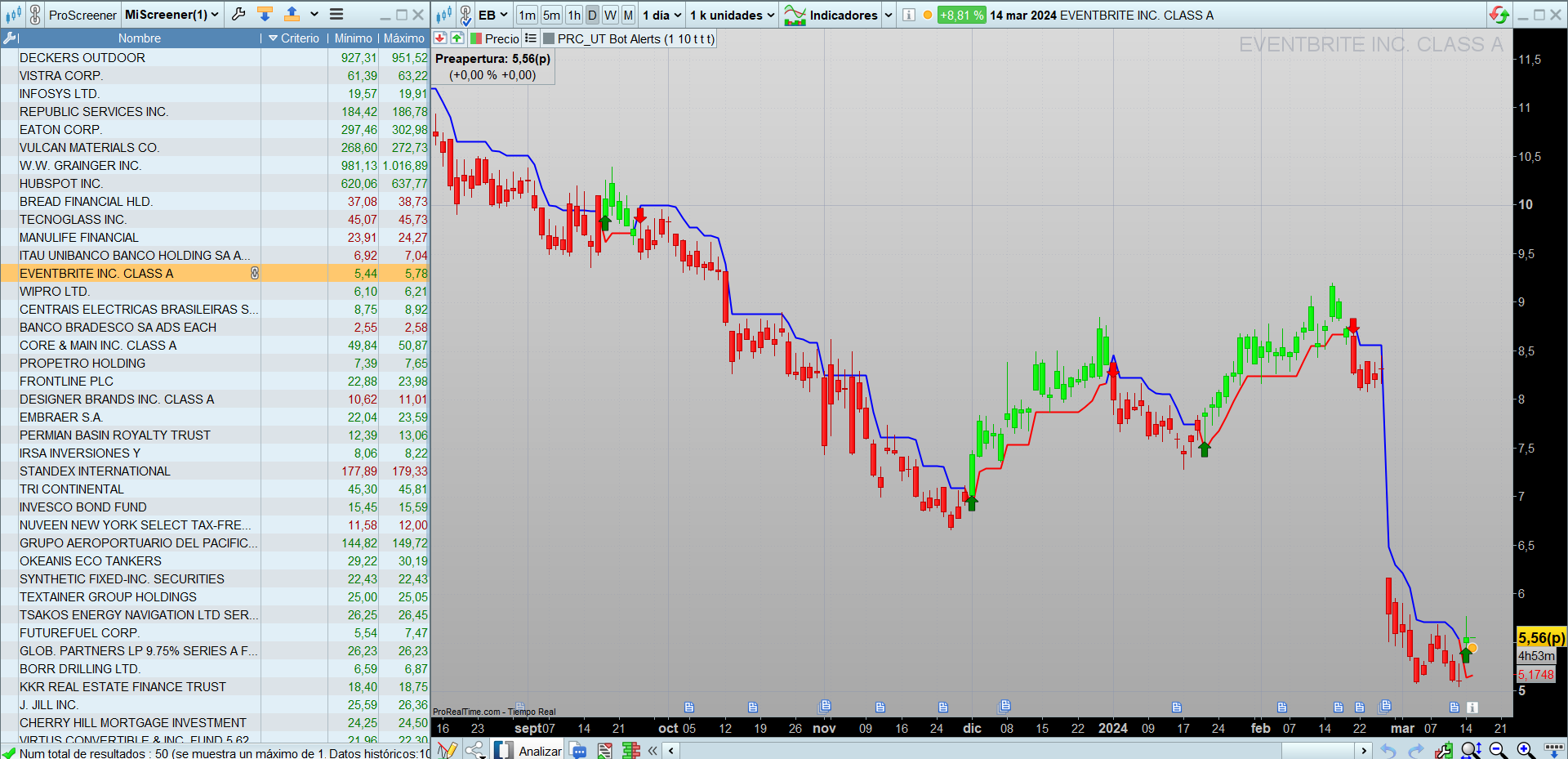
Hi
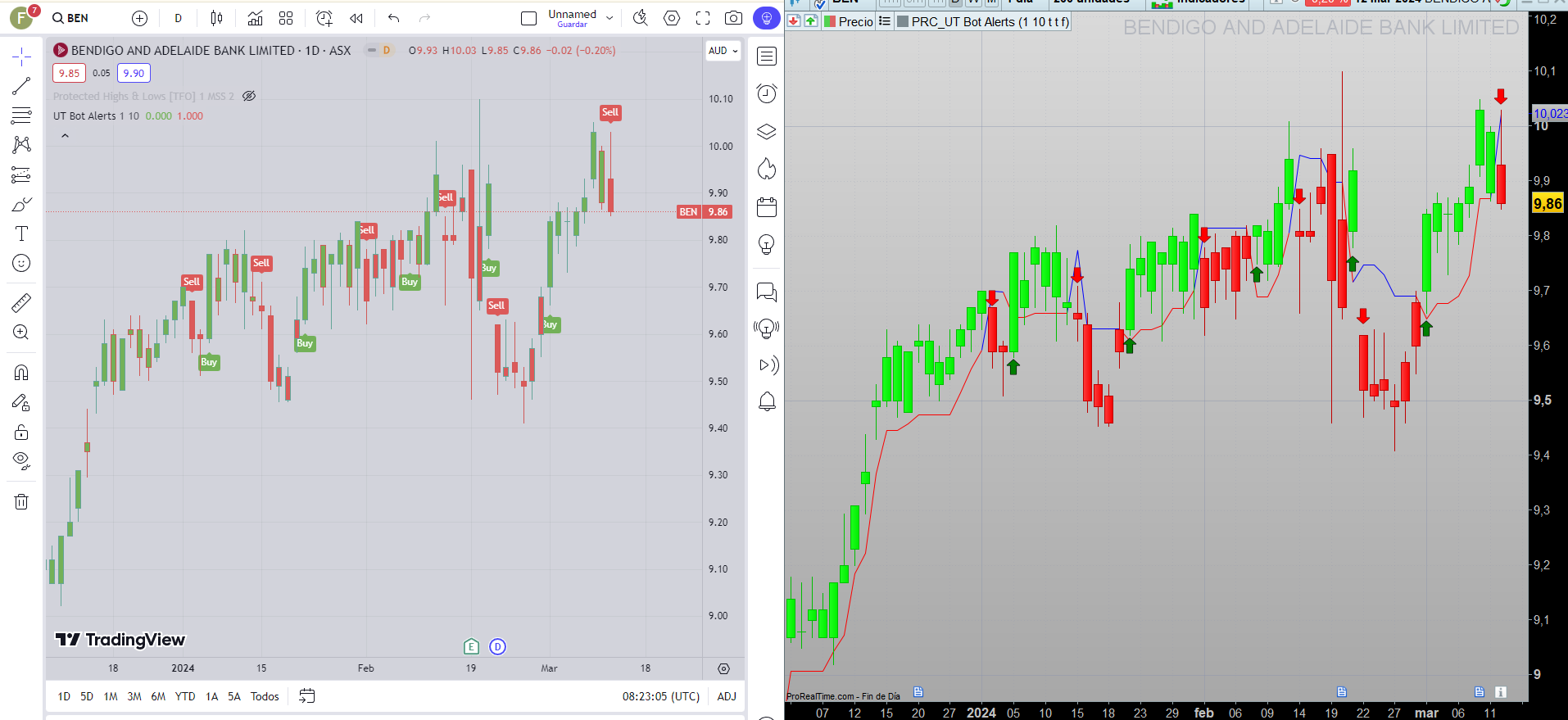
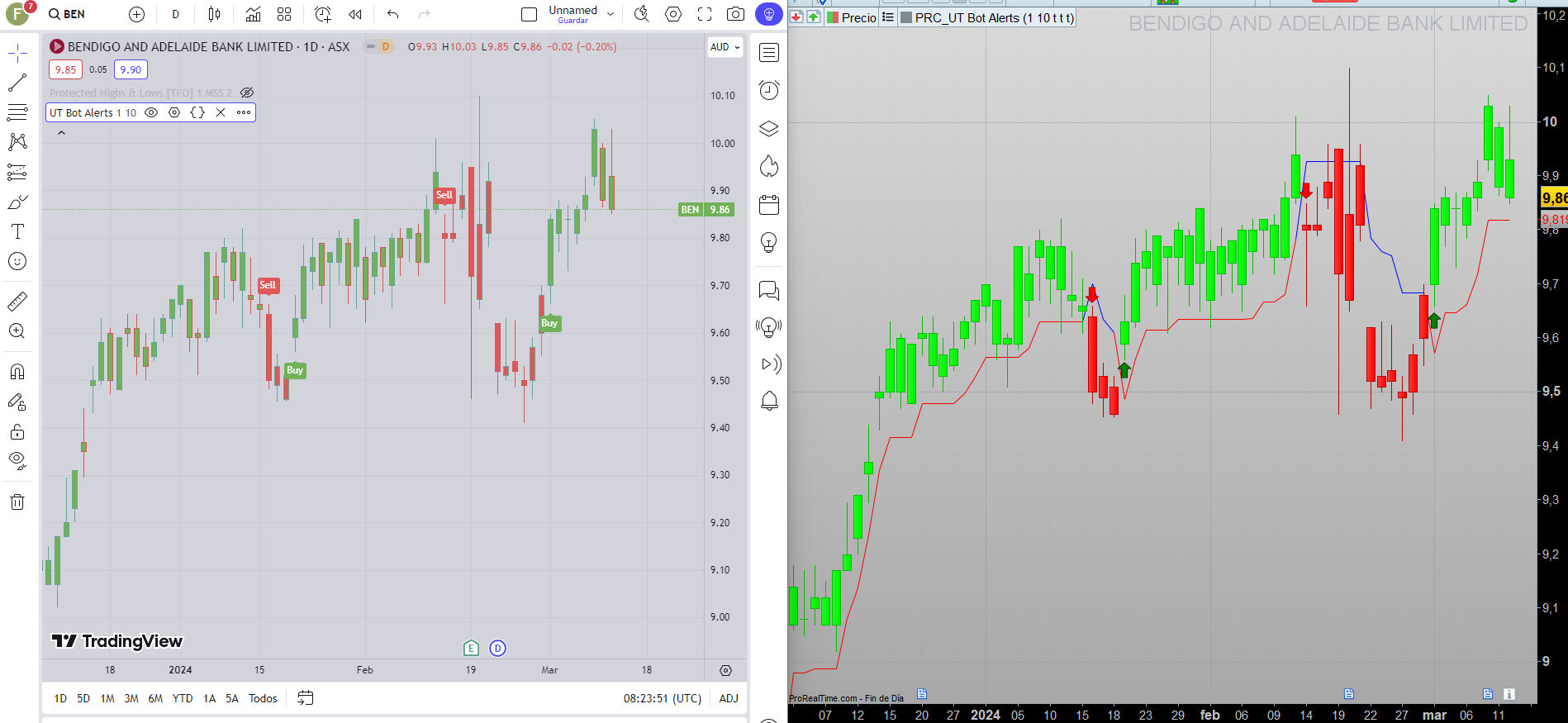
I think you are not working with same configuration as in trading view.
Attached you can see 2 screenshots (with and without Heikin A.).
Signals are the same in TV and PRT.
Ivan
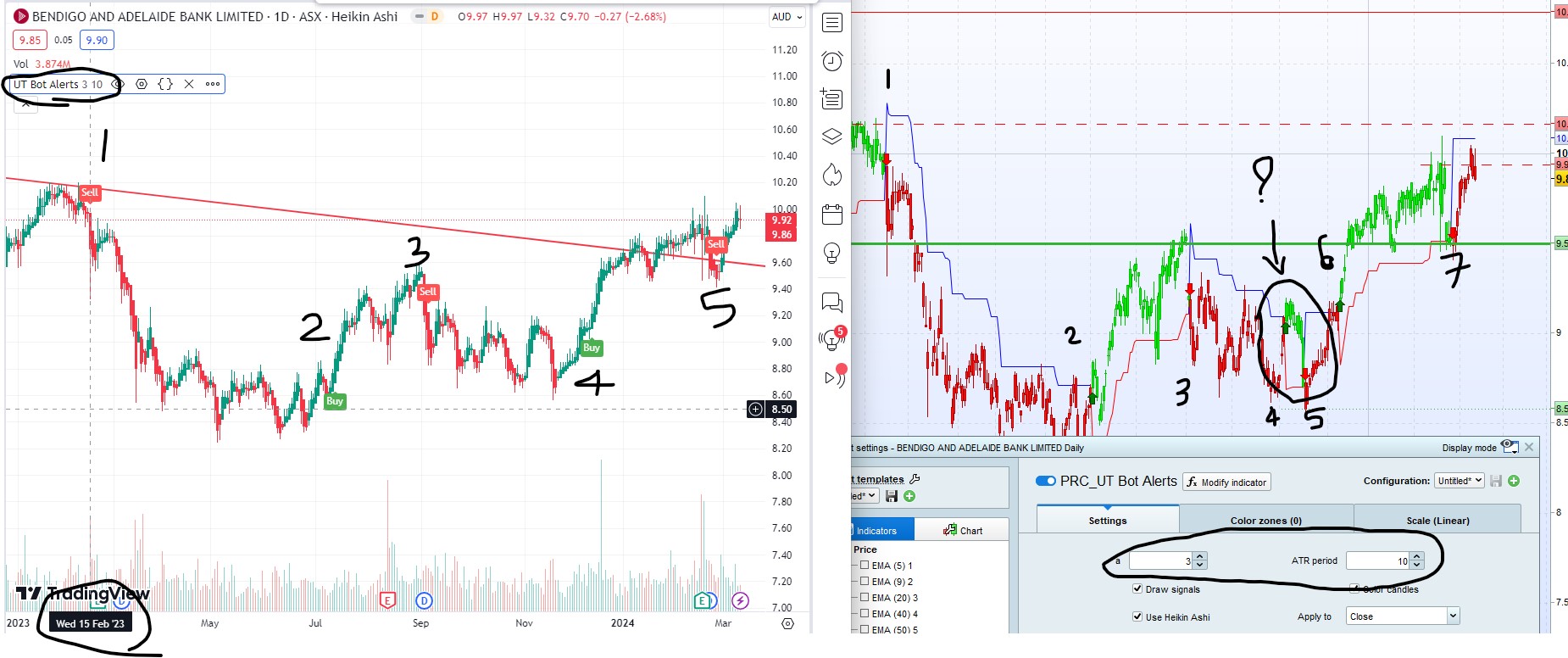
Yes, I used Key value as 3 and ATR period as 10. See attached screenshot with all value visible. As you can see signal number 1, 4 and 5 of trading view is same as signal number 1, 6 & 7.
However, trading view only had 5 signals since 15th Feb 2024, while PRT code had 7 signals so far. Out of 7 signals on PRT signal number 2, 3 doesn’t match with date on Trading view while signal number 4 & 5 are additional signal in PRT that you don’t have in trading view.
You just need to change your key value i.e. a as 3 in your setting and keep ATR value as 10 and you will also see same results.
let me know with sensitivity set you see only 5 signals on PRT as well.
I used TIF file that you attached with previous comment number #229602
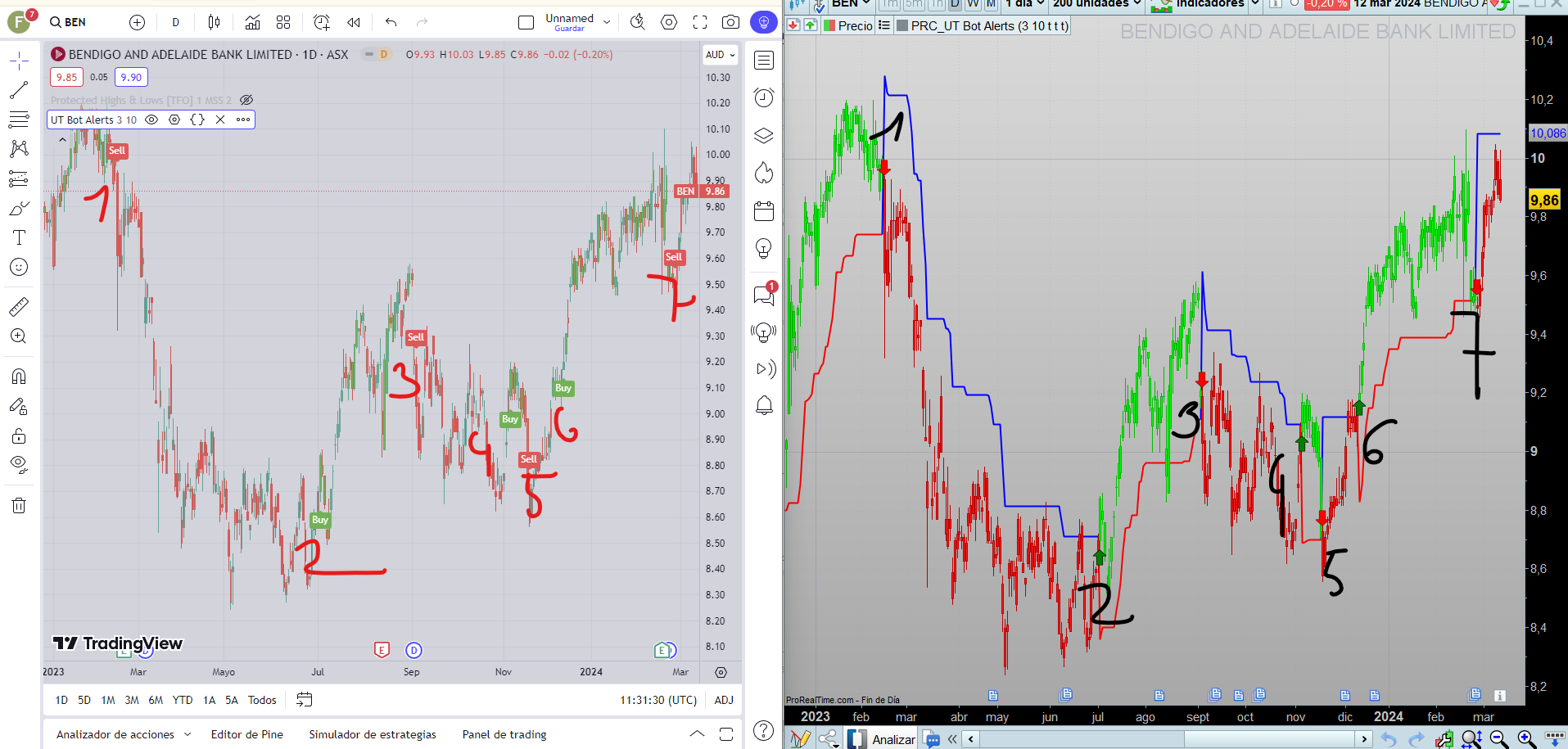
Pues perdona pero no lo entiendo. Como puedes ver en la imagend adjunta son exactamente las mismas señales.
//PRC_UT Bot Alerts
//version = 1
//15.02.24
//Iván González @ www.prorealcode.com
//Sharing ProRealTime knowledge
///inputs
a = 3 //Key Vaule. 'This changes the sensitivity' - Decimal
c = 10 //ATR period - Integer
drawsignals = 1 //Show arrows - Boolean
colorcandles = 1 //Color candles - Boolean
heikin = 1 // boolean. True work as Heikin A
/////////////////
xatr = averagetruerange[c](close)
nLoss = a * xatr

if heikin then
src = (open+close+high+low)/4
else
src = close
endif

if barindex < c then
xatrTrailingStop = undefined
pos = 0
else
if src > xatrTrailingStop[1] and src[1] > xatrTrailingStop[1] then
xAtrTrailingStop = max(xatrTrailingStop[1],src-nLoss)
else
if src < xatrTrailingStop[1] and src[1] < xatrTrailingStop[1] then
xAtrTrailingStop = min(xatrTrailingStop[1],src+nLoss)
else
if src > xatrTrailingStop[1] then
xAtrTrailingStop = src-nLoss
else
xAtrTrailingStop = src+nLoss
endif
endif
endif

if src[1] < xatrTrailingStop[1] and src > xAtrTrailingStop[1] then
pos = 1
r=250
g=0
b=0
else
if src[1] > xatrTrailingStop[1] and src < xatrTrailingStop[1] then
pos = -1
r=0
g=0
b=250
else
pos = pos[1]
endif
endif
endif

///////Trading conditions
ema = average[1](src)
above = ema crosses over xatrTrailingStop
below = ema crosses under xatrTrailingStop

buy1 = src > xatrTrailingStop and above
sell1 = src < xatrTrailingStop and below

barbuy = src > xatrTrailingStop
barsell = src < xatrTrailingStop

//////Plot signals and candles
if drawsignals then
if buy1 then
drawarrowup(barindex,low-0.15*averagetruerange[10])coloured("green")
elsif sell1 then
drawarrowdown(barindex,high+0.15*averagetruerange[10])coloured("red")
endif
endif

if colorcandles then
if barbuy then
rbar=0
gbar=250
bbar=0
elsif barsell then
rbar=250
gbar=0
bbar=0
else
rbar=125
gbar=125
bbar=125
endif
DRAWCANDLE(open, high, low, close)coloured(rbar,gbar,bbar)
endif
return xatrTrailingStop as "Trailing Stop" coloured(r,g,b)style(line,2)
Curiosamente, ambos usamos la misma configuración y obtenemos los mismos resultados en PRT pero diferentes en TradingView. Por mi parte, debe haber algún problema en TradingView.
¿Cómo convierto este indicador en un filtro donde obtengo los resultados de la acción que tiene una flecha verde?
I used Google translate to convert into Spanish… hope it is readable at your end !
Ivan,
I attempted to convert the indicator code into screener as below but results don’t show the stock where they are at BUY candle. I attempted to comment our the code line not required for screener but kept in the code so it’s easy to review what lines are removed.
are you able to look at it please. thanks,
//PRC_UT Bot Alerts
//version = 1
//15.02.24
//Iván González @ www.prorealcode.com
//Sharing ProRealTime knowledge
///inputs
//drawsignals = 1 //Show arrows - Boolean
//colorcandles = 1 //Color candles - Boolean

a = 1 //Key Vaule. 'This changes the sensitivity' - Decimal
c = 10 //ATR period - Integer
//heikin = 1 // boolean. True work as Heikin A
/////////////////
xatr = averagetruerange[c](close)
nLoss = a * xatr
src = (open+close+high+low)/4

//if heikin then
//src = (open+close+high+low)/4
//else
//src = close
//endif

if barindex < c then
xatrTrailingStop = undefined
pos = 0
else
if src > xatrTrailingStop[1] and src[1] > xatrTrailingStop[1] then
xAtrTrailingStop = max(xatrTrailingStop[1],src-nLoss)
else
if src < xatrTrailingStop[1] and src[1] < xatrTrailingStop[1] then
xAtrTrailingStop = min(xatrTrailingStop[1],src+nLoss)
else
if src > xatrTrailingStop[1] then
xAtrTrailingStop = src-nLoss
else
xAtrTrailingStop = src+nLoss
endif
endif
endif

if src[1] < xatrTrailingStop[1] and src > xAtrTrailingStop[1] then
pos = 1
//r=250
//g=0
//b=0
else
if src[1] > xatrTrailingStop[1] and src < xatrTrailingStop[1] then
pos = -1
//r=0
//g=0
//b=250
else
pos = pos[1]
endif
endif
endif

///////Trading conditions
ema = average[1](src)
above = ema crosses over xatrTrailingStop
//below = ema crosses under xatrTrailingStop

buy1 = src > xatrTrailingStop and above


screener[buy1]

//sell1 = src < xatrTrailingStop and below

//barbuy = src > xatrTrailingStop
//barsell = src < xatrTrailingStop

//////Plot signals and candles
//if drawsignals then
//if buy1 then
//drawarrowup(barindex,low-0.15*averagetruerange[10])coloured("green")
//elsif sell1 then
//drawarrowdown(barindex,high+0.15*averagetruerange[10])coloured("red")
//endif
//endif

//if colorcandles then
//if barbuy then
//rbar=0
//gbar=250
//bbar=0
//elsif barsell then
//rbar=250
//gbar=0
//bbar=0
//else
//rbar=125
//gbar=125
//bbar=125
//endif
//DRAWCANDLE(open, high, low, close)coloured(rbar,gbar,bbar)
//endif
//return xatrTrailingStop as "Trailing Stop" coloured(r,g,b)
Hello It is very likely that the indicator code (configured parameters) does not match the search engine parameters. I have checked the code you have passed and I have configured the indicator with your screener code and it works correctly.
Ivan
Thank you but I am not sure why it doesn’t work on my system.
Can you please send me your itf file for this screener please ?
Also, I have a query if you don’t mind and I did search on the manual but couldn’t find exactly what I am looking for.
I am making a simple code for the screener but i am making it for 3 day candle timeframe instead of daily candle. Below is the code for 1 day candle but not sure what i need to change in below code to get output for 3 day candle timeframe.
C1 = close > ExponentialAverage[10]
C2 = Close > highest[2](close[1])

if C1 and C2 then

Screener[c2]

endif
Hi,
This is the code. Just copy and paste:
//PRC_UT Bot Alerts
//version = 1
//15.02.24
//Iván González @ www.prorealcode.com
//Sharing ProRealTime knowledge
a = 1 //Key Vaule. 'This changes the sensitivity' - Decimal
c = 10 //ATR period - Integer
/////////////////
xatr = averagetruerange[c](close)
nLoss = a * xatr
src = (open+close+high+low)/4

if barindex < c then
xatrTrailingStop = undefined
pos = 0
else
if src > xatrTrailingStop[1] and src[1] > xatrTrailingStop[1] then
xAtrTrailingStop = max(xatrTrailingStop[1],src-nLoss)
else
if src < xatrTrailingStop[1] and src[1] < xatrTrailingStop[1] then
xAtrTrailingStop = min(xatrTrailingStop[1],src+nLoss)
else
if src > xatrTrailingStop[1] then
xAtrTrailingStop = src-nLoss
else
xAtrTrailingStop = src+nLoss
endif
endif
endif
if src[1] < xatrTrailingStop[1] and src > xAtrTrailingStop[1] then
pos = 1
else
if src[1] > xatrTrailingStop[1] and src < xatrTrailingStop[1] then
pos = -1
else
pos = pos[1]
endif
endif
endif
///////Trading conditions
ema = average[1](src)
above = ema crosses over xatrTrailingStop
buy1 = src > xatrTrailingStop and above
screener[buy1]
Timeframe could be only 1mn|2mn|3mn|5mn|10mn|15mn|30mn|1h|2h|3h|4h|daily|weekly|monthly|quarterly|yearly
About your code. It’s not working because it’s wrong codified. Should be like this:
C1 = close > ExponentialAverage[10]
C2 = Close > highest[2](close[1])

screener [C1 and C2]