Convert Trading View Code to ProrealCode

Viewing 15 posts - 1 through 15 (of 23 total)
  • Author
    Posts
  • #228127 quote
    WhyAskOZ
    Participant
    New

    hi

    where do i request or ask for help to convert trading view indicator code to pro-realtime code?

    below is the code that i like to convert. it is free indicator code on tradingview so not trying to get paid code from trading view to PRT. Credit for this code is to QUANTNOMAD. Indicator name on TV is UT Bot Alerts.

    Note – MOD – please delete if this is not allowed on this platform as i am new not sure of all rules. thanks.


    //@version=4
    study(title=”UT Bot Alerts”, overlay = true)
    // Inputs
    a = input(1,     title = “Key Vaule. ‘This changes the sensitivity'”)
    c = input(10,    title = “ATR Period”)
    h = input(false, title = “Signals from Heikin Ashi Candles”)
    xATR  = atr(c)
    nLoss = a * xATR
    src = h ? security(heikinashi(syminfo.tickerid), timeframe.period, close, lookahead = false) : close
    xATRTrailingStop = 0.0
    xATRTrailingStop := iff(src > nz(xATRTrailingStop[1], 0) and src[1] > nz(xATRTrailingStop[1], 0), max(nz(xATRTrailingStop[1]), src – nLoss),
       iff(src<nz(xATRTrailingStop[1],0)andsrc[1]<nz(xATRTrailingStop[1],0),min(nz(xATRTrailingStop[1]),src+nLoss),
       iff(src > nz(xATRTrailingStop[1], 0), src – nLoss, src + nLoss)))
    pos = 0
    pos :=   iff(src[1] < nz(xATRTrailingStop[1], 0) and src > nz(xATRTrailingStop[1], 0), 1,
       iff(src[1]>nz(xATRTrailingStop[1],0)andsrc<nz(xATRTrailingStop[1],0),-1,nz(pos[1],0)))
    xcolor=pos==-1?color.red:pos==1?color.green:color.blue
    ema   = ema(src,1)
    above = crossover(ema, xATRTrailingStop)
    below = crossover(xATRTrailingStop, ema)
    buy  =src>xATRTrailingStopandabove
    sell = src < xATRTrailingStop and below
    barbuy  =src>xATRTrailingStop
    barsell=src<xATRTrailingStop
    plotshape(buy,  title = “Buy”,  text = ‘Buy’,  style = shape.labelup,   location = location.belowbar, color= color.green, textcolor = color.white, transp = 0, size = size.tiny)
    plotshape(sell, title = “Sell”, text = ‘Sell’, style = shape.labeldown, location = location.abovebar, color= color.red,   textcolor = color.white, transp = 0, size = size.tiny)
    barcolor(barbuy  ? color.green : na)
    barcolor(barsell ? color.red   : na)
    alertcondition(buy,  “UT Long”,  “UT Long”)
    alertcondition(sell, “UT Short”, “UT Short”)
    #228139 quote
    Iván González
    Moderator
    Master

    Hi,
    I’ll try to convert it. Please be pacient because there are a lot of codes to translate ;

    #228141 quote
    Iván González
    Moderator
    Master

    I can see that your code has already been translate.

    UT BOT ALERTS

    WhyAskOZ thanked this post
    #228143 quote
    WhyAskOZ
    Participant
    New

    THank you.

    However, I don’t think the code is converted correctly. If you read the thread then nicolas did his own version but not the exactly a conversion as requested in the thread.

    #228146 quote
    WhyAskOZ
    Participant
    New

    See below,  I copied entire code from Trading view to PRT but getting error on defining variable H and then next variable title “xATR”.


    you can copy below code and tried to correct it if possible. thanks.

    //@version=4
    //study(title="UT Bot Alerts", overlay = true)
    
    // Inputs
    
    a = 1
    c = 10
    h = 
    
    xATR = atr(c)
    nLoss = a * xATR
    
    src = h ? security(heikinashi(syminfo.tickerid), timeframe.period, close, lookahead = false) : close
    
    xATRTrailingStop = 0.0
    xATRTrailingStop := iff(src > nz(xATRTrailingStop[1], 0) and src[1] > nz(xATRTrailingStop[1], 0), max(nz(xATRTrailingStop[1]), src - nLoss),
    
    iff(src < nz(xATRTrailingStop[1], 0) and src[1] < nz(xATRTrailingStop[1], 0), min(nz(xATRTrailingStop[1]), src + nLoss), 
    iff(src > nz(xATRTrailingStop[1], 0), src - nLoss, src + nLoss)))
    
    pos = 0
    pos := iff(src[1] < nz(xATRTrailingStop[1], 0) and src > nz(xATRTrailingStop[1], 0), 1,
    
    iff(src[1] > nz(xATRTrailingStop[1], 0) and src < nz(xATRTrailingStop[1], 0), -1, nz(pos[1], 0))) 
    
    xcolor = pos == -1 ? color.red: pos == 1 ? color.green : color.blue 
    
    ema = ema(src,1) 
    above = crossover(ema, xATRTrailingStop) 
    below = crossover(xATRTrailingStop, ema) 
    
    buy = src > xATRTrailingStop and above
    sell = src < xATRTrailingStop and below 
    
    barbuy = src > xATRTrailingStop
    barsell = src < xATRTrailingStop 
    
    plotshape(buy, title = "Buy", text = 'Buy', style = shape.labelup, location = location.belowbar, color= color.green, textcolor = color.white, transp = 0, size = size.tiny) 
    plotshape(sell, title = "Sell", text = 'Sell', style = shape.labeldown, location = location.abovebar, color= color.red, textcolor = color.white, transp = 0, size = size.tiny) 
    
    barcolor(barbuy ? color.green : na) 
    barcolor(barsell ? color.red : na) 
    
    alertcondition(buy, "UT Long", "UT Long") 
    alertcondition(sell, "UT Short", "UT Short")
    #228148 quote
    robertogozzi
    Moderator
    Master

    It’s a complete different language, it can’t be corrected. It needs to be converted (translated) to another language.

    #228198 quote
    WhyAskOZ
    Participant
    New

    Thanks. I understand it is different language that is why i am seeking help to see anyone here knows or can convert this to PRT code.

    The purpose of copying into PRT format was that reader of this post can read it clearly.

    #228210 quote
    robertogozzi
    Moderator
    Master

    Undrestood. I know there’s a conversion list.

    #228226 quote
    Iván González
    Moderator
    Master

    Here it is:

    //PRC_UT Bot Alerts
    //version = 0
    //15.02.24
    //Iván González @ www.prorealcode.com
    //Sharing ProRealTime knowledge
    ///inputs
    a = 1 //Key Vaule. 'This changes the sensitivity' - Decimal
    c = 10 //ATR period - Integer
    drawsignals = 1 //Show arrows - Boolean
    colorcandles = 1 //Color candles - Boolean
    /////////////////
    xatr = averagetruerange[c](close)
    nLoss = a * xatr
    
    src = close
    
    if barindex < c then
    xatrTrailingStop = undefined
    pos = 0
    else
    if src > xatrTrailingStop[1] and src[1] > xatrTrailingStop[1] then
    xAtrTrailingStop = max(xatrTrailingStop[1],src-nLoss)
    else
    if src < xatrTrailingStop[1] and src[1] < xatrTrailingStop[1] then
    xAtrTrailingStop = min(xatrTrailingStop[1],src+nLoss)
    else
    if src > xatrTrailingStop[1] then
    xAtrTrailingStop = src-nLoss
    else
    xAtrTrailingStop = src+nLoss
    endif
    endif
    endif
    
    if src[1] < xatrTrailingStop[1] and src > xAtrTrailingStop[1] then
    pos = 1
    r=250
    g=0
    b=0
    else
    if src[1] > xatrTrailingStop[1] and src < xatrTrailingStop[1] then
    pos = -1
    r=0
    g=0
    b=250
    else
    pos = pos[1]
    endif
    endif
    endif
    
    ///////Trading conditions
    ema = average[1](src)
    above = ema crosses over xatrTrailingStop
    below = ema crosses under xatrTrailingStop
    
    buy1 = src > xatrTrailingStop and above
    sell1 = src < xatrTrailingStop and below
    
    barbuy = src > xatrTrailingStop
    barsell = src < xatrTrailingStop
    
    //////Plot signals and candles
    if drawsignals then
    if buy1 then
    drawarrowup(barindex,low-0.15*averagetruerange[10])coloured("green")
    elsif sell1 then
    drawarrowdown(barindex,high+0.15*averagetruerange[10])coloured("red")
    endif
    endif
    
    if colorcandles then
    if barbuy then
    rbar=0
    gbar=250
    bbar=0
    elsif barsell then
    rbar=250
    gbar=0
    bbar=0
    else
    rbar=125
    gbar=125
    bbar=125
    endif
    DRAWCANDLE(open, high, low, close)coloured(rbar,gbar,bbar)
    endif
    return xatrTrailingStop as "Trailing Stop" coloured(r,g,b)


    GraHal, JS and WhyAskOZ thanked this post
    #228329 quote
    WhyAskOZ
    Participant
    New

    Thank you for the great effort.

    There is slight variation between your code and the one the trading view platform and it could be because the code that I gave above didn’t define Variable ” h ” (if you look at the line no. 8 in my above post #228146).


    Trading view defines h as below:

    h = input(false, title = “Signals from Heikin Ashi Candles”)
    which means signals are taken from Heikin Ashi candles while in your code signals are taken from candlesticks.
    in addition line number 15 in your code above has src = close but in trading view src defined again something from Heikin ashi as below :
    src = h ? security(heikinashi(syminfo.tickerid), timeframe.period, close, lookahead = false) : close
    is there a way to get signals from Heikin Ashi candles similar to code on TV ?
    #229585 quote
    WhyAskOZ
    Participant
    New

    @JC_Bywan

    Ivan, already converted majority of the code I gave above in #228146 ,however we still don’t have solution to small item i talked in my post #228329 which is resulting in error/incorrect output when using this code in PRT.

    are you able to help?


    Thanks,

    #229591 quote
    Iván González
    Moderator
    Master

    Hi
    You only have to write this instead line 15 and it will work also with Heikin Ashi candles:

    heikin = 1 // Boolean. True work as heikin A.
    if heikin then
    src=(open+close+high+low)/4
    else
    src = close
    endif
    #229599 quote
    WhyAskOZ
    Participant
    New

    Ivan

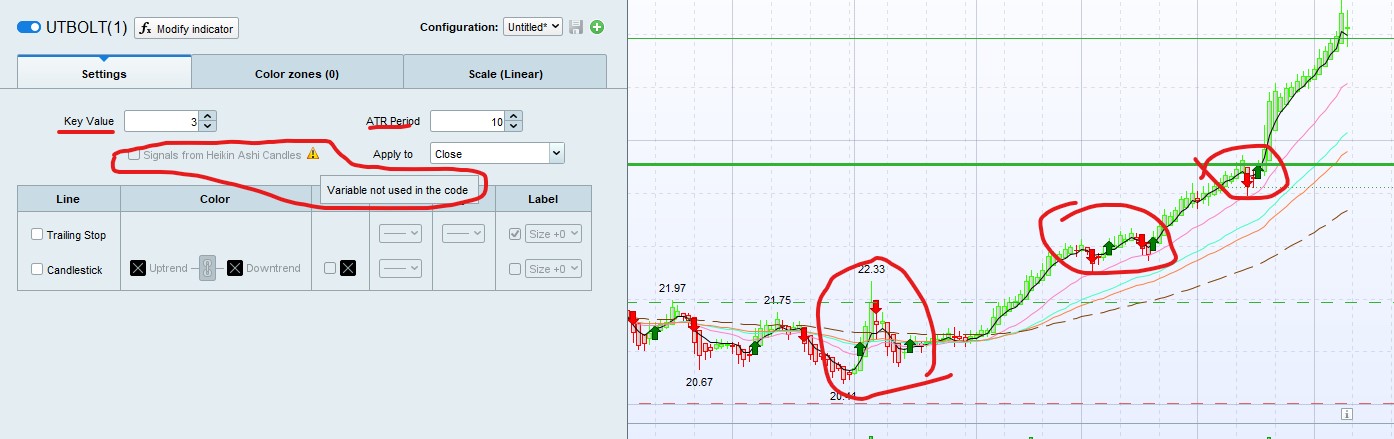
    Thanks, I updated the code as below. However, there are few issues as below (refer to the screenshot as well).

    1. In the setting, when I change the key value & ATR period then there is no change in the Green & Red Arrow Indicator Arrow on the chart. Which is not correct as the location of the indicator should change with change in the ATR period or Key value.
    2. As per the screen shot, “Signals from Heikin Ashi Candles” not active and as you can see in the screenshot it says “Variable not used in the code”.

    See below, I copied updated code so you can test it at your end as well. I used ticker code  ” WBC ” in the screenshot but the result is same across all ticker code i use from Australia.


    //PRC_UT Bot Alerts
    //version = 0
    //15.02.24
    //Iván González @ www.prorealcode.com
    //Sharing ProRealTime knowledge
    ///inputs
    a = 1 //Key Vaule. 'This changes the sensitivity' - Decimal
    c = 10 //ATR period - Integer
    drawsignals = 1 //Show arrows - Boolean
    colorcandles = 1 //Color candles - Boolean
    /////////////////
    xatr = averagetruerange[c](close)
    nLoss = a * xatr
     
    heikin = 1 // boolean. True work as Heikin A
    if heikin then
    src = (open+close+high+low)/4
    else
    src = close
    endif
     
    if barindex < c then
    xatrTrailingStop = undefined
    pos = 0
    else
    if src > xatrTrailingStop[1] and src[1] > xatrTrailingStop[1] then
    xAtrTrailingStop = max(xatrTrailingStop[1],src-nLoss)
    else
    if src < xatrTrailingStop[1] and src[1] < xatrTrailingStop[1] then
    xAtrTrailingStop = min(xatrTrailingStop[1],src+nLoss)
    else
    if src > xatrTrailingStop[1] then
    xAtrTrailingStop = src-nLoss
    else
    xAtrTrailingStop = src+nLoss
    endif
    endif
    endif
     
    if src[1] < xatrTrailingStop[1] and src > xAtrTrailingStop[1] then
    pos = 1
    r=250
    g=0
    b=0
    else
    if src[1] > xatrTrailingStop[1] and src < xatrTrailingStop[1] then
    pos = -1
    r=0
    g=0
    b=250
    else
    pos = pos[1]
    endif
    endif
    endif
     
    ///////Trading conditions
    ema = average[1](src)
    above = ema crosses over xatrTrailingStop
    below = ema crosses under xatrTrailingStop
     
    buy1 = src > xatrTrailingStop and above
    sell1 = src < xatrTrailingStop and below
     
    barbuy = src > xatrTrailingStop
    barsell = src < xatrTrailingStop
     
    //////Plot signals and candles
    if drawsignals then
    if buy1 then
    drawarrowup(barindex,low-0.15*averagetruerange[10])coloured("green")
    elsif sell1 then
    drawarrowdown(barindex,high+0.15*averagetruerange[10])coloured("red")
    endif
    endif
     
    if colorcandles then
    if barbuy then
    rbar=0
    gbar=250
    bbar=0
    elsif barsell then
    rbar=250
    gbar=0
    bbar=0
    else
    rbar=125
    gbar=125
    bbar=125
    endif
    DRAWCANDLE(open, high, low, close)coloured(rbar,gbar,bbar)
    endif
    return xatrTrailingStop as "Trailing Stop" coloured(r,g,b)
    
    PRT-UTBot.jpg PRT-UTBot.jpg
    #229602 quote
    Iván González
    Moderator
    Master

    Hi,
    I think you are working with previous .itf …
    Please, create new indicator, copy the code below and define again input variables or download the attached file.

    //PRC_UT Bot Alerts
    //version = 1
    //15.02.24
    //Iván González @ www.prorealcode.com
    //Sharing ProRealTime knowledge
    ///inputs
    a = 1 //Key Vaule. 'This changes the sensitivity' - Decimal
    c = 10 //ATR period - Integer
    drawsignals = 1 //Show arrows - Boolean
    colorcandles = 1 //Color candles - Boolean
    heikin = 1 // boolean. True work as Heikin A
    /////////////////
    xatr = averagetruerange[c](close)
    nLoss = a * xatr
    
    if heikin then
    src = (open+close+high+low)/4
    else
    src = close
    endif
     
    if barindex < c then
    xatrTrailingStop = undefined
    pos = 0
    else
    if src > xatrTrailingStop[1] and src[1] > xatrTrailingStop[1] then
    xAtrTrailingStop = max(xatrTrailingStop[1],src-nLoss)
    else
    if src < xatrTrailingStop[1] and src[1] < xatrTrailingStop[1] then
    xAtrTrailingStop = min(xatrTrailingStop[1],src+nLoss)
    else
    if src > xatrTrailingStop[1] then
    xAtrTrailingStop = src-nLoss
    else
    xAtrTrailingStop = src+nLoss
    endif
    endif
    endif
     
    if src[1] < xatrTrailingStop[1] and src > xAtrTrailingStop[1] then
    pos = 1
    r=250
    g=0
    b=0
    else
    if src[1] > xatrTrailingStop[1] and src < xatrTrailingStop[1] then
    pos = -1
    r=0
    g=0
    b=250
    else
    pos = pos[1]
    endif
    endif
    endif
     
    ///////Trading conditions
    ema = average[1](src)
    above = ema crosses over xatrTrailingStop
    below = ema crosses under xatrTrailingStop
     
    buy1 = src > xatrTrailingStop and above
    sell1 = src < xatrTrailingStop and below
     
    barbuy = src > xatrTrailingStop
    barsell = src < xatrTrailingStop
     
    //////Plot signals and candles
    if drawsignals then
    if buy1 then
    drawarrowup(barindex,low-0.15*averagetruerange[10])coloured("green")
    elsif sell1 then
    drawarrowdown(barindex,high+0.15*averagetruerange[10])coloured("red")
    endif
    endif
     
    if colorcandles then
    if barbuy then
    rbar=0
    gbar=250
    bbar=0
    elsif barsell then
    rbar=250
    gbar=0
    bbar=0
    else
    rbar=125
    gbar=125
    bbar=125
    endif
    DRAWCANDLE(open, high, low, close)coloured(rbar,gbar,bbar)
    endif
    return xatrTrailingStop as "Trailing Stop" coloured(r,g,b)
    
    WhyAskOZ thanked this post
    PRC_UT-Bot-Alerts.itf
    #229621 quote
    WhyAskOZ
    Participant
    New

    Ivan


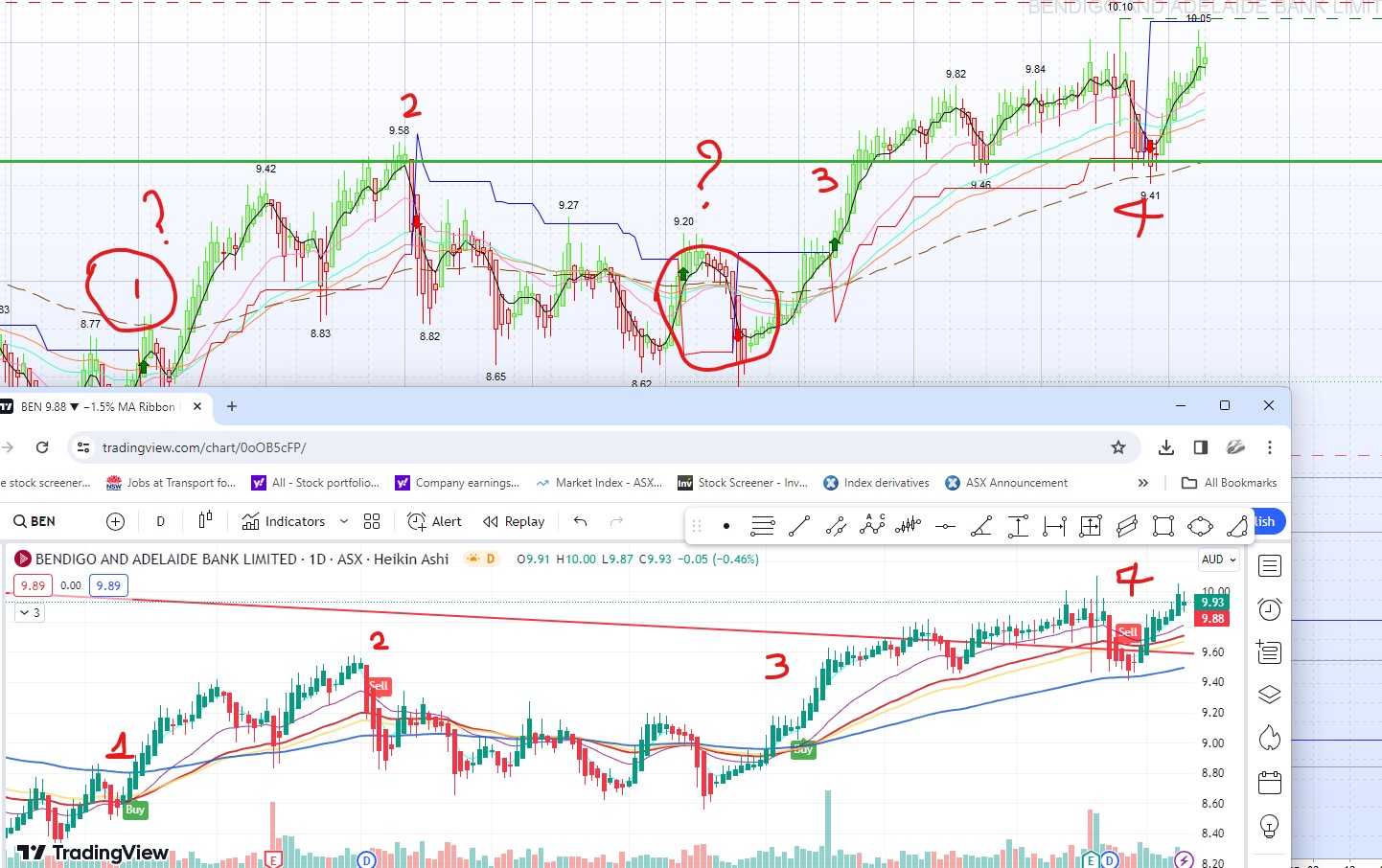
    Thank you. I created new indicator by copying your code above but it didn’t work so then I copied your itf file and imported into my system and it worked. so it did work using the file you sent through but somehow copying code is not working… !

    Somehow, the signal I got on PRT are more then what the code should be giving if it was same as what is on Trading view. See attached image, the bottom part of the image is trading view which gave 4 signals and top part is from PRT using your new code and it gave 6 signals. Two extra signals are highlighted in circle on the top part of the chart.

    In addition signal number 1 on PRT is completely different date to what we have on trading view.

    i checked on different other tickers and same thing happened as here. more signals are coming out of PRT code then what we get from tradingview code. not sure why it is happening, but PRT is giving false signals which is the issue as too many early buy & sell signals comes out of PRT thn trading view for the same setting.

    PRT-UTBot-2.jpg PRT-UTBot-2.jpg PRT-UTBot-2-1.jpg PRT-UTBot-2-1.jpg
Viewing 15 posts - 1 through 15 (of 23 total)
  • You must be logged in to reply to this topic.

Convert Trading View Code to ProrealCode


ProBuilder: Indicators & Custom Tools

New Reply
Author
author-avatar
WhyAskOZ @g42dav Participant
Summary

This topic contains 22 replies,
has 3 voices, and was last updated by Iván González

1 year, 11 months ago.

Topic Details
Forum: ProBuilder: Indicators & Custom Tools
Language: English
Started: 02/14/2024
Status: Active
Attachments: 9 files
Logo Logo
Loading...