Conversion Steven Primo Strategie de Tradingview

Viewing 6 posts - 1 through 6 (of 6 total)
  • Author
    Posts
  • #199341 quote
    Alex72
    Participant
    New

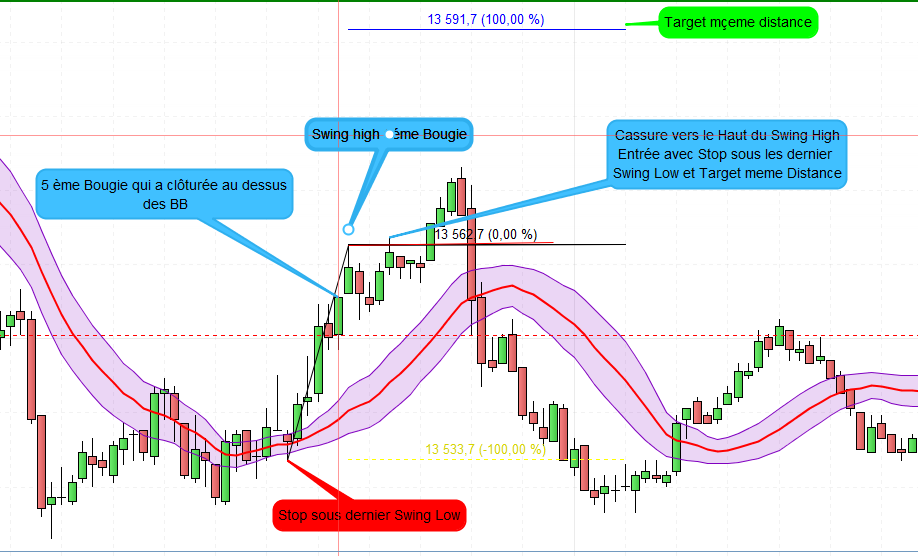
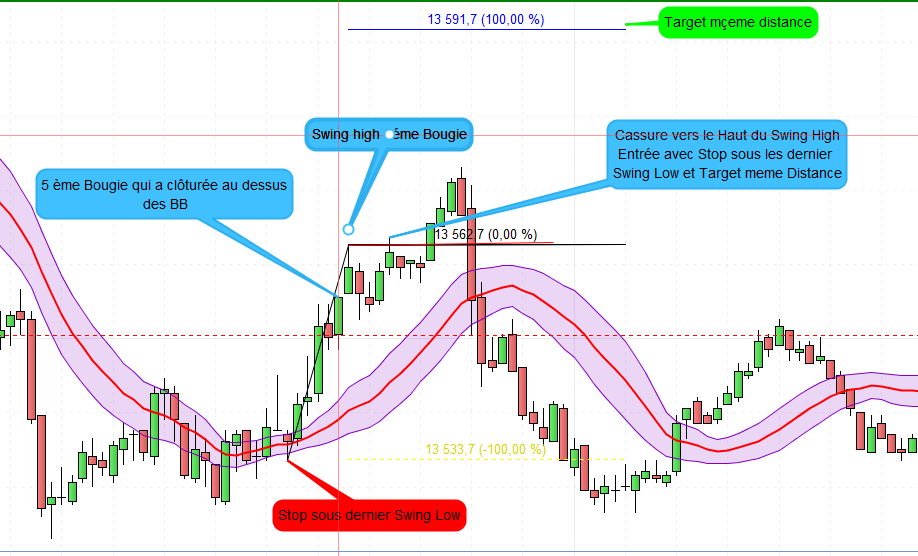
    C’est la Stratégie de Steven primo qui consiste en:
    1) Setup des Bolligner Bands avec deviation de 0.382
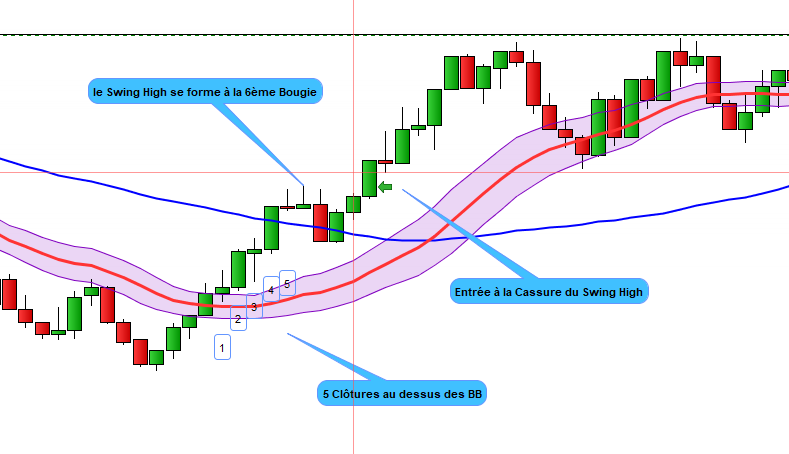
    2) Attendre une clôture de la 5ème bougie au dessus des haut des Bollinger bands.
    3) Repérer le dernier Swing Haut qui s’est formé dans ces 5 dernières bougies ou attendre la formation d’un Swing Haut sans que le prix ne clôture sous le Haut du BB.
    4) Si on n’a pas eu de Swing Haut et qu le prix clôture sous le haut des BB, le processus se repete et donc on attend à nouveau la formation de 5 bougies qui clôturent au dessus du haut des BB et un swing High.
    5) Entrée automatique si on on casse le Swing High.
    6) Placer un Stop sous le dernier Swing Low et le Take profit à la même distance que le Stop.

    j’ai pu avec l’aide de JC_Bywan, Nicolas, robertogozzi faire une petite partie du code que je vais partager dans les réponses mais il reste encore du travail à faire.
    Je vous remercie pour votre aide.

    Steven-Primo-Bollinger-Bands-Code.txt
    #199343 quote
    Alex72
    Participant
    New
    // This source code is subject to the terms of the Mozilla Public License 2.0 at https://mozilla.org/MPL/2.0/
    // © EduardoMattje
    
    //@version=5
    strategy("Steven Primo Bollinger Band", overlay=true, default_qty_type=strategy.percent_of_equity, default_qty_value=100, process_orders_on_close=true, max_labels_count=500)
    
    // Constants
    var TRANSP = 5
    var LONG = strategy.direction.long
    var SHORT = strategy.direction.short
    var ALL = strategy.direction.all
    var S_BOLLINGER = "Bollinger settings"
    var S_SETUP = "Setup settings"
    
    // Inputs
    src = math.log(input.source(close, "Price source", group=S_BOLLINGER))
    var bollingerLength = input.int(20, "Bollinger length", minval=3, group=S_BOLLINGER, inline=S_BOLLINGER)
    var mult = input.float(0.382, "Standard deviation", minval=0.0, step=0.1, group=S_BOLLINGER, inline=S_BOLLINGER)
    
    var orderDirection = input.string(LONG, "Order direction", options=[LONG, SHORT, ALL], group=S_SETUP)
    var useTrailingStop = input.bool(false, "Use trailing stop", group=S_SETUP)
    var consecutiveCloses = input.int(5, "Consecutive closes for the setup", minval=1, group=S_SETUP, inline=S_SETUP)
    var extension = input.int(100, "Extension (%)", minval=100, group=S_SETUP, inline=S_SETUP) / 100.0
    
    // Getting the BB
    [middle, upper, lower] = ta.bb(src, bollingerLength, mult)
    middle := math.exp(middle)
    upper := math.exp(upper)
    lower := math.exp(lower)
    
    // Plotting the BB
    var colorAtTheLimits = color.new(color.yellow, TRANSP)
    var colorAtTheMiddle = color.new(color.blue, TRANSP)
    
    plot(middle, "Middle band", colorAtTheMiddle, display=display.none)
    plot(upper, "Upper band", colorAtTheLimits)
    plot(lower, "Lower band", colorAtTheLimits)
    
    // MA setup
    
    
    // BB setup
    longComparison() => close >= upper
    shortComparison() => close <= lower
    
    var countLong = 0
    var countShort = 0
    
    incCount(count, comparison) =>
        if comparison
            if count == 0 and comparison[1]
                0
            else
                count + 1
        else
            0
    
    countLong := incCount(countLong, longComparison())
    countShort := incCount(countShort, shortComparison())
    
    // Pivot setup
    pivotHigh = ta.pivothigh(1, 1)
    pivotLow = ta.pivotlow(1, 1)
    
    pivotInRange(pivot, count) => ta.barssince(pivot) < count
    
    pvHighInRange = pivotInRange(pivotHigh, countLong)
    pvLowInRange = pivotInRange(pivotLow, countShort)
    
    // Entry price
    epLong = fixnan(pivotHigh) + syminfo.mintick
    epShort = fixnan(pivotLow) - syminfo.mintick
    
    // Stop price
    getRange(currentPrice, pivot, cond, tickMod) =>
        if cond
            currentPrice
        else
            fixnan(pivot) + syminfo.mintick * tickMod
    
    var stopLong = 0.0
    var stopShort = 0.0
    
    stopLong := epShort
    stopShort := epLong
            
    // Target price
    getTarget(stopPrice, entryPrice) =>
        totalTicks = (entryPrice - stopPrice) * extension
        entryPrice + totalTicks
    
    var targetLong = 0.0
    var targetShort = 0.0
    
    targetLong := getTarget(stopLong, epLong)
    targetShort := getTarget(stopShort, epShort)
    
    // Entry condition
    canBuy = countLong >= consecutiveCloses and pvHighInRange and high < epLong
    canSell = countShort >= consecutiveCloses and pvLowInRange and low > epShort
    
    // Entry orders
    inMarket = strategy.opentrades != 0
    
    var plotTarget = 0.0
    var plotStop = 0.0
    
    strategy.risk.allow_entry_in(orderDirection)
    
    if not inMarket
        if canBuy
            plotTarget := targetLong
            plotStop := stopLong
            strategy.entry("long", strategy.long, stop=epLong, comment="Entry long")
        else if canSell
            plotTarget := targetShort
            plotStop := stopShort
            strategy.entry("short", strategy.short, stop=epShort, comment="Entry short")
        else
            strategy.cancel("long")
            strategy.cancel("short")
            
        // Exit orders
        strategy.exit("long", "long", stop=stopLong, limit=targetLong, comment="Exit long")
        strategy.exit("short", "short", stop=stopShort, limit=targetShort, comment="Exit short")
    else
        countLong := 0
        countShort := 0
    
    // Trailing stop
    if useTrailingStop and inMarket
        if strategy.position_entry_name == "long"
            strategy.exit("long", "long", stop=stopLong, limit=plotTarget, comment="Exit long", when=stopLong > plotStop)
            plotStop := stopLong
        else
            strategy.exit("short", "short", stop=stopShort, limit=plotTarget, comment="Exit short", when=stopShort < plotStop) 
            plotStop := stopShort
    
    // Plot exit
    plotCond(price) => inMarket ? price : inMarket[1] ? price[1] : na
    plot(plotCond(plotStop), "Stop loss", color.red, style=plot.style_linebr)
    plot(plotCond(plotTarget), "Target", color.teal, style=plot.style_linebr)

    
    Condition-dentree-1.png Condition-dentree-1.png
    #199348 quote
    Alex72
    Participant
    New

    Avec l’aide de Nicolas j’ai pu avoir ce code qui me trace un segment une fois la condition de 5 bougies qui clôturent au dessus des BB mais le segment est tracé au niveau du haut des 5 dernières bougies mais ce que je voudrait avoir c’est le dernier Swing High après la formation de ces 5 bougies ou meême plus comme illustré dans la photo.

    ONCE x      = 0
    ONCE y      = 0
    ONCE Count  = 0
    ONCE N      = 5
    Count = Count - 1
    indicator3 = Average[20](close)+0.382*std[20](close)
    Above = summation[N](close > indicator3) = N
    Pivot = highest[N](high)
    IF Above AND (Count <= 0) THEN
    x     = BarIndex-N+1
    y     = Pivot
    Count = 5
    Drawsegment(x-1,y,BarIndex,y) coloured(0,0,255,255)
    ENDIF
    
    
    indicator4 = Average[20](close)-0.382*std[20](close)
    Below = summation[N](close < indicator4) = N
    PivotLow = lowest[N](low)
    IF Below AND (Count <= 0) THEN
    x     = BarIndex-N+1
    y     = PivotLow
    Count = 5
    Drawsegment(x,y,BarIndex,y) coloured(255,0,0,255)
    ENDIF
    RETURN
    
    5-Clotures.png 5-Clotures.png Condition-dentree-2.png Condition-dentree-2.png
    #199351 quote
    Alex72
    Participant
    New

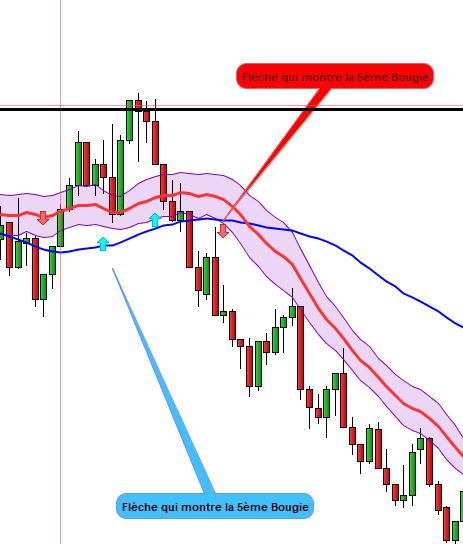
    Condition 1 :Tracer une flèche si on a 5 clôtures au dessus ou sous BB avec ce code.
    Condition 2: Repérer le dernier Swing High ou Low
    Condition 3: Si on a condition 1 et condition 2, entrer Long ou short si on casse respectivement le Swing High ou Low et placer les Stop respectivement sous le dernier Swing Low ou High et la Target à la même distance du Stop.

    Voilà pour la condition 1

    atr=averagetruerange[14]
    // Conditions pour Close > Bollinger UP
    indicator3 = Average[20](close)+0.382*std[20](close)
    c7 = (close > indicator3)
    // Conditions pour Close < Bollinger Down
    indicator4 = Average[20](close)-0.382*std[20](close)
    c8 = (close < indicator4)
    // Conditions pour 5 Cloture au dessus de Bollinger Up
    c9=SUMMATION[5](c7)=5
    //condition pour que la flèche ne surgisse que si le prix est au dessus de SMA20 et SMA50 et SMA20> SMA50 ca donne moins de signaux mais plus interessants
    // Inverse pour Bearish
    sma50 = Average[50](close)
    sma20 = Average[20](close)
    //Bullish = Close > sma50 and close > sma20 and sma20>sma50
    //Bearish = Close < sma50 and close < sma20 and sma20<sma50
    // Fleche Haut si min 5 Close > Bollinger UP
    //Condition = c9 and bullish and lastsig = 0
    if c9  and lastsig=0 then
    drawarrowup(barindex,low-atr) coloured(0,255,255)
    lastsig=1
    endif
    //Le processus se met à zéro si on cloture à nouveau sous Boll Up
    if close<indicator3 then
    lastsig=0
    endif
    // Conditions pour 5 Cloture en dessous de Bollinger down
    c10=SUMMATION[5](c8)=5
    // Fleche Bas si min 5 Close < Bollinger Down
    if c10 and lastsig2=0 then
    drawarrowdown(barindex,high+atr) coloured(255,102,102)
    lastsig2=1
    endif
    //Le processus se met à zéro si on cloture à nouveau au dessus de Boll Down
    if close>indicator4 then
    lastsig2=0
    endif
     
    return
    
    Fleche.png Fleche.png
    #199400 quote
    Nicolas
    Keymaster
    Master

    Je suppose que c’est lié à ton indicateur: https://www.prorealcode.com/topic/eviter-les-repetitions/

    Donc tout est ok désormais ? 🙂

    #199410 quote
    Alex72
    Participant
    New

    Oui c’est sur mais ca c’est tout le code et je suis entrain d’essayer de le faire petit à petit.
    je pense qu’il ya des personnes comme vous bien sur qui maitrisent bien votre codage, moi je ne suis q’u petit débutant et je pensais aider avec le peu que j’ai fait mais il reste encoe du chemin à faire.
    Merci

Viewing 6 posts - 1 through 6 (of 6 total)
  • You must be logged in to reply to this topic.

Conversion Steven Primo Strategie de Tradingview


ProBuilder : Indicateurs & Outils Personnalisés

New Reply
Author
author-avatar
Alex72 @alex72 Participant
Summary

This topic contains 5 replies,
has 2 voices, and was last updated by Alex72
3 years, 6 months ago.

Topic Details
Forum: ProBuilder : Indicateurs & Outils Personnalisés
Language: French
Started: 08/21/2022
Status: Active
Attachments: 5 files
Logo Logo
Loading...