Conversion Indic Predictive Ranges from TV to PRT

Viewing 4 posts - 1 through 4 (of 4 total)

  • Author
    Posts
  • #243750 quote
    reb
    Participant
    Master

    Hello to the PRT masters,

    Would you be so kind to adapt the following TradingView code into a PRT code ?

    indicator(“Predictive Ranges [LuxAlgo]”, “LuxAlgo – Predictive Ranges”, overlay = true)
    //——————————————————————————
    //Settings
    //—————————————————————————–{
    length = input.int(200, ‘Length’, minval = 2)
    mult   = input.float(6., ‘Factor’, minval = 0, step = .5)
    tf     = input.timeframe(”, ‘Timeframe’)
    src    = input(close, ‘Source’)
    //—————————————————————————–}
    //Function
    //—————————————————————————–{
    pred_ranges(length, mult)=>
        var avg = src
        var hold_atr = 0.
        atr = nz(ta.atr(length)) * mult
        avg:=src-avg>atr?avg+atr:
          avg-src>atr?avg-atr:
          avg
        hold_atr := avg != avg[1] ? atr / 2 : hold_atr
        [avg + hold_atr * 2, avg + hold_atr, avg, avg – hold_atr, avg – hold_atr * 2]
    //—————————————————————————–}
    //Calculation
    //—————————————————————————–{
    [prR2
      , prR1
      , avg
      , prS1
      , prS2] = request.security(syminfo.tickerid, tf, pred_ranges(length, mult))
    //—————————————————————————–}
    //Plots
    //—————————————————————————–{
    plot_pru2  = plot(prR2, ‘PR Upper 2’, avg != avg[1] ? na : #f23645)
    plot_pru1  = plot(prR1, ‘PR Upper 1’, avg != avg[1] ? na : #f23645)
    plot_pravg = plot(avg , ‘PR Average’, avg != avg[1] ? na : #5b9cf6)
    plot_prl1  = plot(prS1, ‘PR Lower 1’, avg != avg[1] ? na : #089981)
    plot_prl2  = plot(prS2, ‘PR Lower 2’, avg != avg[1] ? na : #089981)
    //Fills
    fill(plot_pru2, plot_pru1, avg != avg[1] ? na : color.new(#f23645, 95))
    fill(plot_prl1, plot_prl2, avg != avg[1] ? na : color.new(#089981, 95))
    //—————————————————————————–}
    Thanks in advance,
    Reb
    #243762 quote
    Iván González
    Moderator
    Master

    Hi. Here you have the code: https://www.prorealcode.com/prorealtime-indicators/predictive-ranges-indicator/

    //--------------------------------------//
    //PRC_Predictive Ranges
    //version = 0
    //13.02.2025
    //Iván González @ www.prorealcode.com
    //Sharing ProRealTime knowledge
    //--------------------------------------//
    // inputs
    //--------------------------------------//
    length=200 // Length
    mult= 6 // Factor
    src=close
    //--------------------------------------//
    // Calculations
    //--------------------------------------//
    atr=averagetruerange[length](close)*mult
    once avg=src
    
    if src-avg > atr then
    avg=avg+atr
    elsif avg-src > atr then
    avg=avg-atr
    else
    avg=avg
    endif
    
    if avg<>avg[1] then
    holdAtr=atr/2
    alpha=0
    else
    holdAtr=holdAtr
    alpha=255
    endif
    //--------------------------------------//
    // Supports and Resistances
    //--------------------------------------//
    prR2=avg+holdAtr*2
    prR1=avg+holdAtr
    prS1=avg-holdAtr
    prS2=avg-holdAtr*2
    //--------------------------------------//
    // Plot
    //--------------------------------------//
    colorbetween(prR2,prR1,"red",alpha*0.05)
    colorbetween(prS1,prS2,"green",alpha*0.05)
    //--------------------------------------//
    return avg coloured("blue",alpha),prR2 coloured("red",alpha),prR1 coloured("red",alpha),prS1 coloured("green",alpha),prS2 coloured("green",alpha)
    #243819 quote
    reb
    Participant
    Master

    Hi Ivan

    Well done, nice job

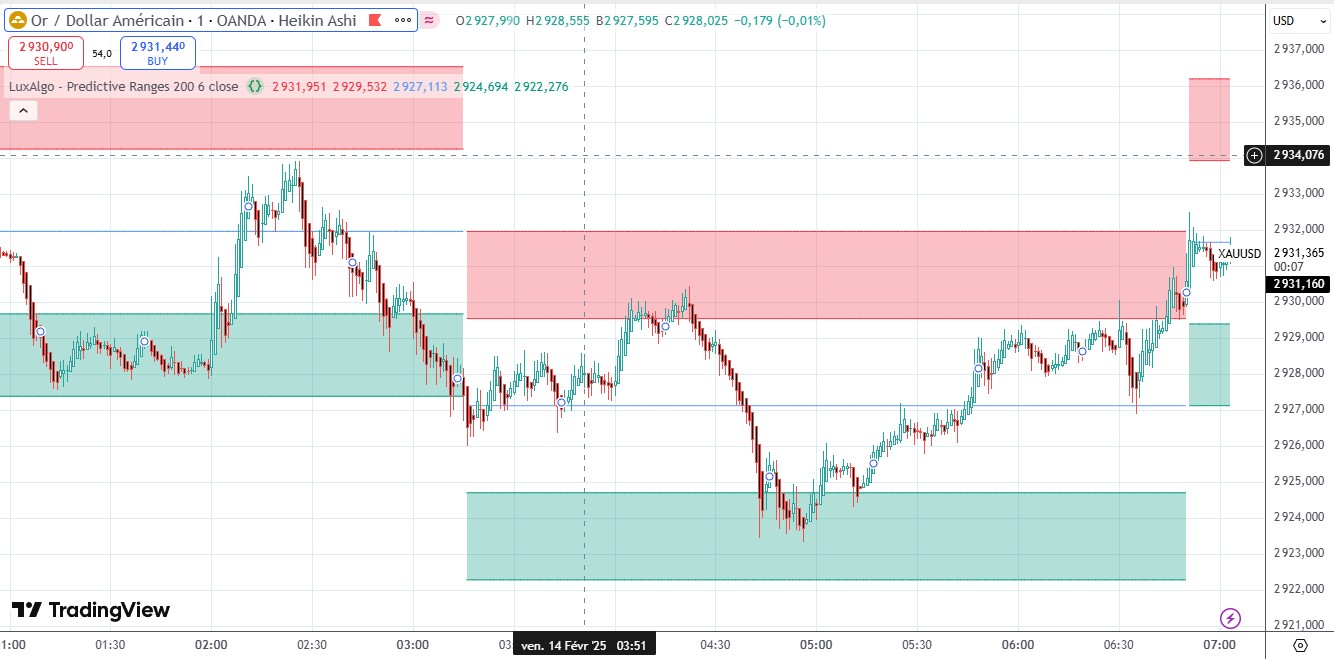
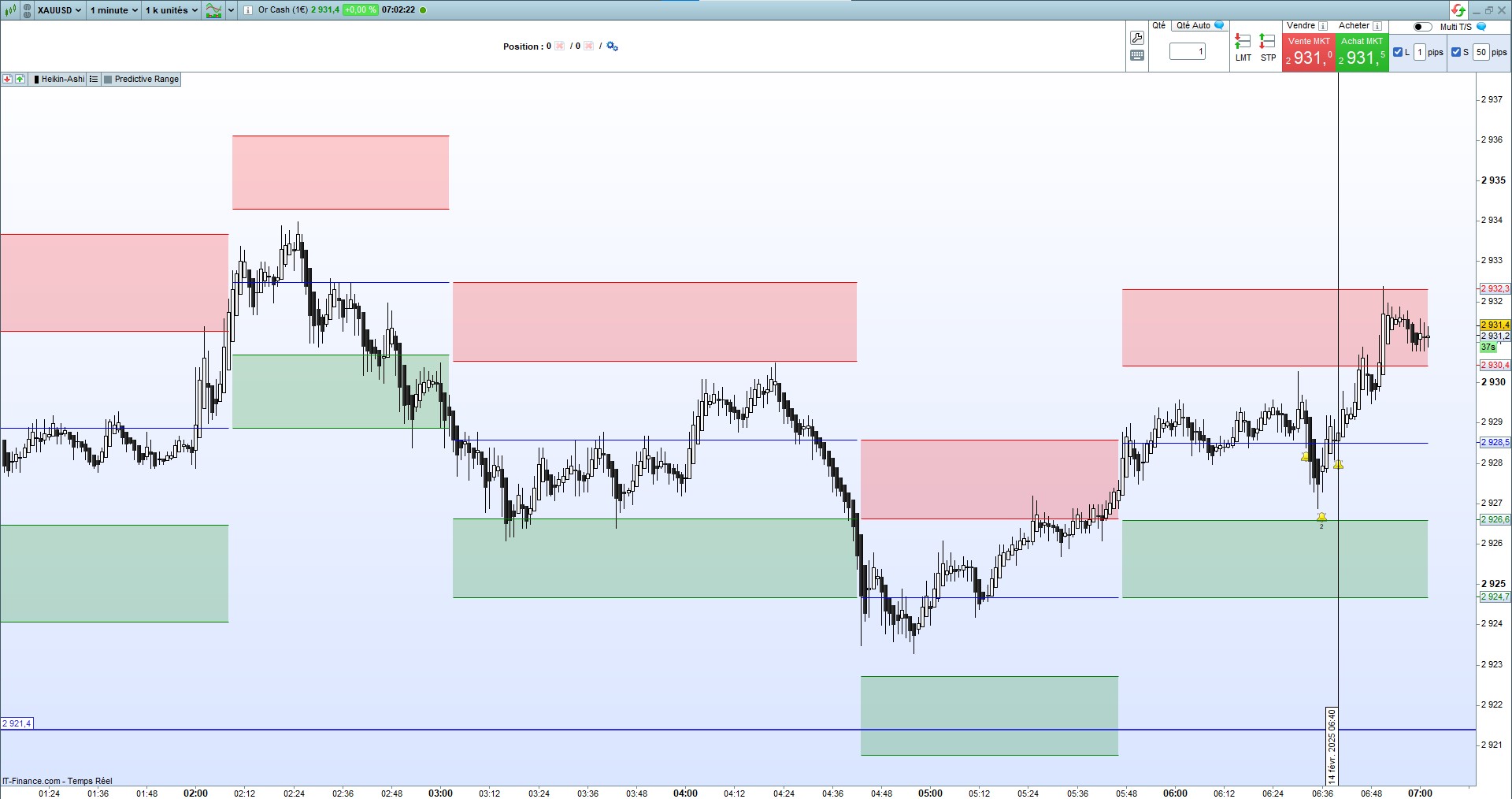
    I have a discrepancy between  range size in PRT and those in TV, do you know why ? (see attached)


    Thks in  advance


    Reb

    #243842 quote
    Iván González
    Moderator
    Master

    Hi. I don't know. It could be because the prices are not the same (dividend adjustment, due to the data source itself, …)

Viewing 4 posts - 1 through 4 (of 4 total)
  • You must be logged in to reply to this topic.

Conversion Indic Predictive Ranges from TV to PRT


ProBuilder: Indicators & Custom Tools

New Reply
Author
author-avatar
reb @reb Participant
Summary

This topic contains 3 replies,
has 2 voices, and was last updated by Iván González

11 months, 3 weeks ago.

Topic Details
Forum: ProBuilder: Indicators & Custom Tools
Language: English
Started: 02/12/2025
Status: Active
Attachments: 2 files
Logo Logo
Loading...