Conversion from TradengView – SlingShot

Viewing 7 posts - 1 through 7 (of 7 total)
  • Author
    Posts
  • #140850 quote
    supermyguel
    Participant
    Average

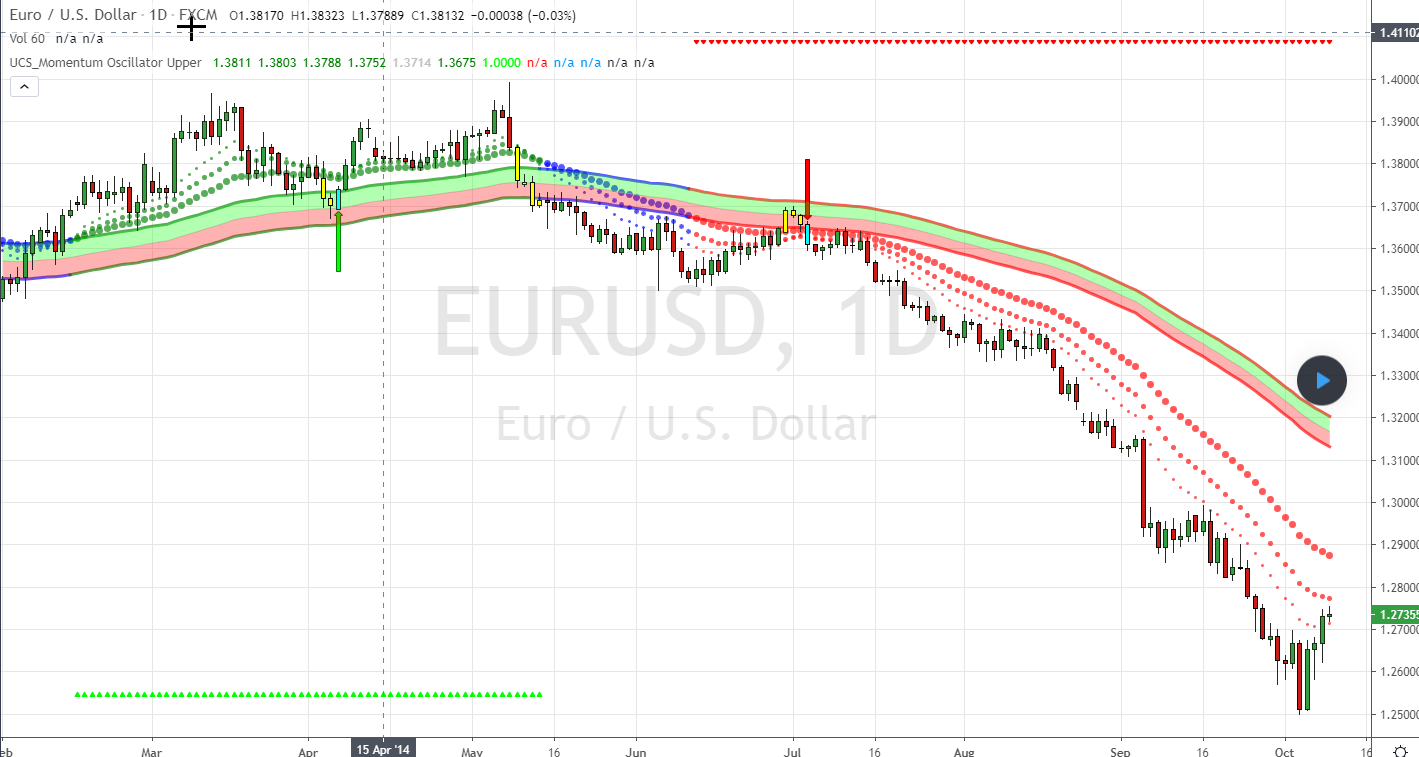
    Hi! Someone can translate this indicator from Pine Editor (Tradingview) to PRT?

    Thanks


    study(“UCS_Momentum Oscillator Upper”, overlay=true)
    sae = input(true, title=”Show Aggressive Entry?, Or Use as Alert To Potential Conservative Entry?”)
    sce = input(true, title=”Show Conservative Entry?”)
    st = input(true, title=”Show Trend Arrows at Top and Bottom of Screen?”)
    def = input(false, title=”Only Choose 1 – Either Conservative Entry Arrows or ‘B’-‘S’ Letters”)
    pa = input(true, title=”Show Conservative Entry Arrows?”)
    sl = input(false, title=”Show ‘↑’-‘↓’ Letters?”)
    
    ma1 = ema(close, 13)
    ma2 = ema(close, 21)
    ma3 = ema(close, 34)
    ma = ema(close, 89)
    
    range = tr
    rangema = ema(range, 89)
    upper = ma + rangema * 0.5
    lower = ma – rangema * 0.5
    midChan = (upper + lower)/2
    //Trend Definition
    tr_up = ma1 > upper and ma2 > upper and ma3 > upper
    tr_down = ma1 < lower and ma2 < lower and ma3 < lower //Aggressive Entry pullbackUpT() => tr_up and close < upper pullbackDnT() => tr_down and close > lower
    //Conservative Entry
    entryUpT() => tr_up and close[1] < upper and close > upper
    entryDnT() => tr_down and close[1] > lower and close < lower //Conservative Entry True/False Condition entryUpTrend = ma1 > upper and ma2 > upper and ma3 > upper and close[1] < upper and close > upper ? 1 : 0
    entryDnTrend = ma1 < lower and ma2 < lower and ma3 < lower and close[1] > lower and close < lower ? 1 : 0 //Define Up and Down Trend for Trend Arrows at Top and Bottom of Screen upTrend = ma1 > upper and ma2 > upper and ma3 > upper
    downTrend = ma1 < lower and ma2 < lower and ma3 < lower
    
    //Definition for Conseervative Entry Up and Down PlotArrows
    codiff = entryUpTrend == 1 ? entryUpTrend : 0
    codiff2 = entryDnTrend == 1 ? entryDnTrend : 0
    
    //Trend Color Definition for Moving Averages and Channel
    scolor = tr_up ? green : tr_down ? red : blue
    
    barcolor(sae and pullbackUpT() ? yellow : sae and pullbackDnT() ? yellow : na)
    barcolor(sce and entryUpT() ? aqua : sce and entryDnT() ? aqua : na)
    //Plot 3 MA’s
    plot(ma1, title=”Fast MA”, color=scolor, style=circles, linewidth=1)
    plot(ma2, title=”Medium MA”,color=scolor, style=circles, linewidth=2)
    plot(ma3, title=”Slow MA”, color=scolor, style=circles, linewidth=3)
    //Channel Plots
    p1 = plot(upper, title=”Upper Channel”, color=scolor, style=line, linewidth=3)
    p2 = plot(midChan, title=”Upper Channel”, color=silver, style=line, linewidth=1)
    p3 = plot(lower, title=”Lower Channel”, color=scolor, style=line, linewidth=3)
    fill(p1, p2, color=lime, transp=70)
    fill(p2, p3, color=red, transp=70)
    
    //Trend Triangles at Top and Bottom of Screen
    plotshape(st and upTrend ? upTrend : na, title=”Conservative Buy Entry Triangle”,style=shape.triangleup, location=location.bottom, color=lime, transp=0, offset=0)
    plotshape(st and downTrend ? downTrend : na, title=”Conservative Short Entry Triangle”,style=shape.triangledown, location=location.top, color=red, transp=0, offset=0)
    
    //Plot Arrows OR Letters ↑ and ↓ for Buy Sell Signals
    plotarrow(pa and codiff ? codiff : na, title=”Up Entry Arrow”, colorup=lime, maxheight=60, minheight=50, transp=0)
    plotarrow(pa and codiff2*-1 ? codiff2*-1 : na, title=”Down Entry Arrow”, colordown=red, maxheight=60, minheight=50, transp=0)
    plotchar(sl and codiff ? low – tr : na, title=”Buy Entry”, offset=0, char=’↑’, location=location.absolute, color=lime, transp=0)
    plotchar(sl and codiff2 ? high + tr : na, title=”Short Entry”, offset=0, char=’↓’, location=location.absolute, color=red, transp=0)


    CM_UCS_Modified-SlingShot.png CM_UCS_Modified-SlingShot.png
    #140852 quote
    Nicolas
    Keymaster
    Master

    Please next time, follow the instructions on how to ask for a code conversion. And don’t double post! No reply in 24 hours doesn’t mean no one will reply.. I’m the only guy around that make the code conversion!

    Your query is added into the conversion list and I’ll do it asap. In the meantime please be patient and don’t post again the same demand! Thank you.

    #140862 quote
    supermyguel
    Participant
    Average

    Ok Thanks.

    I’ll post twice because I dont’t know that you are the only one!

    I’m sorry!

    #140867 quote
    Nicolas
    Keymaster
    Master

    Just read the forum rules above each post form:

    • Do not double post. Ask your question only once and only in one forum. All double posts will be deleted anyway so posting the same question multiple times will just be wasting your own time and will not get you an answer any quicker. Double posting just creates confusion in the forums.
    #142729 quote
    Razz
    Participant
    Master

    Hello Nicolas, have you looked at the indicator? Is it possible in Pro Realtime?
    Nice day

    #144898 quote
    Nicolas
    Keymaster
    Master

    The indicator is now available in our library: CM_UCS_Modified SlingShot

    Razz thanked this post
    #145386 quote
    supermyguel
    Participant
    Average

    Thank you very much Nicolas!

    Number 1

Viewing 7 posts - 1 through 7 (of 7 total)

  • You must be logged in to reply to this topic.

Conversion from TradengView – SlingShot


ProBuilder: Indicators & Custom Tools

New Reply
Author
Summary

This topic contains 6 replies,
has 3 voices, and was last updated by supermyguel
5 years, 4 months ago.

Topic Details
Forum: ProBuilder: Indicators & Custom Tools
Language: English
Started: 08/04/2020
Status: Active
Attachments: 1 files
Logo Logo
Loading...