


Conversion de l’incateur Volatility Stop de tradingview

Viewing 6 posts - 1 through 6 (of 6 total)

  • Author
    Posts
  • #231502 quote
    KOSOUWA
    Participant
    New

    Bonjour,

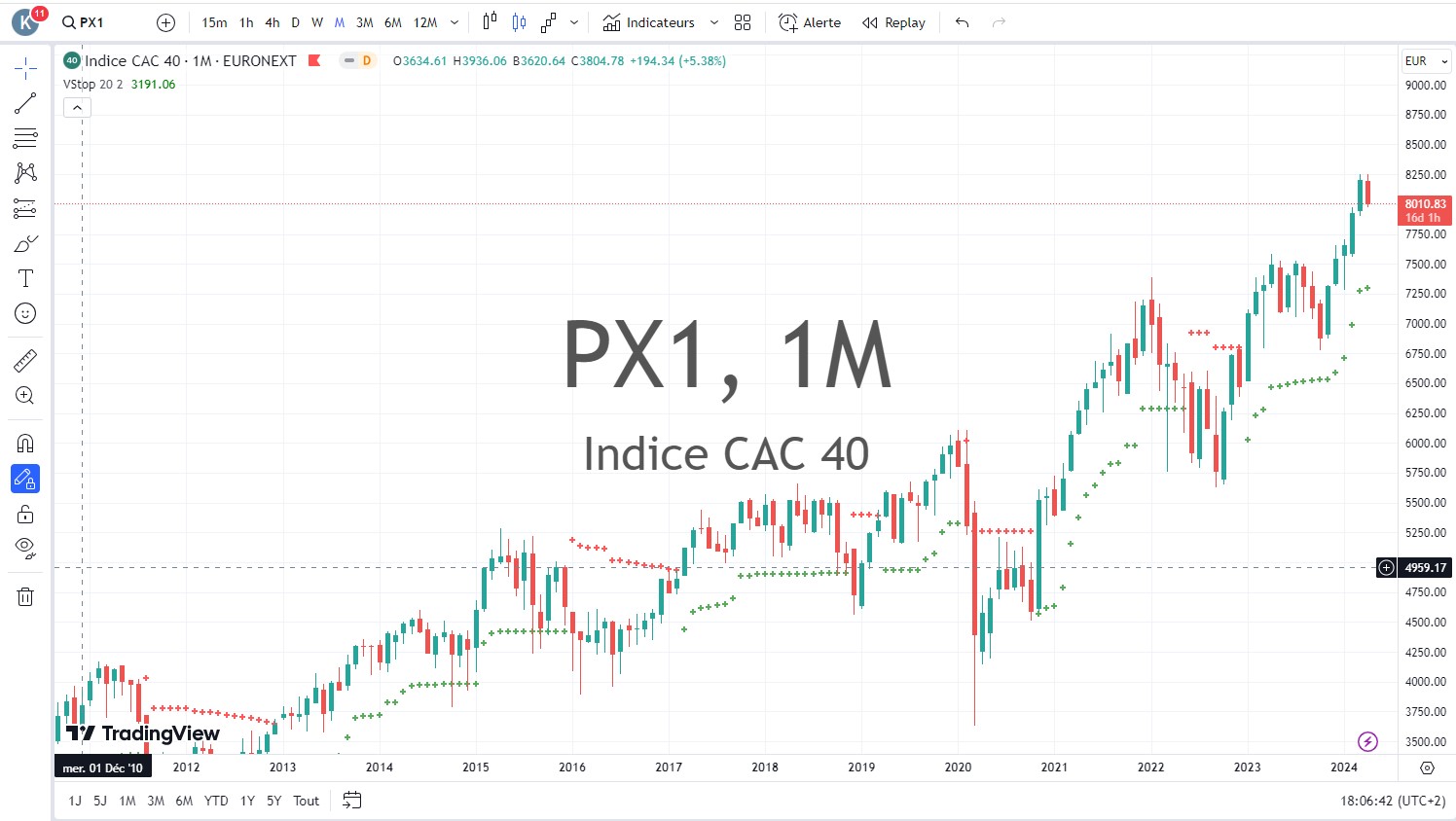
    Ci-dessous, le descriptif de l’indicateur Volatility Stop sur Tradingview.

    L’indicateur Volatility Stop est capable de définir la tendance actuelle. Lorsqu’une tendance à la baisse est déterminée, une ligne rouge au-dessus des barres de prix est tracée ; lorsqu’une tendance à la hausse est déterminée, une ligne verte sous les barres de prix est tracée. Ces lignes sont généralement utilisées comme trailing stop. L’indicateur Volatility Stop est plus utilisé comme outil de sortie que comme outil d’entrée. Lorsque le prix dépasse la valeur VStop, la tendance s’inverse et VStop passe de l’autre côté du prix.

    Et ci-dessous, le code de tradingview.

    study(“Volatility Stop”, shorttitle=”VStop”, overlay=true)
    length = input(20)
    mult = input(2)
    atr_ = atr(length)
    max1 = max(nz(max_[1]), close)
    min1 = min(nz(min_[1]), close)
    is_uptrend_prev = nz(is_uptrend[1], true)
    stop = is_uptrend_prev ? max1 – mult * atr_ : min1 + mult * atr_
    vstop_prev = nz(vstop[1])
    vstop1 = is_uptrend_prev ? max(vstop_prev, stop) : min(vstop_prev, stop)
    is_uptrend = close – vstop1 >= 0
    is_trend_changed = is_uptrend != is_uptrend_prev
    max_ = is_trend_changed ? close : max1
    min_ = is_trend_changed ? close : min1
    vstop = is_trend_changed ? is_uptrend ? max_ – mult * atr_ : min_ + mult * atr_ : vstop1
    plot(vstop, color = is_uptrend ? green : red, style=cross, linewidth=2)

    #231519 quote
    Iván González
    Moderator
    Master

    Bonjour, le voici

    //------------------------------------------------------------------------//
    //PRC_Volatility Stop
    //version = 0
    //15.04.24
    //Iván González @ www.prorealcode.com
    //Sharing ProRealTime knowledge
    //------------------------------------------------------------------------//
    //-----Inputs-------------------------------------------------------------//
    length=20
    mult=2
    src=customclose
    //------------------------------------------------------------------------//
    //-----ATR calculation----------------------------------------------------//
    atr=averagetruerange[length](close)
    //------------------------------------------------------------------------//
    //-----Stop calculation--------------------------------------------------//
    if barindex < length then
    max1=src
    min1=src
    mystop=0
    else
    //-----Control levels
    max1=max(max1[1],src)
    min1=min(min1[1],src)
    if trendUP then
    //-----Stop in Uptrend
    mystop=max(mystop,max1-atr*mult)
    r=0
    g=255
    else
    //-----Stop in DownTrend
    mystop=min(mystop,min1+atr*mult)
    r=255
    g=0
    endif
    //---------------------------------------------------------------------//
    //-----Trend UP definition---------------------------------------------//
    trendUp=(src-mystop) >= 0
    //---------------------------------------------------------------------//
    //-----Signals when trend changes--------------------------------------//
    if trendUP <> trendUP[1] then
    max1=src
    min1=src
    if trendUp then
    mystop=max1-atr*mult
    drawpoint(barindex,mystop,3)coloured("blue",50)
    drawtext("▲",barindex,mystop-0.25*tr)coloured("green")
    else
    mystop=min1+atr*mult
    drawpoint(barindex,mystop,3)coloured("blue",50)
    drawtext("▼",barindex,mystop+0.25*tr)coloured("red")
    endif
    endif
    endif
    //------------------------------------------------------------------------//
    //------------------------------------------------------------------------//
    return mystop as "Stop"style(line,2) coloured(r,g,0)
    
    RicLg thanked this post
    #231530 quote
    KOSOUWA
    Participant
    New

    Bonjour, ça fonctionne c’est super. Merci. 👍

    #235794 quote
    Ramsa976
    Participant
    New

    Bonjour,

    Pourquoi n’est-il pas possible de modifier le style ?

    Par exemple, pour remplacer la ligne en points.

    #235800 quote
    Iván González
    Moderator
    Master

    Bonjour, dans la dernière ligne du code supprimez la partie qui définit le style et la couleur

    #235840 quote
    Ramsa976
    Participant
    New

    Super merci !

Viewing 6 posts - 1 through 6 (of 6 total)
  • You must be logged in to reply to this topic.

Conversion de l’incateur Volatility Stop de tradingview


ProBuilder : Indicateurs & Outils Personnalisés

New Reply
Author
author-avatar
KOSOUWA @kosouwa Participant
Summary

This topic contains 5 replies,
has 3 voices, and was last updated by Ramsa976

1 year, 6 months ago.

Topic Details
Forum: ProBuilder : Indicateurs & Outils Personnalisés
Language: French
Started: 04/14/2024
Status: Active
Attachments: 1 files
Logo Logo
Loading...


