


Contar velas en funcion de la posicion del estocastico

Viewing 3 posts - 1 through 3 (of 3 total)
  • Author
    Posts
  • #127212 quote
    cjr30
    Participant
    Master

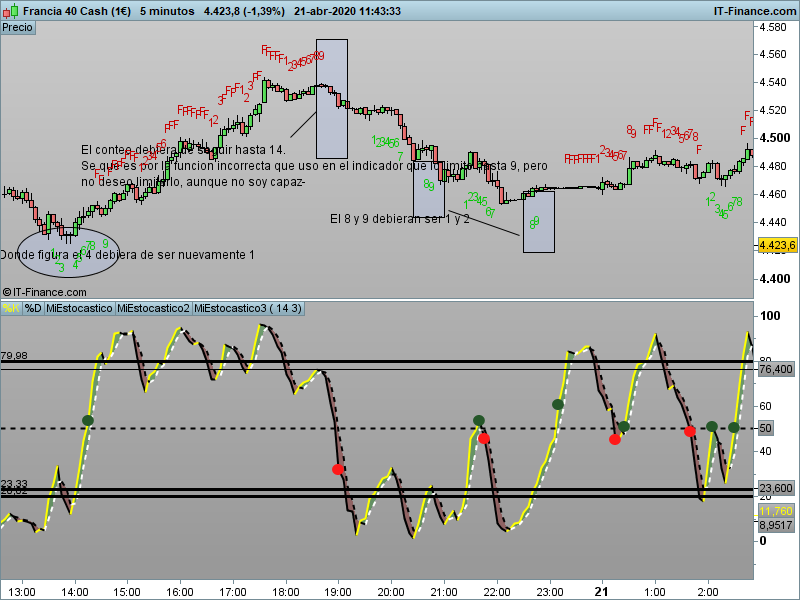
    [attachment file=”127214″]

    Buenos días,

    Llevo varios días, con varios intentos fallidos de realizar un indicador para incorporar en el propio gráfico del precio.

    He acudido a la biblioteca y a varios temas relacionados con lo que busco (creación de loops, función count, función summation, bucles, etc), siendo lo más parecido a lo que busco el indicador Swing Teller Indicator.

    Mi idea es la siguiente:

    Pretendo que en el gráfico se me vayan contando las velas desde el momento en que el estocástico (línea K) cruce el nivel de sobreventa (20) en sentido ascendente y este conteo siga hasta que la línea K llegue al nivel de sobrecompra(80). Mientras línea K se encuentre por encima de 80, no habría conteo.

    Si la línea K cruza hacia abajo la línea 80 empezara el conteo nuevamente, siendo en este caso bajista hasta que nuevamente llegue al nivel de 20, donde ya no se tendría en cuenta.

    Si la línea K cruza la línea 20 hacia arriba se iniciaría de nuevo y así sucesivamente. Si estando por encima de 20, retrocede y nuevamente se pone por debajo de 20, el conteo se pararía.

    El indicador lo tengo prácticamente realizado y adjunto tanto el archivo .itf como un pantallazo de su programación y un gráfico en el cual esta incorporado.


    Si alguien me puede ayudar se lo agradecería.

    La idea del indicador es que cuando existen muchas velas de distancia para que el estocástico evolucione desde 20 a 80, posiblemente la señal que nos diera en combinación con otros indicadores no fuera lo suficientemente rentable, sin embargo si el numero de velas de evolución entre la sobreventa y la sobrecompra fuera  pequeño (tal vez de 3 a 6) y lo combinamos con la señal de otro indicador, la operación si fuera rentable.

    p=periodoK
    q=periodoD
    
    maximo = highest[p](high)
    minimo = lowest[p](low)
    
    REM Construimos el oscilador
    
    oscilador = (close - minimo) / (maximo - minimo) * 100
    
    REM Deducimos el %K y %D del estocástico
    
    lineaK = average[q](oscilador)
    //lineaD = average[q](lineaK)
    // --- settings
    
    // --- end of settings
    ONCE MaxCount = 10                               //no more than 4 candles before restarting from 0
    ONCE UpCount    = 0
    ONCE lineak =80
    
    if  lineaK>20 and lineak<80 then
    DownCount=0
    UpCount=UpCount+1
    
    lineak=barindex
    //draw count
    DRAWTEXT("#Upcount#", barindex, low - 5 * pipsize, Dialog, Bold, 12) COLOURED(255,10,10,255)
    endif
    //up swing fail
    if UpCount>MaxCount or lineaK >80  then
    UpCount   = 0
    lineak = 80
    //draw fail count
    drawtext("F",barindex,low-5*pointsize,Dialog,Standard,12) coloured(0,200,0)
    //reset count
    UpCount=0
    endif
     
    //continue swing Down
    
    if DownCount>0 and lineaK<80 and lineak>20 then
    UpCount=0
    DownCount=DownCount+1
    Downcount=barindex
    //draw count
    DRAWTEXT("#Downcount#", barindex, high+ 5 * pipsize, Dialog, Bold, 12) COLOURED(255,10,10,255)
    DownCount=0
    endif
    //down swing fail
    if DownCount>0 and lineaK<20 and lineak>80 then
    //draw fail count
    drawtext("F",barindex,high+5*pointsize,Dialog,Standard,12) coloured(200,0,0)
    //reset count
    DownCount=0
    endif
     
    //begin swing Up
    if UpCount=0 and barindex-Upcount>1 then
    r = lineaK crosses over 20
    if r then
    UpCount=1
    DownCount=0
    //draw count
    drawtext("1",barindex,low-5*pointsize,Dialog,Standard,12) coloured(0,200,0)
    endif
    endif
     
    //begin swing Down
    if DownCount=0 and barindex-Downcount>1 then
    r = lineaK crosses under 80
    if r then
    DownCount=1
    UpCount=0
    //draw count
    drawtext("1",barindex,high+5*pointsize,Dialog,Standard,12) coloured(200,0,0)
    endif
    endif
     
    return
    
    #127218 quote
    cjr30
    Participant
    Master

    Por favor no tengan en cuenta tanto el archivo del indicador como la programación adjuntada en el anterior mensaje.

    En un mensaje posterior adjuntare los archivos correctos.

    Disculpas

    #127219 quote
    cjr30
    Participant
    Master
    p=periodoK
    q=periodoD
    
    maximo = highest[p](high)
    minimo = lowest[p](low)
    
    REM Construimos el oscilador
    
    oscilador = (close - minimo) / (maximo - minimo) * 100
    
    REM Deducimos el %K y %D del estocástico
    
    lineaK = average[q](oscilador)
    //lineaD = average[q](lineaK)
    // --- settings
    CountDistance=20
    // --- end of settings
    
    if UpCount>0 and lineaK>20 and lineak<80 then
    DownCount=0
    UpCount=UpCount+1
     
    //draw count
    if UpCount=2 then
    drawtext("2",barindex,low-CountDistance*pointsize,Dialog,Standard,12) coloured(0,200,0)
    elsif UpCount=3 then
    drawtext("3",barindex,low-CountDistance*pointsize,Dialog,Standard,12) coloured(0,200,0)
    elsif UpCount=4 then
    drawtext("4",barindex,low-CountDistance*pointsize,Dialog,Standard,12) coloured(0,200,0)
    elsif UpCount=5 then
    drawtext("5",barindex,low-CountDistance*pointsize,Dialog,Standard,12) coloured(0,200,0)
    elsif UpCount=6 then
    drawtext("6",barindex,low-CountDistance*pointsize,Dialog,Standard,12) coloured(0,200,0)
    elsif UpCount=7 then
    drawtext("7",barindex,low-CountDistance*pointsize,Dialog,Standard,12) coloured(0,200,0)
    elsif UpCount=8 then
    drawtext("8",barindex,low-CountDistance*pointsize,Dialog,Standard,12) coloured(0,200,0)
    elsif UpCount=9 then
    drawtext("9",barindex,low-CountDistance*pointsize,Dialog,Standard,12) coloured(0,200,0)
    Barcount=barindex
    //reset count
    UpCount=0
    endif
    //up swing fail
    elsif UpCount>0 and lineaK >80 and lineak<20 then
    //draw fail count
Viewing 3 posts - 1 through 3 (of 3 total)
  • You must be logged in to reply to this topic.

Contar velas en funcion de la posicion del estocastico


ProBuilder: Indicadores y Herramientas

New Reply
Author
author-avatar
cjr30 @cjr30 Participant
Summary

This topic contains 2 replies,
has 1 voice, and was last updated by cjr30

5 years, 9 months ago.

Topic Details
Forum: ProBuilder: Indicadores y Herramientas
Language: Spanish
Started: 04/21/2020
Status: Active
Attachments: 4 files
Logo Logo
Loading...
