Condition sur Pivot H1

Viewing 4 posts - 1 through 4 (of 4 total)

  • Author
    Posts
  • #188999 quote
    GilInvest
    Participant
    Average

    Bjr, dans mon code d’indicateur je souhaite inclure une conditionnalité par rapport au pivot H1. Précisément : je souhaite qu’un indicateur s’affiche entre autres conditions si le prix de cloture se fait au dessus ou en dessous du pivot H1 (ex sur graphique Mn2).

    J’ai tenté (pour un signal haussier sur un graphique Mn2 ou Mn5 ou Mn15) :

    //point pivot en UT 1 heure
    PivotH1 = (High[1] + Low[1] + Close[1] + Open[0])/4
    
    
    Si close>PivotH1 then...

    mais ca n’a rien donné. Merci de vos lumières

    #189004 quote
    Nicolas
    Keymaster
    Master

    Il faut calculer ton pivot dans le bon timeframe:

    //point pivot en UT 1 heure
    timeframe(1 hour,updateonclose)
    PivotH1 = (High[1] + Low[1] + Close[1] + Open[0])/4
    
    //UT du graphique:
    timeframe(default) 
    Si close>PivotH1 then...
    GilInvest thanked this post
    #189078 quote
    GilInvest
    Participant
    Average

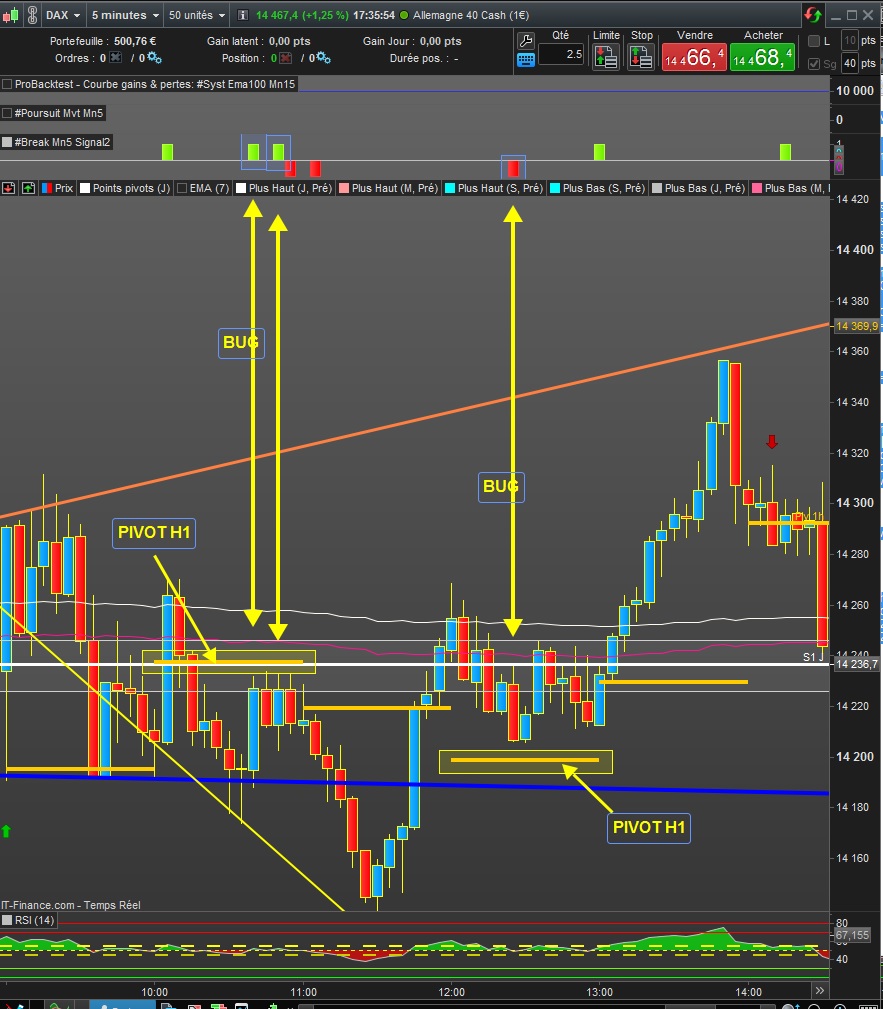
    Merci Nicolas. J’ai intégré mais tombe sur un os. Dans le screen shot attaché (Graphique Mn5) on visualise 3 signaux qui ne devraient pas apparaitre après implémentation de la condition sur pivot (2 signaux haussiers et 1 signal baissier. Voir histogrammes au dessus du graphique Mn5). Je ne comprends pas ou est le bug dans le code ? merci d’avance. Code ci-après

    atr10=averagetruerange[10]

    //point pivot en UT 1 heure
    timeframe(1 hour,updateonclose)
    PivotH1 = (High[1] + Low[1] + Close[1] + Open[0])/4

    once histoup = 0
    once histodown = 0
    once histoupconti = 0
    once histodownconti = 0

    timeframe(default)
    If Low[0]<ExponentialAverage[7] and High[0]>ExponentialAverage[7] and close>PivotH1 and close>open then
    DRAWARROWDOWN(barindex[0],low+atr10/2) coloured(255,0,0)
    histoup=1

    else

    histoup=0

    endif

    timeframe(default)
    If High[0]>ExponentialAverage[7] and High[0]>ExponentialAverage[20] and close<PivotH1 and close<open then
    DRAWARROWDOWN(barindex[0],low+atr10/2) coloured(255,0,0)
    histodown=-1

    else

    histodown=0

    endif

    return histoup coloured(127,255,0) style(histogram), histodown coloured(255,0,0) style(histogram), histoupconti coloured (0,255,255) style(histogram), histodownconti coloured (255,0,255) style(histogram), 0 as “0”

    220228-Bug-Code.jpg 220228-Bug-Code.jpg
    #189132 quote
    GilInvest
    Participant
    Average

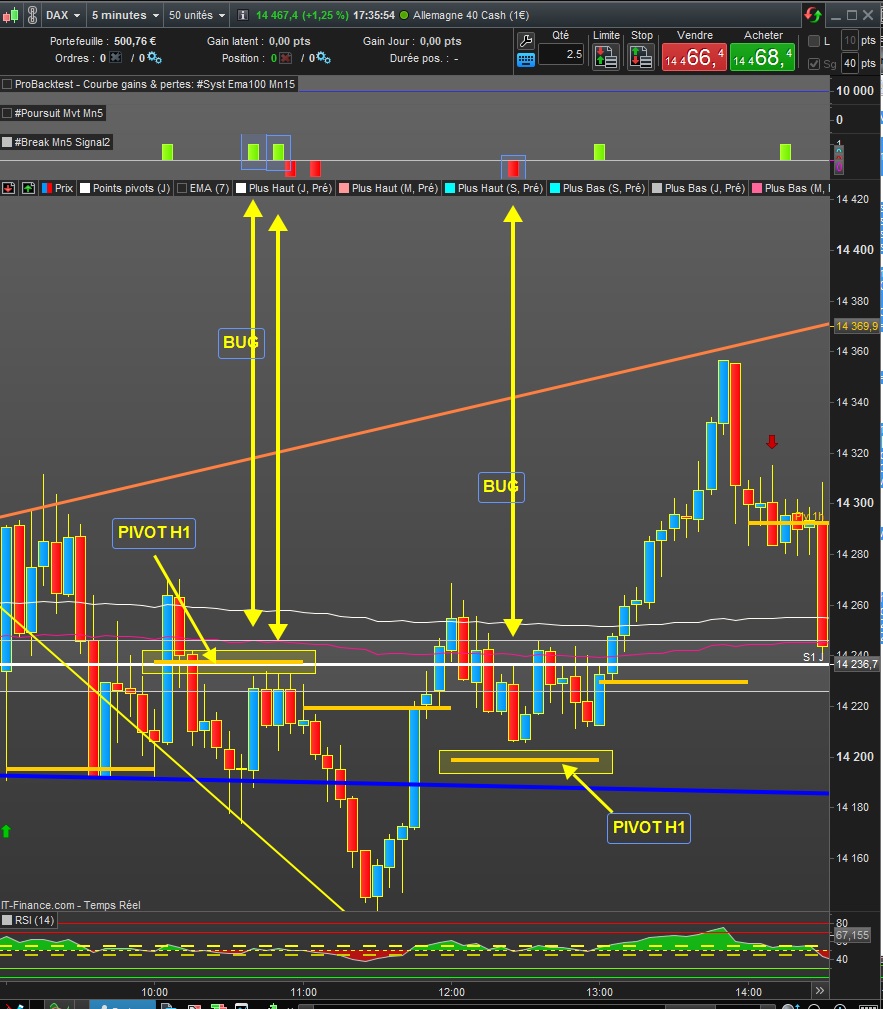
    Merci Nicolas. J’ai intégré mais tombe sur un os. Dans le screen shot attaché (Graphique Mn5) on visualise 3 signaux qui ne devraient pas apparaitre après implémentation de la condition sur pivot (2 signaux haussiers et 1 signal baissier. Voir histogrammes au dessus du graphique Mn5). Je ne comprends pas ou est le bug dans le code ? Mais peut etre est ce du au fait que le Pivot H1 calculé/affiché dans la plate forme PRT est différent du Pivot avec formule indiquée dans le code. Merci d’avance. Code ci-après

    atr10=averagetruerange[10]


    //point pivot en UT 1 heure
    
    timeframe(1 hour,updateonclose)
    PivotH1 = (High[1] + Low[1] + Close[1] + Open[0])/4


    once histoup = 0
    
    once histodown = 0
    
    once histoupconti = 0
    
    once histodownconti = 0
    
    
    timeframe(default)
    
    
    If Low[0]<ExponentialAverage[7] and High[0]>ExponentialAverage[7] and close>PivotH1 and close>open then
    DRAWARROWDOWN(barindex[0],low+atr10/2) coloured(255,0,0)
    
    
    histoup=1


    else


    histoup=0


    endif


    timeframe(default)
    
    If High[0]>ExponentialAverage[7] and High[0]>ExponentialAverage[20] and close<PivotH1 and close<open then
    DRAWARROWDOWN(barindex[0],low+atr10/2) coloured(255,0,0)
    histodown=-1


    else


    histodown=0


    endif


    return histoup coloured(127,255,0) style(histogram), histodown coloured(255,0,0) style(histogram), histoupconti coloured (0,255,255) style(histogram), histodownconti coloured (255,0,255) style(histogram), 0 as “0”


    220228-Bug-Code.jpg 220228-Bug-Code.jpg
Viewing 4 posts - 1 through 4 (of 4 total)
  • You must be logged in to reply to this topic.

Condition sur Pivot H1


ProBuilder : Indicateurs & Outils Personnalisés

New Reply
Author
author-avatar
GilInvest @gilinvest Participant
Summary

This topic contains 3 replies,
has 2 voices, and was last updated by GilInvest
4 years ago.

Topic Details
Forum: ProBuilder : Indicateurs & Outils Personnalisés
Language: French
Started: 02/28/2022
Status: Active
Attachments: 2 files
Logo Logo
Loading...